Wixsharp: ManagedProject MSI with UI shows UILevel = 2
I have created a ManagedProject MSI with an install log that outputs:
MSI (c) (84:A4) [15:32:04:403]: PROPERTY CHANGE: Adding UILevel property. Its value is '2'.
The command line is:
"MySetup.msi" ALLUSERS="1" /l*vx ".\install.log"
Per the WixSharp comments for Condition.Silent, silent mode would be UILevel < 4, but the command line for the MSI does not have any silent or quiet setting!
Any idea?
This is an issue because I am trying to trigger some custom action for when the silent mode is specified, and the custom condition wrongly launches when it should not:
Condition silentInstallCondition = new Condition("(NOT Installed) AND (UILevel < 4)"); //execute this action during the installation but only if it is silent mode (UILevel < 4)
ManagedAction checkSilentParameters = new ManagedAction(CustomActions.CheckSilentParameters, Return.check, When.Before, Step.LaunchConditions, silentInstallCondition);
Thanks
 Jean-Marc1
All 6 comments
These are the msiexec.exe CLI args:
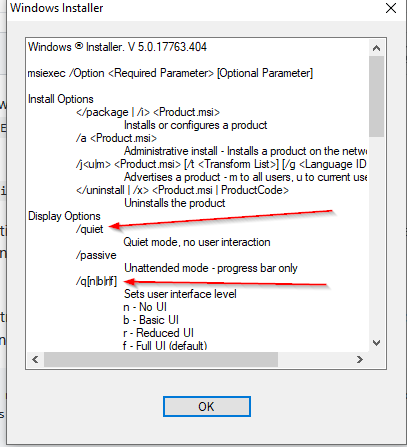
 oleg-shilo
on 7 Nov 2019
oleg-shilo
on 7 Nov 2019
Sorry, I did not explain very well.
I am aware of the MSI command line arguments. The problem is that the MSI log shows UILevel = 2 when it is not run silently.
So it seems that silent mode is incorrectly reported in this ManagedProject MSI.
My guess is that because it is a ManagedProject, and the UI is "outside", the MSI still runs as if it was not showing any UI.
If that's the case, I'll need to find a workaround to detect the command line parameters (whether it has any silent arguments) and based on that, trigger some custom actions (either silent or non-silent functionality).
Jean-Marc1
on 7 Nov 2019
Argh, I tried session.IsUISupressed() but this also returns True even with a full UI.
Environment.CommandLine also does not work from a custom action to retrieve and check the command line parameters...
Jean-Marc1
on 7 Nov 2019
It is an interesting problem.
My guess is that because it is a ManagedProject, and the UI is "outside", the MSI still runs as if it was not showing any UI.
Well, not exactly. ManagedProject is not running "outside". "ExternalUI" samples indeed run UI outside of msiexec but ManagedUI is embedded in the MSI. This is how it works:
ExternalUI
It is a native application that analizes target system in launches the *.msi file with the required parameters.
Normal UI
Default (native) UI
Msi file is launched by double-clicking or from cli via msiexec.exe.
MSI runtime uses its default set of UI dialogs to interact with the user.
Embedded UI
Msi file is launched by double-clicking or from cli via msiexec.exe.
MSI runtime detects embedded custom set of of UI dialogs and uses it for interacting with the user. This is what WixSharp ManagedUI is.
Most likely MSI fails to set UILevel correctly for the EmbeddedUI scenario regardless if it is implemented with WixSharp or any other framework.
Fortunately WixSharp explicitly indicates if ManagedUI is active. You can always check session.Property("WIXSHARP_MANAGED_UI_HANDLE") property for that.
If you are inside of static managed event handler then you can even analize the corresponding event arg property:
void project_BeforeInstall(SetupEventArgs e)
{
    if (e.ManagedUIHandle != IntPtr.Zero)
        . . .
}
Very cool thanks!
I was able to implement a condition like this:
Condition silentInstallCondition = new Condition("(NOT Installed) AND (WIXSHARP_MANAGED_UI_HANDLE = \"\")");
And also using:
private static bool IsSilentInstall(Session session)
{
     string WIXSHARP_MANAGED_UI_HANDLE = session.Property("WIXSHARP_MANAGED_UI_HANDLE");
     session.Log($"IsSilentInstall / WIXSHARP_MANAGED_UI_HANDLE={WIXSHARP_MANAGED_UI_HANDLE}");

     if (string.IsNullOrWhiteSpace(WIXSHARP_MANAGED_UI_HANDLE))
     {
          return true;
     }

     return false;
}
Excellent.
Very minor improvement....
For the readability sake you can use IsEmpty extension method:
```C#
return WIXSHARP_MANAGED_UI_HANDLE.IsEmpty();
// instead of
if (string.IsNullOrWhiteSpace(WIXSHARP_MANAGED_UI_HANDLE))
{
return true;
}
return false;
```
oleg-shilo
on 8 Nov 2019
Related issues
 empz
·
3Comments
empz
·
3Comments
 milhousemanastorm
·
4Comments
milhousemanastorm
·
4Comments
 meytes
·
3Comments
meytes
·
3Comments
 noctis0430
·
5Comments
meytes
·
5Comments
noctis0430
·
5Comments
meytes
·
5Comments