Wixsharp: Defferred session Variables.
Sorry for a new question related to defferred variables.
I read all the issue related to this topic , read your exemples and read your docs but i haven't found a way to make my software work.
My flow is :
Installer ( ManagedProject ) -> custom Form ( collect some data and place it in session ) -> ElevatedManagedAction
So my approach was :
#### project
project.ManagedUI.InstallDialogs.Add(Dialogs.Welcome)
                                            ...
                                            .Add<CustomDialog>()
                                            ....
 new ElevatedManagedAction( CustomActions.InstallScript) { UsesProperties = "HOSTNAME,DB", Execute = Execute.deferred }
####
#### actionclass
public class CustomActions
{
       [CustomAction]
        public static ActionResult InstallScript(Session session)
        {
            //CustomActionData data = session.CustomActionData;
            MessageBox.Show(session.Property("HOSTNAME") + "");
            MessageBox.Show(session.Property("DB") + "");
            return ActionResult.Success;
        }
}
####
#### form
.......
void next_Click(object sender, EventArgs e)
{
            MsiRuntime.Session["HOSTNAME"] = textBox1.Text;
            MsiRuntime.Session["DB"] = textBox2.Text;
            Shell.GoNext();
 }
........
####
I tryed all the method explained everywhere:
using
- UsesProperties = "HOSTNAME,DB"
- UsesProperties = "HOSTNAME;DB"
- UsesProperties = "HOSTNAME=[HOSTNAME];DB=[DB]"
- UsesProperties = "HOSTNAME=[HOSTNAME],DB=[DB]"
Nothing is working for me,
The messagebox always show an empty string.
Let me know if i missed something.
Thank you a lot.
Regards.
 aaarghhh
All 8 comments
Hi there,
There is a problem with the current behavior of WixSharp compiler. It schedules both deferred CA and the CA that tunnels the properties to it at the same step:
<InstallExecuteSequence>
      <Custom Action="Set_InstallScript_Props" After="InstallInitialize" />
      <Custom Action="InstallScript" After="InstallInitialize"> (NOT Installed) </Custom>
Thus the execution order is non-deterministic. This will need to be fixed in the next release.
The solution until the fix is available is to substitute Action="InstallScript" After="InstallInitialize" with Action="InstallScript" After="Set_InstallScript_Props" with XML-Injection.
However you may be just fine with using AfterInstall event that is immuned to this problem.
```C#
project.DefaultDeferredProperties += ",HOSTNAME,DB";
project.AfterInstall += Project_AfterInstall;
. . .
static void Project_AfterInstall(SetupEventArgs e)
{
MessageBox.Show(e.Session.Property("HOSTNAME"));
```
 oleg-shilo
on 18 Aug 2018
oleg-shilo
on 18 Aug 2018
Urgh, thank you for your response.
Unfortunately i need the ElevatedManagedAction due to the right to write file on %ProgramFiles% so in my real source i need to call a cmd witch invoke a python command. The command write, and do some other stuff on that dir. So i can't use Project_AfterInstall due to the user privilege.
A usefull question:
What is right way to make an XMLinjection could you point to the right exemple in your source or post a little snippet?
Thank you a lot.
aaarghhh
on 18 Aug 2018
Mind you Project_AfterInstall is a deferred action. Meaning it is elevated.
oleg-shilo
on 18 Aug 2018
Seems that Project_AfterInstall don't run in Administrator mode so i can't edit file in %PROGRAMFILES% using this method.
aaarghhh
on 19 Aug 2018
Not exactly. Project_AfterInstall is nothing else but a managed deferred action.
This is what my simple right now has revealed:
C#
static void Project_AfterInstall(SetupEventArgs e)
{
    if (e.IsInstalling)
    {
        System.IO.Directory.CreateDirectory(@"C:\Program Files\ttt");
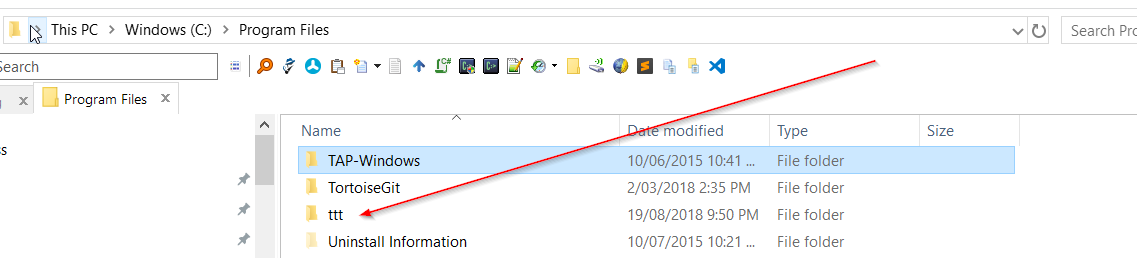
oleg-shilo
on 19 Aug 2018
Yup , i am checking it , you are right.
I am in strange issue where in deferred i call a Python script , that activate his virtualenv , upgrade it's dependencies using pip install a win NGINX version so, the script must run in admin mode.
I am checking where is the problem.
aaarghhh
on 19 Aug 2018
@oleg-shilo, I am suggesting to make the step for CA which sets properties configurable.
 geghamyan
on 20 Aug 2018
geghamyan
on 20 Aug 2018
The API already supports CA for setting the properties. The auto-insertion of this CA is just a bonus, convenience feature. Which simply needs to be tuned up / fixed. If for whatever reason it's not suitable then raw new SetPropertyAction(...) should be used.
Anyway, the defect has been fixed and now auto-inserted SetPropertyAction is always scheduled just before the deferred CA that is services.
The fix will be released today.
oleg-shilo
on 20 Aug 2018
Related issues
 JasShao
·
4Comments
JasShao
·
4Comments
 marcobeninca71
·
4Comments
marcobeninca71
·
4Comments
 ltemimi
·
5Comments
ltemimi
·
5Comments
 JamesWHurst
·
5Comments
JamesWHurst
·
5Comments
 CADbloke
·
4Comments
CADbloke
·
4Comments
Most helpful comment
Hi there,
There is a problem with the current behavior of WixSharp compiler. It schedules both deferred CA and the CA that tunnels the properties to it at the same step:
Thus the execution order is non-deterministic. This will need to be fixed in the next release.
The solution until the fix is available is to substitute
Action="InstallScript" After="InstallInitialize"withAction="InstallScript" After="Set_InstallScript_Props"with XML-Injection.However you may be just fine with using AfterInstall event that is immuned to this problem.
```C#
project.DefaultDeferredProperties += ",HOSTNAME,DB";
project.AfterInstall += Project_AfterInstall;
. . .
static void Project_AfterInstall(SetupEventArgs e)
{
MessageBox.Show(e.Session.Property("HOSTNAME"));
```