Wixsharp: Managed UI: UAC prompt is always in background
When using Managed UI, the UAC prompt that occurs when actually installing the product is in the background / minimized.
I always have to click it in the taskbar to continue.
 dhilgarth
All 33 comments
Duplication of https://github.com/oleg-shilo/wixsharp/issues/151. Some good discussion is there.
Nothing can be done about it. :(
This is how MSI is integrated with UAC.
 oleg-shilo
on 16 Feb 2018
oleg-shilo
on 16 Feb 2018
That's pretty bad, really. It should be noted as one of the limitations. It is entirely possible that I can't use Managed UI because of this and all the work I did so far was in vein :-(
Also I haven't experienced that when using the normal UI
dhilgarth
on 16 Feb 2018
BTW, I am observing this in Windows 10
dhilgarth
on 16 Feb 2018
I am not convinced it is that bad. It's inconvenient. Yes. But.. it does not prevent your setup from being completed. I have seen this happening with native UI as well when focus is intencively shifted from one window to another during UAC triggering.
And again... it is not a WixSharp limitation but an MSI flaw that affects ALL EnbeddedUIs, not only WixSharp managed UI.
After that problem was reported the was discovered That was only discovered I have released a work around: UACRevealer. It worked reasonably well even on Win10.
However some time ago, after yet another Win10 update the UACRevealer trick stopped working. They may issue another update and the trick may become useful again. Who knows....
oleg-shilo
on 16 Feb 2018
You may try to maximize UAC by yourself on loading the ProgressDialog:
```C#
void ProgressDialog_Load(object sender, EventArgs e)
{
banner.Image = MsiRuntime.Session.GetEmbeddedBitmap("WixUI_Bmp_Banner");
ResetLayout();
// MSI always starts EmbeddedUI as a background process. This mistake leads to UAC minimized.
// The line below used to trick UAC into believing that it is a foreground process (notepad)
// who is triggering the UAC so it maximizes it.
Process.Start("notepad.exe").WaitForInputIdle();

Shell.StartExecute();
}
```
oleg-shilo
on 16 Feb 2018
This didn't work for me, although the Notepad was indeed on top when the UAC prompt appeared.
dhilgarth
on 16 Feb 2018
I have even investigated the possibility to programmatically activate the taskbar item (minimized UAC) after the progress dialog started.
But unfortunately Windows does not offer any API for interacting with taskbar (e.g. EnumItems, ActivateItem). The COM interface ITaskbarList has reached v4 (ITaskbarList4) and yet it is still useless for anything else but dealing with your own process item.
An attempt to trigger a mouse click (extremely hacky) on the taskbar items is also a dead end approach. The items are not windows but rather images painted on on a taskbar window.
BTW, revisiting the topic just confirmed the unplesant reality. The internet is full of complains of UAC being minimized for whatever reason, not even during setup.
I have updated the Limitation section of ManagedUI wiki to specifically describe this UAC flaw.
oleg-shilo
on 16 Feb 2018
I thought about activating it as well. Isn't the UAC prompt a window that one could enumerate and show this way?
Using Window Detective, I have found the window but so far I was unable to bring it to front. I tried SetWindowPos, SetForegroundWindow and ShowWindow.
dhilgarth
on 17 Feb 2018
No it's not. In fact UAC window is created in the different desktop session and user cannot access it programmatically for security reasons.
Anyway after some heavy experimenting this is what I come up with:
This is the first line of defense. Actually quite adequate:
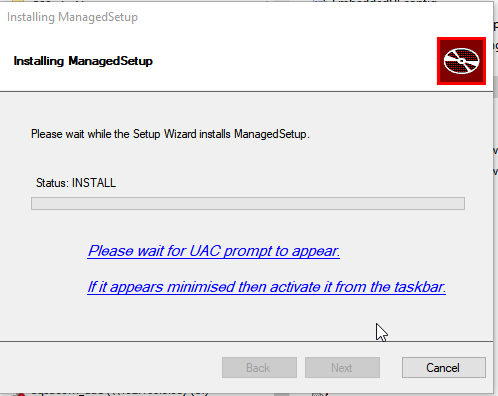
Second, UAC still can be fooled as long as the setup UI has no focus at the time of UAC being triggered.
However Windows does not haveKillFocusAPI.
Previously I managed to do it with an invisible (outside of desktop) instance of Notepad. Now this does not work.
But I found that setting focus to taskbar works as good.
Will keep you updated.
oleg-shilo
on 17 Feb 2018
Fixed in the 9aae824
oleg-shilo
on 17 Feb 2018
But as I mentioned before. It's not a WixSharp problem but a Windows MSI/UAC integration bug. Thus it may stop working if they do something again.
oleg-shilo
on 17 Feb 2018
Done as a HotFix release. NuGet per-release packages are also published.
oleg-shilo
on 18 Feb 2018
Nice, thanks. However, it can't be used currently:
Attempting to resolve dependencies for package 'WixSharp.1.6.3-HotFix' with DependencyBehavior 'Lowest'
Unable to find a version of 'WixSharp.bin' that is compatible with 'WixSharp 1.6.3-HotFix constraint: WixSharp.bin (>= 1.6.3)'.
"Include prerelease" is checked
dhilgarth
on 18 Feb 2018
I was rushing with the release and forgot to change the dependency. Will re-release the packages right away.
oleg-shilo
on 18 Feb 2018
Thanks. BTW, what's with the new method StartMonitoringTaskbarForUAC. It doesn't seem to be used anywhere? Didn't it work?
dhilgarth
on 18 Feb 2018
It worked, but it is too heavy/hacky. I implemented it and afterwards discovered that setting the focus to the taskbar does the job. If in the future this method fails then StartMonitoringTaskbarForUAC can be brought to life.
The important point is that StartMonitoringTaskbarForUAC rather addresses the issue directly: it performs click on the taskbar new item (UAC prompt).
oleg-shilo
on 18 Feb 2018
NuGet WixSharp package v1.6.3.1-HotFix has been published. Give it ~10 mins to get indexed
If you still have problems then use WixSharp.bin. It has no dependencies.
oleg-shilo
on 18 Feb 2018
It didn't work for me. Instead, it brought an unrelated window to the front. I am assuming that's because you bring focus to the taskbar by clicking on it. The click seems to have happened on the last taskbar item on the first row of my taskbar.
dhilgarth
on 18 Feb 2018
What about a totally different approach? Why don't we control when and how the UAC prompt is displayed?
One obvious way to do this would be to create a bootstrapper that launches the MSI in a way that this launch prompts the UAC.
dhilgarth
on 18 Feb 2018
The click seems to have happened on the last taskbar item on the first row of my taskbar.
Yes it is exactly what happens. I assumed that 10 pixels-left from the edge of the taskbar rect is a safe spot to click. Apparently you just proved it's not. I think the difference in my test was that I had a half-empty taskbar.
Why don't we control when and how the UAC prompt is displayed?
That's exactly the problem. UAC cannot be controlled. It is his ultimate purpose to resist any tempering from user mode. It's just unfortunate that there is no at least a simple API for UAC windows management.
...One obvious way to do this would be to create a bootstrapper that launches the MSI ...
Yes you can go this way. WixSharp already supports it. You can build your Burn bundle.
Though it is my understanding that you wanted to solve the problem for a standalone MSI.
I am going to rollback to the SetForegroundWindow(taskbar) approach as it is less intrusive than a click. It only brings the taskbar item preview but without actually activating it. I will also disable UACRevealer by default so users will need to opt-in instead of opting out as it is now.
StartMonitoringTaskbarForUAC will also suffer from the full-taskbar condition. The current algorithm for detecting a new item is to monitor the most-left empty area of the taskbar for appearance of the visual content, which is not uniform (empty). It actually works very well but the filled taskbar will require more sophisticated image recognition algorithm.
If you want to experiment you can always disable UACRevealer.Enabled = false; and place any sort of focus management tricks in your custom "ProgressDialog" on_load event.
oleg-shilo
on 18 Feb 2018
IMO, the best implementation for StartMonitoringTaskbarForUAC would be to look for the shield icon that the prompt contains and click on it.
Regarding the bootstrapper: I haven't used them so far, will check them next week.
dhilgarth
on 18 Feb 2018
... would be to look for the shield icon that the prompt contains and click on it..
Of course. This is what I meant "will require more sophisticated image recognition algorithm".
Though it will not be reliable as tomorrow the next Windows update may bring a new theme for desktop and your shield image will be replaced with something else.
If you want to go this way an arguably a better implementation would be like this:
if (taskbar.IsFull)
    last_item_image = taskbar.GetLastItemImage()
    for i=0 to 5:
        if (last_item_image != taskbar.GetLastItemImage())
            taskbar.ClickOnMostRightPoint()
            break
        Thread.Sleep(1000)
else
    taskbar.ClickOnMostRightPoint()
    Thread.Sleep(1000)
    taskbar.ClickOnMostRightPoint()
The real challenge will be in if (last_item_image != taskbar.GetLastItemImage()). Mind you that the new (UAC) item will be blinking so a pair of two captured images may be different even if they belong to the same item..
Now you probably see what a mess MSI team has created by simply ignoring MS own rule: "All UAC complaint processes should be marked at startup as _foreground process_". They followed that rule for their own MSI UI but not for the custom one (embedded).
oleg-shilo
on 18 Feb 2018
The UAC shield icon hasn't changed since Windows 7, so I would say it is safe to say that it is rather stable.
What about using the Embedded UI as a way to launch our actual UI in our own foreground process? Could that work?
dhilgarth
on 18 Feb 2018
to launch our actual UI
The _actual UI_ is a dll that supposed to be hosted by MSI runtime, who is the offender here. The _actual UI_ cannot be launched any other way.
WixSharp supports creation of the ExternalUI (see the samples). Such an UI is self hosted executable. But it's not necessarily everyone's cup of tea.
Burn bootstrapper is nothing else but a complicated ExternalUI that can run MSI one by one.
You can also have a look WixSharp.Lab native bootstrapper. You can rework it for your needs. Not sure you would want to.
And you can always go with a simple custom launcher (elevated windows application) which simply launches:
msiexe.exe /i <your msi extracted from launcher resources>
You can do plenty, but all this effort for such a little gain...
If you ask me, that warning in the progress dialog is sufficient enough.
oleg-shilo
on 18 Feb 2018
Despite my slight skepticism I am absolutely willing to enhance StartMonitoringTaskbarForUAC with the proper "shield-recognition" algorithm.
I simply don't have time for this (at least right now). Thus if you can develop such an algorithm and share it I will be happy to include it into the solution.
oleg-shilo
on 18 Feb 2018
to launch our actual UI
The actual UI is a dll that supposed to be hosted by MSI runtime, who is the offender here. The actual UI cannot be launched any other way.
I understand that. What I meant was: Let MSI launch a wix# DLL without UI which in turn launches the user defined UI in a foreground process.
WixSharp supports creation of the ExternalUI (see the samples). Such an UI is self hosted executable. But it's not necessarily everyone's cup of tea.
But does this actually solve the problem with the UAC prompt?
If you ask me, that warning in the progress dialog is sufficient enough.
I disagree. It's a pretty bad UX and many normal people don't even know what a "UAC prompt" is.
dhilgarth
on 18 Feb 2018
But does this actually solve the problem with the UAC prompt?
Absolutely, positively yes. See External_UI samples.

But, you will be building your new UI. WixSharp only provides the plumbing.
oleg-shilo
on 18 Feb 2018
Latest update. I have published the update package:
Install-Package WixSharp.bin -Version 1.6.3.2-HotFix
Changes in v1.6.3.2
- UACRevealer algorithm changed to
SetForegroundWindow(taskbar)as a safer option.
* UACRevealer is disabled by default. Enable it when needed: UACRevealer.Enabled = true;.
Worth to mention that the current UAC revealing algorithm is safe and reliable as it only relays on OS messaging and windows management. Thus no mouse-click simulation or desktop image processing involved.
The only side effect of this algorithm is that when the focus is moved to the taskbar it can bring up a small preview of the taskbar item.
However this only happens if taskbar preview is enabled and the very first item on the taskbar has a running application associated with it.
oleg-shilo
on 18 Feb 2018
Hi @oleg-shilo,
This fix does not work for me(
focus is moved to the taskbar it can bring up a small preview of the taskbar item.
I see this small preview on first item in task bar, "explorer.exe" for me. But then nothing happens..
Are there any other workarounds, e.g. elevate msi at very beginning. It seems like minor issue but in actually it is awfully, since it is first user experiance with application. And user does not care what it is not 'our', 'your' fault :)
 skondratov
on 27 Feb 2018
skondratov
on 27 Feb 2018
No there is none that I know.
And, to be honest I am reluctant to invest even more time in the search of another work around that will work in some cases but not in others. After all the problem is a part of the Windows (not even only MSI) user experience.
And user does not care what it is not 'our', 'your' fault :)
I know too well what you mean. But I do believe this part is addressed by the informative prompt:
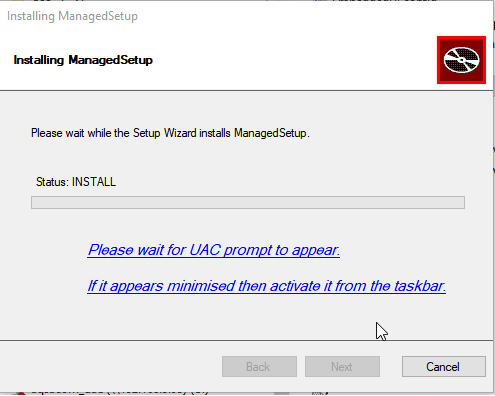
You may even rewrite it to something even more direct: "Now click UAC prompt on the task bar".
oleg-shilo
on 27 Feb 2018
@oleg-shilo Thanks for reply.
Just realized that
WUI.WixUI_Advanced
Covers all my needs and does not suffer from this problem :)
skondratov
on 5 Mar 2018
FYI the current UACRevealer (approach_3 in v1.14.3) doesn't work for me. I had to revert to approach_2
:(
 savehansson
on 7 May 2020
savehansson
on 7 May 2020
Not surprised.
the current UAC revealing algorithm is safe and reliable
The days when it was reliable are al gone. It's only safe now :)
When it was implemented it indeed was reliable. I tested it so many times and on numerous machines. But after some time it started only working 50/50 :o(
There were no changes in the algorithm. I can only think of Win updates as a suspect. So I gave up.
There a few truly embarrassing conceptual mistakes in the win UX that should never exist in the first place. That are haunting users for years. That are ridiculously easy to fix and yet that are still not fixed.
UAC foucs management is one of them. The other one comes in mind - explorer icons overlay. But this is a different story.
Sorry guys this is something that I cannot help us with.
Though #838 is a good compromise
oleg-shilo
on 7 May 2020
Related issues
 Eagle3386
·
4Comments
Eagle3386
·
4Comments
 kain64
·
4Comments
kain64
·
4Comments
 marcobeninca71
·
4Comments
marcobeninca71
·
4Comments
 milhousemanastorm
·
4Comments
milhousemanastorm
·
4Comments
 UweKeim
·
5Comments
UweKeim
·
5Comments
Most helpful comment
Done as a HotFix release. NuGet per-release packages are also published.