Wire-webapp: Page shows: "Wire is already open in another tab." Even though it isn't
Wire for Web Version: 2017-06-22-12-18-prod Doesn't seem to show on the error screen
Browser Version: 54.0 (32-bit)
Installed Browser Addons: Ghostery, µblock origin (Tested with both 'paused') Firefox Sync is set up
OS: Windows 7 (Not sure were to find a specific version)
What steps will reproduce the problem?
- Have app.wire.com open and be logged in; Firefox set up to restore session; (Tab is pinned)
- Close Firefox and reboot the computer (I did a full reboot)
- Start Firefox
What is the expected result?
Open Firefox should contain a app.wire.com tab ready to login.
What happens instead?
Firefox contains a app.wire.com tab with only the message "Wire is already open in another tab"
And the URL shows https://app.wire.com/auth/#tabs
Please provide any additional information below. Attach a screenshot if
possible.
Reloading the page, even with with Shift+F5 does not solve this problem.
Closing the tab and reopening also doesn't help. Restarting Firefox was also tested.
Opening https://app.wire.com/auth/#login in the same tab only works for less
than a second.
The only way to "fix" this issue was to make Firefox forget the site and then login.
This unfortunately deletes keys and history, which creates a new client.

 Don42
Don42
All 9 comments
Workaround:
- Go to https://app.wire.com
- Hit Ctrl+Shift+J (Cmd+Opt+J) to open Dev tools in console
- Paste
document.cookie = 'app_opened=;expires=Thu, 01 Jan 1970 00:00:01 GMT;Path=/;' - Hit Enter
- Go again to https://app.wire.com and it will let you in.
 maximbaz
on 24 Jun 2017
maximbaz
on 24 Jun 2017
Hej,
same issue here:
OS: Linux Mint 18.1 Serena - Cinnamon | and also with Windows 10
Firefox 54.0(64-bit) with disabled µBlock
@maximbaz Workaround seems to work :+1:
 jarvis-owl
on 24 Jun 2017
jarvis-owl
on 24 Jun 2017
@makingthematrix Confirmed, Workaround works for now. Thanks.
I expect the issue will pop up after the next restart.
Don42
on 24 Jun 2017
Thank you for your reports. We introduced the multiple tabs detection in the last release to prevent decryption errors like #1287. Obivously this has some undesired side effects if the cooke enabling this behavior is not properly cleared. I will look into fixing the behavior for the next release or disable the feature temporarily until we have a permanent fix in place. Please excuse the inconvenience.
 gregor
on 25 Jun 2017
gregor
on 25 Jun 2017
Workaround works.
 deadalnix
on 25 Jun 2017
deadalnix
on 25 Jun 2017
Any timeline of when this is going to land in production?
Don42
on 26 Jun 2017
@Don42 No promises, but this is planed for this week. Maybe we manage to get it out as early as tomorrow.
gregor
on 27 Jun 2017
It's the second time this is breaking for me :/
deadalnix
on 27 Jun 2017
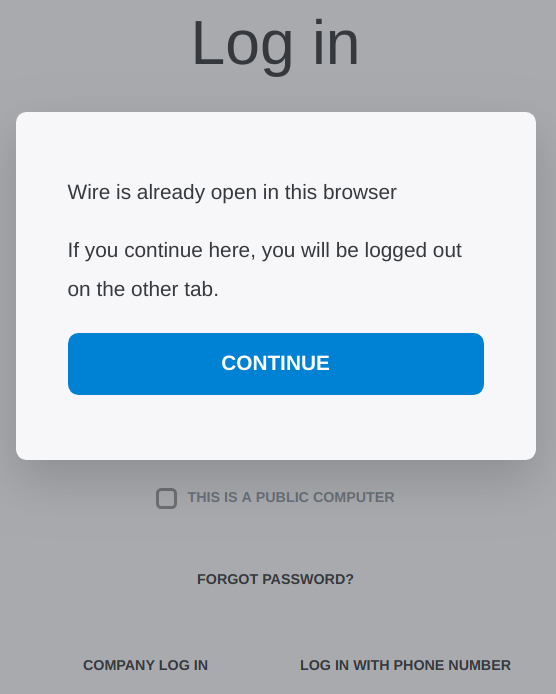
If have this issue too, the workaround didn't work for me. Deleted the cookie and after every crash of Chromium I get this screen again.
 piegamesde
on 11 Dec 2018
piegamesde
on 11 Dec 2018
Related issues
 ghost
·
5Comments
ghost
·
5Comments
 dietmarw
·
4Comments
dietmarw
·
4Comments
 fonixer
·
5Comments
fonixer
·
5Comments
 SuperHaze
·
5Comments
SuperHaze
·
5Comments
 livejamie
·
3Comments
livejamie
·
3Comments
Most helpful comment
Workaround:
document.cookie = 'app_opened=;expires=Thu, 01 Jan 1970 00:00:01 GMT;Path=/;'