Wire-desktop: Did the latest update for the Linux desktop app break it?
Wire version: Wire for Linux Desktop, latest version. Cant check which version that is since that is the issue...
system: Ubuntu Mate 18.04 LTS
Which antivirus software do you have installed: No antivirus
What steps will reproduce the problem?
- Start Wire
What is the expected result?
A functional window with conversations and contacts.
What is the actual result?
A blank Wire window where only the menu bar is visible yet not functional.
 ArmitageShanks
All 30 comments
Confirmed. Same problem here (Linux Mint 19, Wire-Desktop 3.2.2840).
 mi-gri
on 2 Jan 2019
mi-gri
on 2 Jan 2019
Same problem with MacOS 10.13.6. Blank screen except for sidebar, but it is non-functional and drop down menus on the Finder don't work either.
 unequalized
on 3 Jan 2019
unequalized
on 3 Jan 2019
Same problem on Debian sid
 scmorrison
on 3 Jan 2019
scmorrison
on 3 Jan 2019
I have a Wire window with the usual bar down the left side, but none of my contacts appear there. The menus across the drop down and items can be clicked, but they do nothing. "8-[
Fedora 29, Gnome 3.30.2, wire-3.5.2881-x86_64.AppImage
 owlbrudder
on 3 Jan 2019
owlbrudder
on 3 Jan 2019
Reverting to wire-3.3.2872-x86_64.AppImage did not solve my problems, which are the same as the others, which prompts me to ask which files need to be restored from backup?
owlbrudder
on 3 Jan 2019
Same here, Ubuntu 14.04, Wire 2.17.2813
Got a message for update, after updating only a white window appears.
 dceonline
on 3 Jan 2019
dceonline
on 3 Jan 2019
well, seems i found a way to fix it.
First i tried reinstalling wire, but that didn' t work.
So i closed wire, cleaned the ~/.cache directory in my home-dir and restarted the app. that work for me, wire came back with all windows.
you may also try to only delete ~/.cache/fontconfig and/or ~/.cache/mozilla.
dceonline
on 3 Jan 2019
Interesting, dceonline. Why would fontconfig and/or mozilla affect the Desktop application? Weird. I had already reverted to the previous version, so restored ~/.config/Wire from backup and everything came back to life.
owlbrudder
on 3 Jan 2019
Interesting, dceonline. Why would fontconfig and/or mozilla affect the Desktop application?
I don' t know. Maybe there is a difference in handling mozilla-cache. And why i believe it is one of these folders? This two folders where the only which where created after clean of the whole cache folder.
Maybe this will help the devs to check out a better way to update wire on Linux :)
Regards from germany
Ortwin
dceonline
on 3 Jan 2019
@dceonline
Got a message for update, after updating only a white window appears.
Which kind of message did you get? A banner at the top?
Wire 2.17.2813
Are you still using this version? It is over a year old and likely not working correctly anymore.
 ffflorian
on 3 Jan 2019
ffflorian
on 3 Jan 2019
So i closed wire, cleaned the ~/.cache directory in my home-dir and restarted the app. that work for me, wire came back with all windows.
you may also try to only delete ~/.cache/fontconfig and/or ~/.cache/mozilla.
Neither worked for me.
mi-gri
on 3 Jan 2019
To all affected: Please update to the latest version of Wire Desktop and delete the ~/.cache directory.
Seems like our browser detection failed to recognize your old browser version and thus just a white page appears.
ffflorian
on 3 Jan 2019
@mi-gri
Which version of Wire Desktop are you using?
ffflorian
on 3 Jan 2019
@mi-gri
Which version of Wire Desktop are you using?
see above:
Confirmed. Same problem here (Linux Mint 19, Wire-Desktop 3.2.2840).
I upgraded now to 3.5.2881 and the problem disappear (without deleting ~/.cache).
By the way, it's quite confusing for the users when wire reports that it has updated itself to a new version and that you also have to upgrade the wire-desktop package by yourself.
mi-gri
on 3 Jan 2019
ffflorian, which contents of ~/.cache need to be deleted? I have a long list of content in my `/.cache - see attached. I'm uncomfortable about zapping the lot as you may imagine! "8-)
cachelist.txt
owlbrudder
on 3 Jan 2019
My solution which works for me:
- Restore .config/Wire from backup
- cp -r .config.Wire .config/Wire_good
- Start wire-3.5.2881-x86_64.AppImage, which comes up empty.
- Close wire-3.5.2881-x86_64.AppImage
- cp -rf .config/Wire_good .config/Wire
- Start wire-3.5.2881-x86_64.AppImage - everything works again!
All without touching ~.cache at all.
YMMV
owlbrudder
on 4 Jan 2019
I had same issue and I noticed the version reported is quite old, around 3.2. So I installed new .deb version from here but that did run at all, did not show anything, the AppImage is the same. Tried remove --purge and reinstall, no luck.
 multiflexi
on 4 Jan 2019
multiflexi
on 4 Jan 2019
@ffflorian
To all affected: Please update to the latest version of Wire Desktop and delete the
~/.cachedirectory.
Seems like our browser detection failed to recognize your old browser version and thus just a white page appears.
What happens if I delete the ~/.cache directory? I will not lose data for Wire or other apps?
ArmitageShanks
on 4 Jan 2019
Confirmed this issue on Manjaro 18.0.2.
Deleted .cache did not fix the issue.
Attempted to un-install and re-install but seems the AUR build for wire-desktop is now broken. :\
To anyone out there who is reading this, uses the AUR package for Manjaro, and has not yet updated, I wouldn't recommend updating or attempting a re-install just yet.
 verbal007
on 5 Jan 2019
verbal007
on 5 Jan 2019
Same here, OpenSUSE 15.0.
Deleting both ~/.cache and ~/.config/Wire didn't help, blank window persists.
 Abnaxos
on 7 Jan 2019
Abnaxos
on 7 Jan 2019
Same here. Gentoo.
Deleting both directories didn't help, still have a blank window.
 bytefray
on 8 Jan 2019
bytefray
on 8 Jan 2019
If on Linux, close Wire, restore a recently-working version of .config/Wire (a directory) from backup, then re-open Wire. It should be working - it does for me. YMMV.
owlbrudder
on 8 Jan 2019
The last working version to me is 3.3.2872
The versions 3.4.2879 and 3.5.2881 are showing a JavaScript error on startup:
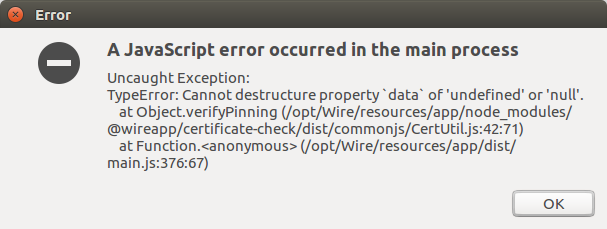
I'm using Wire with socks proxy, maybe the release notes "Improved detection of insecure connections" and "Refined certificate pinning experience" have to do something with this issue
 EmPeWe
on 8 Jan 2019
EmPeWe
on 8 Jan 2019
Same with wire-desktop 3.0.2816 (on Slackware). Purging ~/.cache and moving ~/.config/Wire had no effect.
 next-mad-hatter
on 8 Jan 2019
next-mad-hatter
on 8 Jan 2019
Also tried restoring a backup of .config/Wire from before the update. Still got a blank window.
Abnaxos
on 9 Jan 2019
Same with Mint 17.3, wire-desktop 3.0.2816, 32bit. I get a white screen, menus don't do much except "Quit" and "About". Tried deleting .config/Wire and restored from Backup. Not working.
 ebym
on 9 Jan 2019
ebym
on 9 Jan 2019
I had same issue, a full re-install via AppImage download did the trick ;/ (which is annoying); see #2114
 fermulator
on 22 Jan 2019
fermulator
on 22 Jan 2019
Reporting in for Manjaro 18. The current wire-desktop AUR is still undergoing some fixes, but the wire-desktop-git AUR built just fine, and resolved this blank window issue for me. My problem is SOLVED.
verbal007
on 27 Jan 2019
This should be fixed by now. If not, feel free to comment and I'll reopen.
ffflorian
on 15 May 2019
Just a question, how do I update without losing my data/chats?
I can't update through the app since the window isn't functional?
ArmitageShanks
on 15 May 2019
Related issues
 Nuruddinjr
·
4Comments
Nuruddinjr
·
4Comments
 TalviT
·
4Comments
TalviT
·
4Comments
 cardassian-tailor
·
4Comments
cardassian-tailor
·
4Comments
 xloem
·
3Comments
xloem
·
3Comments
 dwt
·
3Comments
dwt
·
3Comments
Most helpful comment
see above:
I upgraded now to 3.5.2881 and the problem disappear (without deleting ~/.cache).
By the way, it's quite confusing for the users when wire reports that it has updated itself to a new version and that you also have to upgrade the wire-desktop package by yourself.