Wire-desktop: Wire desktop not logging in on linux
Wire Version: 2.11.2670
OS: Linux mint 18.2
Do you have an antivirus software installed: no
Wire desktop does no longer log me in. When I start the application, I'm asked to log in, when I do that, nothing happens and the program is stuck forever. Two other people I'm talking to have the same issue (all since yesterday).
Please fix this asap, wire on the desktop does not work at all currently.
 rbieb
rbieb
All 25 comments
Same here, openSUSE 42.3.
Sometimes it hangs as described in the original bug report, sometimes it brings me straight back to the login screen.
 Abnaxos
on 5 Aug 2017
Abnaxos
on 5 Aug 2017
Same here, Ubuntu 16.04. Yesterday it asked me to update, and after I accepted, it got into a login loop. After I quite Wire and restarted it, it asked me to log in. When I do that, it loads a while and then gets back to the login screen.
I tried removing ~/.config/Wire but that didn't fix anything.
HOWEVER: even though it doesn't seem to log on, I do get desktop notifications of new messages. I just have no way to read them.
 EgbertW
on 5 Aug 2017
EgbertW
on 5 Aug 2017
wire desktop latest version 2.15.2751 on Ubuntu 16.04, only show blue background color in the main window, no login prompt. For instance that has been logged in before, only show owner's avatar and blue background but no message. All menu items can't be opened. It has been like this for last 3 days.
 Fedora7
on 6 Aug 2017
Fedora7
on 6 Aug 2017
Confirmed. No login possible. Brings me straight back to the login screen.
 Iridias
on 6 Aug 2017
Iridias
on 6 Aug 2017
While this issue is marked Linux, I have the same problem on Windows after the latest update (I can't see the version because I can't login). Two machines, Win10 and Win7. Goes back to the login screen after credentials, both phone and email.
 paulkoan
on 7 Aug 2017
paulkoan
on 7 Aug 2017
We are not seeing any issues with logins internally. Is the problem still ongoing? Can you please start the app with devtools or try to login using the webapp and let me know if there is a specidic request failing?
 gregor
on 7 Aug 2017
gregor
on 7 Aug 2017
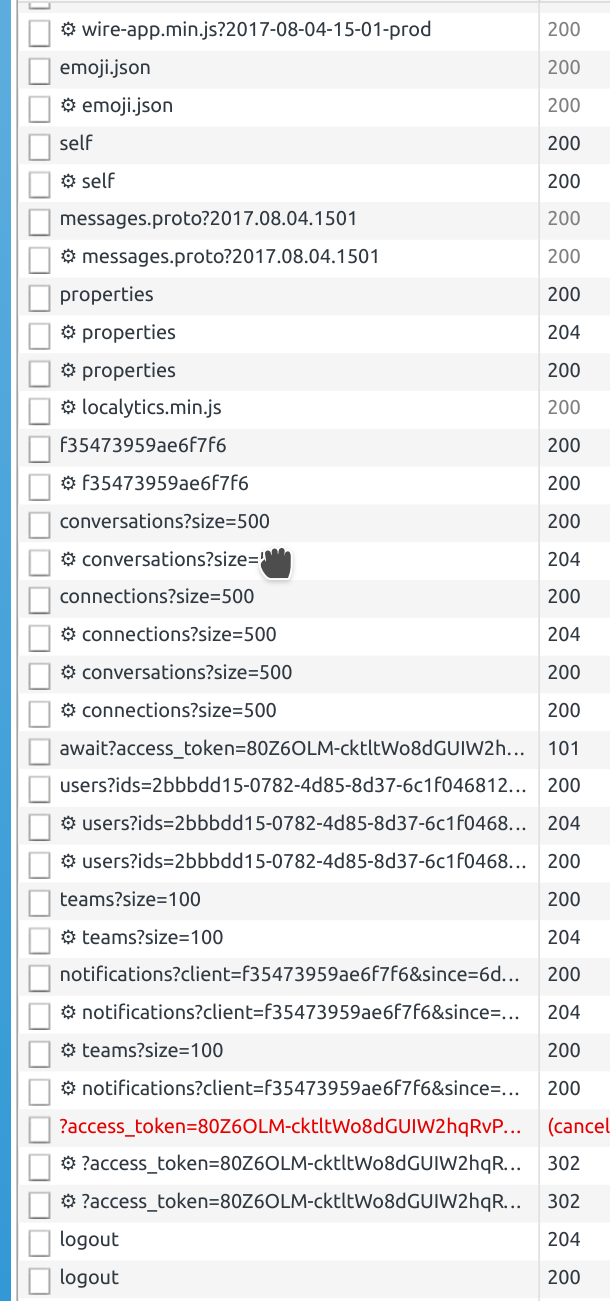
These are the requests following the (successful) login in the Linux app using the DevTools. I don't see any failed requests, only a request is cancelled, followed by a logout. Which I did not initiate.
So it seems that it logs in succesfully and then proceeds to log out immediately.
Opening the webapp at app.wire.com in Firefox works just fine, by the way.
(I'm assuming here that no sensitive information is present in the access tokens - if there is, please let me know and I'll remove the image and restart my session).
EgbertW
on 7 Aug 2017
@EgbertW Access token is only valid for 15 minutes and the screenshot only shows part of it - you should be fine. Could you please open the console, try to log in again, enter wire.app.enable_debugging() as soon as you see the loading bar and send me the log. I want to find out what's triggering the logout. You can email the log to me at gregor AT wire.com
gregor
on 7 Aug 2017
I just sent the requested info to you. It appears that when I enable logging, it doesn't log out right away but instead gets stuck on the loading screen.
I also tried to log out in full, removing local conversations and so on and logging in again. The error log was the same. I did get a mail from Wire after that that I started using a new device, so it seems the log in was successful.
There is an exception in the log: Uncaught (in promise) TypeError: Object.entries is not a function in https://app.wire.com/min/wire-app.min.js?2017-08-04-15-01-prod on line 45.
EgbertW
on 7 Aug 2017
Thank you for your repsonse. Please update to the latest version of Wire. Supported production version is 2.15 which based on an electron version running either Chrome 56 or 58 depending on the platform. The specific call is not supported by older releases based on browser version below 54.
gregor
on 7 Aug 2017
Ah, you are right - that helps. I didn't realize there was a new version. It would be good if the desktop version gives a notification when it should be updated, rather than failing. Or was that already added in the new version? I added the repository now, that should keep it up to date.
Thanks!
EgbertW
on 7 Aug 2017
It was not supposed to fail. We just failed to notice the backwards incompatibility when adding a javascript call that actually required Chrome 54 or newer to be supported. The whole update mechanism is something we are continuously looking into to improve. It just takes time...
gregor
on 7 Aug 2017
Ah, that fixed it for me.
Abnaxos
on 7 Aug 2017
got new error message "Certutils verification failed for app.wire.com: false is false" from latest version 2.15.2751 on Ubuntu 16.04
Fedora7
on 7 Aug 2017
Same here with version 2.15.2751 on Archlinux.
Correction: I'm on Manjaro Linux, which is based on Archlinux. The differences are minimal, though.
 MrCustomizer
on 15 Aug 2017
MrCustomizer
on 15 Aug 2017
Also same here - V2.15.2751 on 4.12.6-1-ARCH
YOUR CONNECTION IS NOT PRIVATE. LEARN MORE
Certutils verification failed for app.wire.com: false is false
Update: Just tried it with Ubuntu 16.04 (VM) and within a Docker Container. Same errors. Must have been a recent update / bug. A few hours ago it worked without problems.
 tracktraps
on 15 Aug 2017
tracktraps
on 15 Aug 2017
Can confirm, it has to be a new problem. I didn't have any troubles yesterday.
MrCustomizer
on 15 Aug 2017
I am experiencing the same problem on Debian 9.1 with all updates running wire-desktop version 2.15.2751 from the https://wire-app.wire.com/linux/debian stable main repository. The error: "Certutils verification failed for app.wire.com: false is false" is echoed to the console twice and the "YOUR CONNECTION IS NOT PRIVATE. LEARN MORE" message is displayed in the application.
I thought maybe it was a TLS certificate issue on app.wire.com, but I tried reading from https://app.wire.com/ using wget, curl, and Google Chrome to be absolutely sure, and there were not certificate errors reported. All applications connected and pulled data from https://app.wire.com/ successfully.
So, this appears to be a problem specific to the wire-desktop application or that application's interoperability with Wire server(s).
 jphebus
on 15 Aug 2017
jphebus
on 15 Aug 2017
I get also YOUR CONNECTION IS NOT PRIVATE. LEARN MORE when i start the app on OS X or elementary OS. It worked 3 hours ago...
 davidak
on 15 Aug 2017
davidak
on 15 Aug 2017
Also experiencing the same problem on both Windows 10.0.15063 and Mac OS 10.12.6. Neither of the desktop apps will log in, but app.wire.com is just fine.
 paulforgione
on 15 Aug 2017
paulforgione
on 15 Aug 2017
It seems the bug has been fixed.
tracktraps
on 15 Aug 2017
Yes, my Wire client works again, too.
MrCustomizer
on 15 Aug 2017
Cause was a server misconfiguration which we did not immediately notice. Human error on our end. Apologies about the temporary interruption and the inconvenience.
gregor
on 16 Aug 2017
official download version and latest github version (commit a3d29169ded0ff24419dc43d373f581258a1d0ce) can't login again. For those aleady logined linux desktop clients, they can't send message (message color grey).
Fedora7
on 23 Aug 2017
I was unable to login since the latest update on MacOS: the app would start loading (show the loading bar and almost finish), but then at the last moment, jump back to the login screen. I thought the problem could be some caches, so inspected the open files. The following did the trick:
rm -rf ~/Library/Containers/com.wearezeta.zclient.mac/
(Before doing this, you may want to check if there's data of some other app in the same directory.) On Linux you might want to look for something similar.
After this, the client did require some time to load: it was showing a blank screen. I'm not sure if waiting enough or getting frustrated and opening the 'About' dialog (the menu was functional) did the trick. In any case, now I'm able to login again.
 yadayadaydadaa
on 9 Apr 2020
yadayadaydadaa
on 9 Apr 2020
Related issues
 TheAresjej
·
5Comments
TheAresjej
·
5Comments
 dwt
·
3Comments
dwt
·
3Comments
 TalviT
·
4Comments
TalviT
·
4Comments
 tokariu
·
3Comments
tokariu
·
3Comments
![dependabot-preview[bot] picture](https://avatars3.githubusercontent.com/in/2141?v=4&s=40) dependabot-preview[bot]
·
3Comments
dependabot-preview[bot]
·
3Comments