Wire-desktop: [Feature request] Windows portability
Obviously Wire is already platform-portable, meaning it works on multiple operating systems. The goal here is to be settings-portable, meaning it would work across Windows machines.
Current behavior
Writes the program to appdata and writes settings to appdata\local and appdata\roaming.
Requested behavior
- Write program and all settings to the same folder (or at least the same root folder) e.g. c:\wire\ and c:\wire\settings
- When the folder is moved to another folder (like x:\wire or c:\Users\Admin\Desktop) the program should launch with the same settings as before
Why is this useful?
Ease of encryption e.g. store inside a TrueCrypt / VeraCrypt volume
USB drive - Someone who uses a public terminal at an internet cafe, computer lab, etc.
Cloud capability - An individual who has this stored on their cloud drive (Dropbox, Google Drive, etc.) will have the same experience/settings from one machine to another without a reinstall
Ease of backup - just copy the folder to a backup drive -- no hunting for the proper files inside appdata
Who cares?
Several messaging tools offer a portable version for greater anonymity (it's easy to dump a flash drive). Pidgin, two Tox clients, Telegram and Microsoft's Skype all have this capability.
Possible issues
Going this route can make updating the client more complicated. When a new version comes out, users will have to avoid overwriting the old config file or lose their settings. As such, I recommend this as an optional setting (a command argument like "--portable") or separate release version.
 vatterspun
All 23 comments
1+ for portable version.
For example Telegram, Isotoxin and all other Tox clients offer portable versions or portable mode on Windows which facilitates usage and backup.
 smaragdus
on 25 May 2017
smaragdus
on 25 May 2017
For reference #397 #427
 ConorIA
on 25 May 2017
ConorIA
on 25 May 2017
For reference #397 #427
Sorry @ConorIA I thought I ran a search before I posted. My fault. Maybe the use case bit will be useful to devs asking "why does this matter and who cares?"
vatterspun
on 28 May 2017
We have to do something about #427 :)
 lipis
on 28 May 2017
lipis
on 28 May 2017
+1, having a portable option would be nice.
 janost
on 5 Jun 2017
janost
on 5 Jun 2017
427 has been merged, which means that one could install to a USB stick and run with the --portable flag. The only thing I am not sure about is whether the install location is customizable.
ConorIA
on 31 Jul 2017
@ConorIA Great news, thanks.
vatterspun
on 10 Aug 2017
Right now the only Windows distribution is WireSetup.exe, which silently installs the app into C:\Users\...\AppData\Local\wire, creates settings’ folders in C:\Users\...\AppData\Roaming\Wire, then the app is immediately launched. So, why this issue about portability was marked as closed?
A portable application does not leave its files or settings on the host computer or modify the existing system and its configuration. The application does not write to the Windows registry or store its configuration files in the user's profile; instead, it stores its configuration files in the portable directory.
 sergeevabc
on 19 Sep 2017
sergeevabc
on 19 Sep 2017
I don't know if this should be closed or what and yeah some clarity on this would be nice. I was guessing the argument enabled path portability, which would let you move the program to a USB or cloud drive, use the "--portable"argument, and it would save settings to the local folder.
Ultimately I'm waiting for a quiet weekend to test this assumption.
vatterspun
on 20 Sep 2017
@vatterspun, on Linux, this is especially useful with the AppImage, or even with an unpacked image from a built app. @sergeevabc is right that it is less useful when the installer automatically installs to a user's AppData folder. That said, I hope that you are right that you can just copy C:\Users\...\AppData\Roaming\Wire to a USB key and take it for a spin. Please do let me know if it works.
ConorIA
on 24 Sep 2017
Update2: I noticed that the program won't start with anything but the latest version so I've refined my setup process.
Update: I've verified the program as portable. Here's my data:
Setup: My test was done in Win7x86 as it's probably the most popular Windows OS.
Steps:
- Download and run the setup file https://wire-app.wire.com/win/prod/WireSetup.exe
- Wait for the registration window to pop up and then close the program (make sure to right-click on the task bar and select "close")
- Go to C:\Users_USERNAME_\AppData\Local\wire and copy all files present to a folder of your choice
- Run _Wire.exe --portable_
- Sign in or sign up for an account and verify via email
- Delete leftovers from C:\Users_USERNAME_\AppData\Local\wire and C:\Users_USERNAME_\AppData\Roaming\Wire
Seems portable, though it writes setting to a LOT of files and folders:
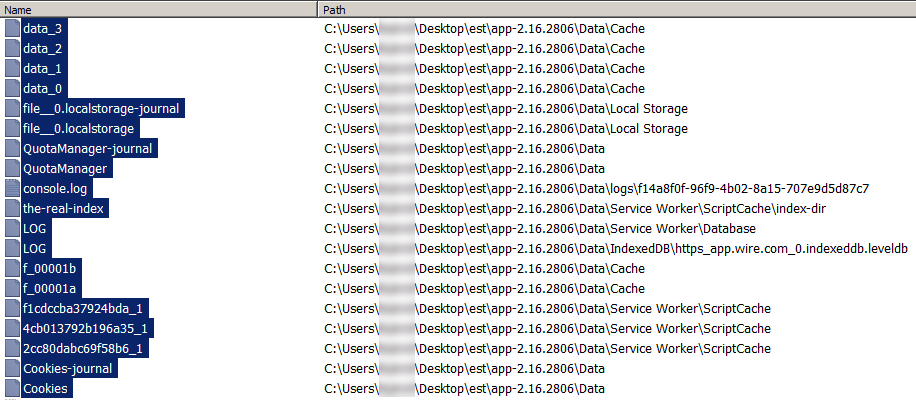
vatterspun
on 24 Sep 2017
There is a precise word for how portability is implemented in this case — rush job, i.e. in a slipshod manner, without due care of end-user expectations. Either Wire’s installer should have portable option (see WikidPad’s installation routine for example) which allows a user to choose the path or Wire should be deployed as ZIP package as well (see Telegram’s releases page for example). It would greatly ease the pain of installing and _updating_ (yes. it’s a huge pain at present) for those of us who use Wire on the go.
sergeevabc
on 27 Sep 2017
@sergeevabc, in this case, it wasn't so much a rush job as it was a climate scientist trying to implement a workaround! The Wire devs can produce true portable binaries with the electron-builder. I've got a PR to accomodate such a build, but I can't get the Gruntfile updated appropriately and don't have any more time to spend on this. Make some noise over on #982 if you wish!
ConorIA
on 27 Sep 2017
I agree that the approach that @sergeevabc is suggesting would ease the process of updating, but I'm just happy to arrive at this point. I've asked a lot of programs to go this route and enable portability and the answer is frequently "no" or silence. Also, there's arguably there's some benefit to responding to quality feature requests quickly versus a slow, more robust change.
vatterspun
on 29 Sep 2017
Agggrrrhhh! Once again I face the need to update Wire without polluting OS, but there is no simple solution. At least provide command-line switch like --extract PATH for official Windows package.
sergeevabc
on 10 Nov 2017
@sergeevabc Alternatively, Telegram has a portable application format that's a little easier to update via the PortableApps format: https://portableapps.com/apps/internet/telegram-desktop-portable
To be clear, I do prefer Wire, but if that's a critical feature for you.
Again, I'm just happy they were willing to add portable functionality.
vatterspun
on 11 Nov 2017
@sergeevabc
I totally agree with you that the implementation of portable mode is disastrous, it is so terrible that it defeats the purpose of portability. Anyway, I do not care about Wire any more- portable or not I am no longer using JavaScript+Electron software- this is the death of programming. I removed all Electron stuff from my system (with one exception but I will remove it as well after I take some screen-shots).
@vatterspun
The manual update of Telegram is easy- download the archive, extract it and replace the old executable (Telegram.exe) with the new one. For me Telegram is by far superior than Wire but I am about to dump it too- the developers ruined the GUI and added a bug which they called a "feature". Anyway, why mess with the slower PortableApps version when Telegram offers a natively portable and stealth version?
smaragdus
on 15 Nov 2017
@smaragdus, +1
Performance matters. Memory usage matters. Its simply not ok for apps to be sluggish.
Electron is Flash for the desktop
sergeevabc
on 23 Nov 2017
@sergeevabc I honestly don't know if thread hijacks are a thing on Github but maybe you could start a new issue encouraging the authors to move away from Electron and toward the React framework as the article suggests? This thread is increasingly a comment on overall development direction and not on a specific feature.
vatterspun
on 24 Nov 2017
@vatterspun #642 but see #994 and https://gitlab.com/ddobrev/Fibre/
ConorIA
on 25 Nov 2017
@ConorIA That's not quite what I was looking for. I think you meant to point that to smaragdus or sergeevabc.
vatterspun
on 25 Nov 2017
Sorry @vatterspun, it was #567 I had meant to link.
ConorIA
on 25 Nov 2017
Revisiting ostensibly implemented portability feature in year 2019. Meh, still a desktop dinosaur.
sergeevabc
on 27 Mar 2019
Related issues
![dependabot-preview[bot] picture](https://avatars3.githubusercontent.com/in/2141?v=4&s=40) dependabot-preview[bot]
·
3Comments
dependabot-preview[bot]
·
3Comments
 Nuruddinjr
·
4Comments
Nuruddinjr
·
4Comments
 Nateowami
·
3Comments
Nateowami
·
3Comments
 zorbathegreek
·
3Comments
zorbathegreek
·
3Comments
 mohammadrafigh
·
4Comments
mohammadrafigh
·
4Comments