Wire-desktop: [linux] emoji appears as black box
problem
when opening an existing conversation in wire-2.13.2741-x86_64.AppImage where the conv between to mobiles included an emoji, the said emoji sent appears in the linux chat feed as a black outlined, white filled, small rectangle
android mobiles where on latest wire update
image

 2114L3
All 14 comments
in testing from comment from mykola-mokhnach in https://github.com/wireapp/wire-android/issues/838 (closed), it is only related to certain emojis

what font is required for all emojis to display correctly?
and can this font be included in the appimage? as it appears to be a dependency for emojis to display correctly
2114L3
on 4 May 2017
Some more info could be found here: https://github.com/wireapp/wire-desktop/issues/161
 lipis
on 4 May 2017
lipis
on 4 May 2017
I am understanding that as with mobiles, the linux desktop app is dependent on the hosts emoji font. under linux would it is up to the administrator or distro to ensure that there is a full featured emoji font available on the system.
if this is correct, please confirm/close the this issue.
adding emoji to the appimage would therefore be an enhancement request
2114L3
on 4 May 2017
Bunch of things are going on in the emoji world and Wire at the moment, and currently we rely on the system fonts so we won't be adding any fonts in the AppImage (or any other distribution of Wire) any time soon. Therefore we'll have to close this issue.. 🤕
lipis
on 4 May 2017
@2114L3 these awful emojis are because a "famous" Symbola font is trying to take over your computer.
But it is possible to fix that today, no need to wait for Wire to implement something.
Wire is using system emoji, so if you fix your system emoji, not only they will be beautiful on Wire, they will be beautiful in every other app you have (that also uses system emoji).
This is how it looks on my Linux today:

All my configs are on github, although I don't give you a 100% guarantee that they will fix your particular system, you are very welcome to use them.
Relevant pieces:
- Nice font and where to put it
- How to kill Symbola and prioritize the beautiful font
fc-cache -fto rebuild the font cache after you change configuration
 maximbaz
on 9 May 2017
maximbaz
on 9 May 2017
@maximbaz How can I setup these fonts system wide, so that all users can use them? I am on ubuntu. Many thanks!
 robertnurnberg
on 25 Jan 2018
robertnurnberg
on 25 Jan 2018
Not 100% sure if Ubuntu follows the same convention (check anyway!), but on Arch Linux system-wide fonts are located in /usr/share/fonts (so put emojione-android.ttf somewhere in there) and conf files are located in /etc/fonts/conf.d directory (for 70-emojione-color.conf). Then run $ fc-cache -f to refresh the cache (maybe also with sudo) and you should be good. Test with $ fc-match emoji and you should get emojione-android.ttf as a result if everything went fine.
By the way, the links need some update:
- this is my latest
70-emojione-color.conf: click - I made
emojione-android.ttfpart of the EmojiOne official release, grab the latest one here: click.
Also worth mentioning in general, for Arch Linux community I now co-maintain the ttf-emojione package on AUR, just install it and no extra action is needed to get colorful emojis in all apps and browsers (including Wire)!
maximbaz
on 25 Jan 2018
Excellent, thanks. I put the emojione-android.ttf into /usr/local/share/fonts and did the rest as you said. Works perfectly on Ubuntu 16.04 LTS.
Edit: On Ubuntu 14.04 LTS (one of my other machines), the above does not work. fc-match emoji returns DejaVuSans.ttf: "DejaVu Sans" "Book" after the above procedure, and no emojis in color in wire. Is there a quick fix, even just for a single user? For example, would overwriting /usr/share/fonts/truetype/dejavu/DejaVuSans.ttf with emojione-android.ttf work?
robertnurnberg
on 26 Jan 2018
FWIW, on OpenSUSE Tumbleweed I just added emojione-android.ttf to my ~/.fonts/ folder, ran fc-cache -f, restarted Wire, and that was it - nice looking emojis in Wire.
I noticed there was a package I could install via zypper but it seemed to be in version 1.3 which is quite far from the 3.1.2 in the EmojiOne repo.
Not sure what the difference between emojione-android and emojione-apple is though? Do they contain different emojis?
 rawtaz
on 27 Jan 2018
rawtaz
on 27 Jan 2018
FWIW, on OpenSUSE Tumbleweed I just added emojione-android.ttf to my ~/.fonts/ folder, ran fc-cache -f, restarted Wire, and that was it - nice looking emojis in Wire.
I made an extra effort to make sure Wire follows Unicode standard for emojis, that's why it works out of the box. However, most of the apps & websites do not follow the standard, and thus you'll sometimes encounter some weirdness, like one emoji not being rendered while others are rendered fine (see below for an example).
The purpose of the 70-emojione-color.conf is to "fix" other apps and websites, to force them to use emoji font correctly and avoid the issues like below. So 70-emojione-color.conf is not necessary for Wire specifically, but it is recommended so that you can enjoy emojis in other apps too.
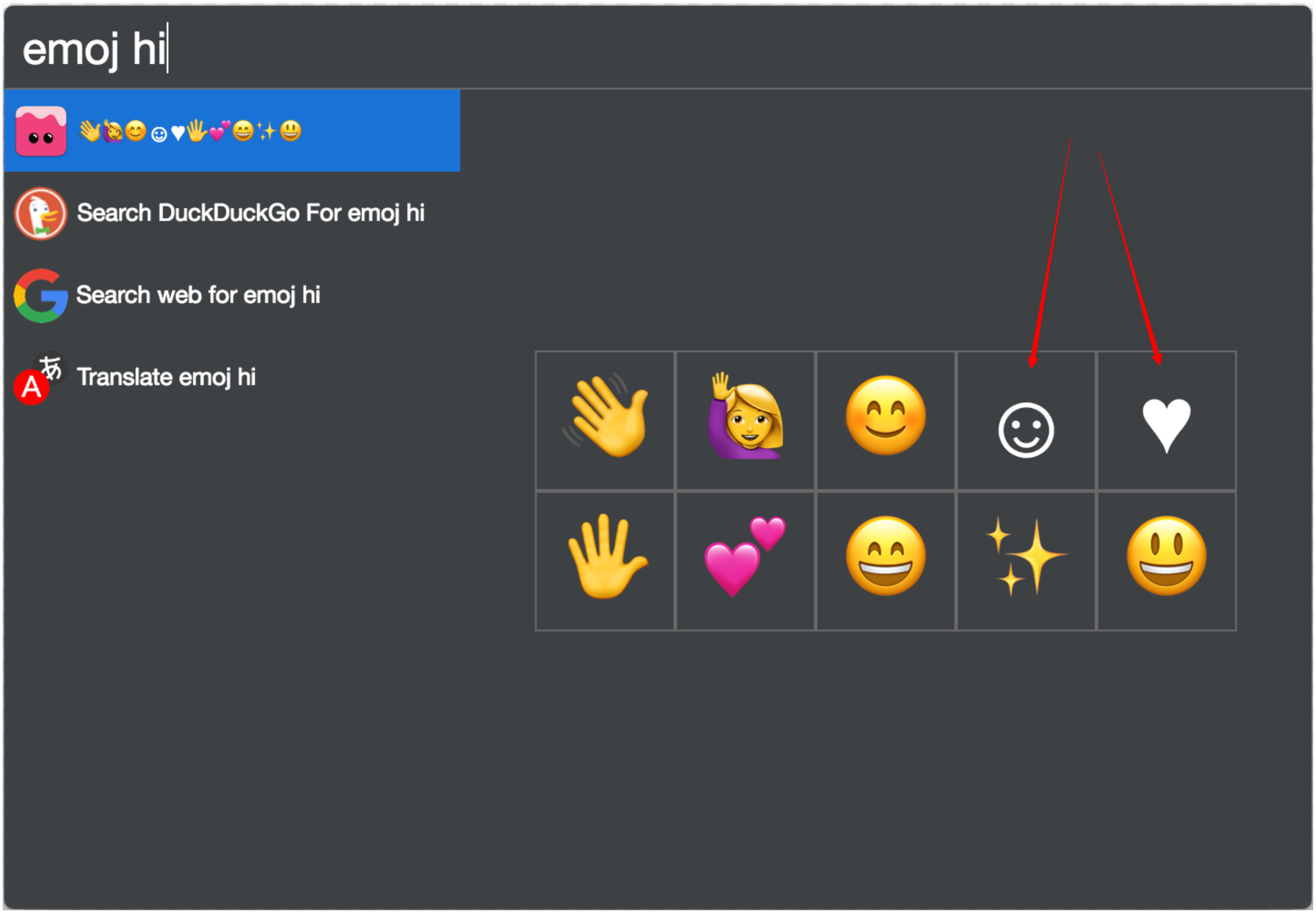
Not sure what the difference between emojione-android and emojione-apple is though? Do they contain different emojis?
They both are supported on Linux (at least in Chromium), but they are different fonts, built on different technologies.
emojione-android.ttf is essentially Google's NotoColorEmoji but with replaced emoji images, and because Google is so nice to put their instruments of making a font in opensource, I was able to plug them into the official EmojiOne release pipeline. That's why emojione-android.ttf is now being officially released as a part of every EmojiOne release.
On the other hand, emojione-apple.ttf is community-driven, it is built using a different technology which only one person among EmojiOne community understands, and he/she makes the font by hand because there are no tools available to automatically compile the font.
maximbaz
on 28 Jan 2018
Thanks for the elaborate explanation @maximbaz!
That's funny, I hadn't thought the EmojiOne set for Android would in reality be Noto emojis :-)
So the emojione-apple-ttf is not Noto emojis, but "real" EmojiOne emojis? Too bad it's just one person, seems fragile, especially with the lack of tooling around it :/
rawtaz
on 28 Jan 2018
@maximbaz I have updated my comment above. Any ideas on how to make this work on Ubuntu 14.04 LTS?
robertnurnberg
on 30 Jan 2018
On Ubuntu 14.04 LTS (one of my other machines), the above does not work. fc-match emoji returns DejaVuSans.ttf: "DejaVu Sans" "Book" after the above procedure, and no emojis in color in wire. Is there a quick fix, even just for a single user? For example, would overwriting /usr/share/fonts/truetype/dejavu/DejaVuSans.ttf with emojione-android.ttf work?
Don't replace the DejaVuSans, it won't help as fontconfig doesn't care about file names, it will look into the file itself.
Try $ fc-match -s emoji | grep android and see if you get a match, fc-match -s prints ALL candidates for emoji font, not only the first one.
If grep doesn't find emojione-android.ttf, it means one of the two things - either you didn't put the font in the correct place so that Ubuntu cannot find it, or an older Ubuntu has a fontconfig that doesn't support colorful emojis. I vaguely recall something about the support for these colorful fonts being added only last year, but I might be wrong.
If grep does find emojione-android.ttf, make sure you didn't forget to install 70-emojione-color.conf file.
Let me know about the results.
maximbaz
on 30 Jan 2018
Thanks again for your quick help @maximbaz!
Running fc-match -s emoji does not list the emojione-android.ttf font. So my guess is that Ubuntu 14.04 is just too old, as the same works on the 16.04 install. Nevermind, I will enjoy these colorful emojis once I have got around to upgrading the distro on that machine.
robertnurnberg
on 30 Jan 2018
Related issues
 AllanDaemon
·
4Comments
AllanDaemon
·
4Comments
 Kasmetski
·
3Comments
Kasmetski
·
3Comments
 zorbathegreek
·
3Comments
zorbathegreek
·
3Comments
 Nuruddinjr
·
4Comments
Nuruddinjr
·
4Comments
 TheAresjej
·
5Comments
TheAresjej
·
5Comments
Most helpful comment
@2114L3 these awful emojis are because a "famous" Symbola font is trying to take over your computer.
But it is possible to fix that today, no need to wait for Wire to implement something.
Wire is using system emoji, so if you fix your system emoji, not only they will be beautiful on Wire, they will be beautiful in every other app you have (that also uses system emoji).
This is how it looks on my Linux today:
All my configs are on github, although I don't give you a 100% guarantee that they will fix your particular system, you are very welcome to use them.
Relevant pieces:
fc-cache -fto rebuild the font cache after you change configuration