Wire-android: [FeatureRequest] [Android] Ability to hide message content in notification
The problem
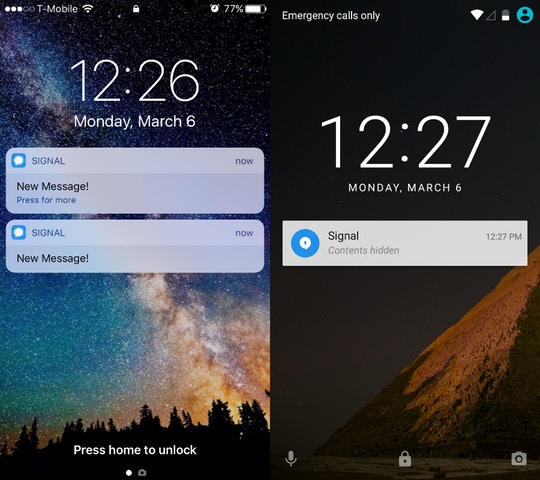
There currently is not a feature to hide the content of a notification on android. Signal, telegram, and whatsapp all provide this feature.
Environment
- Wire version that exhibits the issue: All
- Last Wire version that did not exhibit the issue (if applicable): N/A
- Android OS version used to run Wire: Oreo (note9)
- Is this a custom firmware or a stock one: stock
- Mobile phone model/manufacturer: Note9
- Mobile network type (EDGE/LTE/Wi-Fi/Offline): ALL
Details
- go into settings
- search notifications page for option to hide notifiction content - not found
- search privacy page for option to hide notifiction content - not found
Link to Debug logs
n/a
How to send detailed debug report from Wire:
n/a
Screenshots
this screenshot is how signal hides notification content like I want in wire
 sonofagl1tch
All 14 comments
Agreed. Ideally this would be separate from the desktop settings
 ruxandra-valcu
on 18 Jan 2019
ruxandra-valcu
on 18 Jan 2019
Hi @sonofagl1tch ,
thanks for bringing this up. We have this feature on iOS but we did not have a chance to implement it on Android yet. We are aware that this is not optimal and we will address it at some point, but I don't have any timeline to share.
If anyone in the community feels like trying to solve this before we have a chance to look at it ourselves, I believe this could be a good self-contained topic to make a contribution to the app. In that case, let me know and I can give some hints on where to start with the code.
 marcoconti83
on 12 Feb 2019
marcoconti83
on 12 Feb 2019
@mgmacias95 are you interested in helping me with this?
sonofagl1tch
on 12 Feb 2019
@sonofagl1tch Yes! I'm very interested in this feature too 😄. @marcoconti83 can you please give us some hints to do it? Thanks!
 mgmacias95
on 12 Feb 2019
mgmacias95
on 12 Feb 2019
Hi @sonofagl1tch and @mgmacias95,
That's great to hear! The way I see this, I would split into the following step, and we can go into the details of each step later:
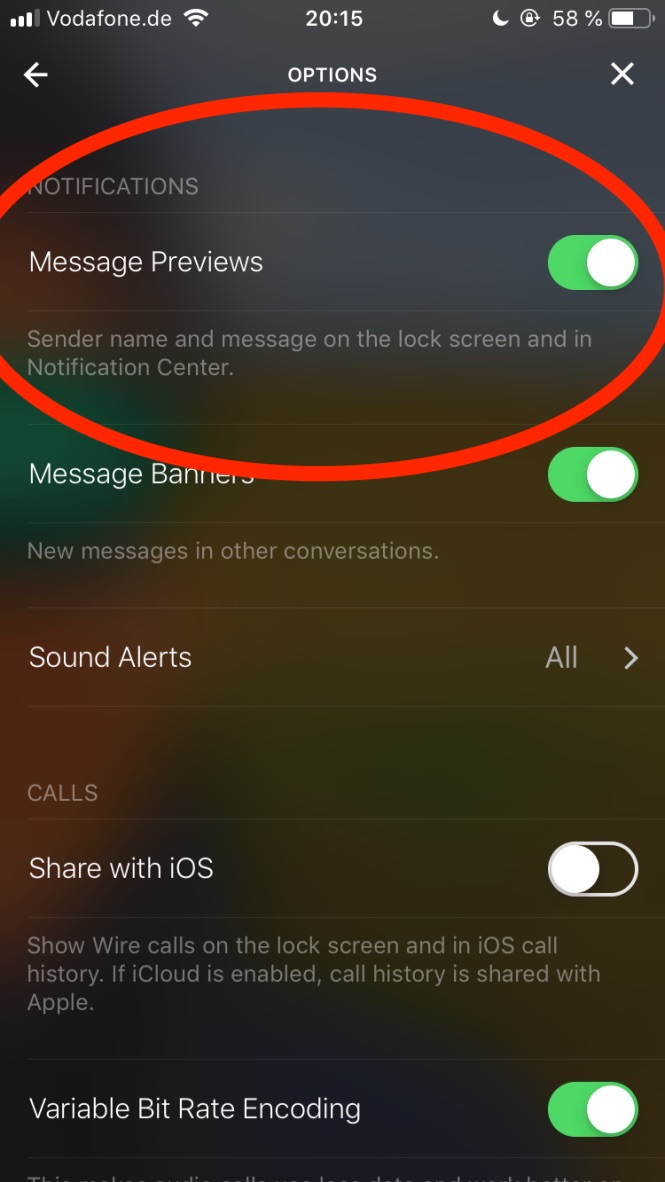
- Modify the layout of the "Options" screen to add a "message preview" toggle. You can use iOS as a reference (I'll attach a screenshot)
- Read/store the value of the setting in the persistent store for user settings
- Create the new strings to display a generic "New Message" text instead of the actual text. This string will be localized by us in different languages, so it can't be hardcoded. We have a copywriter on our side that will tweak it.
- When scheduling a notification, read the setting and pick the proper text/generic message according to the setting
I would start with 0, set up and compile the project locally :) then 1, try to find the layout XML for the options screen and add the proper text and switch there. You can copy-paste from other similar element in the XML, to make sure that it uses the proper classes and IDs structure.
This is the iOS version, for reference:
I would suggest to open a PR already with this first change, and then we can continue the discussion on that PR about the next steps.
marcoconti83
on 13 Feb 2019
Hi @marcoconti83,
Thank you so much for the hints! We'll reach back when do some progress on the issue 😄.
Best regards,
Marta
mgmacias95
on 13 Feb 2019
FYI @jennifergoertzen
marcoconti83
on 14 Feb 2019
@marcoconti83 @mgmacias95 Are you guys still working on it or is it open to be taken up?
 harishvishwakarma
on 14 Mar 2019
harishvishwakarma
on 14 Mar 2019
Hi @harishvishwakarma,
We're working on it 😄.
Thanks!
mgmacias95
on 14 Mar 2019
@mgmacias95 let me know if you need any additional pointer
marcoconti83
on 14 Mar 2019
Is this being worked on? @mgmacias95 @sonofagl1tch Asking because I started searching for a solution, came across this issue, and saw this 7 month old issue with no updates after 4 months.
 Akkuma
on 22 Jul 2019
Akkuma
on 22 Jul 2019
Hi @Akkuma,
Yes it is! :) I'm already testing it! It's available here and here.
The PR will be available soon.
Best regards,
Marta
mgmacias95
on 22 Jul 2019
Thanks to @mgmacias95 ,
this has now be addressed in the latest public release. Many thanks @mgmacias95 for the effort and dedication to push this through!
marcoconti83
on 27 Sep 2019
Thank you so much for all your help and support @marcoconti83! It's been a pleasure!
mgmacias95
on 27 Sep 2019
Related issues
 juliss95
·
4Comments
juliss95
·
4Comments
 revpp
·
7Comments
revpp
·
7Comments
 azlux
·
3Comments
azlux
·
3Comments
 tomleb
·
4Comments
tomleb
·
4Comments
 kroerig
·
4Comments
kroerig
·
4Comments