Winget-cli: using install to update does not apear to be working
Brief description of your issue
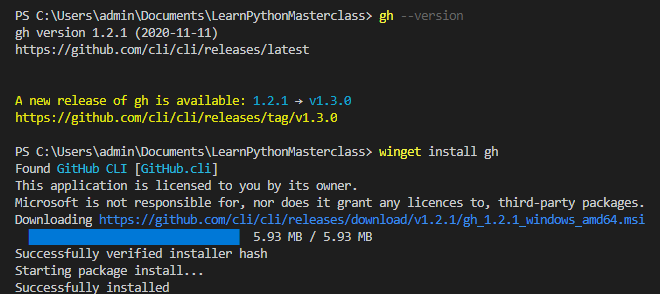
According to the Github cli readme file, I should be able to run winget install gh in order to upgrade to a new version when available. This appears not to be the case.
Steps to reproduce
- Open a Powershell terminal
- type
winget install gh - type
gh --version - If you are notified that there is a new update, you may proceed to step 5
- type
winget install gh - now type
gh --version
Expected behavior
I expect that when i type gh --version in step 6, I will now have the latest version of the github cli tool
Actual behavior
My current version remains the same and I get a message from gh telling me there is a new version available (which is annoying already but I believe an issue has been raise for that) 😄
Environment
[winget --info]
Windows Package Manager v0.2.2941 Preview
Windows: Windows.Desktop v10.0.19042.630
Package: Microsoft.DesktopAppInstaller v1.11.2941.0

Any other software? None
 mikeysan
All 9 comments
I was the one who added that to the GitHub CLI README
 ghost
on 28 Nov 2020
ghost
on 28 Nov 2020
@mikeysan See https://github.com/cli/cli/pull/2272
ghost
on 28 Nov 2020
install command is not for upgrading. But the gh installer should have handled it itself
ghost
on 28 Nov 2020
i it think is because there's a delay between when the gh cli says theres an update and the update actually being available on winget
check if winget got the newer version by:
winget show gh
otherwise it will just reinstall the current versision
 LuanVSO
on 28 Nov 2020
LuanVSO
on 28 Nov 2020
@LuanVSO It was merged 15 hours ago microsoft/winget-pkgs#5037
ghost
on 28 Nov 2020
ghost
on 29 Nov 2020
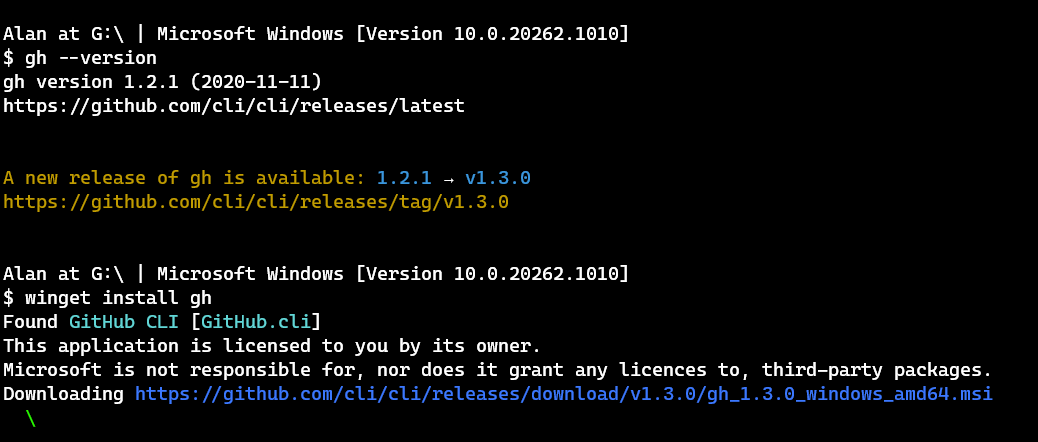
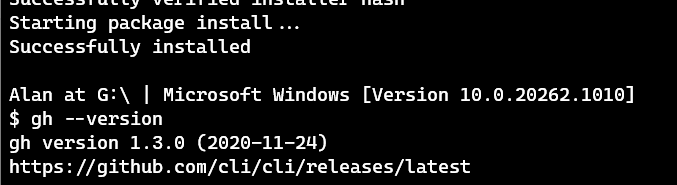
Hey @mikeysan, @alannt777 has provided a solution to your issue so please go ahead and close it. In addition, please note that package related issues don't belong to the winget-cli repo - instead they should be posted in winget-pkgs.
 megamorf
on 29 Nov 2020
megamorf
on 29 Nov 2020
Thanks for the info @megamorf I opened the issue here becasuse I didn't know where the problem stemmed from, but good to know.
Thanks for resolving the issue @alannt777
mikeysan
on 30 Nov 2020
RESOLUTION: The README says to use winget install gh because the GitHub CLI installer will automatically remove the older version of the GitHub CLI.
Unfortunately when @mikeysan used winget install gh, the GitHub CLI manifest for v1.3.0 was not merged yet to the winget-pkgs repo as pointed out by @LuanVSO
ghost
on 30 Nov 2020
Related issues
 auchenberg
·
3Comments
auchenberg
·
3Comments
 denelon
·
4Comments
denelon
·
4Comments
 chrpai
·
3Comments
chrpai
·
3Comments
 sob
·
5Comments
sob
·
5Comments
 nth10sd
·
4Comments
nth10sd
·
4Comments
Most helpful comment
RESOLUTION: The README says to use
winget install ghbecause the GitHub CLI installer will automatically remove the older version of the GitHub CLI.Unfortunately when @mikeysan used
winget install gh, the GitHub CLI manifest for v1.3.0 was not merged yet to the winget-pkgs repo as pointed out by @LuanVSO