Winget-cli: Installation stuck after "package found" stage with high cpu usage
Brief description of your issue
After successfully installing multiple programs using winget, it's now stuck when installing Google.Chrome after the Found Google Chrome [Google.Chrome]
Looking at task manager i can see that Windows package manager client is taking about 25% cpu (out of 6 logical cores)
Steps to reproduce
- run
winget install google.chromein terminal
Expected behavior
Google chrome should be downloaded and installed
Actual behavior
winget is completely stuck (let it run for 1+ hours)
Environment
Windows Package Manager v0.2.2521 Preview
Copyright (c) Microsoft Corporation. All rights reserved.

Windows: Windows.Desktop v10.0.19041.508
Package: Microsoft.DesktopAppInstaller v1.11.2521.0
 OranShuster
All 6 comments
Yup, it appears that something ain't right with it, at the mo. This has also been reported in the winget-pkgs repo, just to let you know! 👍
 peterlewis
on 8 Oct 2020
peterlewis
on 8 Oct 2020
Same issue for me. Can't install anything.
 EddyBeaupre
on 8 Oct 2020
EddyBeaupre
on 8 Oct 2020
Same issue. Completely stuck.
 Bo-Fone
on 8 Oct 2020
Bo-Fone
on 8 Oct 2020
Seems I solved running winget source update.
 ygorlazaro
on 8 Oct 2020
ygorlazaro
on 8 Oct 2020
The rebuild has finished. the problem appears to be resolved. You may need to manually refresh your cache winget source update. Let us know if you're still having trouble.
 denelon
on 8 Oct 2020
denelon
on 8 Oct 2020
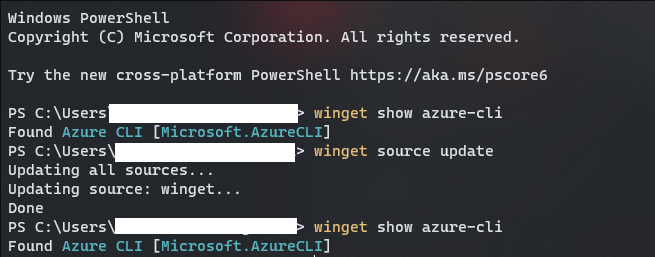
Was fixed last night, but seems to be broken again this morning even after manually refreshing cache with winget source update
 dflo
on 9 Oct 2020
dflo
on 9 Oct 2020
Related issues
 AdilHindistan
·
34Comments
AdilHindistan
·
34Comments
 franciscop
·
28Comments
franciscop
·
28Comments
 StefanScherer
·
14Comments
StefanScherer
·
14Comments
 IngoBoe
·
14Comments
IngoBoe
·
14Comments
 jantari
·
31Comments
jantari
·
31Comments
Most helpful comment
Same issue for me. Can't install anything.