Winget-cli: Possible conflict with Windows Store Python package
Brief description of your issue
Possible conflict with Windows Store Python package. The productId (9nblggh4nns1) provided for the Windows Package Manager app contains Python binaries.
Steps to reproduce
Unknown; discovered while trying to install the Windows Package Manager preview after signing up for the preview.
Expected behavior
That the preview packages is installed and visible under %appdata%\Local\Microsoft\WindowsApps\Microsoft.DesktopAppInstaller_8wekyb3d8bbwe
Actual behavior
The package is listed under %appdata%\Local\Microsoft\WindowsApps\Microsoft.DesktopAppInstaller_8wekyb3d8bbwe, but contains python.exe and python3.exe.


When performing this steps from the invite email to install the preview package the Windows Store displays this:
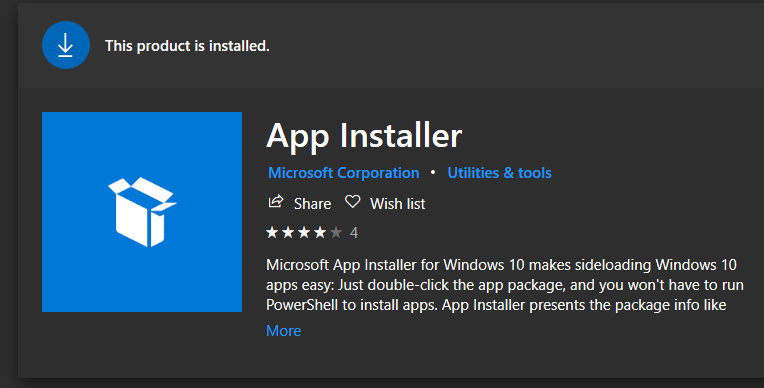
The packages also seems "uninstallable":

It can be removed from the command line:
Remove-AppxPackage -Package "Microsoft.DesktopAppInstaller_1.0.32912.0_x64__8wekyb3d8bbwe"
But if I try to reinstall with the instructions from the email, the "Python" package is installed, not the Package manager preview.
If I manually install the appx from the Releases page, it installs itself into the same folder:

Environment
Windows 10 2004 (19041.508)
 morgansimonsen
All 3 comments
@morgansimonsen Thanks for the report. The aliases you see were introduced before the Windows Package Manager. They were a way to allow developers to type Python on a clean install of Windows and cause a redirect to enable developers to download Python from the store.
So, currently this is by design. However, we will investigate what we should do with these aliases in light of the Windows Package Manager CLI (winget.exe).
 KevinLaMS
on 1 Oct 2020
KevinLaMS
on 1 Oct 2020
I followed the process via the Insider welcome email, and experienced the same thing; install App Installer from Store, get python.exe and python3.exe in the WindowsApps folder, which open the respective Store page for Python, as @KevinLaMS stated. I installed the appxbundle from the releases page and get winget.exe as well as python.exe and python3.exe.
I believe the problem isn't named correctly; there may not actually be any conflicts, just seems to be no winget.exe executable in the package downloaded from the Store.
 osxdude
on 6 Oct 2020
osxdude
on 6 Oct 2020
This issue has been automatically marked as stale because it has been marked as requiring author feedback but has not had any activity for 4 days. It will be closed if no further activity occurs within 3 days of this comment.
![msftbot[bot] picture](https://avatars2.githubusercontent.com/in/26612?v=4&s=40) msftbot[bot]
on 27 Oct 2020
msftbot[bot]
on 27 Oct 2020
Related issues
 denelon
·
4Comments
denelon
·
4Comments
 Callidior
·
5Comments
Callidior
·
5Comments
 aetos382
·
5Comments
aetos382
·
5Comments
 sob
·
5Comments
sob
·
5Comments
 AdilHindistan
·
3Comments
AdilHindistan
·
3Comments
Most helpful comment
I followed the process via the Insider welcome email, and experienced the same thing; install App Installer from Store, get
python.exeandpython3.exein theWindowsAppsfolder, which open the respective Store page for Python, as @KevinLaMS stated. I installed theappxbundlefrom the releases page and getwinget.exeas well aspython.exeandpython3.exe.I believe the problem isn't named correctly; there may not actually be any conflicts, just seems to be no
winget.exeexecutable in the package downloaded from the Store.