Winget-cli: Unable to install *anything* - "The parameter is incorrect."
Brief description of your issue
Every time I try to install a package, any package at all, I get an error dialog with "The parameter is incorrect." I have previously installed ~dozen packages without incident.

Steps to reproduce
In PowerShell window (Admin or normal, makes no difference) install any valid package:
winget install Microsoft.VisualStudioCode
(using VSCode as arbitrary example)
Expected behavior
I expect the package to be installed successfully.
Actual behavior
The PowerShell window hangs and an error dialog pops up with the error "The parameter is incorrect", with title bar of this dialog showing the installer of the package I'm trying to install. After clicking "OK" in dialog, it disappears and the PS windows shows "Installer failed with exit code: 1223"

Environment
Windows Package Manager v0.2.2521 Preview
Windows: Windows.Desktop v10.0.19041.508
Package: Microsoft.DesktopAppInstaller v1.11.2521.0

Tried this in PowerShell v7.0.3, Windows Terminal Version: 1.2.2381.0
 stvhwrd
All 29 comments
Would you be willing to share your logs for the package manager?
 denelon
on 17 Sep 2020
denelon
on 17 Sep 2020
Sure, no problem! What's the process?
stvhwrd
on 17 Sep 2020
%LOCALAPPDATA%\Packages\Microsoft.DesktopAppInstaller_8wekyb3d8bbwe\LocalState\DiagOutputDir
The path above should get you to the log files so we can see what's being reported.
denelon
on 17 Sep 2020
And I should send to [email protected] with a reference to this issue?
stvhwrd
on 17 Sep 2020
No, you can e-mail the logs to [email protected]
denelon
on 17 Sep 2020
The "[email protected]" alias is for more sensitive log issues related to security concerns. These logs don't contain any sensitive information in them.
denelon
on 17 Sep 2020
Got it, thanks. Sent the logs.
stvhwrd
on 17 Sep 2020
We have received them, and will take a look. Thank you very much for sharing!
denelon
on 17 Sep 2020
@stvhwrd out of curiosity, if you remove powershell from the equation do you still see the error? in other words from a command prompt if you just type "winget install microsoft.visualstudiocode" do you get the same error? Thanks
 KevinLaMS
on 17 Sep 2020
KevinLaMS
on 17 Sep 2020
Using vanilla cmd.exe, it's the exact same result.
stvhwrd
on 17 Sep 2020
Thanks for the quick response.
KevinLaMS
on 17 Sep 2020
Is this behavior new since the OS update? Or have you successfully installed since getting Windows.Desktop v10.0.19041.508, which appears to have been released Sept. 8?
 JohnMcPMS
on 17 Sep 2020
JohnMcPMS
on 17 Sep 2020
I hadn't taken note of exact date this first started occurring but no, it's been at least a month... realistically it's probably closer to 3 months.
stvhwrd
on 17 Sep 2020
Sorry, it has been happening for 3 months or it has been 3 months since you last tried?
JohnMcPMS
on 17 Sep 2020
This first started happening approximately 2-3 months ago.
stvhwrd
on 17 Sep 2020
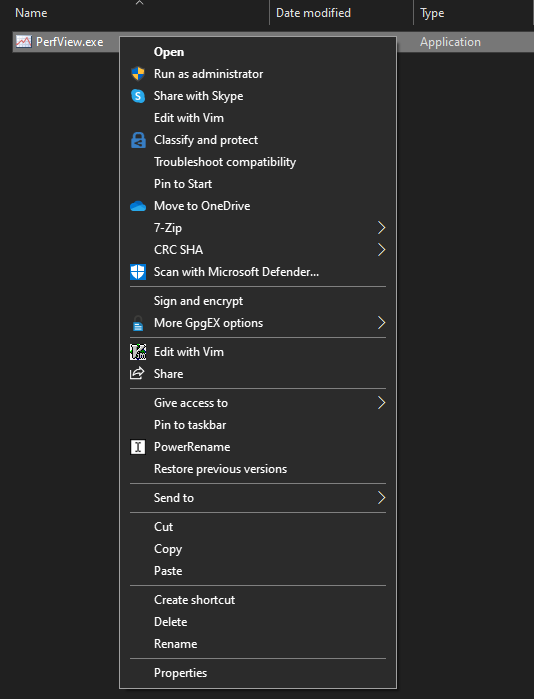
I have a suspicion; do you have any shell verbs registered for exes? If you right click on an exe, which action is in bold?
JohnMcPMS
on 17 Sep 2020
Negative.
stvhwrd
on 18 Sep 2020
It could potentially still be this, but I suspect it less now. We aren't setting the verb on the ShellExecute call, and so the default action should occur. We should set it to open in case someone changes the default verb to something else.
At this point, I'm not sure how else to investigate. ShellExecute is a complex API that does a LOT even just to launch an executable. We are using it because it handles many security checks for us, but it definitely is a bit opaque.
The only thing I can think of at this point is attaching a debugger to see if the error comes out in debug output. If you are ok with helping that way, I can detail how to do that.
JohnMcPMS
on 18 Sep 2020
Yeah for sure, happy to help however I can! I love this project/intention.
Feel free to ping me on Teams - alias is stehowa
stvhwrd
on 18 Sep 2020
I'm experiencing the same issue. This is the error for example when I try to install Audacity.
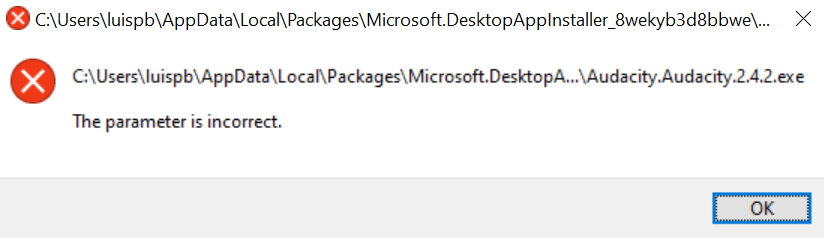
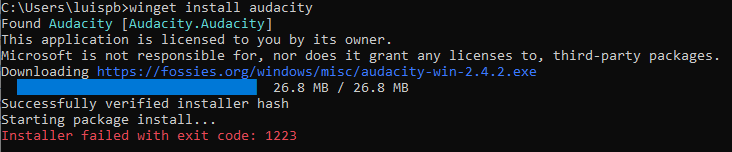
Just sent the log to [email protected]
Thank you
 luispb
on 20 Sep 2020
luispb
on 20 Sep 2020
As an FYI, if you use Windows Feedback [Windows]+[f] and select "Apps" and "Windows Package Manager" for the category it will automatically attach logs.
denelon
on 21 Sep 2020
As an FYI, if you use Windows Feedback [Windows]+[f] and select "Apps" and "Windows Package Manager" for the category it will automatically attach logs.
Good to know!
luispb
on 24 Sep 2020
@stvhwrd has this issue been resolved?
denelon
on 23 Oct 2020
This issue has been automatically marked as stale because it has been marked as requiring author feedback but has not had any activity for 4 days. It will be closed if no further activity occurs within 3 days of this comment.
![msftbot[bot] picture](https://avatars2.githubusercontent.com/in/26612?v=4&s=40) msftbot[bot]
on 27 Oct 2020
msftbot[bot]
on 27 Oct 2020
Not resolved, @JohnMcPMS has done some debugging on my machine on corpnet. Issue persists.
stvhwrd
on 27 Oct 2020
@denelon, not resolved on my side either. Issue persists.
luispb
on 30 Oct 2020
Thanks for letting us know. I've removed the "Needs-Attention".
denelon
on 13 Nov 2020
BTW, I'm getting this same, bizarre error message in PowerShell 7.1.0 Core (installed today) when I run a trivial .bat script from _certain_ directories. (Older version of PowerShell desktop works fine on the same .bat script.)
PS C: > echo 'echo Hello' > hello.bat
PS C: > .\hello.bat
Hello
PS M: > echo 'echo Hello' > hello.bat
PS M: > .\hello.bat
OperationStopped: The parameter is incorrect.
The M-Drive is an IBM MultiVersion File System MVFS drive, so it is "special". Prior versions of PS Core work fine, and PowerShell Desktop still works on this drive.
Submitted separate issue: Issue#14209
 dantho
on 18 Nov 2020
dantho
on 18 Nov 2020
I've figured out the issue, and fortunately it is already resolved in the next client release.
I was able to repro on a machine thanks to @stvhwrd , and found that the problem comes from placing the MotW on the downloaded file. When it is Zone 3, affected machines will generate the invalid parameter error from within the kernel process creation, while also strangely removing the Zone.Identifier alternate stream. I can only assume that this is some particular AV driver or specific enterprise security enforcement, because it does not affect many people.
When I manually set the Zone.Identifier to Zone 2, like we are now doing for trusted sources, the process creation does not fail, and the Zone.Identifier alternate stream is not removed.
I believe that we are very close to releasing the next version that includes the Zone change, and will work with @denelon to get it to you as soon as we can.
JohnMcPMS
on 21 Nov 2020
Related issues
 TravisSpomer
·
3Comments
denelon
·
4Comments
TravisSpomer
·
3Comments
denelon
·
4Comments
 Daegalus
·
5Comments
Daegalus
·
5Comments
 TomBrien
·
4Comments
TomBrien
·
4Comments
 sob
·
5Comments
sob
·
5Comments
Most helpful comment
I've figured out the issue, and fortunately it is already resolved in the next client release.
I was able to repro on a machine thanks to @stvhwrd , and found that the problem comes from placing the MotW on the downloaded file. When it is Zone 3, affected machines will generate the invalid parameter error from within the kernel process creation, while also strangely removing the Zone.Identifier alternate stream. I can only assume that this is some particular AV driver or specific enterprise security enforcement, because it does not affect many people.
When I manually set the Zone.Identifier to Zone 2, like we are now doing for trusted sources, the process creation does not fail, and the Zone.Identifier alternate stream is not removed.
I believe that we are very close to releasing the next version that includes the Zone change, and will work with @denelon to get it to you as soon as we can.