Winget-cli: Unable to identify the correct package (docker desktop) by name, moniker or version
Brief description of your issue
Steps to reproduce
Am trying to install the latest (stable docker release) but winget can't identify the package:
C:\Users\preet> winget show docker
Multiple apps found matching input criteria. Please refine the input.
Name                Id                       Version       Matched
--------------------------------------------------------------------------
Docker Desktop      Docker.DockerDesktop     2.3.0.3.45519 Moniker: docker
Docker Desktop Edge Docker.DockerDesktopEdge 2.3.1.0.45408

C:\Users\preet> winget install docker
Multiple apps found matching input criteria. Please refine the input.
Name                Id                       Version       Matched
--------------------------------------------------------------------------
Docker Desktop      Docker.DockerDesktop     2.3.0.3.45519 Moniker: docker
Docker Desktop Edge Docker.DockerDesktopEdge 2.3.1.0.45408

C:\Users\preet> winget install --moniker docker
Multiple apps found matching input criteria. Please refine the input.
Name                Id                       Version       Matched
-------------------------------------------------------------------------------
Docker Desktop      Docker.DockerDesktop     2.3.0.3.45519 Moniker: docker
Docker Desktop Edge Docker.DockerDesktopEdge 2.3.1.0.45408 Moniker: docker-edge

C:\Users\preet> winget install --moniker "docker"
Multiple apps found matching input criteria. Please refine the input.
Name                Id                       Version       Matched
-------------------------------------------------------------------------------
Docker Desktop      Docker.DockerDesktop     2.3.0.3.45519 Moniker: docker
Docker Desktop Edge Docker.DockerDesktopEdge 2.3.1.0.45408 Moniker: docker-edge

C:\Users\preet> winget install Docker.DockerDesktop -v 2.3.0.3.45519
Multiple apps found matching input criteria. Please refine the input.
Name                Id                       Version
----------------------------------------------------------
Docker Desktop      Docker.DockerDesktop     2.3.0.3.45519
Docker Desktop Edge Docker.DockerDesktopEdge 2.3.1.0.45408
Expected behavior
All of the above options should have worked independently.
Note: when I tried --moniker - notice how the 2.3.1.0.45408 package suddenly started showing a moniker too.
Actual behavior
None of the above commands correctly identified the package
Environment
C:\Users\preet> winget --info
Windows Package Manager v0.1.41331 Preview
Copyright (c) Microsoft Corporation. All rights reserved.

Windows: Windows.Desktop v10.0.20150.1000
Package: Microsoft.DesktopAppInstaller v1.0.41331.0

Links:
  Privacy Statement: https://aka.ms/winget-privacy
  License agreement: https://aka.ms/winget-license
  3rd Party Notices: https://aka.ms/winget-3rdPartyNotice
  Homepage:          https://aka.ms/winget

Any other software?

wsl2
 PreetSangha
All 12 comments
Please try:
winget install Docker.DockerDesktop --exact
 megamorf
on 22 Jun 2020
megamorf
on 22 Jun 2020
Thanks. That worked. Why would the others not work?
PreetSangha
on 22 Jun 2020
Because winget uses a substring search by default, say you have the following two packages:
FooBar
Then winget install Foo will match Foo as well as FooBar. Adding --exact causes winget to treat the specified string Foo as a literal instead, matching exactly what you were searching for. Note that using --exact is case-sensitive at the moment which means searching foo would not match Foo and FooBar.
megamorf
on 22 Jun 2020
Thank you. I appreciate the response, but what about the version and moniker ones I tried?
PreetSangha
on 22 Jun 2020
The version isn't taken into consideration until a match on the package happens.
 denelon
on 23 Jun 2020
denelon
on 23 Jun 2020
Thanks. And the moniker? @denelon Will this be picked up please/?
PreetSangha
on 23 Jun 2020
Annoying when installing thunderbird too.

Though using --exact did fix it.
 ThomasAunvik
on 23 Jun 2020
ThomasAunvik
on 23 Jun 2020
Winget should suggest using -e flag or have interactive dialog on which app to install. I shouldn't need to google how to do this.
 mbialecka
on 24 Jun 2020
mbialecka
on 24 Jun 2020
This looks similar to #292
denelon
on 26 Jun 2020
Changing this issue to a "Task" to update the text output.
Multiple apps found matching input criteria. Please refine the input.
Try winget install <Id> --exact
denelon
on 29 Jun 2020
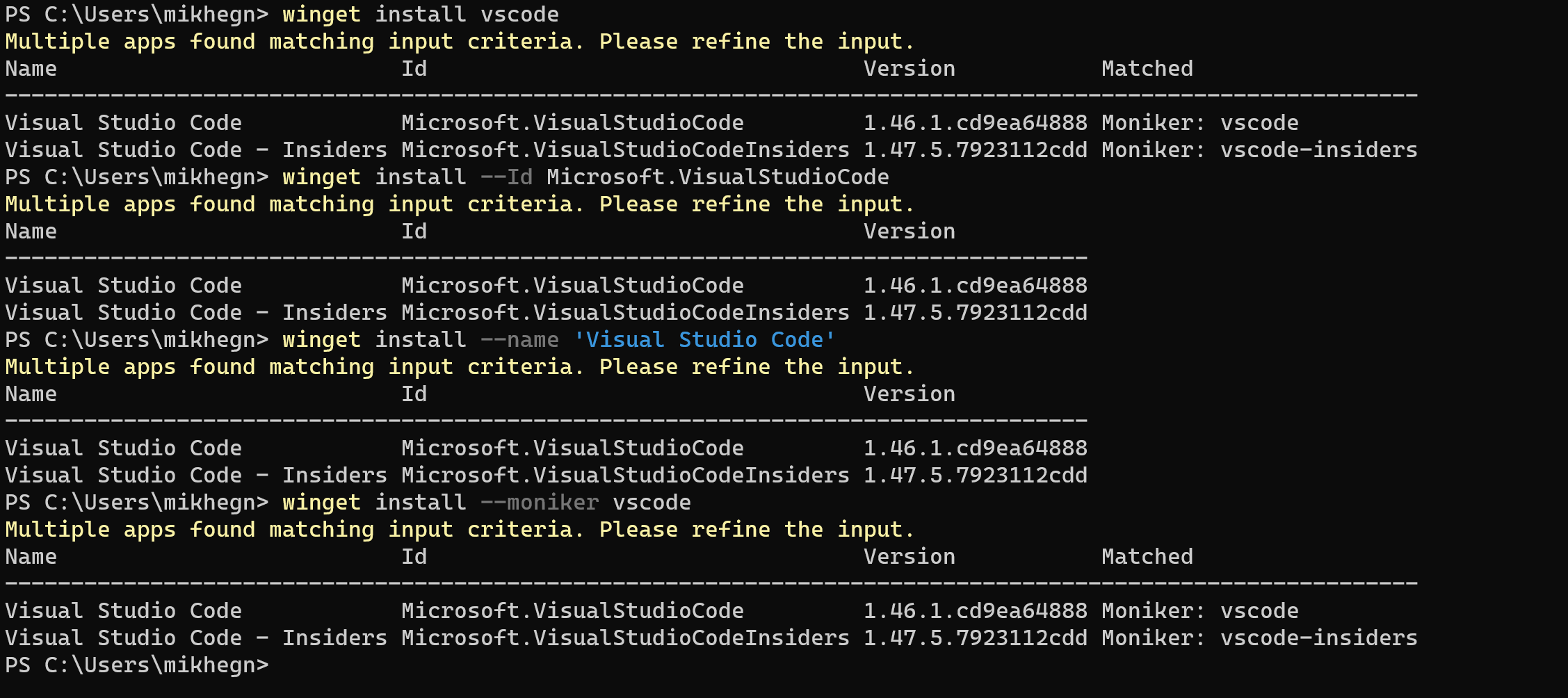
This is a very frustrating user experience.
I would expect a substring to only take effect if I don't use any argument (e.g. --Moniker, --Id or --Name). Alternately let me specify a wildcard character in those cases, instead of defaulting to a substring search.
This is what I intuitively tried to get VS Code installed:
 MikkelHegn
on 30 Jun 2020
MikkelHegn
on 30 Jun 2020
I believe this was resolved in https://github.com/microsoft/winget-cli/releases/tag/v0.1.42101-preview.
denelon
on 25 Aug 2020
Related issues
 Daegalus
·
5Comments
Daegalus
·
5Comments
 aetos382
·
5Comments
aetos382
·
5Comments
 TomBrien
·
4Comments
TomBrien
·
4Comments
 chrpai
·
3Comments
chrpai
·
3Comments
 TravisSpomer
·
3Comments
TravisSpomer
·
3Comments
Most helpful comment
Winget should suggest using -e flag or have interactive dialog on which app to install. I shouldn't need to google how to do this.