Winforms: HelpProvider is unable to show Unicode characters
.NET Core Version:
- .NET 5
Have you experienced this same bug with .NET Framework?
- Yes
Problem description:
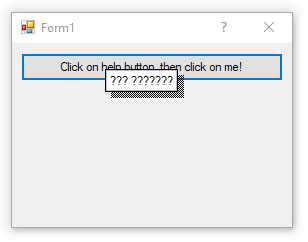
HelpProvider component is unable to show Unicode characters (e.g. Persian language):
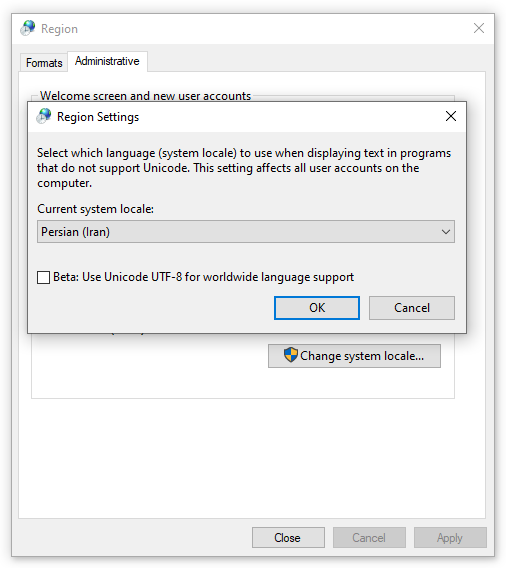
I also have set the language for non-Unicode programs to "Persian" language (in regional settings):
Expected behavior:
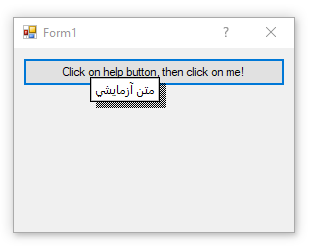
Like all other controls and components, it should be able to show Unicode characters, regardless of the regional settings, or at least respect to regional settings.
Minimal repro:
var f = new Form();
f.HelpButton = true;
f.MinimizeBox = f.MaximizeBox = false;
var button = new Button()
{
    Text = "Click on help button and then on me!",
    AutoSize = true
};
f.Controls.Add(button);
var helpProvider = new HelpProvider();
helpProvider.SetHelpString(button, "متن آزمایشی");
helpProvider.SetShowHelp(button, true);
f.Show();
 r-aghaei
All 5 comments
The problem is in Help class(.NET 4.X, .NET 5) which has created the HH_POPUP but hasn't specified any font for it. As a result the default font which doesn't support Unicode characters will be used. A possible fix could be using a default font like SystemFonts.CaptionFont which supports Unicode characters.
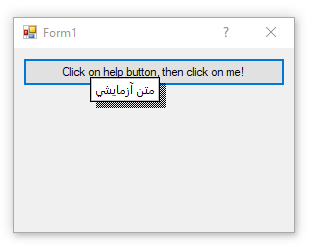
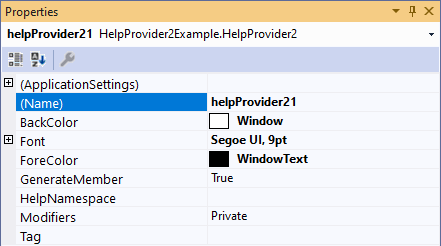
To demonstrate the possible fix, I've already implemented a HelpProvider2 (by modifying the built-in HelpProvider and fixing the problem as I mentioned above) which supports Unicode characters and also supports Font, ForeColor and BackColor:
r-aghaei
on 1 Jan 2021
Thank you for the investigation.
We'll need to have an internl discussion about it, but a fix could be something like this:
diff --git a/src/System.Windows.Forms/src/System/Windows/Forms/Help.cs b/src/System.Windows.Forms/src/System/Windows/Forms/Help.cs
index c815ba705..4cf558f62 100644
--- a/src/System.Windows.Forms/src/System/Windows/Forms/Help.cs
+++ b/src/System.Windows.Forms/src/System/Windows/Forms/Help.cs
@@ -111,9 +111,18 @@ namespace System.Windows.Forms
                 clrForeground = new COLORREF(unchecked((uint)-1)),  // Ignore
                 clrBackground = SystemColors.Window
             };
+
+            var font = SystemFonts.CaptionFont;
+            string captionFont = $"{font.Name}, {font.Size}, , " +
+                $"{(font.Bold ? "BOLD" : "")}" +
+                $"{(font.Italic ? "ITALIC" : "")}" +
+                $"{(font.Underline ? "UNDERLINE" : "")}";
+
-            fixed (char* pszText = caption)
+            fixed (char* pszText = caption, pszFont = captionFont)
             {
                 pop.pszText = pszText;
+                pop.pszFont = pszFont;
+
                 ShowHTML10Help(parent, null, HelpNavigator.Topic, pop);
             }
         }
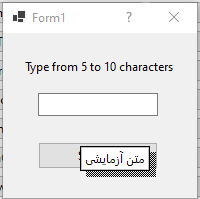
...and then it'd work as expected (I don't have any Arabic languages installed or configured):
 RussKie
on 4 Jan 2021
RussKie
on 4 Jan 2021
It looks like we have 2 possible approaches here:
- The first option would be to identify the best System font to use for the HelpProvider. My thought is that we could/should possibly try to match ToolTip fonts for consistency, but we could look at a couple of options and take a PR with the best looking one 😄 . We'd be more than happy to review a PR from you @r-aghaei 😄
- If we hear that customers need more flexibility we can revisit this issue and update the API to take a font parameter to allow developers to establish whatever font they'd like.
For now my preference is #1. I'd like to take a little bit of time to figure out how we get the font for ToolTips, if in fact they do support unicode characters. Then we should attempt to match. Failing that the SystemFonts.CaptionFont seems quite reasonable to me.
 merriemcgaw
on 5 Jan 2021
merriemcgaw
on 5 Jan 2021
SystemFonts.StatusFont looks a good option. Its value comes from NONCLIENTMETRICSA.lfStatusFont which returns the font used in status bars and tooltips. WPF ToolTip also uses the same as its default font.
r-aghaei
on 5 Jan 2021
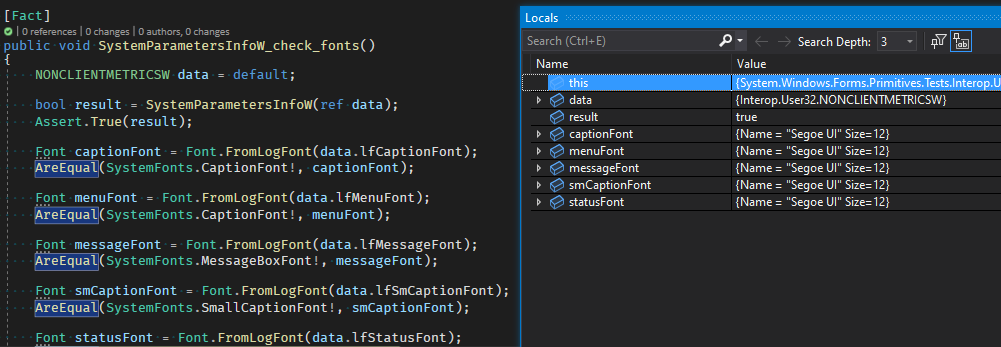
Thank you, I think it is a good choice. Though it is hard to check, all fonts appear to be the same on W10 by default:
RussKie
on 6 Jan 2021
Related issues
 Zheng-Li01
·
4Comments
Zheng-Li01
·
4Comments
 jmairboeck
·
5Comments
jmairboeck
·
5Comments
 damageboy
·
4Comments
damageboy
·
4Comments
 lonitra
·
5Comments
lonitra
·
5Comments
 weltkante
·
4Comments
weltkante
·
4Comments
Most helpful comment
Thank you for the investigation.
We'll need to have an internl discussion about it, but a fix could be something like this:
...and then it'd work as expected (I don't have any Arabic languages installed or configured):
