Winforms: High-DPI scaling is now totally broken
Version
.NET SDK (reflecting any global.json):
 Version:   5.0.100-rc.1.20452.10
 Commit:    473d1b592e

Runtime Environment:
 OS Name:     Windows
 OS Version:  10.0.20211
 OS Platform: Windows
 RID:         win10-x64
 Base Path:   C:\Program Files\dotnet\sdk\5.0.100-rc.1.20452.10\

Host (useful for support):
  Version: 5.0.0-rc.1.20451.14
  Commit:  38017c3935

.NET SDKs installed:
  3.0.100 [C:\Program Files\dotnet\sdk]
  5.0.100-preview.7.20366.6 [C:\Program Files\dotnet\sdk]
  5.0.100-rc.1.20452.10 [C:\Program Files\dotnet\sdk]

.NET runtimes installed:
  Microsoft.AspNetCore.All 2.1.21 [C:\Program Files\dotnet\shared\Microsoft.AspNetCore.All]
  Microsoft.AspNetCore.App 2.1.21 [C:\Program Files\dotnet\shared\Microsoft.AspNetCore.App]
  Microsoft.AspNetCore.App 3.0.0 [C:\Program Files\dotnet\shared\Microsoft.AspNetCore.App]
  Microsoft.AspNetCore.App 3.1.7 [C:\Program Files\dotnet\shared\Microsoft.AspNetCore.App]
  Microsoft.AspNetCore.App 5.0.0-preview.7.20365.19 [C:\Program Files\dotnet\shared\Microsoft.AspNetCore.App]
  Microsoft.AspNetCore.App 5.0.0-rc.1.20451.17 [C:\Program Files\dotnet\shared\Microsoft.AspNetCore.App]
  Microsoft.NETCore.App 2.1.21 [C:\Program Files\dotnet\shared\Microsoft.NETCore.App]
  Microsoft.NETCore.App 3.0.0 [C:\Program Files\dotnet\shared\Microsoft.NETCore.App]
  Microsoft.NETCore.App 3.1.3 [C:\Program Files\dotnet\shared\Microsoft.NETCore.App]
  Microsoft.NETCore.App 3.1.7 [C:\Program Files\dotnet\shared\Microsoft.NETCore.App]
  Microsoft.NETCore.App 5.0.0-preview.7.20364.11 [C:\Program Files\dotnet\shared\Microsoft.NETCore.App]
  Microsoft.NETCore.App 5.0.0-rc.1.20451.14 [C:\Program Files\dotnet\shared\Microsoft.NETCore.App]
  Microsoft.WindowsDesktop.App 3.0.0 [C:\Program Files\dotnet\shared\Microsoft.WindowsDesktop.App]
  Microsoft.WindowsDesktop.App 3.1.3 [C:\Program Files\dotnet\shared\Microsoft.WindowsDesktop.App]
  Microsoft.WindowsDesktop.App 3.1.7 [C:\Program Files\dotnet\shared\Microsoft.WindowsDesktop.App]
  Microsoft.WindowsDesktop.App 5.0.0-preview.7.20366.1 [C:\Program Files\dotnet\shared\Microsoft.WindowsDesktop.App]
  Microsoft.WindowsDesktop.App 5.0.0-rc.1.20452.2 [C:\Program Files\dotnet\shared\Microsoft.WindowsDesktop.App]

To install additional .NET runtimes or SDKs:
  https://aka.ms/dotnet-download
Have you experienced this same bug with .NET Framework?: N/A, relevant API does not exist there
Problem description
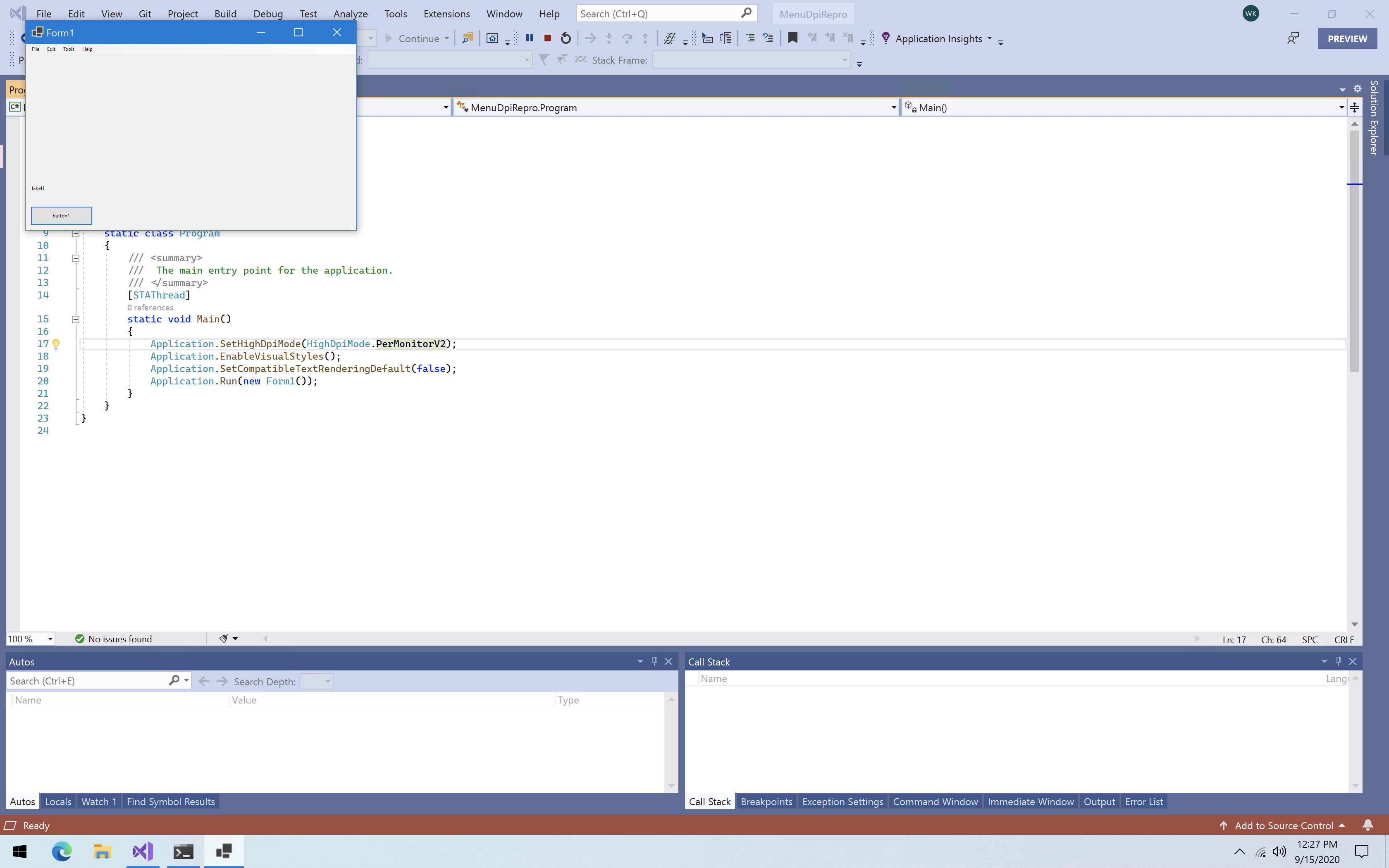
Immediately after updating to VS 16.8 beta 3 and .NET 5 RC 1, now suddenly all of my Windows Forms applications do not DPI scale correctly. This did not happen before I updated. Please see the below screenshot, and zipped repro project. The form displays perfectly OK in the Visual Studio designer, without relaunching VS at 100% DPI. I have called Application.SetHighDpiMode(HighDpiMode.PerMonitorV2) in my Main method. I have also tried HighDpiMode.SystemAware (the template default), to no avail. I am running Windows 10 build 20211 at (I believe) 200% DPI scaling, over a Remote Desktop connection.
 wjk
wjk
All 8 comments
It is not clear from your screenshot what you wanted and what you got in the end.
And in Form1.Designer.cs I see this line:
this.AutoScaleDimensions = new System.Drawing.SizeF(13F, 32F);
With default sys. font and 100% dpi it's 7F, 17F. So, I think you are design this (in VS designer) with 200dpi...
 kirsan31
on 15 Sep 2020
kirsan31
on 15 Sep 2020
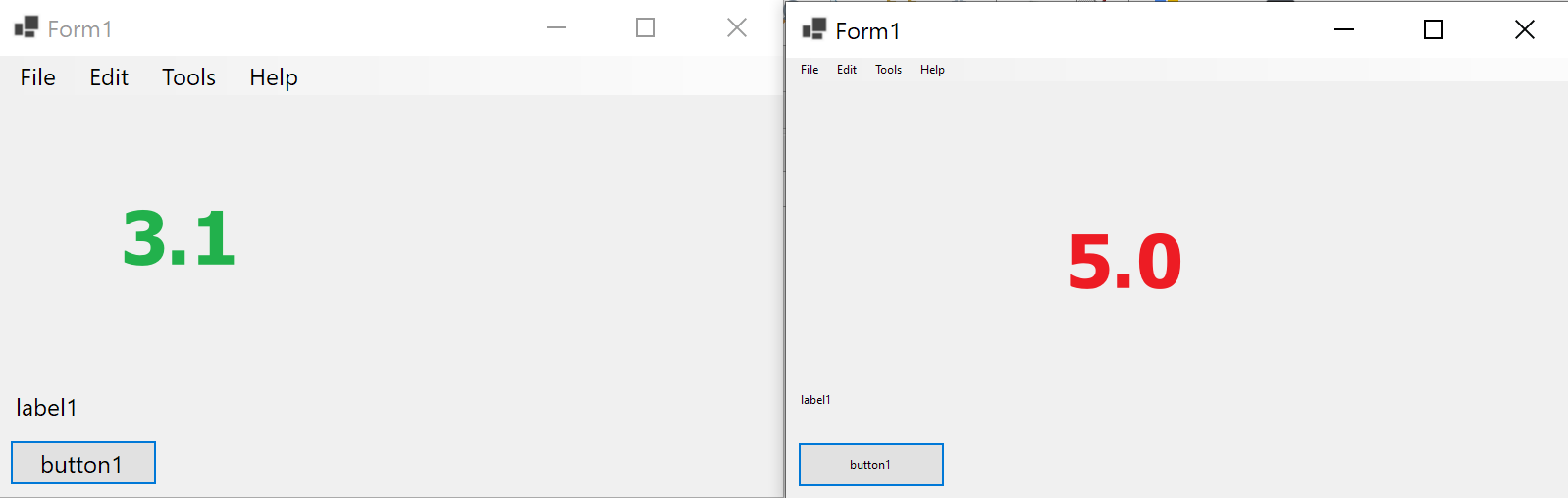
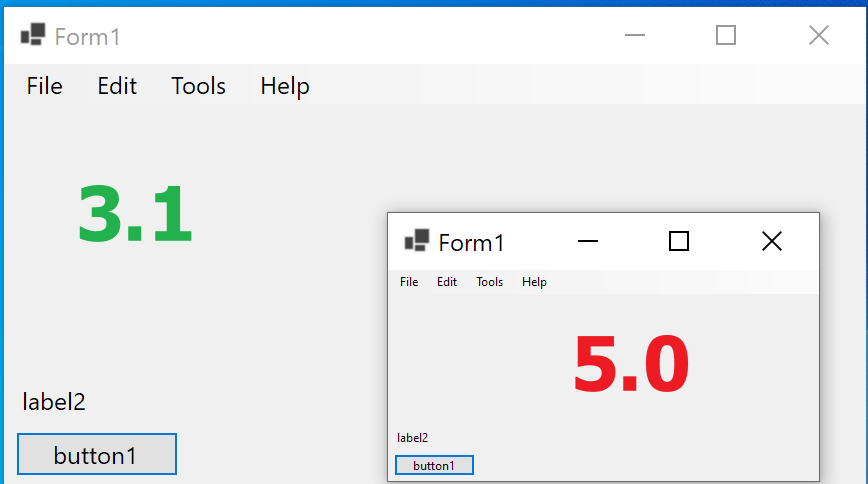
@kirsan31 Apologies; the issue is that the text in the label, button, and menu bar is apparently sized in raw pixels, and as a result everything is too small to be usable on higher DPI screens.
Also, when I once tried the .NET Core WinForms designer with VS in bitmap scaling mode, everything in the designer was twice as big as it should have been, which made me think that I was supposed to use it at native DPI. I'll get back to you on the latter issue; I have a meeting I need to attend. Thanks!
wjk
on 15 Sep 2020
Sorry got it. Can confirm that dpi scaling is broken even on 5.0 prev. 8 (5.0.100-preview.8.20417.9).
200Dpi
this.AutoScaleMode = System.Windows.Forms.AutoScaleMode.Font;:
this.AutoScaleMode = System.Windows.Forms.AutoScaleMode.Dpi;:
kirsan31
on 15 Sep 2020
There was a high DPI related regression in Preview8 (see: #3832) which we fixed in RC2.
 RussKie
on 16 Sep 2020
RussKie
on 16 Sep 2020
The fix is available in the latest RC2 build: https://github.com/dotnet/installer
RussKie
on 16 Sep 2020
Work well on rc2.
kirsan31
on 16 Sep 2020
There was a high DPI related regression in Preview8 (see: #3832) which we fixed in RC2.
@RussKie I just checked it with RC2 and still see problems. Please get back to it, my comments are in #3832
 IrinaPykhova
on 16 Sep 2020
IrinaPykhova
on 16 Sep 2020
This has been confirmed fixed.
 merriemcgaw
on 25 Sep 2020
merriemcgaw
on 25 Sep 2020
Related issues
 Vino-Wang
·
4Comments
Vino-Wang
·
4Comments
 vladimir-krestov
·
3Comments
vladimir-krestov
·
3Comments
 jmairboeck
·
5Comments
jmairboeck
·
5Comments
 lonitra
·
5Comments
lonitra
·
5Comments
 Olina-Zhang
·
5Comments
Olina-Zhang
·
5Comments
Most helpful comment
There was a high DPI related regression in Preview8 (see: #3832) which we fixed in RC2.