Winforms: TextFormatFlags.NoPadding not working with .Net 5 Windows App (Core).
.NET Core Version:
.NET SDK 5.0.100-preview.8.20417.9
Have you experienced this same bug with .NET Framework?:
No
It is also not reproducible with .Net Core 3.1.
Problem description:
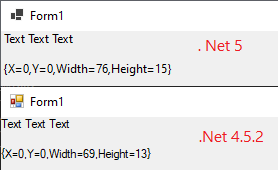
The TextRenderer.DrawText method ignores the TextFormatFlags.NoPadding flag and render string with padding. But the MeasureText method works correctly with this flag.
This sample measure text size and render it, when I run this code with the .Net Framework / .Net Core 3.1/ .Net 5 old builds - this code works correctly, but after update VS to Version 16.8.0 Preview 2.1, this code works incorreclty.
Sample:
protected override void OnPaint(PaintEventArgs e)
        {
            base.OnPaint(e);

            var g = e.Graphics;
            var text = "Text Text Text";
            var font = Font;
            var width = int.MaxValue;
            var flags = TextFormatFlags.NoPadding;
            var size = TextRenderer.MeasureText(g, text, font, new Size(width, 0), flags);
            var r = new Rectangle(Point.Empty, size);
            TextRenderer.DrawText(g, text, font, r, ForeColor, flags);
            System.Diagnostics.Debug.WriteLine(r);
        }
Result:
.Net Framework 4.5.2:

.Net 5:

Expected behavior:
The TextFormatFlags.NoPadding - Does not add padding to the bounding rectangle.
Minimal repro:
- Run attached app:
DrawText_issue.zip - Observe - NoPadding doesn't work with the DrawText method.
 smToDo
All 7 comments
Please note that we consider this issue as showstopper. For us it breaks behavior both for pure .Net 5 applications and for .Net 4.5.2 libraries used in .Net 5 apps. Text wraps unexpectedly in wrong places
 IrinaPykhova
on 2 Sep 2020
IrinaPykhova
on 2 Sep 2020
Investigating...
 JeremyKuhne
on 9 Sep 2020
JeremyKuhne
on 9 Sep 2020
I know what the problem is, working on the fix.
JeremyKuhne
on 10 Sep 2020
The fix is in for RC2 (#3873).
JeremyKuhne
on 10 Sep 2020
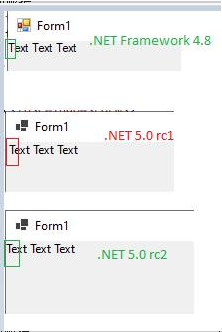
Verified this issue with .Net SDK 5.0.100-rc.2.20460.32, this issue is fixed. After run attached app(DrawText_issue.zip),the TextFormatFlags.NoPadding - does not add padding to the bounding rectangle,TextFormatFlags.NoPadding is working with .Net 5 Windows App (Core). Please see below result:
 Ashley-Li
on 11 Sep 2020
Ashley-Li
on 11 Sep 2020
Hi guis,
I checked Preview 3, now MeasureText ignored NoPadding too.
sdk - 5.0.100-rc.1.20452.10
smToDo
on 14 Sep 2020
@smToDo as @Ashley-Li indicated the issue is fixed in SDK 5.0.100-rc.2.20460.32
 RussKie
on 15 Sep 2020
RussKie
on 15 Sep 2020
Related issues
 weltkante
·
5Comments
RussKie
·
5Comments
weltkante
·
5Comments
RussKie
·
5Comments
 SergeySmirnov-Akvelon
·
3Comments
SergeySmirnov-Akvelon
·
3Comments
 Zheng-Li01
·
4Comments
Zheng-Li01
·
4Comments
 Olina-Zhang
·
5Comments
Olina-Zhang
·
5Comments
Most helpful comment
Please note that we consider this issue as showstopper. For us it breaks behavior both for pure .Net 5 applications and for .Net 4.5.2 libraries used in .Net 5 apps. Text wraps unexpectedly in wrong places