Winforms: 'File name' ComboBox in SaveFileDialog is truncated by default after clicking 'Hide Folders'
.NET Core Version:
5.0.100-preview.8.20363.2 from master branchHave you experienced this same bug with .NET Framework?:
YesMore info:
This is not a regression issue, can repro in .Net Core previous version and .Net framework
Problem description:
'File name' ComboBox in SaveFileDialog is truncated by default after clicking 'Hide Folders'. After resizing this dialog, truncation will be resolved. See following screenshot:
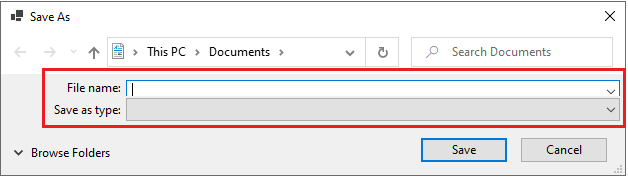
Expected behavior:
No truncation in SaveFileDialog
Minimal repro:
- Create a Winforms .Net Core app
- Add a SaveFileDialog to the form designer
- Write one line code to show SaveFileDialog when running app
- Build and run this app
- In SaveFileDialog, click 'Hide Folders', and then observe 'File name' comboBox
Or
- Extract following attached project and open it
WindowsFormsApp20.zip - Build and run this app, in SaveFileDialog, click 'Hide Folders', and then observe 'File name' comboBox
external issue
 Olina-Zhang
All 2 comments
This is a native dialog, this overlap repros in notepad as well:

 Tanya-Solyanik
on 15 Jul 2020
Tanya-Solyanik
on 15 Jul 2020
👍2
@Olina-Zhang this is a Windows dialog, we don't own it. I suppose you can raise an AzDO ticket to the Windows team.
 RussKie
on 16 Jul 2020
RussKie
on 16 Jul 2020
👍1
Was this page helpful?
0 / 5 - 0 ratings
Related issues
 vladimir-krestov
·
3Comments
vladimir-krestov
·
3Comments
 SergeySmirnov-Akvelon
·
3Comments
Olina-Zhang
·
5Comments
SergeySmirnov-Akvelon
·
3Comments
Olina-Zhang
·
5Comments
 lonitra
·
5Comments
lonitra
·
5Comments
 M-Lipin
·
4Comments
M-Lipin
·
4Comments
Most helpful comment
This is a native dialog, this overlap repros in notepad as well:
