Winforms: InvokeRequired sometimes not working correctly
- .NET Core Version: 3.1.5
.NET Core SDK (gemäß "global.json"):
 Version:   3.1.301
 Commit:    7feb845744

Laufzeitumgebung:
 OS Name:     Windows
 OS Version:  10.0.18362
 OS Platform: Windows
 RID:         win10-x64
 Base Path:   C:\Program Files\dotnet\sdk\3.1.301\

Host (useful for support):
  Version: 3.1.5
  Commit:  65cd789777

.NET Core SDKs installed:
  2.1.807 [C:\Program Files\dotnet\sdk]
  2.2.202 [C:\Program Files\dotnet\sdk]
  2.2.204 [C:\Program Files\dotnet\sdk]
  2.2.207 [C:\Program Files\dotnet\sdk]
  2.2.300 [C:\Program Files\dotnet\sdk]
  2.2.301 [C:\Program Files\dotnet\sdk]
  2.2.401 [C:\Program Files\dotnet\sdk]
  2.2.402 [C:\Program Files\dotnet\sdk]
  3.1.301 [C:\Program Files\dotnet\sdk]

.NET Core runtimes installed:
  Microsoft.AspNetCore.All 2.1.19 [C:\Program Files\dotnet\shared\Microsoft.AspNetCore.All]
  Microsoft.AspNetCore.All 2.2.8 [C:\Program Files\dotnet\shared\Microsoft.AspNetCore.All]
  Microsoft.AspNetCore.App 2.1.19 [C:\Program Files\dotnet\shared\Microsoft.AspNetCore.App]
  Microsoft.AspNetCore.App 2.2.8 [C:\Program Files\dotnet\shared\Microsoft.AspNetCore.App]
  Microsoft.AspNetCore.App 3.1.5 [C:\Program Files\dotnet\shared\Microsoft.AspNetCore.App]
  Microsoft.NETCore.App 2.1.19 [C:\Program Files\dotnet\shared\Microsoft.NETCore.App]
  Microsoft.NETCore.App 2.2.8 [C:\Program Files\dotnet\shared\Microsoft.NETCore.App]
  Microsoft.NETCore.App 3.1.5 [C:\Program Files\dotnet\shared\Microsoft.NETCore.App]
  Microsoft.WindowsDesktop.App 3.1.5 [C:\Program Files\dotnet\shared\Microsoft.WindowsDesktop.App]
- Have you experienced this same bug with .NET Framework?:
No, the code works for years without any issues
Problem description:
I have the issue that InvokeRequired returns false where it should return true. This causes that directly updating of text fails with System.InvalidOperationException: The calling thread cannot access this object because a different thread owns it.
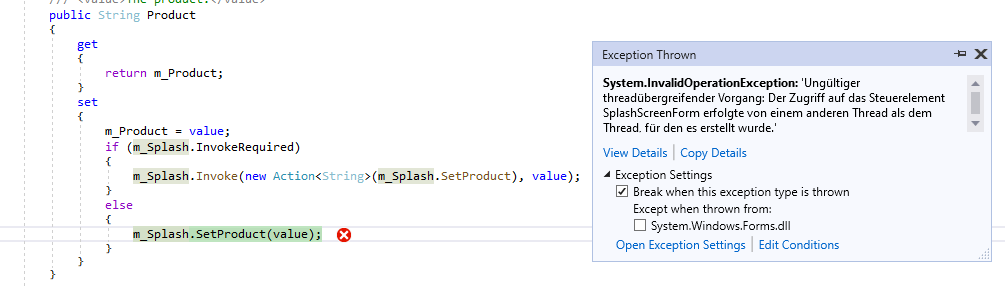
Expected behavior:
InvokeRequired works fine
Minimal repro:
I tried to create a repro and here it always works and I have no idea why. For the problematic application, this is a .net framework 4.8 WinForms application. I followed the guide for migration, converted the csproj to SDK style, set target to netcoreapp3.1, added UseWindowsForms.
Workaround
when I set breakpoint at first line and wait a bit before I hit F5 to continue, the call works fine.
 MagicAndre1981
All 11 comments
You may have a race condition in your code, since you didn't include a repro or source to inspect, try following experiment:
- remove the branch on
InvokeRequiredand always callInvoke - if this sometimes or always throws an exception you likely have a threading bug in your code
- if this never throws then this may be a bug in WinForms
The Invoke infrastructure requires some handle to operate on, so m_Splash or one of its parents need to have IsHandleCreated return true. If nothing at all is created then its considered safe to call methods because no thread is assigned yet, so InvokeRequired will return false. However if you have a race condition and the splash screen is created between InvokeRequired and calling SetProduct that would explain what you're seeing. The invoke infrastructure will not magically make your code threadsafe in this case, since the controls need to be already created before it works.
As for why it doesn't happen on Desktop Framework, the timing just may be slightly different and not trigger the race condition there.
 weltkante
on 10 Jul 2020
weltkante
on 10 Jul 2020
System.InvalidOperationException: The calling thread cannot access this object because a different thread owns it.
It's seems like non WinForms exception, but WPF... Do your splash uses WPF? If yes, may be WinForms GUI thread != WPF (Dispatcher) UI thread?
 kirsan31
on 10 Jul 2020
kirsan31
on 10 Jul 2020
I was this error yesterday in code below on Preview 6, it seems like a race because it does not always happen. I should not have to call Invoke. I disable "splash.Status =" for now.
Private Sub MyApplication_Startup(sender As Object, e As StartupEventArgs) Handles Me.Startup
AppFramework.SetHighDpiMode(HighDpiMode.SystemAware)
' Get the splash screen.
Dim splash As SplashScreen1 = CType(My.Application.SplashScreen, SplashScreen1)
' Display current status information.
splash.Status = "Current user: " & My.User.Name ' <- Exception Here trying to set Status
End Sub
 paul1956
on 10 Jul 2020
paul1956
on 10 Jul 2020
@paul1956 its unclear of whether the OP is using the VB splash screen or something else, so you may want to create a separate issue for the VB splash screen API improvement to not require Invoke. (This issue is about whether there is a bug in Invoke/InvokeRequired itself.)
weltkante
on 10 Jul 2020
@weltkante Invoke should not be required (it is not in Framework), my only point is I started seeing the same issue with Preview 6. SplashScreen is where I saw it my guess is it would happen with any form accessed from MyApplication_Startup. The code in the example is exactly what you get in Framework when you ask VS to add ApplicationEvents to your application. This may be a complete coincidence, and I don't have a case that reproduces it every time, I have seen it twice yesterday out of may 20-30 startups.
paul1956
on 10 Jul 2020
No, I don't use VB Splashscreen nor .net 5 preview nor WPF. I use .net core 3.1.5 and WinForms only.
I got the splashscreen showing up without any issues. Before I read texts from Resources and here I got the issue. Now I assign the strings in code without using resources. I'll try this next week several times if this works all time.
MagicAndre1981
on 10 Jul 2020
I didn't mean it has anything to do with SplashsSreen or even VB, it is just the first time I access a Form where I should be (and was on Framework) on UI thread and am sometimes not. I did notice that WinForms on Core changed to always Invoke with a new pattern (used twice) the reference source handles this differently. This is just an observation, and again could be unrelated.
Dim invoked = False
Try
MainForm.Invoke(
Sub()
invoked = True
OnStartupNextInstance(New StartupNextInstanceEventArgs(New ReadOnlyCollection(Of String)(args), bringToForegroundFlag:=True))
End Sub)
Catch ex As Exception When Not invoked
' Only catch exceptions thrown when the UI thread is not available, before
' the UI thread has been created or after it has been terminated. Exceptions
' thrown from OnStartupNextInstance() should be allowed to propagate.
End Try
End Sub
Before I read texts from Resources and here I got the issue. Now I assign the strings in code without using resources. I'll try this next week several times if this works all time.
ok, here is a repro
When I use Resources I get the random exceptions, if I replace it with texts directly in code it works. For full .net it makes no difference what I use.
MagicAndre1981
on 17 Jul 2020
@MagicAndre1981 my initial guess was correct, you start the background worker too early, before the handle is created, so InvokeRequired will be false for code that executes while the splash screen is still being constructed (at that point its not assigned any thread, calling InvokeRequired returns false because any thread can take ownership, calling Invoke throws). It has nothing to do with Resources except accessing Resources changes the timing of the race condition.
TLDR: WinForms is behaving as documented, its a bug in the calling code on your side, several solutions are possible:
- move the call to
BackgroundWorker.RunWorkerAsyncinto theForm.Loadevent of the splash screen so the handle you callInvokeRequiredon is guaranteed to be created at the point your background worker executes - add a call to
Form.CreateHandlebefore callingRunWorkerAsyncto force handle creation - simply trying to access the
Form.Handlealso implicitly creates the handle
The last option already can be implemented through your existing interface in SplashScreen.cs:
private void ShowDialog(ISplashScreenForm spl)
{
    m_Splash = spl;
    var handle = spl.Handle; // forcing handle creation to allow threadsafe calls before the form is shown
    m_Worker.RunWorkerAsync();
    Application.Run((Form) m_Splash);
}
It has nothing to do with Resources except accessing Resources changes the timing of the race condition.
Strange that the old code worked from VS2005/2008 (.net 2.0/3.5) until VS2019 (.net 4.8) starting with XP Single/Dual Core systems until Windows 10 with 4/6/8 Cores.
Thanks for this trick with Handle:
The value of the Handle property is a Windows HWND. If the handle has not yet been created, referencing this property will force the handle to be created.
I added this discard to avoid assigning a variable that I never use again:
_ = spl.Handle;
and check it for the next days.
MagicAndre1981
on 22 Jul 2020
Thank you @weltkante!
@MagicAndre1981 I'm closing the issue as I believe @weltkante has provided the explanation.
Please ping back if you think there's more to discuss.
 RussKie
on 23 Jul 2020
RussKie
on 23 Jul 2020
Related issues
weltkante
·
5Comments
 Shyam-Gupta
·
4Comments
Shyam-Gupta
·
4Comments
 0x084E
·
3Comments
0x084E
·
3Comments
 damageboy
·
4Comments
damageboy
·
4Comments
 noseratio
·
5Comments
noseratio
·
5Comments
Most helpful comment
@MagicAndre1981 my initial guess was correct, you start the background worker too early, before the handle is created, so
InvokeRequiredwill be false for code that executes while the splash screen is still being constructed (at that point its not assigned any thread, callingInvokeRequiredreturns false because any thread can take ownership, callingInvokethrows). It has nothing to do with Resources except accessing Resources changes the timing of the race condition.TLDR: WinForms is behaving as documented, its a bug in the calling code on your side, several solutions are possible:
BackgroundWorker.RunWorkerAsyncinto theForm.Loadevent of the splash screen so the handle you callInvokeRequiredon is guaranteed to be created at the point your background worker executesForm.CreateHandlebefore callingRunWorkerAsyncto force handle creationForm.Handlealso implicitly creates the handleThe last option already can be implemented through your existing interface in
SplashScreen.cs: