Winforms: RichTextBox Rtf property wrong converting non ascii chars
.NET Core Version: 3.1.2
Have you experienced this same bug with .NET Framework?: No
Problem description:
After assigning to richTextBox.Rtf some rtf code with nonbreaking space (160 char code), RichTextBox converts it to \'c2\~ insted of \~.
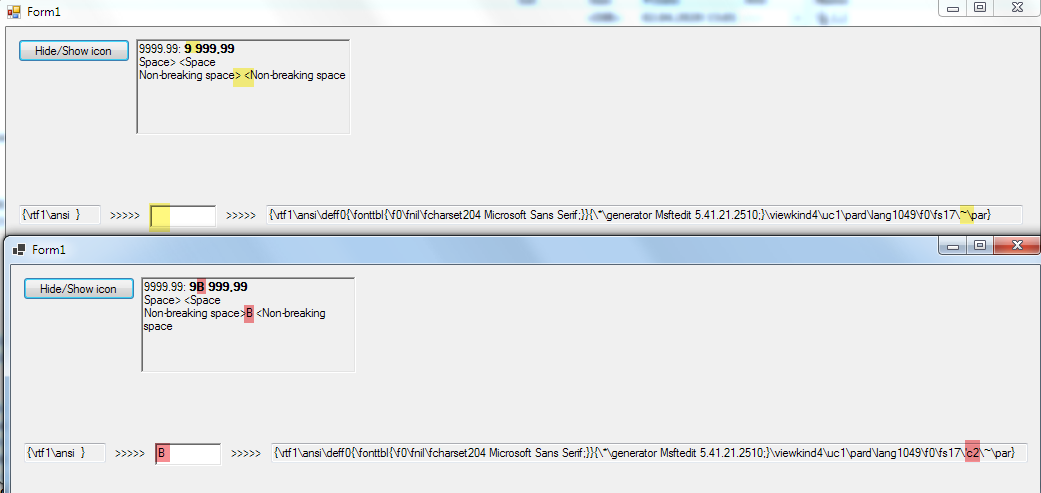
Due to the fact that, number formatting like :N using nonbreaking space for thousand separators (in appropriate cultures) this lead to huge problems :((((
Expected behavior:
Nonbreaking space must be properly converted to \~.
Windows 7 x64.
Minimal repro:
WinFormsCoreTest2.zip
 kirsan31
All 28 comments
.NET Core changed the semantics of Encoding.Default to be UTF8 rather than ANSI - this breaks the native RTF control here
I did a quick search and WinForms has multiple usages of Encoding.Default which probably all need to be reviewed and (probably) be fixed. If the encoding is for win32 interop you will want ANSI encoding (based on the current Windows codepage) and not UTF8 encoding.
 weltkante
on 2 Apr 2020
weltkante
on 2 Apr 2020
Sad thing is that, I saw this behavior back in mid-2019 while was playing with preview of 3.0. But I thought that this was not a bug, but just some change in the core, that would require some adaptation ... :(
kirsan31
on 6 Apr 2020
@RussKie what does "waiting-review" mean? this is definitely a bug/regression that needs to be fixed and there may be more regressions in the other sites which use Encoding.Default
I'd do a PR but I actually have no idea how to get the current Windows encoding in .NET Core (i.e. how to properly port Encoding.Default usages from Desktop Framework). Maybe @JeremyKuhne knows something?
weltkante
on 16 Apr 2020
@weltkante
what does "waiting-review" mean? this is definitely a bug/regression that needs to be fixed and there may be more regressions in the other sites which use Encoding.Default
I have long wanted to write such a comment here, but you got ahead of me :-)
kirsan31
on 16 Apr 2020
@tarekgh What is the prescribed way to get the equivalent of .NET Framework Encoding.Default in Core?
 JeremyKuhne
on 16 Apr 2020
JeremyKuhne
on 16 Apr 2020
What is the prescribed way to get the equivalent of .NET Framework Encoding.Default in Core?
In core Encoding.Default is always returning UTF-8. This is intentional as apps should be using Unicode in general and on Linux we don't support any default encoding but UTF-8. If you want to get the same result returned from the full framework Encoding.Default, you can call:
C#
CodePagesEncodingProvider.Instance.GetEncoding(0)
 tarekgh
on 16 Apr 2020
tarekgh
on 16 Apr 2020
Fixing this.
JeremyKuhne
on 17 Apr 2020
what does "waiting-review" mean?
For an issue case it means we need to have internal discussions pertaining to a specific issue.
For a PR it means means I have asked someone else to look at it, and waiting for that to happen.
 RussKie
on 27 Apr 2020
RussKie
on 27 Apr 2020
What is the prescribed way to get the equivalent of .NET Framework Encoding.Default in Core?
In core
Encoding.Defaultis always returning UTF-8. This is intentional as apps should be using Unicode in general and on Linux we don't support any default encoding but UTF-8. If you want to get the same result returned from the full framework Encoding.Default, you can call:CodePagesEncodingProvider.Instance.GetEncoding(0)
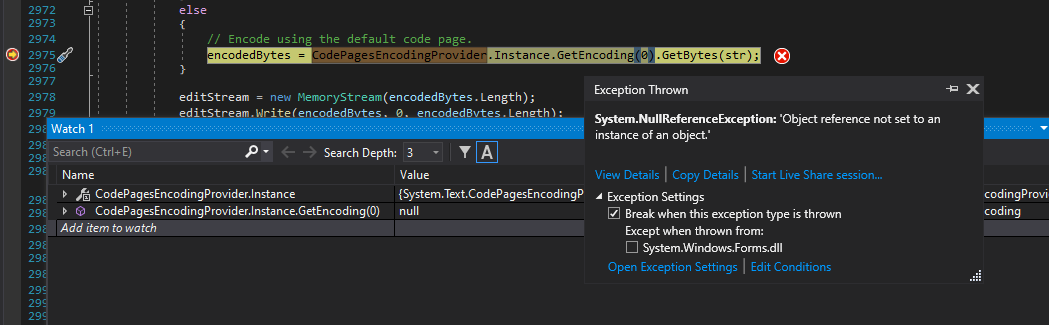
@tarekgh I'm having massive problems with this code locally - it fails with NREs using C:\Program Files\dotnet\shared\Microsoft.NETCore.App\5.0.0-preview.5.20253.6\System.Text.Encoding.CodePages.dll
RussKie
on 4 May 2020
Here's the stack:
    System.Text.Encoding.CodePages.dll!System.Text.CodePagesEncodingProvider.GetEncoding(int codepage = 65001) Line 25  C#  Non-user code. Symbols loaded.
    System.Text.Encoding.CodePages.dll!System.Text.CodePagesEncodingProvider.GetEncoding(int codepage = 0) Line 25  C#  Non-user code. Symbols loaded.
    System.Windows.Forms.dll!System.Windows.Forms.RichTextBox.StreamIn(string str = "{\\rtf1\\ansi  }", Interop.Richedit.SF flags = RTF) Line 2975  C#  Symbols loaded.
    System.Windows.Forms.dll!System.Windows.Forms.RichTextBox.Rtf.set(string value = "{\\rtf1\\ansi  }") Line 712   C#  Symbols loaded.
    System.Windows.Forms.Tests.dll!System.Windows.Forms.Tests.RichTextBoxTests.RichTextBox_SetAnsiRtf_DoesNotCorrupt() Line 5100    C#  Symbols loaded.
It fails to detect my encoding and returns here:
https://github.com/dotnet/runtime/blob/4f9ae42d861fcb4be2fcd5d3d55d5f227d30e723/src/libraries/System.Text.Encoding.CodePages/src/System/Text/CodePagesEncodingProvider.cs#L58-L60
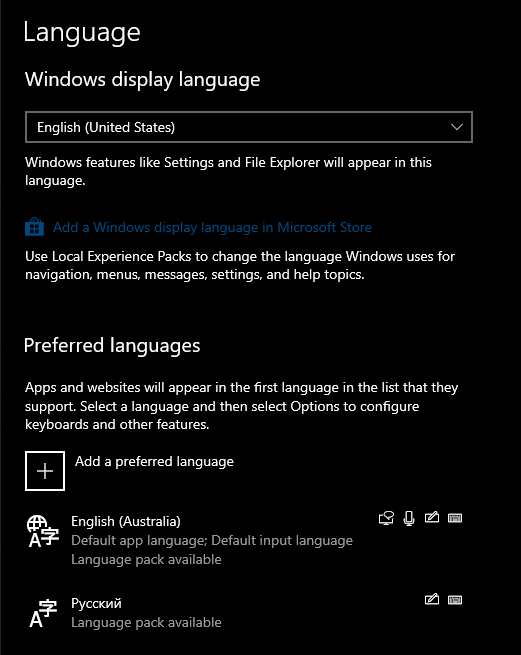
From what I understand the code is unable to handle codepage 65001, which is UTF-8 Unicode with Cyrillic.
I have a mixed bag of locale/language settings on my machine (well all of my computers in fact):
RussKie
on 4 May 2020
@RussKie You need just to do the following instead:
C#
Encoding encoding = CodePagesEncodingProvider.Instance.GetEncoding(0) ?? Encoding.UTF8;
encodedBytes = encoding.GetBytes(str);
tarekgh
on 4 May 2020
@RussKie You need just to do the following instead:
Encoding encoding = CodePagesEncodingProvider.Instance.GetEncoding(0) ?? Encoding.UTF8;
encodedBytes = encoding.GetBytes(str);
CodePagesEncodingProvider.Instance :
Gets an encoding provider for code pages supported in the desktop .NET Framework but not in the current .NET Framework platform.
So, code above check this list, and if code page returned from GetCPInfoExW(CP_ACP, 0, &cpInfo) (system's active code page) is not from it - uses utf8. Theoretically this code will fail if system's code page is from list of supported in current .NET Framework platform (and != utf8):
- ASCII (code page 20127), which is returned by the Encoding.ASCII property.
- ISO-8859-1 (code page 28591).
- UTF-7 (code page 65000), which is returned by the Encoding.UTF7 property.
- UTF-8 (code page 65001), which is returned by the Encoding.UTF8 property.
- UTF-16 and UTF-16LE (code page 1200), which is returned by the Encoding.Unicode property.
- UTF-16BE (code page 1201), which is instantiated by calling the UnicodeEncoding.UnicodeEncoding or UnicodeEncoding.UnicodeEncoding constructor with a bigEndian value of true.
- UTF-32 and UTF-32LE (code page 12000), which is returned by the Encoding.UTF32 property.
- UTF-32BE (code page 12001), which is instantiated by calling an UTF32Encoding constructor that has a bigEndian parameter and providing a value of true in the method call.
As far as I know, utf8 is the only option that Windows can use, so this code must be 100% correct (for now). But ideally it's must look like (and will be equivalent to .net Encoding.Default):
var cp = SystemDefaultCodePage; // this is private from CodePagesEncodingProvider.Windows, see below...
return CodePagesEncodingProvider.Instance.GetEncoding(cp) ?? Encoding.GetEncoding(cp)
SystemDefaultCodePage, then calls TryGetACPCodePage.
kirsan31
on 4 May 2020
@kirsan31 the encoding is really kind of frozen area which I doubt we'll add more encoding either in Windows or .NET. So, things can change is very unlikely. Also, the direction for Windows is to try to promote UTF-8 moving forward. I wouldn't worry things change in the future for now. Also, we can easily fix this in the CodePagesEncodingProvider be transparent to the WinForms code too.
tarekgh
on 4 May 2020
Expected behavior:
Nonbreaking space must be properly converted to\~.Windows 7 x64.
Minimal repro:
WinFormsCoreTest2.zip
@kirsan31 I'm running your example on W10 and both net472 and netcoreapp3.1 apps show the same "broken" behaviour:

Is the issue W7Sp1 specific? Have you observed it on other versions?
RussKie
on 5 May 2020
This is likely your locale, as you described before you are having a UTF8 based locale. If you have a "real" codepage the behavior differed between Desktop/Core.
I don't know why the RTF control breaks down with UTF8 locale when its actually your real codepage, there is probably another bug somewhere, but since its consistent with Desktop Framework the bug might be in the RTF control itself.
weltkante
on 5 May 2020
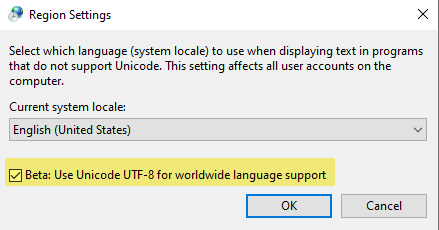
@RussKie Yes, @weltkante is right. We have deeper problem here, RichTextBox can't properly convert (both .net and core) non ascii characters with utf8 (with non utf8 locale, original .net woks fine on both win 7/10):
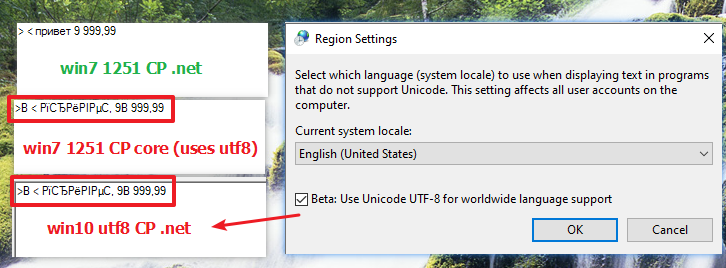
Current bug with Encoding.Default perfectly emulate this Win10 feature:
kirsan31
on 5 May 2020
Here @JeremyKuhne said that you can get UTF8 to work by specifying the code page explicitly with the SF_USECODEPAGE flag.
Maybe you can detect that CodePagesEncodingProvider.Instance.GetEncoding(0) returns null and then use SF_USECODEPAGE to work around the RTF control bug.
weltkante
on 5 May 2020
@JeremyKuhne has an incoming PR
RussKie
on 7 May 2020
We should break out a separate issue for the part of this that isn't a regression so that we can track servicing separately as the two issues have different servicing input criteria. There is a workaround for the UTF-8 input, you can manually escape anything that isn't in the ASCII range (i.e. over 127).
Adding UTF-8 support to the RTF setter is, as I mentioned, a no brainer. I'll just always do it as we start with UTF-16 input anyway (i.e. string). Forcing it through the code page has no value.
JeremyKuhne
on 9 May 2020
@JeremyKuhne I will open a new issue, a bit later when will have time...
Done.
kirsan31
on 9 May 2020
Closing this as a fix for regression.
We'll continue to work on https://github.com/dotnet/winforms/issues/3247
RussKie
on 14 May 2020
@RussKie Why 3.1.5 tag was removed? As i can see this was merged to 3.1 branch... Same here.
Or it's not decided yet in which servicing release it will be?
kirsan31
on 14 May 2020
It is going out in 3.1.5. We tag issues to prioritise dev efforts, and PRs get tagged for actual release.
https://github.com/dotnet/winforms/milestone/19?closed=1
RussKie
on 14 May 2020
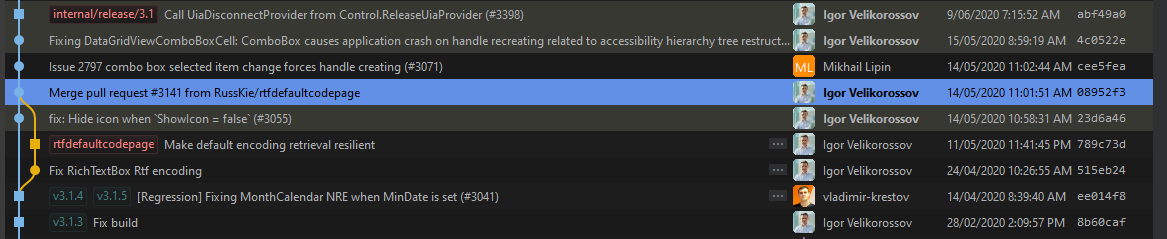
@RussKie Hm, i see no mentions of any fixes for WinForms in 3.1.5 release notes. I have checked this issue and https://github.com/dotnet/winforms/issues/3022 - they not fixed in 3.1.5 :((((

kirsan31
on 10 Jun 2020
Sorry, looks like it didn't make it into 3.1.5. But it definitely made it into 3.1.6
RussKie
on 10 Jun 2020
Just a reminder. I think this:
I did a quick search and WinForms has multiple usages of
Encoding.Defaultwhich probably all need to be reviewed and (probably) be fixed. If the encoding is for win32 interop you will want ANSI encoding (based on the current Windows codepage) and not UTF8 encoding.
was forgotten? May be create separate issue for tracking?
kirsan31
on 6 Jul 2020
May be create separate issue for tracking?
Yes, please.
RussKie
on 7 Jul 2020
But it definitely made it into 3.1.6
Finally it here in 3.1.6! Release notes have nothing about WinForms, and I was afraid that fixes did not come out again...
I hope, that remaining not fixed cases of Encoding.Default is not so harmful and we will try to migrate to core once again :)
kirsan31
on 14 Jul 2020
Related issues
 damageboy
·
4Comments
damageboy
·
4Comments
 0x084E
·
3Comments
0x084E
·
3Comments
 SergeySmirnov-Akvelon
·
3Comments
kirsan31
·
4Comments
SergeySmirnov-Akvelon
·
3Comments
kirsan31
·
4Comments
 jmairboeck
·
5Comments
jmairboeck
·
5Comments
Most helpful comment
@RussKie what does "waiting-review" mean? this is definitely a bug/regression that needs to be fixed and there may be more regressions in the other sites which use
Encoding.DefaultI'd do a PR but I actually have no idea how to get the current Windows encoding in .NET Core (i.e. how to properly port
Encoding.Defaultusages from Desktop Framework). Maybe @JeremyKuhne knows something?