Winforms: Two nodes ‘WPF’ and ‘.NET Core’ are missing on C# winforms core application
- .NET Core Version: .NET Core 3.0.100-rc1-014181
- VS: 16.4.0 Preview1.0 [29304.142.master]
- Have you experienced this same bug with .NET Framework?: No
More info:
This is a regression issue from d16.3 P3.
Minimal repro:
- Create a C# winforms core application.
- Right-click the project in solution Explorer window, then click 'Add' to open the "Add New item" page.
Actual behavior:
Two nodes ‘WPF’ and ‘.NET Core’ are missing on Add New item window.
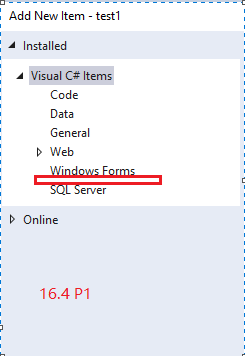
Expected behavior:
These two nodes are showing correctly on Add New item window.
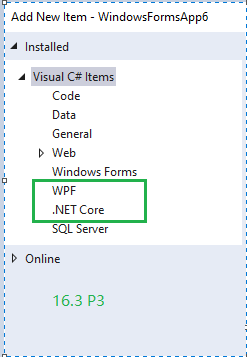
 Amy-Li02-zz
All 18 comments
@Amy-Li02 our template "Windows Forms" is present in your screenshot. We do not maintian "WPF" and ".NET Core" templates.
 RussKie
on 9 Sep 2019
RussKie
on 9 Sep 2019
@livarcocc , @vatsan-madhavan , @rladuca - this is a regression in the "Add New Item" dialog 16.4 P1 - which repo should take this issue (WinForms is there but nothing else)
/cc @zsd4yr
 merriemcgaw
on 10 Sep 2019
merriemcgaw
on 10 Sep 2019
@chabiss, @diverdan92, @OliaG - can you help? I don't think IDE experience issues are tracked in any repo.
Should this issue be re-opened?
 vatsan-madhavan
on 10 Sep 2019
vatsan-madhavan
on 10 Sep 2019
@jjmew @jmarolf did something change in the project system?
 diverdan92
on 11 Sep 2019
diverdan92
on 11 Sep 2019
They are not supposed to show. See https://github.com/dotnet/project-system/issues/573
 jjmew
on 11 Sep 2019
jjmew
on 11 Sep 2019
@jjmew - it would seem like things have changed regarding WPF/WinForms support in .NET Core from what that issue was filed. Do we want to update our definition of expected behavior to reflect the new support platforms?
I would expect both of these to show up for .NET Core WinForms development.
diverdan92
on 11 Sep 2019
I can see at least two mistakes here:
- WinForms projects are also .NET Core projects, so you should show WinForms and .NET Core items, not just WinForms items.
- WPF could (and probably should) be removed unless UseWPF is defined as true in the project file, then you need to show WPF items, projects hosting both WPF and WinForms are a thing!
 weltkante
on 11 Sep 2019
weltkante
on 11 Sep 2019
Oh also, remember that WinForms (and WPF) added a 'class library' type, which should probably be incorporated into the mix.
winformslib and wpflib are the templates I'm talking about:
Windows Forms (WinForms) Application              winforms                 [C#]          Common/WinForms
Windows Forms (WinForms) Class library            winformslib              [C#]          Common/WinForms

WPF Application                                   wpf                      [C#]          Common/WPF
WPF Class library                                 wpflib                   [C#]          Common/WPF
WPF Custom Control Library                        wpfcustomcontrollib      [C#]          Common/WPF
WPF User Control Library                          wpfusercontrollib        [C#]          Common/WPF
Should this issue be moved into https://github.com/dotnet/project-system/ repo?
RussKie
on 12 Sep 2019
/cc: @davkean
RussKie
on 12 Sep 2019
This is by design, .NET Core node was an accident, and WPF node doesn't exist when the project isn't a WPF project.
 davkean
on 12 Sep 2019
davkean
on 12 Sep 2019
Thank you
RussKie
on 12 Sep 2019
@davkean this contradicts the WinForms on .NET Framework experience. The Add->New Item dialog includes the WPF node with the WPF User Control item template, which makes sense, because you can include such a control in the WinForms app using the WinForms ElementHost control.
@RussKie - can we consider reopening this issue as an issue with the design, if this is the current design?
cc @OliaG
diverdan92
on 12 Sep 2019
@diverdan92 I perfer the issue moved as it is clearly has nothing to do with WinForms runtime.
RussKie
on 12 Sep 2019
@RussKie agreed. Sounds like it should be moved to project system as suggested above.
diverdan92
on 12 Sep 2019
@diverdan92 We've discussed this issue lots of times in the past; unlike the Framework design where templates can just add references to add WPF to a project - there's no current way for a template/VS to reason about adding "WPF" to a project due to the current file format. If SDK/WinForms/WPF want to solve this problem end-to-end (they combined own the format & templates) - feel free to open a design issue against them. The current design is about preventing the user from adding a template that will not work in their project.
davkean
on 13 Sep 2019
@davkean WPF does work in WinForms, always has been. Desktop Framework has had artificial boundaries through project types separating the frameworks, this separation is gone in .NET Core (there is only one SDK containing both WinForms and WPF !) and you just need to add a setting in the csproj (which is now editable in VS with text editor) so the barrier to using WPF in WinForms is adding one line of text. Looking statically at project types or templates is the wrong approach for .NET Core. This issue really should be moved to the appropriate place (which is still unclear, at least to me)
weltkante
on 13 Sep 2019
@weltkante I'm aware of how this works, I work on the project-system. I'm not against having the templates show up, its just that the underlying VS pieces haven't landed to make it work. You will see that if both WPF and WinForms properties are turned on, all the templates show up.
davkean
on 13 Sep 2019
Related issues
 M-Lipin
·
4Comments
M-Lipin
·
4Comments
 KlausLoeffelmann
·
3Comments
KlausLoeffelmann
·
3Comments
 Jenna-Zheng
·
3Comments
Jenna-Zheng
·
3Comments
 damageboy
·
4Comments
damageboy
·
4Comments
 Vino-Wang
·
4Comments
Vino-Wang
·
4Comments
Most helpful comment
I can see at least two mistakes here: