Winforms: MenuBar checkbox color is different between .NET Core 3 and .NET Framework
- .NET Core Version: 3.0 Preview 7
- Have you experienced this same bug with .NET Framework?: No
Problem description:
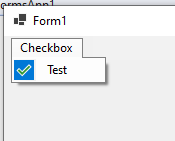
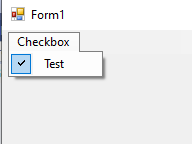
MenuBar's MenuItem has a different color when it is checked (with no mouse hovering) between .NET Framework and .NET Core 3. The color for .NET Core 3 appears to be a bug, as I wouldn't have expected it to have the solid blue background, nor a different checkmark, as shown below.
Actual behavior:
.NET Core 3:
Expected behavior:
.NET Framework
Minimal repro:
Repo.zip
 MatthewBeardmore
All 14 comments
This is expected - we updated icons to a more modern look for .NET Core 3.
 merriemcgaw
on 9 Aug 2019
merriemcgaw
on 9 Aug 2019
Alright, I'll go ahead and close it now. Honestly, I thought it was a mistake because of how out of place it looked. Thanks.
MatthewBeardmore
on 9 Aug 2019
we updated icons to a more modern look
This is baffling. Not only that the new icon looks completely out of place with the default ToolStrip render style but there's absolutely nothing modern about it. If anything, this looks like something from a badly designed UI from the '90 or as a rendering bug, the kind of bug that you get when you don't handle the transparency color correctly.
 mikedn
on 9 Aug 2019
mikedn
on 9 Aug 2019
It really does look like a transparency color issue, which is why I reported it in the first place.
MatthewBeardmore
on 9 Aug 2019
Have to agree with @mikedn, WinForms shouldn't change UI style by itself, makes it look out of place with the rest of Windows UI. In particular since WinForms is mostly about wrapping native controls. In our application we are mixing technologies and now the WinForms windows are going to stand out annoyingly compared to the native and WPF windows.
 weltkante
on 9 Aug 2019
weltkante
on 9 Aug 2019
Thank you all for your feedback! It's absolutely appreciated and we will take another look at this particular icon. If you notice any others that look badly in the new format, please reach out. @dreddy-work please work with the UX team to find something more inline with the default MenuStrip style.
merriemcgaw
on 9 Aug 2019
@MatthewBeardmore
It really does look like a transparency color issue, which is why I reported it in the first place.
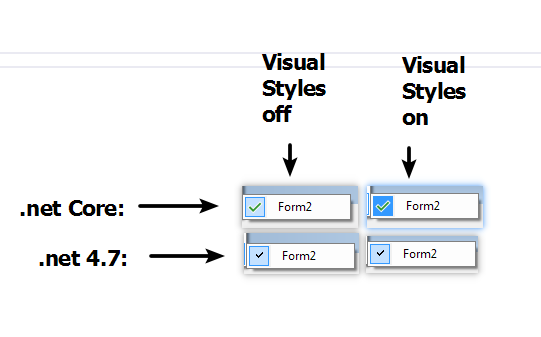
I think same. It's looks different with visual styles on/off on .net core (and with v.s. off, it's look ok :)). When ,net version looks the same in both cases. Win 7x64 with Aero On:
```c#
// enable visual styles (default behavior):
Application.EnableVisualStyles();
```c#
// disable visual styles:
Application.VisualStyleState = System.Windows.Forms.VisualStyles.VisualStyleState.NoneEnabled;
//Application.EnableVisualStyles();
 kirsan31
on 11 Aug 2019
kirsan31
on 11 Aug 2019
This is not blocking any functionality so we're marking this as 3.1.
merriemcgaw
on 12 Aug 2019
It isn't blocking anything, but it looks ugly and does not match the previous behavior. It also makes conversion to .NET Core harder as I now have to reskin these to something more appropriate, just for it to be changed again in 3.1.
MatthewBeardmore
on 12 Aug 2019
I see two opinions here.
- Changing Icons to match the Framework version ( legacy Icons)
- Match the behavior when VisualStyle is ON /OFF with framework but keep the new Icon.
Will take a look if we can match the behavior when VisualStyle is ON/OFF with framework but try to keep new Icons. We adopted VisualStudio formats in core. @MatthewBeardmore, @kirsan31 and @weltkante, please respond if you disagree.
 dreddy-work
on 21 Aug 2019
dreddy-work
on 21 Aug 2019
I think the new icons are fine in most places (and even in this place), but the transparency behind the VisualStyle On looks very out of place. If that was fixed, I think it would match well enough with the previous style and previous behavior that (for me) would work fine.
MatthewBeardmore
on 21 Aug 2019
Thanks for investigating this further!
MatthewBeardmore
on 4 Sep 2019
Closing as PR merged.
dreddy-work
on 5 Sep 2019
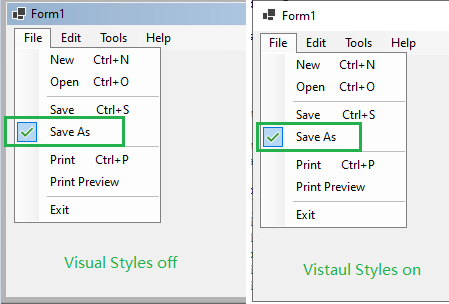
Verified this bug with .Net core 3.0.100-rc1-014190 from release branch, the issue has been fixed.
 Zheng-Li01
on 10 Sep 2019
Zheng-Li01
on 10 Sep 2019
Related issues
 noseratio
·
5Comments
noseratio
·
5Comments
 lonitra
·
5Comments
lonitra
·
5Comments
 RussKie
·
5Comments
RussKie
·
5Comments
 Jenna-Zheng
·
3Comments
weltkante
·
5Comments
Jenna-Zheng
·
3Comments
weltkante
·
5Comments
Most helpful comment
This is baffling. Not only that the new icon looks completely out of place with the default
ToolStriprender style but there's absolutely nothing modern about it. If anything, this looks like something from a badly designed UI from the '90 or as a rendering bug, the kind of bug that you get when you don't handle the transparency color correctly.