Winforms: .NET Core 3.0 Preview 7 - PictureBox.LoadAsync throws an exception. "Operation is not supported on this platform."
_From @ebizupnorth on Monday, July 29, 2019 4:28:28 AM_
pictureBox1.WaitOnLoad = false;
pictureBox1.LoadAsync("https://publicdomainarchive.com/wp-content/uploads/2014/03/public-domain-images-free-stock-photos-high-quality-resolution-downloads-around-the-house-1.jpg");
The following code throws an Exception "Operation is not supported on this platform." on .NET Core 3.0 Preview 7. The picture loads fine when using .NET Framework 4.8
Form1.Designer.cs
namespace WindowsFormsApp1
{
    partial class Form1
    {
        /// <summary>
        /// Required designer variable.
        /// </summary>
        private System.ComponentModel.IContainer components = null;

        /// <summary>
        /// Clean up any resources being used.
        /// </summary>
        /// <param name="disposing">true if managed resources should be disposed; otherwise, false.</param>
        protected override void Dispose(bool disposing)
        {
            if (disposing && (components != null))
            {
                components.Dispose();
            }
            base.Dispose(disposing);
        }

        #region Windows Form Designer generated code

        /// <summary>
        /// Required method for Designer support - do not modify
        /// the contents of this method with the code editor.
        /// </summary>
        private void InitializeComponent()
        {
            this.pictureBox1 = new System.Windows.Forms.PictureBox();
            this.button1 = new System.Windows.Forms.Button();
            ((System.ComponentModel.ISupportInitialize)(this.pictureBox1)).BeginInit();
            this.SuspendLayout();
            //
            // pictureBox1
            //
            this.pictureBox1.Location = new System.Drawing.Point(45, 78);
            this.pictureBox1.Name = "pictureBox1";
            this.pictureBox1.Size = new System.Drawing.Size(403, 392);
            this.pictureBox1.SizeMode = System.Windows.Forms.PictureBoxSizeMode.StretchImage;
            this.pictureBox1.TabIndex = 0;
            this.pictureBox1.TabStop = false;
            //
            // button1
            //
            this.button1.Location = new System.Drawing.Point(551, 116);
            this.button1.Name = "button1";
            this.button1.Size = new System.Drawing.Size(75, 23);
            this.button1.TabIndex = 1;
            this.button1.Text = "button1";
            this.button1.UseVisualStyleBackColor = true;
            this.button1.Click += new System.EventHandler(this.Button1_Click);
            //
            // Form1
            //
            this.AutoScaleDimensions = new System.Drawing.SizeF(8F, 16F);
            this.AutoScaleMode = System.Windows.Forms.AutoScaleMode.Font;
            this.ClientSize = new System.Drawing.Size(800, 561);
            this.Controls.Add(this.button1);
            this.Controls.Add(this.pictureBox1);
            this.Name = "Form1";
            this.Text = "Form1";
            ((System.ComponentModel.ISupportInitialize)(this.pictureBox1)).EndInit();
            this.ResumeLayout(false);

        }

        #endregion

        private System.Windows.Forms.PictureBox pictureBox1;
        private System.Windows.Forms.Button button1;
    }
}
Form1.resx
<?xml version="1.0" encoding="utf-8"?>
<root>
  <!--
    Microsoft ResX Schema

    Version 2.0

    The primary goals of this format is to allow a simple XML format
    that is mostly human readable. The generation and parsing of the
    various data types are done through the TypeConverter classes
    associated with the data types.

    Example:

    ... ado.net/XML headers & schema ...
    <resheader name="resmimetype">text/microsoft-resx</resheader>
    <resheader name="version">2.0</resheader>
    <resheader name="reader">System.Resources.ResXResourceReader, System.Windows.Forms, ...</resheader>
    <resheader name="writer">System.Resources.ResXResourceWriter, System.Windows.Forms, ...</resheader>
    <data name="Name1"><value>this is my long string</value><comment>this is a comment</comment></data>
    <data name="Color1" type="System.Drawing.Color, System.Drawing">Blue</data>
    <data name="Bitmap1" mimetype="application/x-microsoft.net.object.binary.base64">
        <value>[base64 mime encoded serialized .NET Framework object]</value>
    </data>
    <data name="Icon1" type="System.Drawing.Icon, System.Drawing" mimetype="application/x-microsoft.net.object.bytearray.base64">
        <value>[base64 mime encoded string representing a byte array form of the .NET Framework object]</value>
        <comment>This is a comment</comment>
    </data>

    There are any number of "resheader" rows that contain simple
    name/value pairs.

    Each data row contains a name, and value. The row also contains a
    type or mimetype. Type corresponds to a .NET class that support
    text/value conversion through the TypeConverter architecture.
    Classes that don't support this are serialized and stored with the
    mimetype set.

    The mimetype is used for serialized objects, and tells the
    ResXResourceReader how to depersist the object. This is currently not
    extensible. For a given mimetype the value must be set accordingly:

    Note - application/x-microsoft.net.object.binary.base64 is the format
    that the ResXResourceWriter will generate, however the reader can
    read any of the formats listed below.

    mimetype: application/x-microsoft.net.object.binary.base64
    value   : The object must be serialized with
            : System.Runtime.Serialization.Formatters.Binary.BinaryFormatter
            : and then encoded with base64 encoding.

    mimetype: application/x-microsoft.net.object.soap.base64
    value   : The object must be serialized with
            : System.Runtime.Serialization.Formatters.Soap.SoapFormatter
            : and then encoded with base64 encoding.

    mimetype: application/x-microsoft.net.object.bytearray.base64
    value   : The object must be serialized into a byte array
            : using a System.ComponentModel.TypeConverter
            : and then encoded with base64 encoding.
    -->
  <xsd:schema id="root" xmlns="" xmlns:xsd="http://www.w3.org/2001/XMLSchema" xmlns:msdata="urn:schemas-microsoft-com:xml-msdata">
    <xsd:import namespace="http://www.w3.org/XML/1998/namespace" />
    <xsd:element name="root" msdata:IsDataSet="true">
      <xsd:complexType>
        <xsd:choice maxOccurs="unbounded">
          <xsd:element name="metadata">
            <xsd:complexType>
              <xsd:sequence>
                <xsd:element name="value" type="xsd:string" minOccurs="0" />
              </xsd:sequence>
              <xsd:attribute name="name" use="required" type="xsd:string" />
              <xsd:attribute name="type" type="xsd:string" />
              <xsd:attribute name="mimetype" type="xsd:string" />
              <xsd:attribute ref="xml:space" />
            </xsd:complexType>
          </xsd:element>
          <xsd:element name="assembly">
            <xsd:complexType>
              <xsd:attribute name="alias" type="xsd:string" />
              <xsd:attribute name="name" type="xsd:string" />
            </xsd:complexType>
          </xsd:element>
          <xsd:element name="data">
            <xsd:complexType>
              <xsd:sequence>
                <xsd:element name="value" type="xsd:string" minOccurs="0" msdata:Ordinal="1" />
                <xsd:element name="comment" type="xsd:string" minOccurs="0" msdata:Ordinal="2" />
              </xsd:sequence>
              <xsd:attribute name="name" type="xsd:string" use="required" msdata:Ordinal="1" />
              <xsd:attribute name="type" type="xsd:string" msdata:Ordinal="3" />
              <xsd:attribute name="mimetype" type="xsd:string" msdata:Ordinal="4" />
              <xsd:attribute ref="xml:space" />
            </xsd:complexType>
          </xsd:element>
          <xsd:element name="resheader">
            <xsd:complexType>
              <xsd:sequence>
                <xsd:element name="value" type="xsd:string" minOccurs="0" msdata:Ordinal="1" />
              </xsd:sequence>
              <xsd:attribute name="name" type="xsd:string" use="required" />
            </xsd:complexType>
          </xsd:element>
        </xsd:choice>
      </xsd:complexType>
    </xsd:element>
  </xsd:schema>
  <resheader name="resmimetype">
    <value>text/microsoft-resx</value>
  </resheader>
  <resheader name="version">
    <value>2.0</value>
  </resheader>
  <resheader name="reader">
    <value>System.Resources.ResXResourceReader, System.Windows.Forms, Version=4.0.0.0, Culture=neutral, PublicKeyToken=b77a5c561934e089</value>
  </resheader>
  <resheader name="writer">
    <value>System.Resources.ResXResourceWriter, System.Windows.Forms, Version=4.0.0.0, Culture=neutral, PublicKeyToken=b77a5c561934e089</value>
  </resheader>
</root>
Form1.cs
using System;
using System.Collections.Generic;
using System.ComponentModel;
using System.Data;
using System.Drawing;
using System.Linq;
using System.Text;
using System.Threading.Tasks;
using System.Windows.Forms;

namespace WindowsFormsApp1
{
    public partial class Form1 : Form
    {
        public Form1()
        {
            InitializeComponent();
        }

        private void Button1_Click(object sender, EventArgs e)
        {
            try
            {
                pictureBox1.WaitOnLoad = false;
                pictureBox1.LoadAsync("https://publicdomainarchive.com/wp-content/uploads/2014/03/public-domain-images-free-stock-photos-high-quality-resolution-downloads-around-the-house-1.jpg");
            }
            catch (Exception ex)
            {
                MessageBox.Show(ex.Message);
            }
        }
    }
}
_Copied from original issue: dotnet/core#3107_
 carlossanlop
All 8 comments
_From @ebizupnorth on Monday, July 29, 2019 5:57:12 PM_
Workaround:
var httpClient = new HttpClient();
var stream = await httpClient.GetStreamAsync("https://publicdomainarchive.com/wp-content/uploads/2014/03/public-domain-images-free-stock-photos-high-quality-resolution-downloads-around-the-house-1.jpg");
pictureBox1.Image = Image.FromStream(stream);
_From @carlossanlop on Wednesday, July 31, 2019 7:06:17 PM_
Thank you @ebizupnorth for the detailed report. I will transfer your issue to the winforms repo.
carlossanlop
on 31 Jul 2019
I think this was reported previously as #242 but @merriemcgaw misunderstood the comment from corefx and closed as "by design". This is the wrong resolution, what is by design is the implementation in corefx throwing, but that does not mean WinForms can propagate the throw. WinForms needs to update their implementation to keep working in .NET Core. There was a comment afterwards with a link on how to replace Delegate.BeginInvoke calls in .NET Core implementations but the issue never was reopened.
Note that the naming of that function LoadAsync predates the async/await language features. It is not actually modeled after that pattern.
 weltkante
on 31 Jul 2019
weltkante
on 31 Jul 2019
@weltkante you're right - thank you for catching that, it slipped by me. We'll keep this one open for now. I can't be sure if we'll get it for this 3.0 GA but we'll try.
 merriemcgaw
on 1 Aug 2019
merriemcgaw
on 1 Aug 2019
Here's where it is failing
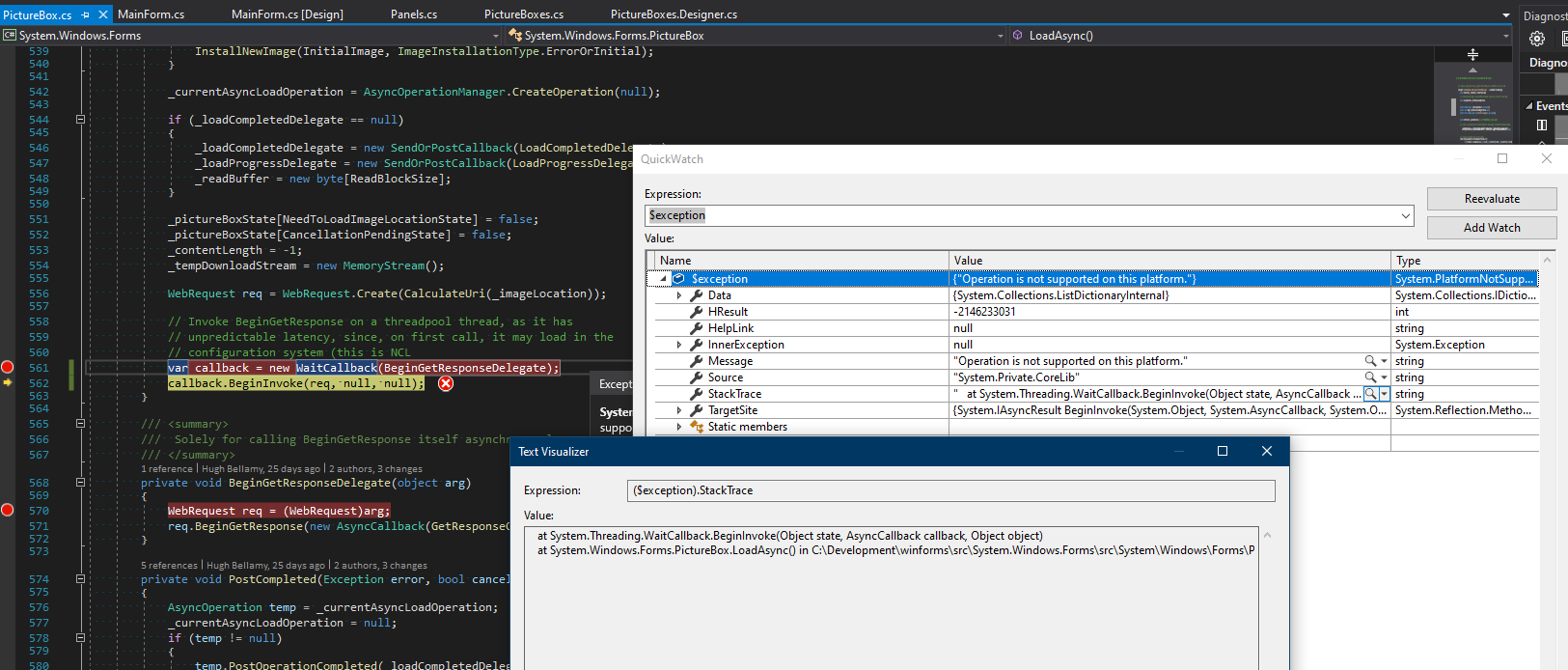
It looks like PlatformNotSupportedException exception is thrown down in the stack (by CoreFx or CoreClr), but there is insufficient information to dig deeper... 😕
@ericstj @danmosemsft @JeremyKuhne any pointers?
I haven't setup either CoreFx or CoreClr... yet 🤔
 RussKie
on 24 Aug 2019
RussKie
on 24 Aug 2019
Erm, above I have linked issue #242 which has the analysis but was closed prematurely due to a misunderstanding.
WinForms needs to stop calling Delegate.BeginInvoke because thats not supported on .NET Core. #242 has a link how to replace Delegate.BeginInvoke calls in .NET Core applications.
242 also says something about an platform-compat analyzer which can detect such invalid uses of obsolete APIs, dunno but maybe worth checking out to see if WinForms has more bad API usage.
weltkante
on 24 Aug 2019
Thank you @weltkante 👍
RussKie
on 26 Aug 2019
Verified this bug with .Net core 3.0.100-rc1-014190 from release branch, the issue has been fixed.
 Zheng-Li01
on 10 Sep 2019
Zheng-Li01
on 10 Sep 2019
Related issues
 Shyam-Gupta
·
4Comments
RussKie
·
5Comments
Shyam-Gupta
·
4Comments
RussKie
·
5Comments
 KlausLoeffelmann
·
3Comments
weltkante
·
5Comments
KlausLoeffelmann
·
3Comments
weltkante
·
5Comments
 vladimir-krestov
·
3Comments
vladimir-krestov
·
3Comments