Winetricks: Unable To Install dotnet35sp1
Winetricks sometimes fails to install the dotnet35sp1 verb.
To get solid test data, I ran the dotnet35sp1 verb 5 times on clean prefixes with reboots in between:
- Test with Wine 2.21
- Same
- Test with Wine 2.21 Staging
- Same
- Same
The command used to run each is export WINEARCH=win32 && export WINEPREFIX=~/.wine.${NUMBER} && wineboot &> wineboot.log && winetricks dotnet35sp1 &> winetricks-dotnet35sp1.log, with NUMBER being the test number. For each of these tests, I got as much data as I could to try and see what the problem is.
Summary
This section summarizes the overall conclusions I made from the test data. This is put above the tests themselves because they, when together, get to be quite lengthy.
Wine Stable
On Wine Stable, the verb failed in both of my tests, while installing the .NET 2.0 SP2 runtime, due to the installer not detecting the .NET 2.0 runtime.
Wine Staging
On Wine Staging, the verb failed in one of my tests for an unknown reason. In the other two tests, a fatal error in either mscorsvw.exe or an unidentified program was encountered while installing the .NET 2.0 SP1 and .NET 2.0 SP2 runtimes, always because of an unimplemented function, mscoree.dll.CorIsLatestSvc. However, the verb still succeded despite these errors.
Tests
This section has the test data itself. Each attempt builds off the last unless noted otherwise, with things differing from the last attempt bolded.
First Attempt
Program Versions
wine:wine-2.21winetricks:20171018
Installations
- .NET 2.0: Success.
- .NET 3.0: Success.
- .NET 2.0 SP1: Success, with errors. Before running the installer, the verb hung while setting the Windows version to
win2k, at line 1019 of the log. To get around this, I started the task manager withexport WINEARCH=win32 && export WINEPREFIX=~/.wine.1 && wine taskmgr, and ended every process manually, with the task manager itself last.

- XPS Essentials Pack: Success.
- .NET 3.0 SP1: Success.
- .NET 3.5: Success.
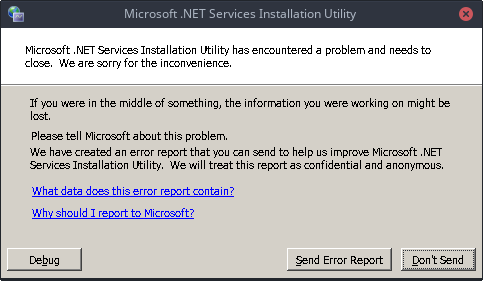
- .NET 2.0 SP2: Failure. While running the installer, at line 2005 of the log, the Microsoft .NET Services Installation Utility encountered a fatal error. I clicked the
Don't Sendbutton. After this, the installation started removing files, and when finished opened up another fatal error message box, at line 2019 of the log. I clicked theDon't Send Reportbutton. The main installation window now showed the error text, and link to the error log, saying that the .NET 2.0 runtime was not detected.


Second Attempt
Program Versions
wine:wine-2.21winetricks:20171018
Installations
- .NET 2.0: Success.
- .NET 3.0: Success.
- .NET 2.0 SP1: Success, with errors. Before running the installer, the verb hung while setting the Windows version to
win2k, at line 1024 of the log. To get around this, I started the task manager withexport WINEARCH=win32 && export WINEPREFIX=~/.wine.2 && wine taskmgr, and closed every process manually, with the task manager itself last. Like the .NET 2.0 SP2 installation, after ending everything but the task manager, the task manager crashed. - XPS Essentials Pack: Success.
- .NET 3.0 SP1: Success.
- .NET 3.5: Success.
- .NET 2.0 SP2: Failure. While running the installer, at line 2024 of the log, the Microsoft .NET Services Installation Utility encountered a fatal error. I clicked the
Don't Sendbutton. After this, the installation started removing files, and when finished opened up another fatal error message box, at line 2019 of the log. I clicked theDon't Send Reportbutton. The main installation window now showed the error text, and link to the error log, saying that the .NET 2.0 runtime was not detected.
Third Attempt
Program Versions
wine:wine-2.21 (Staging)winetricks:20171018
Installations
- .NET 2.0: Success.
- .NET 3.0: Success.
- .NET 2.0 SP1: Success, with errors. Before running the installer, the verb hung while setting the Windows version to
win2k, at line 799 of the log. Additionally,mscorsvw.exeencountered a fatal error. After clickingClose, the verb continued without me having to use the task manager to end the processes.

mscoreswv.exe Backtrace - XPS Essentials Pack: Success.
- .NET 3.0 SP1: Success.
- .NET 3.5: Success.
- .NET 2.0 SP2: Success, with errors. Around the time the installer started, at approximately line 1637 of the log, an unidentified program encountered a fatal error.
Unidentified Backtrace - .NET 3.5 SP1: Success, with errors. During the installation, an error was logged to the terminal (And not the log file.):
*** Error in 'C:\windows\Microsoft.NET\Framework\v3.5\WFServicesReg.exe': corrupted size vs. prev_size: 0x7c803a8b ***. (Note: backtick edited to single quote.)
Fourth Attempt
Program Versions
wine:wine-2.21 (Staging)winetricks:20171018
Installations
- .NET 2.0: Success.
- .NET 3.0: Failure. After opening the command prompts to silently install the runtime, at line 1595, the verb hung with no immediately apparant reason/error.
Fifth Attempt
Because attempt 4 was such an outlier, the differences of this attempt will be based on attempt 3 instead.
Program Versions
wine:wine-2.21 (Staging)winetricks:20171018
Installations
- .NET 2.0: Success.
- .NET 3.0: Success, with errors. Somewhere during this verb, an unidentified program encountered a fatal error.
Unidentified Backtrace - .NET 2.0 SP1: Success.
- XPS Essentials Pack: Success.
- .NET 3.0 SP1: Success.
- .NET 3.5: Success.
- .NET 2.0 SP2: Success. Unlike attempt 3, no errors were logged to the terminal.
 CodingKoopa
All 56 comments
I have this issue and its driving me up the wall. I have a program that uses .NET 3.5 SP1 but I refuse to use Windows.
 bunkbail
on 5 Jul 2017
bunkbail
on 5 Jul 2017
I haven't heard anything more about this issue, but it might be worth it for you to try using Mono. It doesn't always work for everything that Wine can run after running the .NET installers, but there are cases of either working.
CodingKoopa
on 5 Jul 2017
One thing I noticed is that the freeze on setting the win version can be gotten past by killing all of the mscoreesvc.exe programs in Task manager/System monitor.
 qwertychouskie
on 6 Jul 2017
qwertychouskie
on 6 Jul 2017
Also, I should mention that I just successfully installed .Net 3.5 SP1 (and 4.6.2) in a fresh Win32 prefix on Wine Staging 2.11 this morning.
qwertychouskie
on 6 Jul 2017
Gave Staging 2.11 a few tries.
- First attempt: It crashed. I wasn't forwarding the log output for this so I just moved on. For this, I forgot to clear the winetricks download cache.
- Second attempt: It hung with a wait timing out. This time, I did remove the download cache beforehand, and I did get the full log. Log link. This log didn't get truncated or anything, it just hung at that
err:ntdll:RtlpWaitForCriticalSection section 0x7bd10500 "../../../wine-staging/dlls/ntdll/virtual.c: csVirtual" wait timed out in thread 0156, blocked by 015c, retrying (60 sec)line.
- Third attempt: Same result as second attempt.
- Fourth attempt: For this one, I downgraded the Winetricks version to the latest release (As opposed to the
nextversion from the self updater, switched to the default Wine prefix, and didn't forward my log. This time, it had the same result as the first attempt, but I can try to get a bit more info now. So, it crashed while setting the Windows version to win2k. Here's as much as the log I could get from scrolling up in my terminal. And here's the crash details from Wine.
CodingKoopa
on 6 Jul 2017
@TheKoopaKingdom you might want to file a bug in Bugzilla https://bugs.winehq.org/ about that unimplemented function for mscoree.dll. If it gets implemented it might help to alleviate some of the issues you are having with dotnet35sp1...
 slyscorpion
on 8 Jul 2017
slyscorpion
on 8 Jul 2017
Please don't file a bug for the missing mscoree function, that's not the issue. It simply means that you're trying to use builtin mscoree with native .Net.
The hang is a bug, but I'm not sure why it's hanging. It's also not affecting everyone, which is curious.
 austin987
on 8 Jul 2017
austin987
on 8 Jul 2017
I got it to work :D.
So, here's a recap of what I've concluded so far (But take it with a grain of salt, though, because there might be some other conditions that have messed with my results.):
- If the log is being forwarded, the .NET 3.0 installer will hang at
err:ntdll:RtlpWaitForCriticalSection section 0x7bd10500 "../../../wine-staging/dlls/ntdll/virtual.c: csVirtual" wait timed out in thread 0156, blocked by 015c, retrying (60 sec). Winetricks log. - If the log is not being forwarded, when setting the Windows version to
win2k, a Wine crash occurs (Crash details, Winetricks log up to first crash.). Another crash occurs somewhere, but Winetricks just moves right on anyways. One more crash occurs for WFServicesReg.exe, crash details. Despite all of these crashes, though,dotnet35sp1actually does install.
CodingKoopa
on 8 Jul 2017
So, I tested this without log forwarding yesterday, and it still hung, so it seems that the log forwarding is just a coincidence. However, getting around the hang is actually possible.
One thing I noticed is that the freeze on setting the win version can be gotten past by killing all of the
mscoreesvc.exeprograms in Task manager/System monitor.
It turns out this can also be used to get around the hang. What I did is, in a new terminal tab, I set the Wine prefix to the once that Winetricks was currently installing dotnet35sp1, and ran wine taskmgr. From there, I ended all three of the mscoreesvc.exe processes. After this, the installation continued.
CodingKoopa
on 11 Jul 2017
The installation is broken again. During the installation of the .NET 2.0 SP2 runtime, a fatal error messagebox comes up. Behind it the installation progress bar continues, but when it reaches the end nothing happens. When I close the error, the main window recognizes the error and starts removing the installation files. Here's the error log:
[11/01/17,21:30:26] Microsoft .NET Framework 2.0a: [2] Error: Installation failed for component Microsoft .NET Framework 2.0a. MSI returned error code 1603
[11/01/17,21:31:26] WapUI: [2] DepCheck indicates Microsoft .NET Framework 2.0a is not installed.
This seems to be a wine-staging specific issue. Without staging, I don't get any crash dialogs (though it does now hang for me with a windbg process that never completes. With staging, I see the mscoree crashes you see, as well as a dobule-free in libxml2.
@slackner @mmueller2012 do you have any thoughts?
austin987
on 10 Nov 2017
I actually gathered tons of test data to figure something out, but it turns out I was on an outdated version of Wine, 2.18. I still have to test on the latest stable version, 2.20.
CodingKoopa
on 11 Nov 2017
Added lots of test data to the OP. I'm going to be reinstalling this OS soon, so if anymore data is needed, there may be some variation.
Since this can be quite finicky at times, if anyone else feel like testing it for themselves, here's a template:
### Program Versions
- `wine`:
- `winetricks`:

### Installations
- .NET 2.0:
- .NET 3.0:
- .NET 2.0 SP1:
- XPS Essentials Pack:
- .NET 3.0 SP1:
- .NET 3.5:
- .NET 2.0 SP2:
- .NET 3.5 SP1:
I won't be making a full testcase because it's getting pretty redundant, but I did a quick test with Wine 2.22 stable. The SP2 installer still failed.
CodingKoopa
on 26 Nov 2017
@TheKoopaKingdom at this point I'd recommend filing a wine bug and cc'ing me
austin987
on 26 Nov 2017
Alright, will do when I get a chance.
CodingKoopa
on 26 Nov 2017
This is probably well known, I got it working with an older version of the Winetricks script.
I'm running Wine 3.6.0 Staging on Debian Jessie (package version 3.6.0~jessie)
Together with Winetricks 0.0+20180217-1 (debian Sid package as of April 2018 pointed out in the Installation section at this site) I get crashes and problems described earlier.
I just wiped my WINEPREFIX (rm -rf $WINEPREFIX) and started from scratch. I had an old Winetricks (version 20141130) on another computer that I copied over to this Jessie machine.
Now .NET 3.5 SP1 installs as expected together with Wine 3.6.0 Staging. So some problems as been introduced since version 20141130. So by trying versions after that you would find in what version of Winetricks the problems started.
 mem-
on 25 Apr 2018
mem-
on 25 Apr 2018
I've done some more testing, I found Winetricks 20170207 on another computer.
That Winetricks version together with Wine 3.6.0 Staging (as above) gives error messages on
.NET 3.0 and 3.5: "unimplemented function mscoree.dll.CorIsLastestSvc called in 32-bit code".
But .NET 3.5 SP1 is installed correctly and "winetricks list-installed" list the package as expected.
With Winetricks version 20180217 I also get the error messages but no install of the XML Parser.
My guess is that lack of the XML Parser is the reason for 3.5SP1 to not finish correctly.
To sum it up:
- Wine 3.6.0 Staging used in all tests
- Winetricks 20141130 installs .NET 3.5 SP1 without errors, servicepacks for .NET 2.0 ask for Windows restart.
- Winetricks 20170207 gives error messages but works. No restart dialogs.
- Winetricks 20180217 fails to install XML Parser and doesn't have a clear finish of .NET 3.5 SP1
Another test to see if .NET was installed correctly is to start IExplorer (wine iexplore.exe) and visit some User-Agent tester page. The .NET versions should be listed.
mem-
on 25 Apr 2018
Has there been any further movement on this by chance? I'm using Ubuntu 18.04 with the distro packaged wine 3.0, winetricks 20180217. I'm hanging up around here doing a WINEARCH=win32 WINEPREFIX=~/.wineADE winetricks -q dotnet35sp1:
006d:err:ole:create_server class {a9e69610-b80d-11d0-b9b9-00a0c922e750} not registered
006d:err:ole:CoGetClassObject no class object {a9e69610-b80d-11d0-b9b9-00a0c922e750} could be created for context 0x15
006d:err:eventlog:ReportEventW L"WMI classes are not installed."
------------------------------------------------------
Running /usr/bin/wineserver -w. This will hang until all wine processes in prefix=/home/pat/.wineADE terminate
------------------------------------------------------
Executing w_do_call dotnet20sp1
Executing load_dotnet20sp1
Executing w_do_call remove_mono
Executing load_remove_mono
------------------------------------------------------
Mono does not appear to be installed.
------------------------------------------------------
------------------------------------------------------
Working around wine bug 34803
------------------------------------------------------
reg: The system was unable to find the specified registry key or value
reg: The system was unable to find the specified registry key or value
reg: The system was unable to find the specified registry key or value
Executing rm -f /home/pat/.wineADE/dosdevices/c:/windows/system32/mscoree.dll
Executing w_do_call dotnet20
dotnet20 already installed, skipping
------------------------------------------------------
Setting windows version so installer works
------------------------------------------------------
------------------------------------------------------
Running /usr/bin/wineserver -k. This will kill all running wine processes in prefix=/home/pat/.wineADE
------------------------------------------------------
Setting Windows version to win2k
Executing wine regedit /S C:\windows\Temp\_dotnet20sp1\set-winver.reg
------------------------------------------------------
Running /usr/bin/wineserver -w. This will hang until all wine processes in prefix=/home/pat/.wineADE terminate
------------------------------------------------------
I'm not sure what a good path forward might be. @mem- mentions success with 20141130 winetricks, but not sure where to pick that up.
 patdavid
on 6 May 2018
patdavid
on 6 May 2018
Yep, that's an issue, documented in the first test case at the top:
To get around this, I started the task manager with
export WINEARCH=win32 && export WINEPREFIX=~/.wine.1 && wine taskmgr, and ended every process manually, with the task manager itself last.
CodingKoopa
on 6 May 2018
Yes, I did try that same approach but killing the processes didn't get me past the stall on my side.
I've had some success with rolling back to a previous winetricks as mentioned, but not sure if it all worked ok or if there's further issues with the program I am targeting through all of this. Thanks for all of the input so far!
patdavid
on 6 May 2018
Crash dialog on staging occurs because of this patch: https://github.com/wine-staging/wine-staging/blob/master/patches/kernel32-Debugger/0001-kernel32-Always-start-debugger-on-WinSta0.patch
This crash dialog doesn't occur in main Wine because the debugger starts on the '__wineservice_winstation' window station and so doesn't actually show itself, so it effectively hangs.
 zfigura
on 6 May 2018
zfigura
on 6 May 2018
In a quick test, running ps aux | grep winedbg will show the hanging process, which can then be killed via kill.
That didn't succeed for me every time. It seems there are two bugs, the crash dialog not showing, and the crash itself. I filed an upstream bug for the first issue, https://bugs.winehq.org/show_bug.cgi?id=45149
austin987
on 7 May 2018
I ended up being able to install without issues by using the full package of dotnet 3.5 vs the smaller installer.
I had to disconnect from the internet to avoid having it hang at possibly Lang pack downloads? Not 100% sure.
Using the full package and being offline, it installed without any problems.
patdavid
on 7 May 2018
I'm seeing the same issue as @patdavid, what did you do to get the standalone installer to run successfully? Did you pre-install any winetricks verbs?
 bjmc
on 16 May 2018
bjmc
on 16 May 2018
@bjmc - I wrote up a small walkthrough of what I did: https://patdavid.net/2018/05/installing-adobe-digital-editions-on-linux-with-wine/#installing
It was for getting Adobe Digital Editions running, but all of the first steps are to get to a good dotnet3.5SP1 install...
patdavid
on 16 May 2018
Funnily enough, I'm also trying to get ADE working. Thanks!
bjmc
on 16 May 2018
I think this happens because we remove mscoree.dll before installing .NET, but dotnet35 installs two dotnet prerequisites, so the second one will end up removing native mscoree.dll.
Why are we removing mscoree.dll?
zfigura
on 2 Jul 2018
@patdavid it doesn't seem to work anymore (I got a setup error and I tried multiple times following your guide and your comments on winehq).
 frafra
on 8 Jul 2018
frafra
on 8 Jul 2018
@frafra ugh, really? I can try to take a look at it again fresh when I get some time to amend/update. Did something change I wonder?
patdavid
on 8 Jul 2018
@patdavid Yes, I tried hard, but it fails at the very end of the installation. It could be a regression with the newer version if Wine (currently using 3.11 as it is the default for Fedora 28).
Edit: Fails with Wine 3.0.2 (from WineHQ repositories) too.
frafra
on 8 Jul 2018
Workaround I found: winetricks dotnet35sp1 was failing at the point of installing dotnet20sp2. Once it exited, you couldn't run it again because it thinks dotnet20 and dotnet35 conflict or something. However, winetricks dotnet20sp2 works fine to install it later. So what I did was run winetricks dotnet35sp1. and as soon as it finished installing dotnet20sp1, I opened a new terminal and ran winetricks dotnet20sp2. That installed fine, and then when the first process gets around to it, it finds it already installed and goes through the rest of the process without further issues.
This worked on Ubuntu 18.04, Winetricks 20180217, wine-3.0.2
 ikeboy
on 11 Aug 2018
ikeboy
on 11 Aug 2018
Installations of dotnet35sp1 via winetricks started working for me again once wine 3.13 came out.
 blkeller
on 29 Aug 2018
blkeller
on 29 Aug 2018
Is this still present in current winetricks (specifically after 431bb18719c4acd134983a198fae6c7e98c3b281, but possibly even earlier as per the last comment)?
zfigura
on 19 Nov 2018
I've lost track of it, really, it feels like it has been broken and fixed many times. On Wine 3.20 Staging, though, with Winetricks version 20180815, the dotnet35sp1 verb works fine, without any user intervention. Considering this issue solved, closing.
CodingKoopa
on 21 Nov 2018
Using Ubuntu 18.04 with winetricks provided by apt and none of the workarounds mentioned here worked for me. I manually updated winetricks to the latest version and I was successfully able to install dotnet35sp1.
$ winetricks --version
20180217
$ sudo apt remove winetricks
$ sudo wget https://raw.githubusercontent.com/Winetricks/winetricks/master/src/winetricks -O /usr/local/bin/winetricks
$ sudo chmod +x /usr/local/bin/winetricks
$ winetricks --version
20181203-next
 bmaupin
on 5 Jan 2019
bmaupin
on 5 Jan 2019
Using Ubuntu 18.04 with winetricks provided by apt and none of the workarounds mentioned here worked for me. I manually updated winetricks to the latest version and I was successfully able to install dotnet35sp1.
$ /usr/bin/winetricks --version
20180217
$ sudo wget https://raw.githubusercontent.com/Winetricks/winetricks/master/src/winetricks -O /usr/local/bin/winetricks
$ sudo chmod +x /usr/local/bin/winetricks
$ winetricks --version
20181203-next
Unless I've completely lost the plot it looks to me like you will now have two different versions of Winetricks installed at the same time, one in /usr/bin & the other in /usr/local/bin, recipe for disaster right there.
 lucifertdark
on 5 Jan 2019
lucifertdark
on 5 Jan 2019
Unless I've completely lost the plot it looks to me like you will now have two different versions of Winetricks installed at the same time, one in /usr/bin & the other in /usr/local/bin, recipe for disaster right there.
Yeah, I was being lazy because I assumed that /usr/bin/winetricks was provided by the wine package and I'd have to uninstall the whole thing to get rid of it. But I guess it's its own package, so I went ahead and uninstalled it.
bmaupin
on 5 Jan 2019
This issue appears to have started occurring again, with (but not necessarily only starting with) Wine 4.12.1 and Winetricks version 20190615:
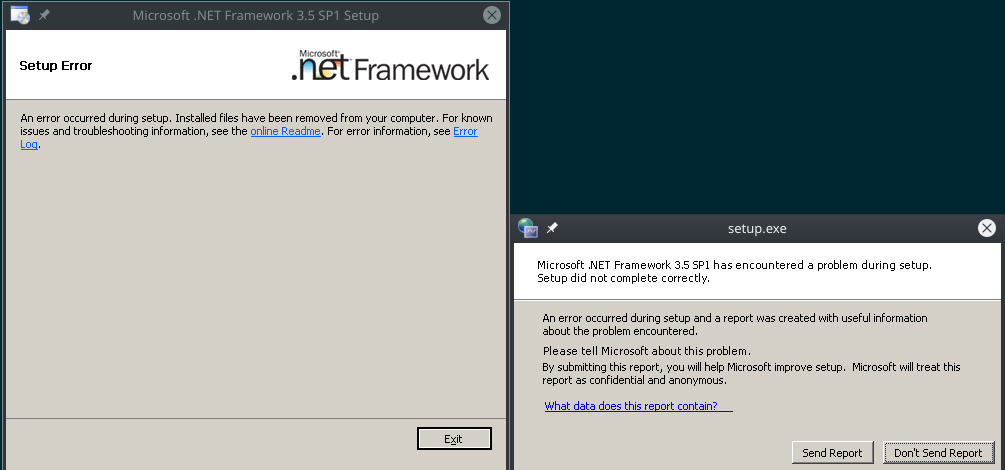
Commands ran during each test were:
export WINEARCH=win32 WINEPREFIX=~/.local/share/wineprefixes/testrm -rf ~/.cache/winetricks/ "$WINEPREFIX"winebootwinetricks dotnet35sp1
Tests conducted with Arch Linux.
Wine 4.12.1
Wine 4.12.1 Staging
CodingKoopa
on 21 Jul 2019
I'm not able to reproduce; works fine here with wine-4.12.1 / WINEARCH=win32 in both quiet and non-quiet modes. Unfortunately nothing is immediately obvious to me from those logs what's wrong.
austin987
on 22 Jul 2019
To further investigate, I grabbed the error log from the dialog (from a 4.12.1 non-staging test, but for this log it seems to be pretty irrelevant). It's an exact match to the log here, leading me to believe that the issue is with the .NET 2.0 SP2 runtime, essentially.
Tests were ran with same commands as before (except for the Winetricks verb), all with Wine 4.12.1 non-staging, with Arch Linux.
dotnet20
Installing the .NET 2.0 runtime succeeded.
dotnet20sp1
Installing the .NET 2.0 SP1 runtime failed, with the same error message as before.
dotnet20sp2
Installing the .NET 2.0 SP2 runtime failed, with the same error message as before.
With this testing, it seems that the problem starts with the .NET 2.0 SP1 runtime / dotnet20sp1. Unfortunately, I'm unsure of what resolved this issue last time.
CodingKoopa
on 22 Jul 2019
Hi, I'm also having the issue with dotnet35sp1 and seems to be failing at the same stage
Wine version - wine-4.12.1
Distro - Void (I experienced the same issue on arch)
For both of these, I used win32 architecture.
dotnet35sp1 logs:
https://pastebin.com/2ukWbZ8g
dotnet20sp1 logs:
https://pastebin.com/v4sh01Tv
 MJGHD
on 30 Jul 2019
MJGHD
on 30 Jul 2019
For the sake of testing things in different environments, I've gathered some testcases on Debian Buster 10.0 running in QEMU, as well as edited past comments and Pastebin pastes to reflect them having been performed in Arch. I've went back to the testcase format + bolding, as there are a lot of different variables here. For Debian, Wine builds were installed from here as this source has Staging builds in addition to Stable and Development.
Testcase 1
- Distro:
Debian GNU/Linux 10 (buster) - Wine Version:
4.12.1 Staging - Winetricks Version:
20181203 - Wine Mono Installed: No
- Wine Gecko Installed: No
- Winetricks verb:
dotnet35sp1 - Status: Succeeded
- Winetricks log: https://pastebin.com/fTdpXZ6p
Testcase 2
- Distro:
Debian GNU/Linux 10 (buster) - Wine Version:
4.12.1 Staging - Winetricks Version:
20181203 - Wine Mono Installed: Yes (Through built in installer)
- Wine Gecko Installed: No
- Winetricks verb:
dotnet35sp1 - Status: Failed
- Winetricks log: https://pastebin.com/6ZMniahu
- Error log: https://pastebin.com/rsmAfz8m
Testcase 1
- Distro:
Arch Linux - Wine Version:
4.12.1 Staging - Winetricks Version:
20190615 - Wine Mono Installed: No
- Wine Gecko Installed: No
- Winetricks verb:
dotnet35sp1 - Status: Failed
- Winetricks log: https://pastebin.com/xRa0wkA6
- Error log: https://pastebin.com/UpggGYqQ
Testcase 2
- Distro:
Arch Linux - Wine Version:
4.12.1 Staging - Winetricks Version:
20190615 - Wine Mono Installed: Yes (Through built in installer)
- Wine Gecko Installed: No
- Winetricks verb:
dotnet35sp1 - Status: Failed
- Winetricks log: https://pastebin.com/NYeK4XtD
- Error log: https://pastebin.com/UpggGYqQ
From these results, I initially thought that uninstalling Wine Mono was the key, but this only solves the issue on Debian (as, when Wine Mono is present on Debian, the error it causes is a different error than the one we have experienced on Arch and Void). Currently, this leads me to believe it's either something with my particular filesystem arrangement, or something about the rolling-update nature of the distros for which this is broken on.
Some other (probably unimportant) random oddities:
- On Arch, when Wine Gecko was installed as a system package,
winebootwould ask about Wine Mono. When Gecko was uninstalled,winebootasked about that, and never prompted about Mono. This is the reason why for Arch tests, Mono is installed as a system package. Finally, when Mono is installed as a system package (but not Gecko), Gecko is not prompted for. ¯\_(ツ)_/¯ - On Arch, sometimes, during
wineboot, this would occur:
--- snip ---
wineserver: could not save registry branch to system.reg : No such file or directory
wineserver: could not save registry branch to user.reg : No such file or directory
Could not load wine-gecko. HTML rendering will be disabled.
wine: configuration in '/home/kyle/.local/share/wineprefixes/test' has been updated.
Tests where this occurred were omitted from any of the testcases.
CodingKoopa
on 31 Jul 2019
I cannot get dotnet 3.5 or 3.5sp1 installed on the latest version either!
It used to work fine for me, but now it keeps failing.
Im running Manjaro (arch based)
 Gibbz
on 8 Aug 2019
Gibbz
on 8 Aug 2019
Similar on Ubuntu 19.04 too. Even in a fresh prefix, with WINEARCH=win32, always hangs at
Setting Windows version to winxp
Executing wine regedit C:\windows\Temp\_dotnet20\set-winver.reg
------------------------------------------------------
Running /usr/bin/wineserver -w. This will hang until all wine processes in prefix=/home/falken/.wine-ade-2 terminate
----------------
Running taskmgr in another window (with same prefix and arch) and killing everything let's it proceed.
If you keep trying again and again with winetricks dotnet35sp1 (with or without --force as needed) it does seem to keep changing the error message, but never works.
Which makes no sense, and isn't much help, sorry.
One other odd thing is wine dotnetfx35.exe always downloads things. Even though it's the full 200-and-something meg download version.
 tomchiverton
on 25 Aug 2019
tomchiverton
on 25 Aug 2019
I was only doing this to install Adobe Digital Editions.
The fix is to remove all the Ubuntu wine packages and just use the ones from winehq ppa. Then install latest winetricks which has an option to install ADE (v4) directly.
Now works fine, opens and downloads books purchased from Kobo.
Fresh wine prefix, wine32 arch, natch.
So wine 3 is just broken, probably will never be fixed. Stop using it. Wine 4 works.
And I didn't break whatever magic Steam Proton does while doing it..
tomchiverton
on 26 Aug 2019
So wine 3 is just broken, probably will never be fixed. Stop using it. Wine 4 works.
To be clear, the other recent reports have all been taken with Wine versions from the 4.x series.
And I didn't break whatever magic Steam Proton does while doing it..
Steam Proton uses its own Wine prefixes, as well as its own Wine binaries, so there's little chance of the two affecting each other (generally, Steam even bundles its own shared libraries that it depends on too).
CodingKoopa
on 26 Aug 2019
Using Arch Linux I tried several versions of the wine package. Installing dotnet35sp1 failed for versions 4.10 - 4.15, which is at the moment the most recent version.
However, using Wine 4.9 installing dotnet35sp1 did work without a problem. Upgrading wine afterwards still keeps it running. So my workaround for now is downgrade Wine to 4.9, install dotnet35sp1 and upgrade wine again.
I'm using winetricks 20190615 across all Wine versions.
 Whisprin
on 6 Sep 2019
Whisprin
on 6 Sep 2019
I'm pretty confident that this issue was introduced by a change in wine-msi since 4.11.
https://bugs.winehq.org/show_bug.cgi?id=47724
 4llan
on 7 Sep 2019
4llan
on 7 Sep 2019
With that bug being closed, I have performed some additional testing. For all of these, neither Wine Mono nor Wine Gecko were installed.
Testcase 1
- Distro:
Debian GNU/Linux 10 (buster) - Wine Version:
wine-4.0.3(winehq-stable) - Winetricks Version:
20181203 - Winetricks verb:
dotnet35 - Status: Success
- Winetricks log: https://pastebin.com/qmGyPDu2
Testcase 2
- Distro:
Debian GNU/Linux 10 (buster) - Wine Version:
wine-5.0-rc2(winehq-devel) - Winetricks Version:
20181203 - Winetricks verb:
dotnet35 - Status: Success
- Winetricks log: https://pastebin.com/Yn1Afqce
Testcase 3
- Distro:
Debian GNU/Linux 10 (buster) - Wine Version:
wine-5.0-rc2 (Staging)(winehq-staging) - Winetricks Version:
20181203 - Winetricks verb:
dotnet35 - Status: Success
- Winetricks log: https://pastebin.com/7SNiLjtk
Testcase 1
- Distro:
Arch Linux - Wine Version:
wine-4.0.3(wine-stable) - Winetricks Version:
20191224 - Winetricks verb:
dotnet35 - Status: Failure

- Winetricks log: https://pastebin.com/zigjQaem
- Error Log 1: https://pastebin.com/J96xwjgR
- Error Log 2: https://pastebin.com/ke1A5c9j
Testcase 2
- Distro:
Arch Linux - Wine Version:
wine-5.0-rc2(wine) - Winetricks Version:
20190615 - Winetricks verb:
dotnet35sp1 - Status: Failure
- Winetricks log: https://pastebin.com/5UWituK6
- Error Log 1: https://pastebin.com/x9Uuxhqg
- Error Log 2: https://pastebin.com/qqHcwdcq
Testcase 2
- Distro:
Arch Linux - Wine Version:
wine-5.0-rc2 (Staging)(wine-staging) - Winetricks Version:
20190615 - Winetricks verb:
dotnet35sp1 - Status: Failure
- Winetricks log: https://pastebin.com/xPNVWSda
- Error Log 1: https://pastebin.com/6twt8Fc0
- Error Log 2: https://pastebin.com/7TC2qVEf
This data shows that installation of dotnet35 (which should more or less produce the same results as dotnet35sp1) is now successful on Debian, but not on my Arch Linux installation. I'm unsure of what is causing this difference. Cheers, hope you're all doing well 😃
CodingKoopa
on 27 Dec 2019
A) does installing winbind on arch help (I realize debian is also missing, but IIRC it has broken things for some people before).
B) https://blogs.msdn.microsoft.com/aaronru/2008/05/21/when-installing-net-framework-3-5-on-vista-what-does-the-net-framework-2-0-sp1-on-vista-error-code-1058-mean-and-how-do-i-work-around-it/ implies that your arch error is due to the windows update service being disabled. Wine has a basic implementation of that, though I don't know why Arch fails there.
My suggestion would be to compare the differences in the two systems. I.e., if you build wine yourself on both, does it work? Are they using different compilers? Does arch apply custom patches?
austin987
on 29 Dec 2019
Does arch apply custom patches?
Going by the prepare() function in the Arch wine PKGBUILD script, not really. I'm less familiar with the Debian build system, but I've installed my package from WineHQ, so I doubt that patches have been applied here. I wasn't able to conclusively determine this myself, because the OBS confuses me.
I will try the other things you've listed when I get the chance, cheers.
CodingKoopa
on 29 Dec 2019
Put aside that I had to kill mscorsvw half way through the install procedure, it seems to install just fine for me on manjaro.
 mirh
on 18 Apr 2020
mirh
on 18 Apr 2020
What Wine version (wine --version) are you using?
CodingKoopa
on 18 Apr 2020
5.5 staging
mirh
on 18 Apr 2020
dotnet35 and dotnet35sp1 both work for me now. Tested on Arch, with wine and wine-stable. I also have reports of it working with wine-staging.
CodingKoopa
on 14 Jul 2020
Related issues
 heidemn
·
3Comments
heidemn
·
3Comments
 kenorb
·
8Comments
kenorb
·
8Comments
 GoogleCodeExporter
·
14Comments
GoogleCodeExporter
·
14Comments
 nl255
·
10Comments
nl255
·
10Comments
 vadi2
·
5Comments
vadi2
·
5Comments
Most helpful comment
I'm pretty confident that this issue was introduced by a change in wine-msi since 4.11.
https://bugs.winehq.org/show_bug.cgi?id=47724