Winetricks: not able to install dotnet >= 45
Ref. following issue:
Installation of .NET 3.0 (dotnet30) fails
https://github.com/Winetricks/winetricks/issues/700#issuecomment-279733112
'netframework3.exe' can fail also in a similar manner to 'dotnetfx3.exe', executing the command that failed using wine on the command line alone works fine.
'dotnet40' installs OK (depending only on dotnet30), however dotnet45 and above pulls in dotnet35sp1, and also dotnet20 (which conflicts with dotnet >= 45), before failing in one of the ways as outlined above.
Applies to the current default wine and winetricks install on Ubuntu (wine 1.8), however also stable 2.0, and devel and staging 2.1 (with the latest winetricks).
A workaround:
$ wineboot --init
$ wine winecfg  # [ ] change OS to Windows 7
$ wine uninstaller  # [ ] uninstall mono if installed
$ # download .NET 4.52 https://www.microsoft.com/en-gb/download/details.aspx?id=42642
$ wine /opt/NDP452-KB2901907-x86-x64-AllOS-ENU.exe
.NET 4.62 will install likewise from what I can gather but with a workaround (involves an alternate download).
 gso
gso
All 13 comments
I'm not able to install .NET 4.62, installing with silent mode doesn't work neither
In a clean wine 32 prefix
winetricks dotnet46
installs .Net 2.0 and
error: dotnet46 conflicts with dotnet20, which is already installed.
 ghost
on 22 Feb 2017
ghost
on 22 Feb 2017
You need to download an 'un-official re-packed version' by the looks, see the WineHQ DB entry https://appdb.winehq.org/objectManager.php?sClass=version&iId=34702 - you will need also to install it manually (ref. workaround steps outlined above).
4.0 installs with winetricks fine, for some reason though higher than this pulls in 3.x which installs 2.0 which conflicts with the original version; .NET > 4.0 can however be installed standalone (i,.e., does not actually need 3.x or 2.0, unless they are included by winetricks for other misc. components).
gso
on 22 Feb 2017
+1 that winetricks dotnet45 seems to install dotnet20, and then later says error: dotnet45 conflicts with dotnet20, which is already installed.
I'm interested to see where the script that winetricks dotnet45 is lives - I didn't see it when I searched through this repo.
 caseywatts
on 27 Mar 2017
caseywatts
on 27 Mar 2017
Please test #757
 austin987
on 31 Mar 2017
austin987
on 31 Mar 2017
austin987
on 31 Mar 2017
austin987
on 31 Mar 2017
https://github.com/Winetricks/winetricks/commit/ddf5c7c059ebc9b78031584cb82332e091c52d28 should fix this.
austin987
on 20 Apr 2017
I haven't been able to test this, sorry
I thought I could power through, but I don't grok wine/winetricks/etc enough to figure out how to test a branch :x
I think it seems pretty likely that not calling w_call dotnet35 will fix this issue, I'm hopeful! :)
caseywatts
on 20 Apr 2017
For anyone else having this problem a workaround is to run:
winetricks --force dotnet452
The installer for .NET 4.0 will run first, which will ask if you want to remove or repair the installation - either option seems to work fine (selecting remove will give you an error that you cannot remove 4.0 in this context, which then proceeds to install 4.5.2 fine)
 krisives
on 20 Nov 2018
krisives
on 20 Nov 2018
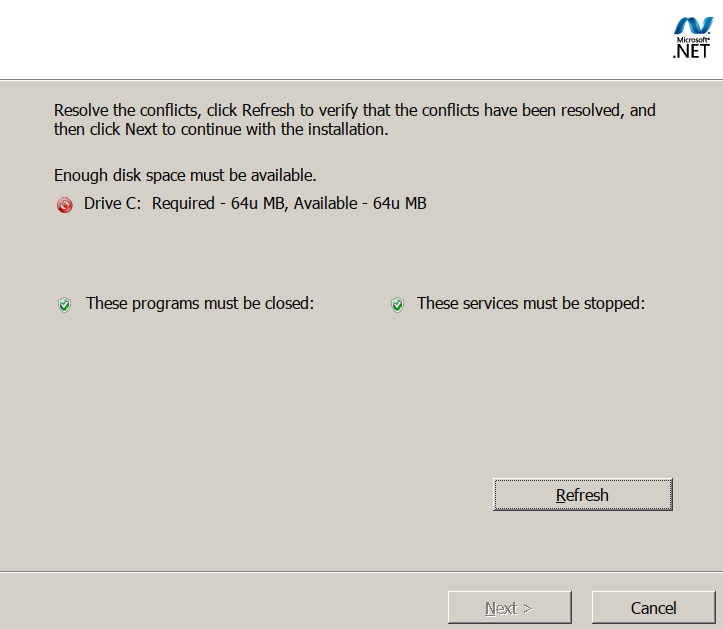
Whatever I do I get this:
 Zibri
on 21 Feb 2019
Zibri
on 21 Feb 2019
@Zibri If I remember correctly, this does actually mean you need more disk space, despite the error not showing correctly.
 qwertychouskie
on 21 Feb 2019
qwertychouskie
on 21 Feb 2019
@Zibri what kind of file system is your prefix on?
austin987
on 21 Feb 2019
Normal root file system on ubuntu standard installation. (ext4)
On Thu, 2019-02-21 at 14:35 -0800, Austin English wrote:
@Zibri what kind of file system is your prefix on?
—
You are receiving this because you were mentioned.
Reply to this email directly, view it on GitHub, or mute the thread.{"api_version":"1.0","publisher":{"api_key":"05dde50f1d1a384dd78767c5
5493e4bb","name":"GitHub"},"entity":{"external_key":"github/Winetrick
s/winetricks","title":"Winetricks/winetricks","subtitle":"GitHub
repository","main_image_url":"https://github.githubassets.com/images/
email/message_cards/header.png","avatar_image_url":"https://github.gi
thubassets.com/images/email/message_cards/avatar.png","action":{"name
":"Open in GitHub","url":"https://github.com/Winetricks/winetricks"}}
,"updates":{"snippets":[{"icon":"PERSON","message":"@austin987 in734: @Zibri what kind of file system is your prefix
on?"}],"action":{"name":"View Issue","url":"https://github.com/Winetr
icks/winetricks/issues/734#issuecomment-466195621"}}}
[
{
"@context": "http://schema.org",
"@type": "EmailMessage",
"potentialAction": {
"@type": "ViewAction",
"target": "https://github.com/Winetricks/winetricks/issues/734#issuec
omment-466195621",
"url": "https://github.com/Winetricks/winetricks/issues/734#issuecomm
ent-466195621",
"name": "View Issue"
},
"description": "View this Issue on GitHub",
"publisher": {
"@type": "Organization",
"name": "GitHub",
"url": "https://github.com"
}
}
]
Zibri
on 23 Feb 2019
https://bugs.winehq.org/show_bug.cgi?id=33392
In my testing dotnet45 needed 1.7GB of free space while dotnet46 was good with 1.5GB (at least as reported by df).
EDIT: dotnet40 is the most painful, with 1.9GB required
 mirh
on 2 Sep 2020
mirh
on 2 Sep 2020
Related issues
 bandi13
·
14Comments
bandi13
·
14Comments
 IngeniousDox
·
7Comments
IngeniousDox
·
7Comments
 pmo-19
·
7Comments
pmo-19
·
7Comments
 as3mbus
·
4Comments
as3mbus
·
4Comments
 601t
·
4Comments
601t
·
4Comments
Most helpful comment
For anyone else having this problem a workaround is to run:
The installer for .NET 4.0 will run first, which will ask if you want to remove or repair the installation - either option seems to work fine (selecting remove will give you an error that you cannot remove 4.0 in this context, which then proceeds to install 4.5.2 fine)