Windowstemplatestudio: WPF installer
Describe the bug
After creating a new app, I wanted to test out the package.appinstaller. After executing it, it shows a window saying "Error in parsing the app package."
To Reproduce
Steps to reproduce the behavior:
- Create new WPF project
- Add installer
- Build
- Run installer
Expected behavior
Installer runs and installs the package on computer it is ran on.
Additional context
I am a newbie so please go easy on me.
System
- VS Version:16.5.2
- WinTS Wizard Version:0.21.20097.1 (nightly)
- WinTS Template Version:unknown, whatever is the default for the nightly version
- Windows Build:18363
 Luk164
All 10 comments
Hi,
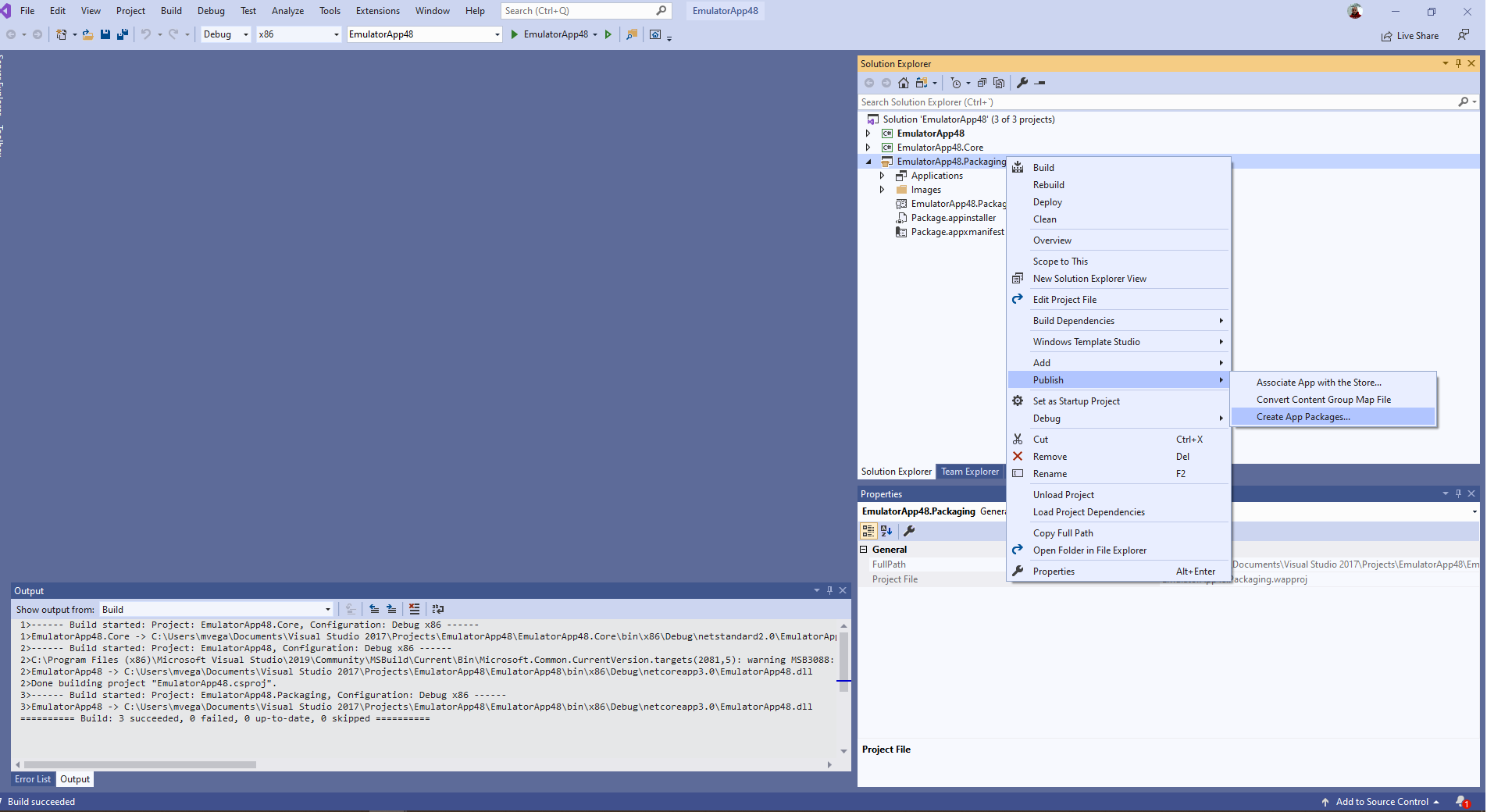
You can try creating the package with Publish > Create App Packages using x86 configuration
 mvegaca
on 6 Apr 2020
mvegaca
on 6 Apr 2020
How can you create a new project wpf with dev-nightly? i got an error saying: The given key was not present in the dictionary . So i cannot even create a project. What kind of mistakes i'm doing?
I was already running nightly.
Luk164
on 7 Apr 2020
I've just tried to reproduce that but I can create and install the app using the MSIX feature, please try following these steps:
- Set Packaging project as the startup project
- Set build configuration as x86
- Right click publish => Create App Packages => Sideloading (without automatic updates) => use selected certificate => select x86 Debug
- Open resulting package folder
- Install certificate
- Install using Install.ps1
- Open the app
If you still can install the app, please try to attach an easy to reproduce generated app and I'll try help you
mvegaca
on 8 Apr 2020
@mvegaca Well, your step-by-step instructions did help. Installer does its magic and installs the app, but now it does not launch and I do not get any error message either. Probably a problem with me having a Entity Framework database inside? But all calls to it are covered by try carch with message box prompt if error happens.
Luk164
on 9 Apr 2020
@Luk164, could you share a repro project?
 sibille
on 13 Apr 2020
sibille
on 13 Apr 2020
@Luk164, could you share a repro project?
I tried creating a fresh project, but that worked fine, so I sent you invites to my two part project that is having the issue (this is a part of a bachelors degree project so I should not share it openly). Please excuse the other installers, I was using hail-mary approach to see if something works. Hope it helps
Luk164
on 13 Apr 2020
@Luk164, is this still an issue? Could you provide repro steps or resend the invitation to the repro project?
sibille
on 15 Jun 2020
@sibille Ok, I tested it and fresh project works fine. The only thing left is to get it to work on the old one. I will be defending my work 25.6. after that I should be free to publish the code. I will also re-add you to the repo now. Edit: Access granted to both main project and its one submodule.
Luk164
on 15 Jun 2020
Had a look at your project the installer looks good, I think your problem is related to entity framework. I see an error in the EventLog saying that package: 'Microsoft.EntityFrameworkCore.Design', version: '3.1.4' was not found.
I did not find a lot of information on how to correctly setup entity framework in a packaged wpf application, did you try to open an issue at https://github.com/dotnet/efcore/issues?
sibille
on 16 Jun 2020
@sibille Good find, I will create an issue when I can finally show source code. Thank you
Also, as you probably noticed, I already have the old windows installer packaging set up so this is not a very pressing issue. I am also thinking about trying out WiX or NSIS. I tried advanced installer but it was not the right fit for me
Luk164
on 16 Jun 2020
Related issues
 touseefbsb
·
6Comments
touseefbsb
·
6Comments
 crutkas
·
8Comments
sibille
·
4Comments
crutkas
·
8Comments
sibille
·
4Comments
 hupo376787
·
6Comments
sibille
·
4Comments
hupo376787
·
6Comments
sibille
·
4Comments