Windowstemplatestudio: Page: adaptive gridview page
we can have a page option with adaptive gridview( as in uwp community toolkit ) and/or Listview with slideable listview items ( also in uwp community toolkit) and both of these controls can have a sticky header ( within uwp community toolkit ) or shy header ( when in creators update or further, shy header example is present in windows dev UI sample app ).
Datatemplate and structure of each griview or listview item can be of typical use with couple of basic properties which can be easily edited obviously afterwards by the developer as in MVVM pattren would be perfect for this scenario.
 touseefbsb
All 98 comments
One issue per request, this is two requests.
 crutkas
on 25 May 2017
crutkas
on 25 May 2017
Different header options make this even more than two requests.
For reference: http://docs.uwpcommunitytoolkit.com/en/master/controls/AdaptiveGridView/
Also note that the ListView in the Fall Creators Update adds native support for swipeable list items too.
 mrlacey
on 25 May 2017
mrlacey
on 25 May 2017
then only gridview page with header would be enough for this one request. Thanks
touseefbsb
on 26 May 2017
GridView vs Adaptaptive gridview, why not just reference the UWP toolkit one via a comment. If someone wants to do the upgrade, the could. While powerful, it should be an easy swap
crutkas
on 26 May 2017
Is the current Grid page sufficient or is there the need for a toolkit/adaptive version as well?
Or would documentation on how to use something else be enough?
mrlacey
on 2 Jan 2018
is the new photo grid page more inline? I really think that we are splitting hairs here for swapping out controls. i stand behind we comment the template that you can swap it out with others else we'll have hundreds of permutations.
crutkas
on 3 Jan 2018
@crutkas @mrlacey I have some more feature recommendations, regarding this gridviewpage, or extensions in adaptivegridview if you will.
- Search bar : a top search bar attached to the control which can be enabled/disabled with a bollean property. this search bar auto filters the items on basis of the filterDescriptor provided ( filter descriptor can be defined by the developer, tht which string,time,int property to match with which condition i.e : Contains, startswith, endswith e.t.c. and which operator to use [AND/OR] in case of multiple property filter provided.)
Grouping : another optional feature to enable grouping on basis of a string property of the items. and this grouping will obviously include the semantic zoom feature as well.
Incremental Loading: I know this is already in the community toolkit. But it can be part of the control with another boolean property to enable it.
Sorting : sorting with 1 or more properties.
List/GridSwitcher : there can be a toggle button on the top of the control which can toggle the control to view as a listview ( each item expanded fully ) or to a gridview ( normal grid like behaviour )
These are some of the most common scenarios which are required by developers and there are many ways to do it, but this can get very complicated to align them with best practices. We can discuss which features are doable or should be done, or should a seperate dedicated new type of page should be created for all these features? or maybe should I post it in community toolkit repo instead?
Please note that many of these features are inspired from Telerik UWP Grid Control but that is rather just a row by row control to show the data, but I was wondering if some of those key features can be implemented in a traditional collectionView which is native to uwp and has the brilliant UI we all know and love, which works great with fluent design obviously by default and users can add animations etc into it if they want. This can be a very powerful control/page yet looking very good to the eye as well.
touseefbsb
on 1 Feb 2018
@touseefbsb a lot of what you're mentioning seems more related to #520 where we have split out the ideas behind a more complex list page.
also, where are the two quotes from?
mrlacey
on 1 Feb 2018
I'm open to having a separate grid page option (for the Community Toolkit version) but we need to be clear on how it's different to the Telerik one and the different advantages of each.
mrlacey
on 1 Feb 2018
@mrlacey
yeah sure let me elaborate how it can be different from telerik one.
Telerik control disadvantages for uwp platform.
- No Fluent Design
- No responsiveness because of multiple columns.
- Restricted to a column based data only ( cannot show data like a traditional gridview)
- column headers are not needed in all scenarios.
Basically what I am trying to explain here is that telerik grid control is limited to 1 specific scenario which is to represent and deal with column based data with mostly, strings, datetime, int and all mathemetical properties and taking their sum, avg etc. which is good with database like apps and apps which need to deal with that sort of data only.
Meanwhile if we want to show a list of items with any sort of custom functionality and custom data template working with images, videos, buttons, commandbars, semantic zoom, grouping, and whole lot of fancy uwp stuff which traditional listview/gridview offer, also they offer fluent design and on the road map of UI that should be prefered.
telerik UI has bundle of features which are mostly not used unless ( as i said before ) you have an admin dasboard app and you need to work with database stuff.
So I am proposing a powerful control which is based on traditional uwp gridview/listview ( or AdaptiveGridView would be even better ). and then add those uwp extension features to it by default, which are already present in the platform but user has to do a lot of work to enable them, like sorting, switching between grid./list mode,, semantic zoom and grouping. this will be 1 advantage, and then I want to take only some features inspired from telerik grid, which can be used in almost 90 percent of the uwps apps which have a list of elements in any form, and those features are like searching ( filtering as we type ) accross 1 or more properties, as told by the developer.
I can show you guyx images or other references or examples of such use cases, on web and on other mobile apps well where this use case is very very common.
*Summary *:
this new control = uwp adaptive gridview + uwp features to extend the listview/gridview + some extra new features which can be seen in almost every app
touseefbsb
on 1 Feb 2018
and as u said in the other issue, virtualization, pull to referesh. incremendtal loading, stuff like this is required by every uwp gridview and are called as best practices in my opinion, then why not have a control with all these features, and every feature can be enabled with just one boolean property? this will remove a lot of friction for uwp developers in many scenarios. and if a feature is unwanted , developer should just not enable it or disable it if it is enabled by default, and then he wont need to worry about maintaing tht specific feature in his app.
touseefbsb
on 1 Feb 2018
WTS is not here to write/host new controls.
If you think the control in the community toolkit could be improved, then you should make your suggestions there.
WTS is also not about adding pages that show examples of all that could be done around an area of functionality or combination of controls. The aim of WTS is to provide a structure to build upon, not provide a lot of configurable options in a lot of code that the majority of people won't need.
If there are some clearly distinguishable advantages to adding a page option that adds the AdaptiveGridView with a small amount of data and minimal additional code then yes we should consider adding it, otherwise not.
mrlacey
on 1 Feb 2018
Oh alright I will request it in the uwp community toolkit then thanks :)
touseefbsb
on 1 Feb 2018
I'll close this for now then. We can reopen if there's a good argument for having the toolkit control on its own page and with a clear differentiation from the Telerik grid.
mrlacey
on 1 Feb 2018
@mrlacey
Ok then ill try to make it simpler to create a page with following features.
we can have a page with AdaptiveGridView attached with a commandbar at the top. and this control will be using AdvancedCollectionView (which is also from toolkit) as its itemsource. and on the command bar we can expose the features of AdvancedCollectionView like filtering, sorting, NotificationDeferrer (for performance) ,live shaping, incremental loading etc. the filtering will obviously require textbox/Autosuggestbox in the commandbar.
and the use case can be pretty straight forward and simple with some simple data template ( image and 2 textblocks ). and the developer can customize the scenario according to their needs, with documentation and the code comments provided.
So we are not creating a new control, just putting a toolkit control and extending it functionality with a toolkit service, and provide developers with a headstart on a dedicated page in WTS. all code is already created by the toolkit, we just have to assemble a control and a service with best practices of WTS
touseefbsb
on 1 Feb 2018
The issue of how to distinguish between this grid and the one from Telerik still remains. As well as making it clear to people which they should use.
What's the specific advantage of adding a page that has what you describe?
You refer to a "use case" but don't give one. Just a description of something that can be customized. Why and how would this be used?
Why add a page with this combination of controls rather than another set? There's a balance to be found between providing something that can be used by a large number of people and moving towards a position of adding lots of pages that contain a wide variety of different combinations of controls.
mrlacey
on 1 Feb 2018
ok ill try to provide some common use cases.
- media apps ( both video and audio ) can use this page frequently on multiple pages.
- a simple collection which needs all these features but dont want extra features which telerik provides ( sum, column grouping, mathematical operations filter each column.)
- all the grids or lists in uwp are responsive to screensize but telerik is not responsive bcz of the column structure, so even if we need a responsive gridview, we cnt use telerik.
- apart from media we can have use cases, like rss feeds, twitter feeds etc.
- Another reason that developer will prefer this new page is bcz telerik grid cannot be easily extended with external uwp features. ( semantic zoom, fluent design, ink support and many more ).
Right now I cant think of any more concrete use cases, but I think you get the idea is "telerik grid covers only 1 main use case i.e : data base like rows and columns. But the page I am suggesting will cover all other use cases and possibilities in uwp which deals with collection of data or collection of xaml elements, gridview is I think one of the most used controls in the platform tht is because almost every app needs a gridview functionality. look at movies and tv, groove, netflix and hundreds of more apps on the store which are using gridviews with searching, filtering, sorting, sematic zoom and incremental loading with virtualization. and the telerik grid can only work with business data apps, it will not work good if I wan to put images, videos and even a command bar in each item. I hope now I have clarified my point :)
touseefbsb
on 1 Feb 2018
telerik grid page
want to make a business apps with data rows and high calculations of columns, and maybe thousands of rows and dont care much abt how it looks and responsiveness, then select this page for ur app.
gridview page
- care that it is responsive, fluid and uses microsoft fluent design and what all personal and entertainment apps of uwp are using and want to implement powerful coneection animations, and scaling and other composition layer stuff with your gridview? then use this page and extend it or customize it to ur needs.
touseefbsb
on 1 Feb 2018
couldn't this be used in the photo page?
crutkas
on 1 Feb 2018
@crutkas if the photo page can have a textblock in the datatemplate along with image( for sake of sorting and filtering ) then yes we can upgrade the photo page to include all of this
touseefbsb
on 1 Feb 2018
@touseefbsb have you looked at the page, i would imagine the template could
crutkas
on 1 Feb 2018
yes I have looked at the photo page, obviously all of the features I mentioned above with AdvancedCollectionView can be implemented into photo page as well. but right now it doesnt have them, correct me if I am wrong
touseefbsb
on 1 Feb 2018
we have to thread a delicate balance of useful templates that are adaptable but not too targetted for one person's need. If you feel strongly that that page should be adjusted, by all means, lets create a very targetted issue for this, state the scenario on improvements and what will be adjusted.
A different route could be pointing to documentation in a comment in the template saying "hey, if you want some of these features, swapping this control for that control could do that for you, go here to learn more"
crutkas
on 1 Feb 2018
I think part of the problem here is the overload of the word "grid".
We have the current "Grid Page" which uses the Telerik control and is designed for displaying rows and columns of text. Like a spreadsheet.
Touseef correctly points out that there are lots of other scenarios where it may desirable to have other, more complex, items displayed in rows and columns on a page. What might also be called a "grid."
The community toolkit contains a control (called the "AdaptiveGridView") that is capable of displaying arbitrary content in rows and columns as well as containing other features. Such grids are used very widely and there are few assumptions that can be made about functionality on pages that use this layout.
Of the non-text content that may be displayed in a "grid", the most common form is _assumed_ to be media or images. WTS already contains an "Image gallery" page which is a "grid" optimized for displaying images in both a thumbnail gallery and full-screen modes.
In theory, the ImageGallery could be changed to host any XAML content and not just a single image but there are a few issues with this.
- It's not simple.
- The positioning of the page as being an "image gallery" doesn't make it obvious that repurposing is possible.
- The ImageGallery page includes things that may not be wanted, such as large/detail view and connected animations, which would need to be removed.
I think there could be a place for a new page that can host arbitrary XAML content in rows and columns.
- Using the
AdaptiveGridViewfor this page seems a reasonable approach. - The generated UI should be simple. I suggest an image or block of color with some text over the top and accompanying TODO items to indicate that it is expected that the default UI will be changed.
- The page would do nothing in terms of triggering navigation or providing any other action when an item is selected as there's no single action that can be assumed to be always wanted here.
- The generated page should not include other controls or functionality that may or may not be wanted or enabled by the developer. (If anyone wanted to contribute some documentation that shows how this could be done then we could link to that.)
- I'm in two minds about even including the
AdvancedCollectionViewto show sorting and filtering of data. If we did use it, it would have to come with a comment that it is optional and can be removed if not wanted/needed.
If we did add this it would need a suitable name. We don't want two things called just "Grid". I suggest renaming the existing grid to "DataGrid" and calling this a "ContentGrid". Other suggestions for names are welcome.
mrlacey
on 1 Feb 2018
I think the name must have GridView in it, because the normal Grid is just the grid control in the xaml which is very different from a GridView which represents a collection. This GridView is a normal uwp control comes with sdk. UWP Community Toolkit extended this control to create an improved version of it called AdaptiveGridView. The main extra feature it has that the window size change also changes the size of each cell in the GridView which is perfect for responsive layout. So I will suggest to use AdaptiveGridView from the Toolkit on this page, instead of normal GridView control.
So I will suggest some of following names.
- ExtendedGridView
- AdvancedGridView ( Considering AdvancedCollectionView)
- SuperGridView
or add the word Page at the end if you want to name it obviously as a page. but the word GridView or CollectionView would be best to use in it as it will send the write message to the uwp developers.
About the AdvancedCollectionView :
I think this should be a must feature because every uwp develop knows how to use a simple AdaptiveGridView or a normal GridView. But not everyone knows how to implement some extended features which are wrapped in AdvancedCollectionView by the toolkit for us. Yes it would be good practice to make them optional according to the choice of the user, because Microsoft recommends them as best practices and most apps do need them, if a user just wants to use a normal gridview they can just put up a blank page and use the control straight away thts not much work, but including these other features is a lot of friction, but many use cases as well, so creating a dedicated page for that would be perfect in my opinon.
I can further suggest about how to go with the user interface and other features, if you guys go ahead and decide to make this page.
touseefbsb
on 1 Feb 2018
For lack of any _proper_ data and because there's speculation on "most apps" needing this.
I looked at all the screenshots of the top free PC apps in the US store.
Of those with "real" UI, about a third used some sort of "generic grid".
Based on a quick assessment of "How would I create what I'm seeing?" There was only a single app screenshot where I think the current ImageGallery would have been a good base for recreating what I saw. And also only a single app where I'd use the Telerik grid.
Not a thorough, scientific, or representative study, but I'm becoming convinced there's a need for something here.
mrlacey
on 1 Feb 2018
@touseefbsb the displayed name of any page will not include "Page" or "View" as a suffix. They're too loaded and controversial. They also don't add any meaning.
We can't leave the current page just called "Grid" and have the new one called "AdvancedGrid" or "SuperGrid" because these names do nothing to communicate the differences between them or help someone know which one is more appropriate to their needs.
every uwp develop knows how to use a simple AdaptiveGridView or a normal GridView
Absolutely not! I guarantee there are some UWP developers who have no clue about either. I bet there are also some who've never even heard of the UWP Community Toolkit.
It's not helpful to make any such broad assumptions about the people who will use WTS. Especially, as a key part of our intended audience is people who are new to developing with/for UWP.
Microsoft recommends them as best practices
I'm lost about what you are saying is recommended as best practices. Can you explain? And point to where this is documented?
mrlacey
on 1 Feb 2018
if you want to look at more use cases, search the store with "video player" and "music player" tags, 90 percent of these apps will have the GridView. Developers used to struggle on how to use those extra features thankfully toolkit gave the solution by creating AdvanceCollectionView Now I think these 2 aspects should be merged together to solve the problem and make a standard implementation once and for all, obviously this page will also keep improving with community feedback
touseefbsb
on 1 Feb 2018
First of all I think you are confusing Grid with GridView. those are 2 completely different controls.
Grid is a xaml control and it is just an empty container like stackpanel or relativepanel.
GridView is entirely different thing. Obviously you might know all that as you are a uwp man yourself.
the naming of telerik grid is actually confusing, because it is actually a datagrid and not a grid. instead a better name for that should be a tableView. I dont know why telerik named it as grid which causes the confusion with normal uwp grid.
the reason i said GridView should be included in the name is because it will be based on AdaptiveGridView which is NOT a grid but actually a GridView. the name SuperGrid is misleading yes, but the name SuperGridView is not.
Yes you are right the beginers wont know how to implement a simple gridview, but I think microsoft docs and uwp samples on github already have that code with examples, so why would we want to reproduce that? wts is supposed to reduce the friction towards better apps for uwp developers so that is why I suggested to use AdvanceCollectionView as well. because a beginer developer will do go tutorials, then docs and then the uwp samples, and after the basics, when they want to make an app they might find out WTS and use it to generate their project, but if this page is generating whts already present in sample, then it would be just an extra page I think.
And i said Microsoft recommends is because, you can look at the traditional uwp apps, see Movies and TV for instance, and notice the semantic zoom in its gridview, Microsoft has that on almost every app where they use this scenario, look at groove app, calendar app, calculator app, mail app.
Other features like filtering and sorting and incremental loading are already used a lot with GridView, just the fact that toolkit creating this dedicated control and this dedicated class AdvanceCollectionView proves my point that this is something which is used by uwp developers a lot. my aim or suggestion is just to bring these 2 together on one page and make the life of a developer a lot easier. i.e AdaptiveGridView + AdvancedCollectionView
touseefbsb
on 1 Feb 2018
@mrlacey any update on where are we going on this? the discussion seems to be stopped for some days.
touseefbsb
on 9 Feb 2018
@touseefbsb My apologies for letting this go quiet. I was getting lost with your talk about building new controls, discussion about naming, and I didn't understand where the quotes you were including were coming from.
I was also struggling to find a way to clearly communicate what I was proposing.
I am not thinking about building any new controls or adding extensive code to any pages.
What I am proposing is a new Page in the WTS templates.
While at the moment we have this:
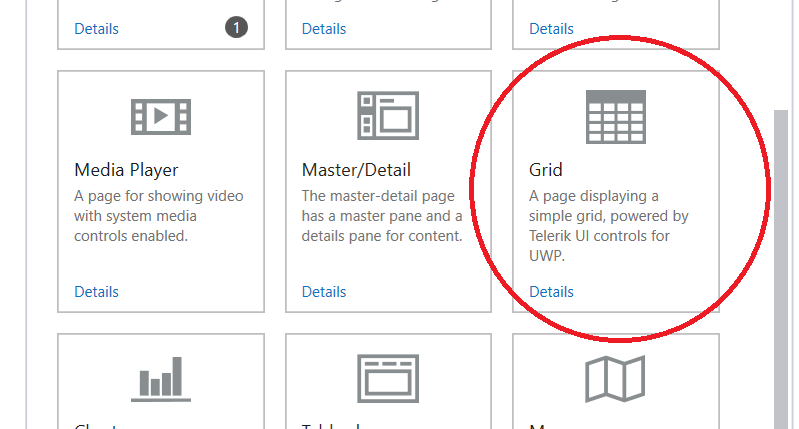
I think there is a strong argument for moving to something like this:
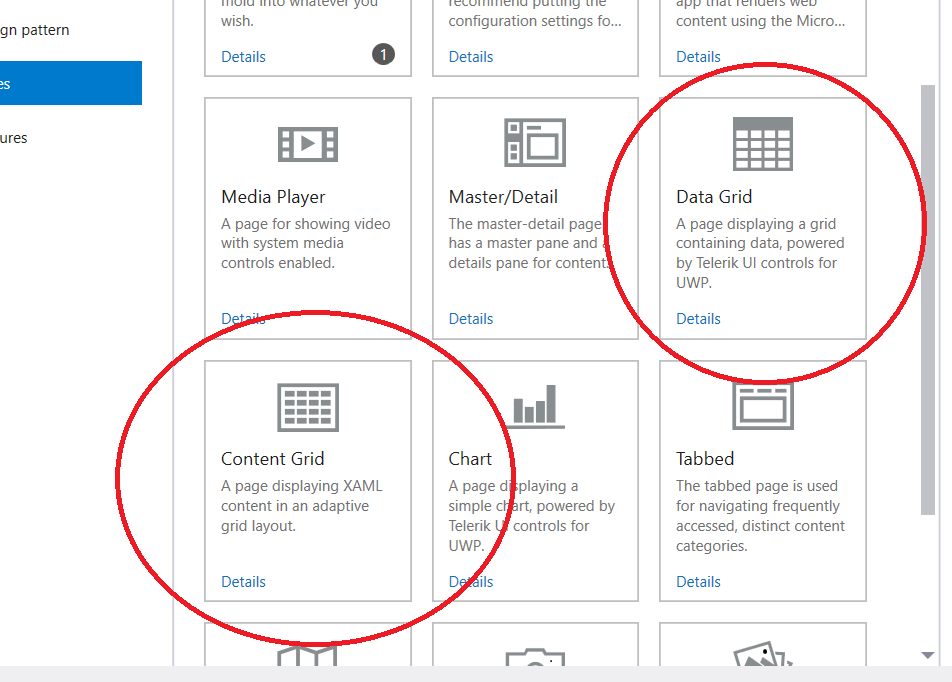
The existing "Grid" page would be renamed to make it clearer that it is for textual and numeric Data displayed in a grid/table.
A new page would be added that would display XAML based Content in a "_grid_". It would use the AdaptiveGridView from the toolkit but contain minimal extra code or functionality.
The use of pages that contain XAML content representing a related series of items and that is laid out in rows and columns is common and I think this justifies the inclusion of such a page. However, the XAML that is used for items in the grid, and the functionality and interactions with those items varies wildly between apps. Due to this variety, we would provide only very basic XAML as an example and leave the implementation of interactions, and functionality to individual app developers.
mrlacey
on 10 Feb 2018
@mrlacey fair enough seems reasonable. my only concern is that it should not be reproducing the GridView sample code in the uwp-samples repo, it should do it with a different approach or maybe something which the samples dont have already, as I suggested before.
touseefbsb
on 10 Feb 2018
I disagree. We should produce code that makes sense for a new page. wts makes code that is for your file new project. It is a strong starting point for you. You could use it for samples and learning but we make code that helps you do complex stuff and make your application faster versus tracking down boilerplate code.
crutkas
on 10 Feb 2018
@touseefbsb here is an idea, why don’t you produce a proof of concept of what you think a successful page of this would look like. What would you want as the template?
crutkas
on 10 Feb 2018
@crutkas yeah you are right the boilerplate code should be simple and must be applied to all use cases because it is very generic page for any uwp project, in that case I think very basic implementation only seems relevent, with links to further resources in the comments, if anyone wants to extend and add certain more features to the page.
touseefbsb
on 10 Feb 2018
Can you create a POC for what you think you feel a solid page file new would be for this scenario? We can look at it and make it generic. I think you have a clear vision here
crutkas
on 11 Feb 2018
ok sure I will try to make a sample as soon as I get some time to do that
touseefbsb
on 14 Feb 2018
@crutkas @mrlacey Here it is I have created a sample app project generated with WTS, and with only 1 page which is the sample AdaptiveGridViewPage it shows the basic functionality of an adaptivegridview, in a normal MVVM pattren, along with using AdancedCollectionView for basic sort and filter added as well. Also I have added some properties on adaptivegridview control as to keep it from any kind of runtime exception and prevent any issues which the normal toolkit has uptil now. so this is a starting point with a general setup, I would love to provide more comments and proper docs on this, once we move forward with including this page in WTS have a look and let me know what do u guyx think abt it.
touseefbsb
on 19 Feb 2018
@touseefbsb I'm not ignoring this. just want to find the time to have a proper look at what you've done before I reply :)
mrlacey
on 22 Feb 2018
@mrlacey Fair Enough, do take your time and feel free to ask questions ill be happy to discuss :)
touseefbsb
on 22 Feb 2018
@mrlacey did you get a chance to look at the code? :)
touseefbsb
on 27 Feb 2018
This is blocked on me, not Matt. I have not had time to look at. I have been out last week and will as well this week taking care of someone.
We love the energy and I will review shortly. Bare with me.
crutkas
on 27 Feb 2018
@crutkas yeah sure I can wait no problem. I am just making sure that this remains active thats all :) and I hope whoever you are taking care of gets well soon :)
touseefbsb
on 27 Feb 2018
@touseefbsb this is a great effort. You've done pretty much what I was expecting. There are just a few differences I'd like to see in the actual templates.
- One of WTS’s principles is to try to reduce the amount of code a developer has to delete to a minimum yet still being functional. I don't think we should include the command bar and related functionality by default in the generated code. The justification for this page is that there are lots of different apps for which displaying content in a grid like this makes sense, but not all of them will need extended functionality. Instead, we should have documentation on how to add this (and reference it in a comment in the code) so what people specifically need for their app can easily be added (whether that's search, filtering, or something else) rather than forcing others to remove something they don't need.
- Your comments in the code about sort order are flipped.
- We have standardized on using
SampleOrderfor data. This class is part of ourSampleDataService.We should use this as the source of data displayed by default. Don't add a newPersonclass. - The code uses a mix of logic in the ViewModel and the code behind file. These should not be mixed but used depending upon the selected framework.
- The code is also affected by toolkit bug 1686 which should be considered if a template using this is released before toolkit v2.2 is released.
For reference (so I don't forget before coming back to this) there are also some smaller changes that will need to be made before converting to templates.
- Review comments and todo items in the generated code.
- Ensure all coding style checks pass.
- Avoid specific integer values in the generated XAML. Use appropriate resources instead.
- UI text should be localized.
- Review element naming (esp. if using an AdvancedCollectionView.)
- Avoid hard-coded property names. Use
nameof()were appropriate. - Add a dummy handler (with TODO comment) for when an item is tapped/clicked.
I feel confident about scheduling this for the v2.1 release, subject to getting a design review of the final output before release.
Are you ok to create the templates for this?
mrlacey
on 26 Mar 2018
@mrlacey Yes I would love to contribute but I haven't done something like this before so my steps might be slower , because I have written the project and can easily make changes to c# and xaml as per guidelines, but I dont know how the template system works and how exactly will I proceed with that, I might need some help regarding this along the way.
touseefbsb
on 26 Mar 2018
also I have updated the repo with some improvements, mainly I have removed the command bar and AdvancedCollectionView, but I have provided the comments pointing towards the docs of it. have a look and let me know.
touseefbsb
on 26 Mar 2018
@touseefbsb I've had a quick look at the change and noticed that you're still generating data in the AdaptiveGridViewPageViewModel. Instead, you should use the SampleDataService to get instances of SampleOrder. Take a look at how the Grid, Chart, and MasterDetail pages get this data.
mrlacey
on 26 Mar 2018
@mrlacey I have added SampleDataService.
touseefbsb
on 27 Mar 2018
SampleDataService should be in the Services folder but otherwise looks reasonable.
Looking forward to seeing this turned into the templates for one of the frameworks. I suggest CodeBehind or MVVMBasic as a starting point. It's easier to get one framework perfect and then create the others than have to go back and change multiple files based on reviews.
Also, be sure to get tests passing (especially the "TemplateValidation" and "Minimum" execution sets) before asking for a review as those tests should catch a lot of the common issues.
mrlacey
on 27 Mar 2018
@mrlacey ok so how exactly should I proceed, lets say with MVVM-Basic template? what should be my steps?
Should I clone this repo? ( WTS repo ) and copy the code and files from my sample repo to somewhere in WTS repo? and then do the tests within the repo and ultimately do a pull request?
touseefbsb
on 27 Mar 2018
for that I think I have to put the code in WindowsTemplateStudio/Templates/Pages folder?
touseefbsb
on 27 Mar 2018
@touseefbsb
Yes, you'll need to fork the repo and create a branch to make the changes in.
The project you have should serve as a reference but you can't just copy and use those files as is.
The best docs we have for explaining template authoring are here. I suggest reading them a couple of times and comparing with existing templates.
Start by looking at the existing templates for something similar (e.g. The Image Gallery page) to see how it's a combination of files from "templates\Pages\ImageGallery" and "templates_composition\MVVMBasic\Page.ImageGallery"
Run the VSEmulator, choose "Analyze C# project selection" and select the equivalent items to what you want to create (NavPane, MVVMBasic & ImageGalleryPage).
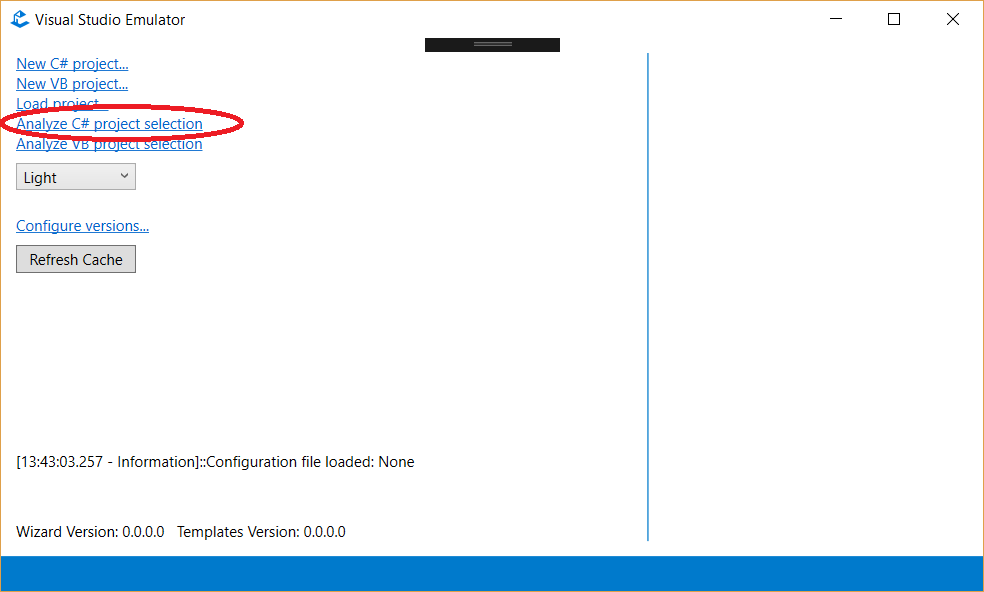
See the VS debug output window for an indication of how multiple files are combined to create the final project.
Please note any exceptions or issues you run into so we can improve the tooling and/or documentation for the future.
mrlacey
on 27 Mar 2018
while I read this please let me know if you have a name for the page in mind, so I make the branch name and other stuff accordingly @mrlacey
touseefbsb
on 27 Mar 2018
What's wrong with "Content Grid" as suggested previously?
mrlacey
on 27 Mar 2018
@mrlacey
ok so Ive written C# code for mvvm and code behind as well, Basically wht I have done is Ive added 2 folders to the templates/Pages folder
- ContentGrid
- ContentGrid.CodeBehind
first one is MVVM Basic and second one is CodeBehind. looking at the blank page and imageGallery page I have followed the namespacing , models, services accordingly.
I have noticed there is no Strings folder in ImageGallery while there is one in BlankPage but that resources file cannot be opened, I think it is supposed to be that way because template is suposed to replace stuff there. but should ContentGrid have a strings folder or not?
I see in the view of ImageGallery there is title of textbox which is localized and written as x:Uid="ImageGalleryView_Title how is it localized when there is no strings folder? that is a bit confusing.
and about .template.config folders I have noticed there are description and json files for each language. but these languages seem to differ in different pages, ImageGallery seems to lack en-US language in templateconfig, while Black page does have it. so which languages will exist in ContentGrid ? and I think all of them are following this json data with 4 properties, so ContentGrid can aslo have these 4 properties for every language I guess?
{
"author": "Microsoft",
"name": "ImageGallery",
"description": "Eine Seite, die einen Bilderkatalog anzeigt und Benutzern die Navigation zwischen Katalog und Bilddetails ermöglicht.",
"identity": "wts.Page.ImageGallery"
}
P.S : Right now I am making the changes in visual studio in Folder View once I make all the basic changes then I'll go to solution view and open the Visual Studio Simulator to run the tests.
touseefbsb
on 27 Mar 2018
I have pushed the changes into a new branch within my fork called "ContentGridBranch" and the Strings and .template.config folders in ContentGrid / ContentGrid.CodeBehind are copied from Blank template for now, I will change them after I get clarified what I should put in them.
here is the link to that branch, so that you can see the changes I've made.
https://github.com/touseefbsb/WindowsTemplateStudio/tree/ContentGridBranch
touseefbsb
on 27 Mar 2018
@touseefbsb don't include any translated versions of files yet. These can be generated with the localization tool. The translations will be obtained once the English versions of the descriptions have been finalized.
ImageGallery has the strings added through the composition templates (templates_composition_shared\Page.ImageGallery\Strings)
That all pages/features don't have the same description translations sounds like a bug.
mrlacey
on 27 Mar 2018
yeah I just noticed this that ImageGallery seems to lack en-US language in templateconfig, while Blank page does have it, if it is abug then I think it should be reported.
touseefbsb
on 27 Mar 2018
@mrlacey So basically you are saying right now I don't need to include a Strings Folder or a .templte.config folder in ContentGrid ? and should I add Page.ContentGrid in composition folder? so that I can get the title of the page from there with Strings?
touseefbsb
on 27 Mar 2018
@touseefbsb if you need to include text in the default content of the templates it will need to go in a postaction file to modify the resw file. This file is under the strings folder.
I'm not saying you don't need one. I'm saying it might not go under 'templates/pages/...'
mrlacey
on 28 Mar 2018
@mrlacey Yes I just need to include 1 string which is the title of the page, like any other page. apart from that I dont have any text on xaml page which needs to be localized, so how do you suggest I proceed with this? should the page title come from composition , like ImageGallery page is getting?
touseefbsb
on 28 Mar 2018
Yes I just need to include 1 string which is the title of the page, like any other page. apart from that I dont have any text on xaml page which needs to be localized, so how do you suggest I proceed with this? should the page title come from composition , like ImageGallery page is getting?
Different frameworks will require different page implementations. Rather than duplicate files in multiple page templates, it's possible to use composition and filtering to add files in multiple scenarios.
Resources are a great example of files that will be the same regardless of framework and so are a great candidate for putting in a composition template.
For simplicity and while only building out the initial templates for a single framework (as advised) you could put the resources in a page and then move them when adding other templates and the duplication becomes clear.
mrlacey
on 28 Mar 2018
@mrlacey I have updated the string resource files for both ContentGrid and ContentGrid.CodeBehind both string folders are exactly the same and both are in the Pages folder for now. and I have emptied the .template.config folder for both of them, because I think first of all the description have to be finalized them localization tool will generate those files right?
touseefbsb
on 28 Mar 2018
@touseefbsb You'll need the config file to be able to use the template. You can use dummy or placeholder descriptions for now if you don't want to suggest the description to use. I said don't worry about the localized versions of the description and template files for now.
Not only are the config files necessary for accessing the templates in the wizard they're also checked by the tests as mentioned above.
mrlacey
on 28 Mar 2018
@mradmila I have added description.md and description json files for en-US now what is the next step? Should I now proceed to opening the Visual Studio Simulator solution?
touseefbsb
on 28 Mar 2018
to be more specific what is the name of the solution file I should open now for testing?
touseefbsb
on 28 Mar 2018
I use big.sln but you could use Installer.sln & test.sln
Read these (at least a couple of times)
https://github.com/Microsoft/WindowsTemplateStudio/blob/dev/docs/readme.md
https://github.com/Microsoft/WindowsTemplateStudio/blob/dev/docs/getting-started-developers.md
https://github.com/Microsoft/WindowsTemplateStudio/blob/dev/docs/templates.md
mrlacey
on 28 Mar 2018
@mrlacey this template stuff and how to test etc is really overwhelming me as I am not good with this stuff, can I do a pull request for the code I have written, and let someone else who is more capable for testing and stuff takeover from here? bcz Ive written the mvvmbasic and code-behind templates, and thats pretty much where my expertise ends, I will be present and helping out with others in creation of other templates for VB and even mvvmlight/prism, I mean I will explain what my code is doing so that someone else can take over to continue creating templates for other frameworks and also test it. the code Ive written is pretty simple and very less both backend and the view as well so it wont be so hard to understand by others :) I can do some more comments on the code if you think it is needed?
touseefbsb
on 29 Mar 2018
Sorry @touseefbsb for the late response. Sure, we can help you out with template creation. It might seem complicated in the first place, but a lot easier when you get used to it.
Thanks for the work you've done so far!
Just to be sure we get the correct starting point: https://github.com/touseefbsb/WindowsTemplateStudio/tree/ContentGridBranch has already templates created for mvvm basic and code behind, correct?
To build up the templates colaboratively we can do PR to your fork until everything is set up, and then you do a PR of everything back into WTS, is that ok for you?
 sibille
on 11 May 2018
sibille
on 11 May 2018
@sibille yes that is correct it has template for code behind and mvvm basic for c#. and yes its fine the way you described it, you guys can do a PR to my fork and then I will do a PR to the main repo
touseefbsb
on 11 May 2018
I've added a PR on @touseefbsb fork with missing composition templates and also a project update from dev (WTS 2.1).
https://github.com/touseefbsb/WindowsTemplateStudio/pull/1.
You can review that template on the this branch. Comments are welcome. I'll translate this template for other C# and VS frameworks on wednesday.
Thanks all.
 mvegaca
on 14 May 2018
mvegaca
on 14 May 2018
@mvegaca I have merged your pull request and I think we wll be able to close this issue once other frameworks get added into my fork and then we create a PR to this main branch.
touseefbsb
on 14 May 2018
Important: This needs a design review before raising a PR. Ideally, this should also be done before doing the extra work for other frameworks/language.
mrlacey
on 15 May 2018
@crutkas, could we get an design review for the attached generated app? AdaptiveGridViewPoC.zip
@touseefbsb, we'll wait with the implementation of the other frameworks until we received feedback.
sibille
on 16 May 2018
@sibille yeah sure once mvvm basic and code behind gets reviewed and verified then other frameworks should be implemented
touseefbsb
on 16 May 2018
ok, so i just looked at the POC Sibille provided and i'm a bit confused on action / need. this is an extremely simple page without any real direct action after stuff is displayed. I click on stuff and nothing is wired up.
As of now, i don't see the difference between this and something like the image gallery which is more robust or a master detail.
crutkas
on 16 May 2018
I haven't looked at the POC but remember requesting a placeholder for when an item is selected. It should be an empty event handler with a comment like "do something here if you need to"
mrlacey
on 16 May 2018
I was reviewing the sample page this is based on, and I think it's all included in the template.
Click event is wired up, but just contains a empty eventhandler with a TODO, thats why you do not see any action.
That said, there is no problem in adding more functionality: What would you expect from this page? I think for example ordering or filtering was proposed here before.
sibille
on 16 May 2018
yes I did add a lot of features in initial fork but then gradually reduced them as it was suggested we need to provide very basic functionality :)
touseefbsb
on 16 May 2018
It's not that "we need to provide very basic functionality" it's that everything we provide should be broadly useful. We recognized that a page with a basic grid layout was used in many apps but in a wide variety of different ways. The generated code should not provide code that developers will have to delete (unless the page/feature is unusable without it--such as sample data) and so that means not covering specialized cases when they'll only be useful in a small percentage of cases.
mrlacey
on 18 May 2018
Added a messagebox that tells which item was clicked.
sibille
on 22 May 2018
sibille
on 22 May 2018
Moving to 2.3 as currently under design review
sibille
on 8 Jun 2018
I wonder how long the design review will take :) @sibille
touseefbsb
on 29 Sep 2018
@touseefbsb, we're getting a full design review for all pages from the fluent design team, that's why it's taking a bit longer. Will come back with results soon.
sibille
on 1 Oct 2018
oh alright.
touseefbsb
on 1 Oct 2018
Ok, we got Fluent team feedback. @sibille will adjust accordingly and other action item will be to when click, nav to detail page. Use master detail's detail page for that navigation.
crutkas
on 16 Oct 2018
Use master detail's detail page for that navigation.
Will _probably_ need to break out this template and use composition to add the detail page. There should not be a dependency between this and the Master/Detail page
mrlacey
on 16 Oct 2018
@mrlacey totally agree that the detail page then would have to be appropriately broken out much like sample data is
crutkas
on 16 Oct 2018
@crutkas and @mrlacey I had a look at this, and if you add 2 MasterDetail pages you'll get two detail pages, which makes sense, because it's probable that you'll use the two pages for different things, like a booklist and songlist, with different detail pages. So AdaptiveGridView should have its own detail page, too. Additionally the masterdetail detail page isn't really a page but a user control, so we cannot use the same template for adaptivegridview.
We're preparing localization files, proposal for this page is the following:
short description: This page allows you to add custom items in form of an Adaptive Grid.
long description: This page allows you to add custom content in a GridView which is responsive to the screensize change. For more info about Adaptive Grid View see here
sibille
on 18 Oct 2018
@sibille I just wanted to make it clear that the tow page options should each include a separate detail page. Not link between the templates. If we can't use the exact same output as the MasterDetail, it would be helpful if there was a difference in the detail page of the AGV so they can be visually differentiated easily.
A few tweaks to the descriptions
short description: This page allows you to add custom items in the form of an Adaptive Grid.
long description: This page allows you to add custom content in a GridView which is responsive to the screen size change. Learn more about the Adaptive Grid View.
mrlacey
on 18 Oct 2018
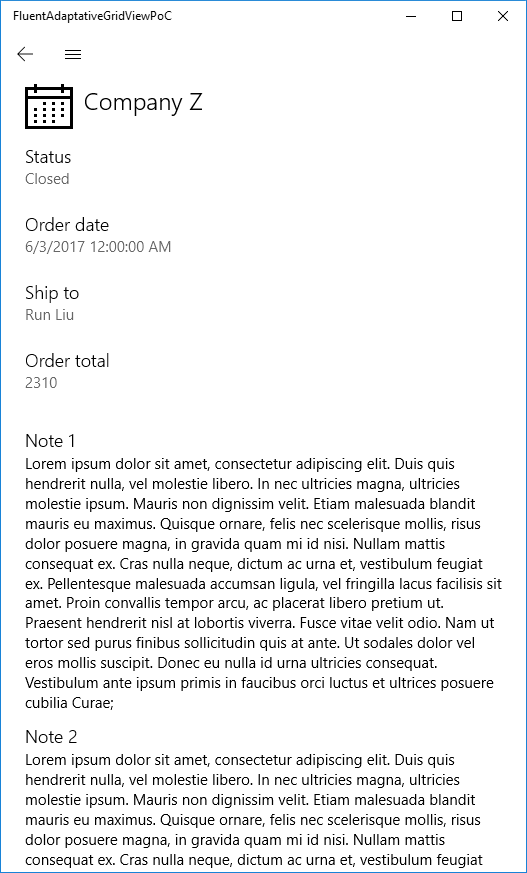
I've updated the PoC with the design team comments. I've also added a detail page with responsive behaviors using VisualStateManager.
Download the app here.
Coments are welcome ;)
AdaptativeGridView with items
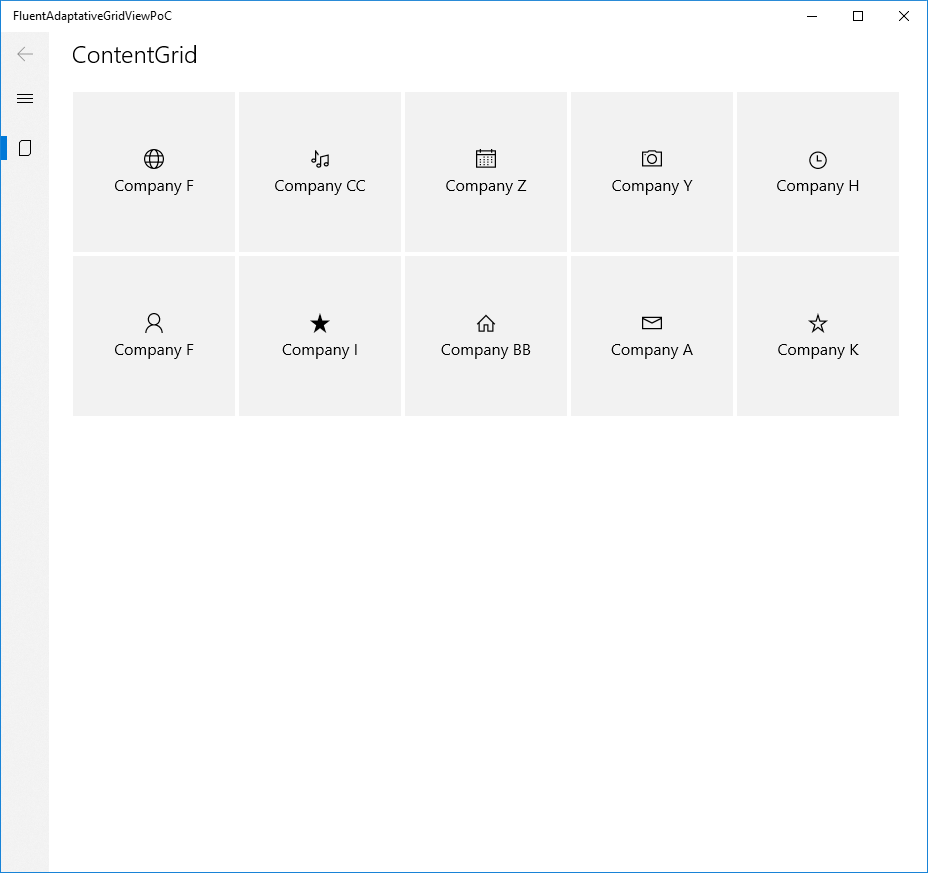
Item details

Window small size mode
mvegaca
on 25 Oct 2018
Minor alignment fixes.
mvegaca
on 29 Oct 2018
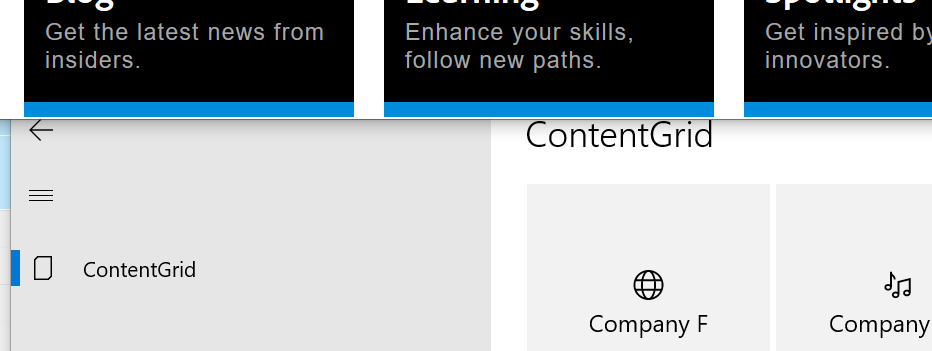
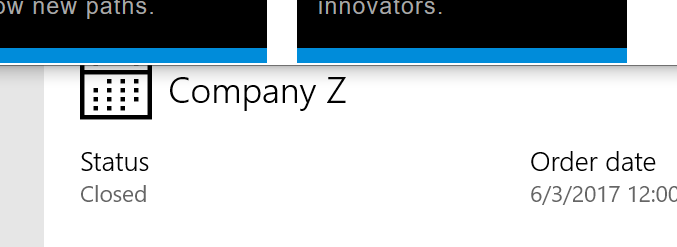
- connected animation is awkward due to title disappearing then transitioning versus a smooth transition.
- titles are different height between grid and detail page
crutkas
on 30 Oct 2018
We've updated the app adding connected animation between the gray gridview thumbnail and a new gray detail hero item. We've also aligned titles.
mvegaca
on 2 Nov 2018
Discussing with the dev team, we need to factor in the new back button behavior. We need to sync with fluent team to be sure it is the correct behavior. We are adjusting to 3.0. This page is close
crutkas
on 5 Nov 2018
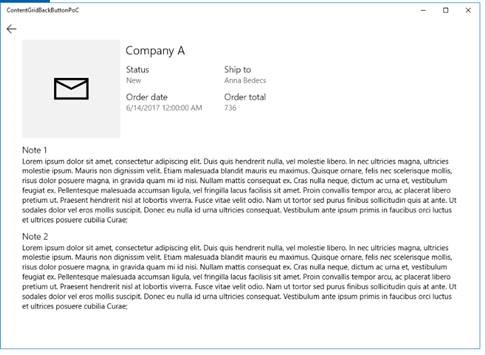
Synced with fluent team, we'll add a back button to the page for blank project types.
sibille
on 19 Dec 2018
Verified in dev-nightly:
Templates version: 0.20.19018.2
Wizard version: 0.20.19018.1
 dgomezc
on 18 Jan 2019
dgomezc
on 18 Jan 2019
Related issues
 myokeeh
·
6Comments
crutkas
·
8Comments
myokeeh
·
6Comments
crutkas
·
8Comments
 ganesanviji
·
3Comments
crutkas
·
5Comments
ganesanviji
·
3Comments
crutkas
·
5Comments
 michael-hawker
·
7Comments
michael-hawker
·
7Comments