Windowsserverdocs: Codebox broken in localized pages
Hi team,
I'm opening this issue as per what was found here: https://github.com/MicrosoftDocs/windowsserverdocs.ru-ru/issues/2
Loc team comment: This file is affected by a source issue. The text in the code box is not written as such
@iv777 commented 4 days ago — with docs.microsoft.com
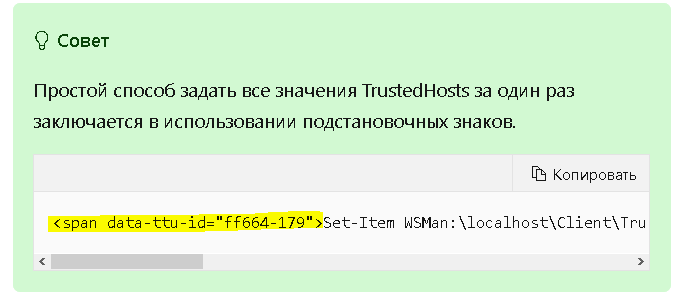
In russian version
https://docs.microsoft.com/ru-ru/windows-server/manage/windows-admin-center/support/troubleshooting
I see:
Document Details
⚠ Do not edit this section. It is required for docs.microsoft.com ➟ GitHub issue linking.
- ID: 1e5fc70f-7d73-a27a-dd16-caf965c849d0
- Version Independent ID: c0c463f4-52f4-3582-87fd-edd2c5263871
- Content: Windows Admin Center Common Troubleshooting Steps
- Content Source: WindowsServerDocs/manage/windows-admin-center/support/troubleshooting.md
- Product: windows-server
- Technology: manage
- GitHub Login: @jwwool
- Microsoft Alias: jeffrew
 CeciAc
All 7 comments
The affected Note blob can be found in this section, approximately one page lower than the link anchor text:
https://docs.microsoft.com/ru-ru/windows-server/manage/windows-admin-center/support/troubleshooting#i-can-connect-to-some-servers-but-not-others
It looks like the translation happens before the page has finished rendering into HTML, but I don't know the technical details well enough to say for certain where and how this happens.
The HTML code of the ru-ru page looks like this:
<li><p><span data-ttu-id="ff664-177">Задайте для TrustedHosts значение NetBIOS, IP-адреса или полного доменного имени компьютеров, которыми вы планируете управлять:</span><span class="sxs-lookup"><span data-stu-id="ff664-177">Set TrustedHosts to the NetBIOS, IP, or FQDN of the machines you intend to manage:</span></span></p>
--
| <pre><code class="lang-powershell">Set-Item WSMan:localhost\Client\TrustedHosts -Value '192.168.1.1,server01.contoso.com,server02'
| </code></pre>
| <div class="TIP">
| <p>Совет</p>
| <p><span data-ttu-id="ff664-178">Простой способ задать все значения TrustedHosts за один раз заключается в использовании подстановочных знаков.</span><span class="sxs-lookup"><span data-stu-id="ff664-178">For an easy way to set all TrustedHosts at once, you can use a wildcard.</span></span></p>
| <pre><code><span data-ttu-id="ff664-179">Set-Item WSMan:\localhost\Client\TrustedHosts -Value '\*'</span><span class="sxs-lookup"><span data-stu-id="ff664-179">Set-Item WSMan:\localhost\Client\TrustedHosts -Value '\*'</span></span>
| </code></pre>
| </div>
| </li>
| <li><p><span data-ttu-id="ff664-180">После завершения тестирования можно выполнить следующую команду в сеансе PowerShell с повышенными привилегиями для очистки параметров TrustedHosts:</span><span class="sxs-lookup"><span data-stu-id="ff664-180">When you are done testing, you can issue the following command from an elevated PowerShell session to clear your TrustedHosts setting:</span></span></p>
| <pre><code class="lang-powershell">Clear-Item WSMan:localhost\Client\TrustedHosts
| </code></pre>
| </li>
| <li><p><span data-ttu-id="ff664-181">Если вы ранее экспортировали параметры, откройте файл, скопируйте значения и используйте следующую команду:</span><span class="sxs-lookup"><span data-stu-id="ff664-181">If you had previously exported your settings, open the file, copy the values, and use this command:</span></span></p>
| <pre><code class="lang-powershell">Set-Item WSMan:localhost\Client\TrustedHosts -Value '<paste values from text file>'
| </code></pre>
| </li>
The HTML code in the en-us version of the page (without this issue) looks like this:
<li><p>Set TrustedHosts to the NetBIOS, IP, or FQDN of the machines you
--
| intend to manage:</p>
| <pre><code class="lang-powershell">Set-Item WSMan:localhost\Client\TrustedHosts -Value '192.168.1.1,server01.contoso.com,server02'
| </code></pre>
| <div class="TIP">
| <p>Tip</p>
| <p>For an easy way to set all TrustedHosts at once, you can use a wildcard.</p>
| <pre><code>Set-Item WSMan:\localhost\Client\TrustedHosts -Value '*'
| </code></pre>
| </div>
| </li>
| <li><p>When you are done testing, you can issue the following command from an elevated PowerShell session to clear your TrustedHosts setting:</p>
| <pre><code class="lang-powershell">Clear-Item WSMan:localhost\Client\TrustedHosts
| </code></pre>
| </li>
| <li><p>If you had previously exported your settings, open the file, copy the values, and use this command:</p>
| <pre><code class="lang-powershell">Set-Item WSMan:localhost\Client\TrustedHosts -Value '<paste values from text file>'
| </code></pre>
| </li>
@TinaMcN : Does this issue also belong in your work domain?
 illfated
on 11 Jan 2020
illfated
on 11 Jan 2020
Thank you for reporting the issue.
This is Localization issue. @DavidPrio please export to https://github.com/MicrosoftDocs/windowsserverdocs.ru-ru/issues and handle it.
 nokura
on 12 Jan 2020
nokura
on 12 Jan 2020
Hi @illfated @nokura
After looking at it thoroughly with the team, we can confirm this is a source issue.
The text in the red rectangle is the one having the issue, and the green one is one example of how a code block can be written.
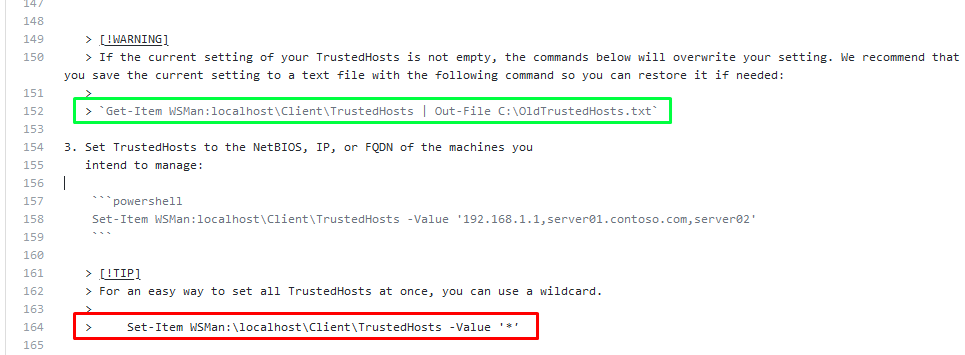
Another form in which it can be written according to the MS Official Guideline (https://review.docs.microsoft.com/en-us/help/contribute/code-in-docs?branch=master#inline-code-blocks) is by indentation.
In this case, it looks like it was used indentation to create the code block, but spaces were used instead of tabs:

So there are two proposed fixes:
- Fence the content in the code by using backticks (`)
- Use indentation between > and Set-Item WSMan:localhostClientTrustedHosts -Value '*'.
CeciAc
on 15 Jan 2020
@CeciAc : 👍 Thank you very much for confirming and highlighting this! 😃 I will offer a PR to correct the issue. 🕺
I very much prefer using MD backticks, because that allows for adding code syntax highlighting in the source (and possibly in the public page, I forgot if it transfers).
edit: This is my prepared suggested solution:
```diff
[!TIP]
For an easy way to set all TrustedHosts at once, you can use a wildcard.
- > Set-Item WSMan:localhostClientTrustedHosts -Value '*'
- >
- > ```powershell
- > Set-Item WSMan:localhostClientTrustedHosts -Value '*'
- > ```
illfated
on 15 Jan 2020
There you go. PR #3739 created. Reviews are welcome.
illfated
on 15 Jan 2020
PR #3739 has been merged in commit https://github.com/MicrosoftDocs/windowsserverdocs/commit/875c871595ef0c4506b1de6144c0082eec9ac853 now. I know it may take a few days, maybe a week, until these changes migrate to the docs.microsoft.com page, so feel free to keep track of when it completes and shows up in the translated pages.
illfated
on 13 Feb 2020
please-close
illfated
on 28 Oct 2020
Related issues
 gabrielluizbh
·
5Comments
gabrielluizbh
·
5Comments
 yoshihirok
·
4Comments
yoshihirok
·
4Comments
 timtribers
·
4Comments
timtribers
·
4Comments
 Garthmj
·
3Comments
Garthmj
·
3Comments
 chall3ng3r
·
4Comments
chall3ng3r
·
4Comments