Windowscommunitytoolkit: Foreground theme resource does not apply in dark mode [DataGridTextColumn]
Describe the bug
Using "ThemeResource" I want to change the foreground (DataGridTextColumn) depending on whether it is in light mode or dark mode, but it works only in light mode, in dark mode use the default color
- [ ] Is this bug a regression in the toolkit? If so, what toolkit version did you last see it work:
Expected behavior
Change foreground by switching to dark mode
Screenshots
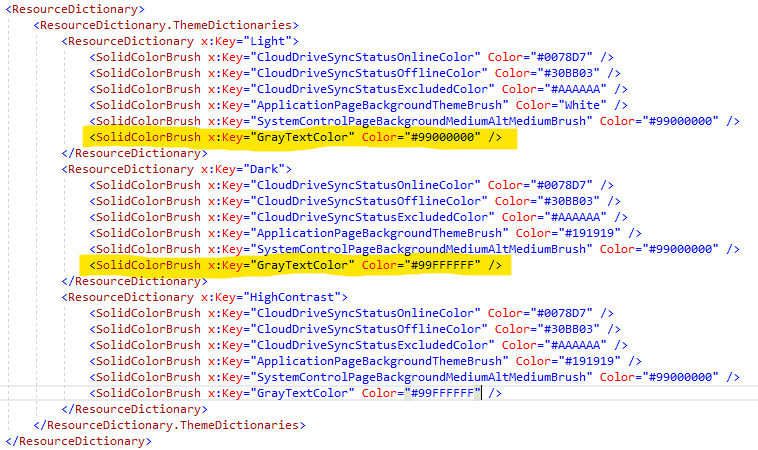
App.xaml:
DataGridTextColumn:

Tested using red for light mode and blue for dark mode:
Light mode: correctly changes to red

Dark mode: does not change to blue

Environment
NuGet Package(s): Microsoft.Toolkit.Uwp.UI.Controls.DataGrid

Package Version(s): 6.1.0

Windows 10 Build Number:
- [ ] Fall Creators Update (16299)
- [ ] April 2018 Update (17134)
- [ ] October 2018 Update (17763)
- [ ] May 2019 Update (18362)
- [X] May 2020 Update (19041)
- [ ] Insider Build (build number: )

App min and target version:
- [ ] Fall Creators Update (16299)
- [ ] April 2018 Update (17134)
- [X] October 2018 Update (17763)
- [ ] May 2019 Update (18362)
- [X] May 2020 Update (19041)
- [ ] Insider Build (xxxxx)

Device form factor:
- [X] Desktop
- [ ] Xbox
- [ ] Surface Hub
- [ ] IoT

Visual Studio
- [ ] 2017 (version: )
- [X] 2019 (version: 16.6.5)
- [ ] 2019 Preview (version: )
 XPoppyX
All 12 comments
Hello XPoppyX, thank you for opening an issue with us!
I have automatically added a "needs triage" label to help get things started. Our team will analyze and investigate the issue, and escalate it to the relevant team if possible. Other community members may also look into the issue and provide feedback 🙌
![msftbot[bot] picture](https://avatars2.githubusercontent.com/in/26612?v=4&s=40) msftbot[bot]
on 29 Jul 2020
msftbot[bot]
on 29 Jul 2020
Thanks for reporting this issue. I am going to add this issue in our 7.0 release bucket as the Datagrid team is highly focused on WinUI 3 at the moment. @anawishnoff and @RBrid for visibility ⬆️
 Kyaa-dost
on 29 Jul 2020
Kyaa-dost
on 29 Jul 2020
Thanks for filing this, @XPoppyX! How are you programmatically switching between light and dark modes? It definitely seems fishy that the cell would listen to the light mode resources but not the dark mode resources. Do your styles for High contrast work?
 anawishnoff
on 5 Aug 2020
anawishnoff
on 5 Aug 2020
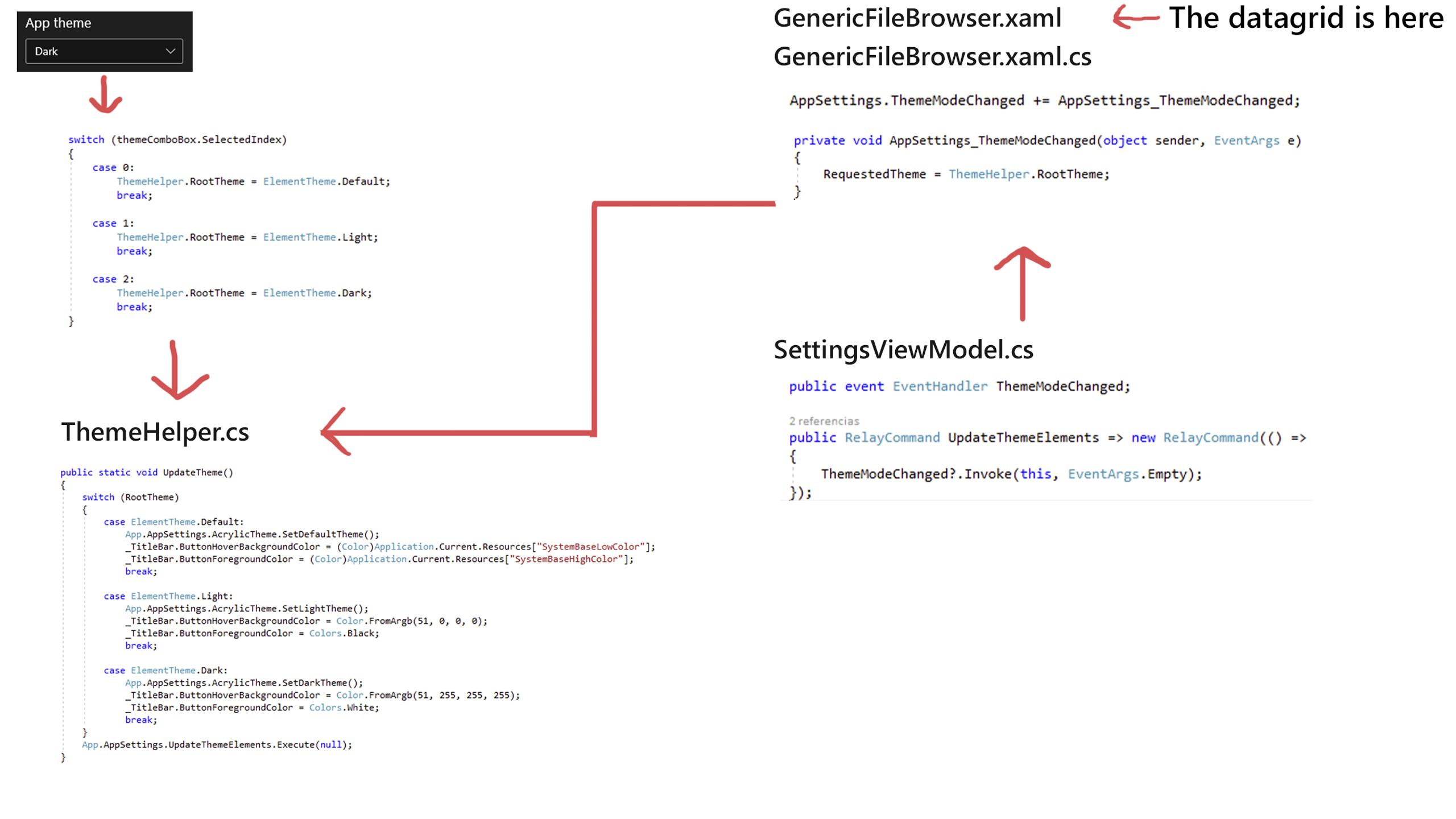
I'm not sure how high contrast works, but it doesn't change the foreground either.
there are more people with more experience working in this app, if you need more info I can contact them to answer any other questions
XPoppyX
on 5 Aug 2020
@XPoppyX Sorry for the late response! Looks like you're changing the color/theme twice - once in your Xaml, with the ThemeResource GrayTextColor, and again programmatically in ThemeHelper.cs, although I could be misunderstanding how the app works. Maybe a little bit of explanation would help along with the diagram above?
@RBrid does it look like the issue is just the styling for the button being defined twice?
anawishnoff
on 19 Aug 2020
in grid view the color changes correctly
_tested with blue for light mode and red for dark mode_


XPoppyX
on 19 Aug 2020
@XPoppyX Sorry, I think I wasn't reading closely enough in my previous comment, I see that you're only changing the TitleBar styling in your .cs code. This might be a bug, unless @RBrid has a different idea 😊
anawishnoff
on 19 Aug 2020
The behavior sounds right to me. See how the TextBlock/TextBox's Foreground brush gets set in the DataGridTextColumn's cells, via the RefreshForeground method. It uses the DataGridTextColumn.Foreground property or DataGridRow.ComputedForeground property (which uses DataGridRow.Foreground or DataGrid.RowForeground or DataGrid.AlternatingRowForeground). It's a pretty complicated inheritance mechanism, right?
In your case even the light mode must be broken. Check what happens after you edit some cells (and a TextBox is used instead of a TextBlock). The Foreground starts to be black and because of row recycling random rows will show incorrectly as you scroll down. By the way if you started your app in Dark mode by default, you'd think the Light mode is broken.
Anyways this is how I made it work for me in my application:
In app.xaml I declared custom theme colors:
<Application
    x:Class="DataGridTestDriver.App"
    xmlns="http://schemas.microsoft.com/winfx/2006/xaml/presentation"
    xmlns:x="http://schemas.microsoft.com/winfx/2006/xaml"
    xmlns:local="using:DataGridTestDriver"
    RequestedTheme="Light">
    <Application.Resources>
        <ResourceDictionary>
            <ResourceDictionary.ThemeDictionaries>
                <ResourceDictionary x:Key="Default">
                    <SolidColorBrush x:Key="GrayTextColorBrush" Color="#FFFFFF00"/>
                </ResourceDictionary>
                <ResourceDictionary x:Key="HighContrast">
                    <SolidColorBrush x:Key="GrayTextColorBrush" Color="#FF00FF00"/>
                </ResourceDictionary>
                <ResourceDictionary x:Key="Light">
                    <SolidColorBrush x:Key="GrayTextColorBrush" Color="#FFC50500"/>
                </ResourceDictionary>
            </ResourceDictionary.ThemeDictionaries>
        </ResourceDictionary>
    </Application.Resources>
</Application>
(see how my default RequestedTheme is "Light")
I added a combobox to my MainPage.xaml:
<ComboBox x:Name="cmbAppTheme" SelectedIndex="0" SelectionChanged="cmbAppTheme_SelectionChanged">
  <ComboBoxItem>Default</ComboBoxItem>
  <ComboBoxItem>Light</ComboBoxItem>
  <ComboBoxItem>Dark</ComboBoxItem>
</ComboBox>
Here's what I do when the combobox changes (dg is my DataGrid):
        private void cmbAppTheme_SelectionChanged(object sender, SelectionChangedEventArgs e)
        {
            switch (cmbAppTheme.SelectedIndex)
            {
                case 0:
                    if (this.RequestedTheme != ElementTheme.Default)
                    {
                        this.RequestedTheme = ElementTheme.Default;
                    }
                    break;
                case 1:
                    if (this.RequestedTheme != ElementTheme.Light)
                    {
                        this.RequestedTheme = ElementTheme.Light;
                    }
                    break;
                case 2:
                    if (this.RequestedTheme != ElementTheme.Dark)
                    {
                        this.RequestedTheme = ElementTheme.Dark;
                    }
                    break;
            }

            if (dg != null)
            {
                SolidColorBrush grayTextColorBrush = this.ThemeDictionary["GrayTextColorBrush"] as SolidColorBrush;

                foreach (DataGridColumn dataGridColumn in dg.Columns)
                {
                    DataGridTextColumn dgtc = dataGridColumn as DataGridTextColumn;

                    if (dgtc != null)
                    {
                        dgtc.Foreground = grayTextColorBrush;
                    }
                }
            }
        }
Also whenever a DataGridTextColumn is added to the DataGrid, its Foreground property needs to be set:
        private void Dg_Columns_CollectionChanged(object sender, NotifyCollectionChangedEventArgs e)
        {
            ...
                if (e.NewItems != null)
                {
                    SolidColorBrush grayTextColorBrush = this.ThemeDictionary["GrayTextColorBrush"] as SolidColorBrush;

                    foreach (DataGridColumn dataGridColumn in e.NewItems)
                    {
                        DataGridTextColumn dgtc = dataGridColumn as DataGridTextColumn;

                        if (dgtc != null)
                        {
                            dgtc.Foreground = grayTextColorBrush;
                        }
                    }
                }
            ...
        }
That worked for me. I hope it works for you. Thanks, -Régis
 RBrid
on 21 Aug 2020
RBrid
on 21 Aug 2020
@RBrid Thank you very much, I'll test it tomorrow
XPoppyX
on 21 Aug 2020
@XPoppyX did that resolve the issue?
Kyaa-dost
on 26 Aug 2020
We haven't tested yet, but I think this issue can be closed
XPoppyX
on 26 Aug 2020
Closing this issue now per resolution provided above.
Kyaa-dost
on 9 Jan 2021
Related issues
 SmartPolarBear
·
4Comments
SmartPolarBear
·
4Comments
 ranjeshj
·
3Comments
ranjeshj
·
3Comments
 michael-hawker
·
4Comments
michael-hawker
·
4Comments
 andriihorpenko
·
3Comments
andriihorpenko
·
3Comments
 jamesmcroft
·
3Comments
jamesmcroft
·
3Comments