Windowscommunitytoolkit: Connected Animation "hangs floating" and then pops away when navigating back to originating list
I'm submitting a bug or a question (not sure)
Current behavior
I am using a Windows Template Studio generated UWP project based on the Prism framework.
I have a ListView containing search results bound to an ObservableCollection. When tapping / clicking a ListView item (search result), the app navigates to a search result detail page. The search result item from the ListView is shown on the detail page using a connected animation.
When navigating back to the search page, the search results are restored using the Prism [RestorableState] attribute on the ObservableCollection SearchResults property of the ViewModel.
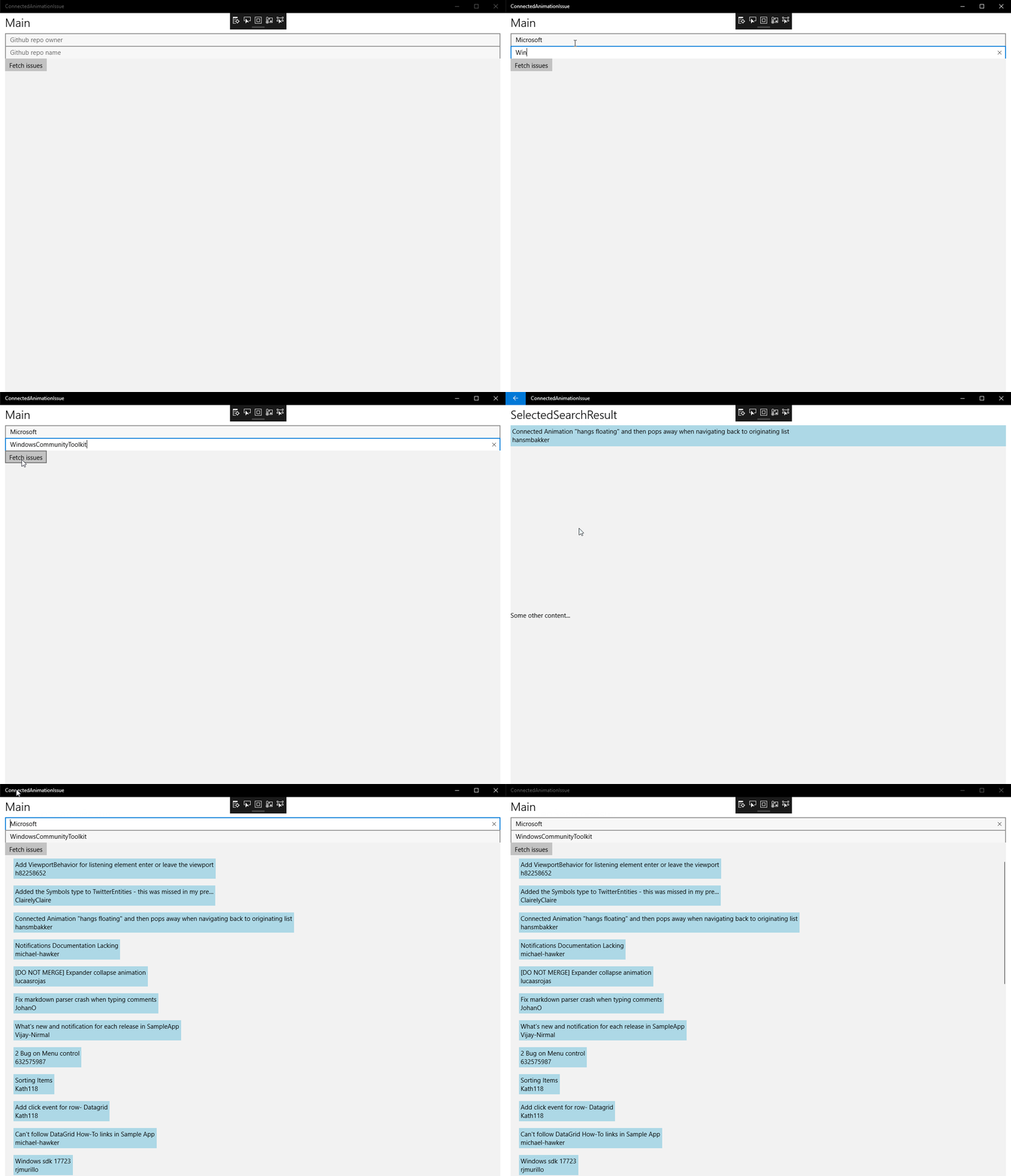
The connected animation when going back is broken - after going back, the search result item floats above the page containing the list of search results and then pops away.
I reckon this is caused because the connected animation cannot find the original ObservableCollection item to connect to (since it is being restored by [RestorableState]), however I cannot find examples how to do this properly.
Therefore I do not know whether it is a bug or using it improperly. I provided the most important bits in the reproduction part.
Expected behavior
I would expect the search result item flow back into the list of search results.
Minimal reproduction of the problem with instructions
Main.xaml:
<ListView
        animations:Connected.ListItemElementName="searchResultControl"
        animations:Connected.ListItemKey="searchResult"
        ItemsSource="{x:Bind ViewModel.SearchResults}">
                <ListView.ItemTemplate>
                        <DataTemplate
                                x:DataType="searchService:SearchResultClass">
                                <ownControls:SearchResultItem
                                        x:Name="searchResultControl"
                                        Margin="0,8"
                                        Data="{x:Bind}" />
                </DataTemplate>
        </ListView.ItemTemplate>
</ListView>
SearchDetailPage.xaml
<ownControls:SearchResultItem
                animations:Connected.Key="searchResult"
                Data="{x:Bind ViewModel.SearchResult}"
                />
Environment
Nuget Package(s):
- Microsoft.Toolkit.Uwp.UI.Animations 4.0.0
- Prism.Unity 6.3.0

Windows 10 Build Number:
- [ ] Creators Update (15063)
- [ ] Fall Creators Update (16299)
- [x] April 2018 Update (17134)
- [ ] Insider Build (build number: )

App min and target version:
- [x] Creators Update (15063)
- [ ] Fall Creators Update (16299)
- [x] April 2018 Update (17134)
- [ ] Insider Build (xxxxx)

Device form factor:
- [x] Desktop
- [ ] Mobile
- [ ] Xbox
- [ ] Surface Hub
- [ ] IoT

Visual Studio
- [ ] 2017 (version: )
- [x] 2017 Preview (version: 15.8 Preview 5)
 hansmbakker
All 13 comments
@JustinXinLiu, any thoughts on this?
 nmetulev
on 16 Aug 2018
nmetulev
on 16 Aug 2018
Is it possible to have a repo?
 JustinXinLiu
on 16 Aug 2018
JustinXinLiu
on 16 Aug 2018
I'm working on a reproduction project, but I'm having some issues getting the animation to work from a listview
 kbrons
on 16 Aug 2018
kbrons
on 16 Aug 2018
I got the basics working, I'll try to move it to a Prism app and replicate the ObservableCollection/RestorableCollection behavior
kbrons
on 16 Aug 2018
@kbrons thank you so much already for working on a reproduction project!
I'm willing to provide a repro project as well, but I can't do that earlier than tomorrow evening or coming Saturday I'm afraid. I posted this already to see whether anybody had seen the behavior in their own apps.
I couldn't reproduce the behavior in the Windows Community Toolkit Gallery, but I believe that is because there fixed GridView items are used instead of dynamically loaded items from a webservice, combined with the RestorableState attribute?
hansmbakker
on 16 Aug 2018
It might be related to that, but I'm trying to reproduce it to make sure. I can try to simulate that behavior delaying the loading of an ObservableCollection. If that works, I'll take the Prism route and see what happens
kbrons
on 16 Aug 2018
@kbrons @JustinXinLiu @nmetulev reproduction repo at https://github.com/hansmbakker/ConnectedAnimationIssueReproduction
hansmbakker
on 17 Aug 2018
I tried to reproduce the issue by delaying the loading of an ObservableCollection without success. Now we can be sure that the problem has nothing to do with the items loading. In this case, it might be related to the Prism Framework.
 Bmartin2013
on 17 Aug 2018
Bmartin2013
on 17 Aug 2018
Actually the issue has nothing to do with Prsim but the Connected Animation API.
If you look closely, the forward connected animation doesn't work as well. The animation you see is the built-in animation that you get for free.
During my debugging, I found the toolkit was throwing the following exception on ListViewBase.PrepareConnectedAnimation.
'Value does not fall within the expected range.'
There's no error handling there, so the error was simply ignored. I will talk to @nmetulev on how to better handle this.
This error normally occurs when the API PrepareConnectedAnimation failed to find the element inside the item template, which means the third parameter was misspelt.
However, I didn't see anything wrong with your code, the name and everything else all looked correct, so then I tried wrapping your GithubIssueSummary control inside another element just to test things out.
<ListView.ItemTemplate>
    <DataTemplate x:DataType="service:GithubIssue">
        <Grid>
            <ownControls:GithubIssueSummary x:Name="searchResultControl" Title="{x:Bind title}" Creator="{x:Bind user}" />
        </Grid>
    </DataTemplate>
</ListView.ItemTemplate>
And guess what... the error went away and the forward connected animation started working.
What this tells me is that the API for some reason couldn't locate the control at the top level. It always assumes the connected element lives one level down. This is clearly a bug and I will report it to the team. But for the time being, the workaround is pretty simple.
Then, to make the back connected animation work, you will need to make sure when coming back to your main page, the list is still populated with data. Generally, I'd make my main page always cached as it's the one single page that gets rendered most frequently. So if you update its NavigationCacheMode to Required, you will see the back connected animation start working.
<Page x:Class="ConnectedAnimationIssue.Views.MainPage"
      NavigationCacheMode="Required"
OK, just realized that you are using RestorableState. So you don't need to do the manual cache at all. Simply wrap your control with a Grid and your issue should go away.
JustinXinLiu
on 21 Aug 2018
Hi @justinxinliu,
Thank you for your investigation and elaborate feedback and workaround! I’ll try it tonight!
hansmbakker
on 21 Aug 2018
I can confirm your workaround works! Thank you very much! 😃
hansmbakker
on 21 Aug 2018
Great! I am closing the issue now.
JustinXinLiu
on 21 Aug 2018
Related issues
 miguelarcilla
·
4Comments
miguelarcilla
·
4Comments
 ilinkmobility
·
4Comments
ilinkmobility
·
4Comments
 SmartPolarBear
·
4Comments
SmartPolarBear
·
4Comments
 kusanagi2k2
·
4Comments
kusanagi2k2
·
4Comments
 Vijay-Nirmal
·
4Comments
Vijay-Nirmal
·
4Comments
Most helpful comment
I got the basics working, I'll try to move it to a Prism app and replicate the ObservableCollection/RestorableCollection behavior