Windowscommunitytoolkit: Extended Adaptive GridView (new control )
I'm submitting a...
[ ] Regression (a behavior that used to work and stopped working in a new release)
[ ] Bug report  <!-- Please search GitHub for a similar issue or PR before submitting -->
[ x] Feature request <!-- Please file a UserVoice request and include the link below https://wpdev.uservoice.com/forums/110705-universal-windows-platform/category/193402-uwp-community-toolkit -->
[ ] Sample app request
[ ] Documentation issue or request
[ ] Question of Support request => Please do not submit support request here, instead see https://github.com/Microsoft/UWPCommunityToolkit/blob/master/contributing.md#question
UserVoice link
Details of the control.
I have some more feature recommendations, regarding extensions in adaptivegridview if you will.
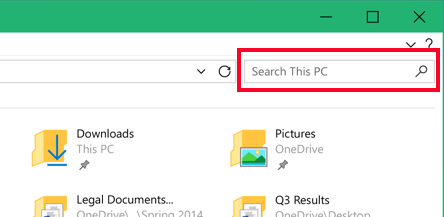
Search bar : a top search bar attached to the control which can be enabled/disabled with a boolean property. this search bar auto filters the items on basis of the filterDescriptor provided ( filter descriptor can be defined by the developer, tht which string,time,int property to match with which condition i.e : Contains, startswith, endswith e.t.c. and which operator to use [AND/OR] in case of multiple property filter provided.)
Grouping : another optional feature to enable grouping on basis of a string property of the items. and this grouping will obviously include the semantic zoom feature as well.
Incremental Loading: I know this is already in the community toolkit. But it can be part of the control with another boolean property to enable it.
Sorting : sorting with 1 or more properties.
List/GridSwitcher : there can be a toggle button on the top of the control which can toggle the control to view as a listview ( each item expanded fully ) or to a gridview ( normal grid like behaviour )
These are some of the most common scenarios which are required by developers and there are many ways to do it, but this can get very complicated to align them with best practices.
Please note that many of these features are inspired from Telerik UWP Grid Control but that is rather just a row by row control to show the data, but I was wondering if some of those key features can be implemented in a traditional collectionView which is native to uwp and has the brilliant UI we all know and love, which works great with fluent design obviously by default and users can add animations etc into it if they want. This can be a very powerful control/page yet looking very good to the eye as well.
How is it different from telerik grid?
Let me elaborate how it can be different from telerik grid.
Telerik control disadvantages for uwp platform.
- No Fluent Design
- No responsiveness because of multiple columns.
- Restricted to a column based data only ( cannot show data like a traditional gridview)
- column headers are not needed in all scenarios.
Basically what I am trying to explain here is that telerik grid control is limited to 1 specific scenario which is to represent and deal with column based data with mostly, strings, datetime, int and all mathematical properties and taking their sum, avg etc. which is good with database like apps and apps which need to deal with that sort of data only.
Meanwhile if we want to show a list of items with any sort of custom functionality and custom data template working with images, videos, buttons, commandbars, semantic zoom, grouping, and whole lot of fancy uwp stuff which traditional listview/gridview offer, also they offer fluent design and on the road map of UI that should be prefered.
telerik UI has bundle of features which are mostly not used unless ( as i said before ) you have an admin dasboard app and you need to work with database stuff.
So I am proposing a powerful control which is based on traditional uwp gridview/listview ( or AdaptiveGridView would be even better ). and then add those uwp extension features to it by default, which are already present in the platform but user has to do a lot of work to enable them, like sorting, switching between grid./list mode,, semantic zoom and grouping. this will be 1 advantage, and then I want to take only some features inspired from telerik grid, which can be used in almost 90 percent of the uwps apps which have a list of elements in any form, and those features are like searching ( filtering as we type ) across 1 or more properties, as told by the developer.
I can show you guys images or other references or examples of such use cases, on web and on other mobile apps well where this use case is very very common.
*Summary *:
this new control = uwp adaptive gridview + uwp features to extend the listview/gridview + some extra new features which can be seen in almost every app
Searchbar example
Environment
Nuget Package(s):

Package Version(s):

Windows 10 Build Number:
- [ ] Anniversary Update (14393)
- [ ] Creators Update (15063)
- [ ] Fall Creators Update (16299)
- [ ] Insider Build (xxxxx)

App min and target version:
- [ ] Anniversary Update (14393)
- [ ] Creators Update (15063)
- [ ] Fall Creators Update (16299)
- [ ] Insider Build (xxxxx)

Device form factor:
- [ ] Desktop
- [ ] Mobile
- [ ] Xbox
- [ ] Surface Hub
- [ ] IoT

Visual Studio
- [ ] 2017 15.3
- [ ] 2017 15.4
 touseefbsb
All 6 comments
That's a pretty tall order! Let's take a look at these requests
- Grouping: This is available today with the
SemanticZoom - Incremental Loading: This is available today with the
ISupportIncrementalLoadinginterface which is implemented by theAdvancedCollectionViewand theIncrementalLoadingCollection - Sorting: This is available today with the
AdvancedCollectionView - Search bar: I don't see this being a fundamental component to a generic list/grid control. In the image provided of Windows Explorer it is not part of the grid/list area. Adding a search bar and filtering can be done to any UI with the help of the
AdvancedCollectionViewfor filtering - List/GridSwitcher: The AdvancedGridView is itself a GridView and renders as a GridView would. In fact the control has no XAML template defined because it uses the default GridView template.
Requests 1-4 can be accomplished today by using classes already provided with the classes/controls provided by the core SDK or within the Toolkit. Request 5 I believe to be a breaking change but could be accomplished in any app by placing both a ListView and GridView in a view and changing visibility.
I personally think that defining a CollectionView resource or SemanticZoom takes little effort and does not need to be simplified by building them into a single control
 skendrot
on 1 Feb 2018
skendrot
on 1 Feb 2018
@skendrot u r right switching visibility can achieve that, but wont that cause double rendering consumption? because ven one collection control can be expensive with heavy image content, and other buttons etc, but having 2 at the same time, wont that be a problem? or is there a better way to do that
touseefbsb
on 1 Feb 2018
A lot of times users want one or the other. You can defer the load of the controls until it is determined which the user wants. You could also specify a ContentControl and swap out the ContentTemplate as you see fit.
skendrot
on 1 Feb 2018
seem fair alright @skendrot thanks for the tips. I can see tht all of this is already easily possible and no need to make a new control for now. you can close it now if you see fit :)
touseefbsb
on 1 Feb 2018
However awesome this would be (and I appreciate the awesome write up, if only all new issues were like this :)), we try to prioritize building individual components that can be used in combination to get the exact experience a developer would want vs creating one control that can do everything and anything. It's a balance between providing powerful components that can be simple to use in a wide variety of scenarios while still enabling the ability to extend and modify to fit one's needs.
 nmetulev
on 1 Feb 2018
nmetulev
on 1 Feb 2018
@nmetulev Yes I understand, but its good to discuss the thoughts and ideas so we can help each other and bring out better solutions to complex problems, tht is why I try to share the complex scenarios here so either we can get a control for that, or I can have some suggestions on how I can achieve that and why that is not use case for which a control should be created :).
touseefbsb
on 1 Feb 2018
Related issues
 ranjeshj
·
3Comments
ranjeshj
·
3Comments
 michael-hawker
·
4Comments
michael-hawker
·
4Comments
 kusanagi2k2
·
4Comments
kusanagi2k2
·
4Comments
 Joebeazelman
·
3Comments
Joebeazelman
·
3Comments
 deltakosh
·
3Comments
deltakosh
·
3Comments
Most helpful comment
@nmetulev Yes I understand, but its good to discuss the thoughts and ideas so we can help each other and bring out better solutions to complex problems, tht is why I try to share the complex scenarios here so either we can get a control for that, or I can have some suggestions on how I can achieve that and why that is not use case for which a control should be created :).