Windowscommunitytoolkit: [OrbitView] Specify Child OrbitViewItem's locations for layout
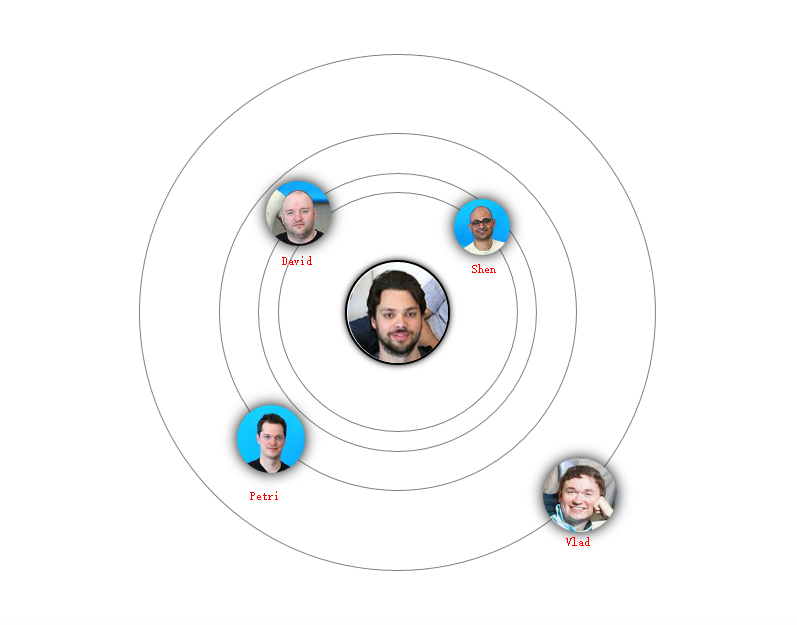
Hi, I want to show the OrbitViewDataItem label, like below
And also I want to specify the location of each item, for example,
Shen ------ 12 o'clock
David ------7 o'clock
......
How? Thanks.
 hupo376787
All 19 comments
@nmetulev ping
 IbraheemOsama
on 19 Sep 2017
IbraheemOsama
on 19 Sep 2017
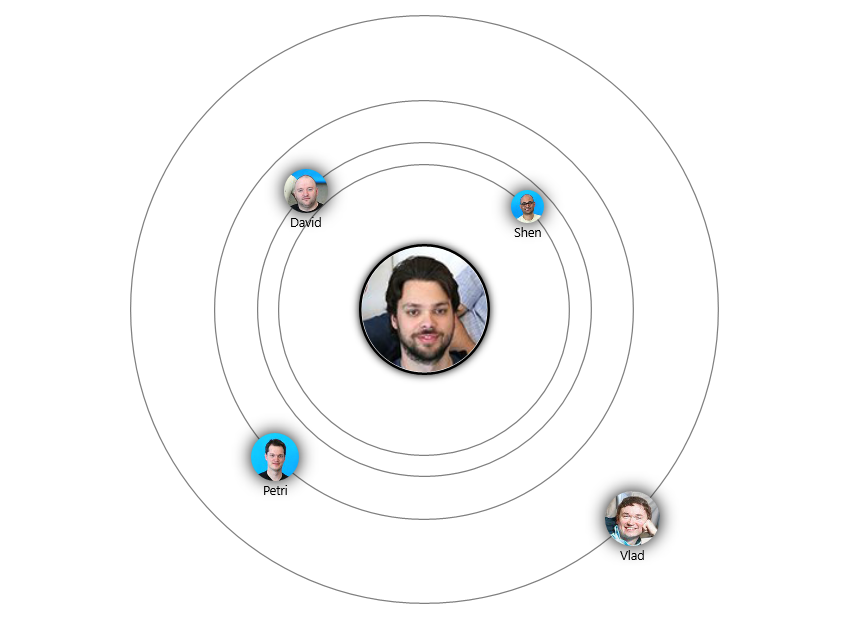
@hupo376787 there's no way to specify a specific angle for an item currently, they're all laid out automatically in this method.
You can add labels by restyling the item template though (from the sample app as well):
            <controls:OrbitView.ItemTemplate>
              <DataTemplate>
                <Grid>
                  <Grid.RowDefinitions>
                    <RowDefinition Height="*"/> <!-- Have this space to keep image centered on line -->
                    <RowDefinition Height="2*"/>
                    <RowDefinition Height="*"/>
                  </Grid.RowDefinitions>
                  <controls:DropShadowPanel x:Name="DropShadowPanel"
                                            HorizontalContentAlignment="Stretch"
                                            HorizontalAlignment="Center"
                                            VerticalContentAlignment="Stretch"
                                            BlurRadius="20"
                                            Color="Black"
                                            Grid.Row="1">
                    <Ellipse Stretch="Uniform" VerticalAlignment="Stretch" HorizontalAlignment="Center"
                             Width="{Binding ActualHeight, ElementName=DropShadowPanel}">
                      <Ellipse.Fill>
                        <ImageBrush ImageSource="{Binding Image}" />
                      </Ellipse.Fill>
                    </Ellipse>
                  </controls:DropShadowPanel>
                  <TextBlock Text="{Binding Label}" Grid.Row="2"
                             HorizontalAlignment="Center" FontSize="10"/>
                </Grid>
              </DataTemplate>
            </controls:OrbitView.ItemTemplate>
 michael-hawker
on 19 Sep 2017
michael-hawker
on 19 Sep 2017
Interesting suggestion. One way to add this would be to have a ShowItemLabel property on the OrbitView. However, I'm not sure if this is something that would be used by most developers.
 nmetulev
on 20 Sep 2017
nmetulev
on 20 Sep 2017
@michael-hawker Thanks.
hupo376787
on 20 Sep 2017
@nmetulev I just came up an idea about the orbit view. Imagine we use orbit view to achieve a solar system 3D animation, it would be useful, haha
hupo376787
on 20 Sep 2017
I like it, that's the reason why I first created the orbit view, to show orbits :)
nmetulev
on 20 Sep 2017
looks like @michael-hawker answer was the right answer so I'll close this issue. However, feel free to reopen if that is not the case
nmetulev
on 27 Sep 2017
@nmetulev there was still the part about specifying custom locations for the orbit items. Could be interesting to have a property which if set to non-null would override the algorithm for positioning?
michael-hawker
on 27 Sep 2017
Ah, you are right, that would be interesting to add. All reopen the issue and mark it as help wanted for those looking to help implementing this feature.
nmetulev
on 27 Sep 2017
I'll think about this a bit for 2.2 along with what I want to do for the UniformGrid #1532 improvements. I feel like having attached properties on the items could be useful here as an approach to specify an angle/distance for specific items and then layout others accordingly.
michael-hawker
on 10 Nov 2017
@michael-hawker @nmetulev i started writing some code with a Dependancy property (ItemsAngle) as an idea which you can specify on the OrbitView Control and using that angle all items will be laid out. for example if you have static 4 items in OrbitView you can set this property as 90 and all 4 items will be separated by 90 degrees. If you do not set this property, then it will auto calculate angle based on total no of items. Never got a chance to complete implementing this since i had to meet some project deadlines @ work.
I would suggest something like above + also the suggestion @michael-hawker mentioned in the last comment. That way developers will have 3 options.
1) Layout Items in a uniform fashion,
2) Specify Layout angle of each item on OrbitView Directly.
3) Specify Layout angle of each item on OrbitViewItem.
Maybe i am overthinking the improvements?
 avknaidu
on 11 Nov 2017
avknaidu
on 11 Nov 2017
Great idea!
hupo376787
on 11 Nov 2017
@avknaidu, all three sounds like a great improvement IMO and we should do them. :)
nmetulev
on 11 Nov 2017
Moving to 3.0 as I'm not getting to the UniformGrid until then.
michael-hawker
on 11 Feb 2018
@michael-hawker can you check this issue? Because it is not assigned to a milestone on Github.
 lucaasrojas
on 29 Jun 2018
lucaasrojas
on 29 Jun 2018
So, is there any progress on custom start angle or specify angle of this control?
 ray1997
on 29 Nov 2018
ray1997
on 29 Nov 2018
This is open for anyone to pick up, feel free to submit a PR if you are up to it.
nmetulev
on 29 Nov 2018
Well.. I'm totally not good with math and calculating stuff. But in my desparate need of customizable angle for my control. I was looking and found an actual thing I want. Maybe there is some code there that can salvaging be a reference and put into OrbitView?
Here is that project: https://github.com/CatalystCode/radial-menu
ray1997
on 29 Nov 2018
Thanks for the link @ray1997, I thought we had an issue for a radial menu, but I guess not. It'd be a neat control to have. I think it'd be a separate control, but could maybe share some layout logic here.
@felixrieseberg would you be interested in contributing to the toolkit? It seems like you could convert the UserControl to a TemplatedControl pretty easily.
Aside, there was also the request from #1154 to be able to collapse/expand the control, so that maybe they could align more than we think?
michael-hawker
on 29 Nov 2018
Related issues
 SmartPolarBear
·
4Comments
SmartPolarBear
·
4Comments
 kusanagi2k2
·
4Comments
kusanagi2k2
·
4Comments
 tibitoth
·
3Comments
tibitoth
·
3Comments
 karmaecrivain94
·
3Comments
karmaecrivain94
·
3Comments
 andriihorpenko
·
3Comments
andriihorpenko
·
3Comments