Windows-itpro-docs: Why are you saying to use "Select the target Feature Update version" (GPO) over using Update/TargetReleaseVersion (MDM CSP)
In the "I want to stay on a specific version" section, you mention using Select the target Feature Update version setting, which is a GPO setting, INSTEAD of using the MDM CSP equivalent (Update/TargetReleaseVersion). Why is this? It would be helpful to understand why as the CSP is easy to deploy, works, and is still supporting according to the Update CSP page (https://docs.microsoft.com/en-us/windows/client-management/mdm/policy-csp-update#update-targetreleaseversion)
Document Details
⚠ Do not edit this section. It is required for docs.microsoft.com ➟ GitHub issue linking.
- ID: dc7f6e79-7956-8478-9fde-282b68321b21
- Version Independent ID: 82721a86-2b04-c2c8-0029-5a6acbffc2a4
- Content: Configure Windows Update for Business by using CSPs and MDM - Windows Deployment
- Content Source: windows/deployment/update/waas-wufb-csp-mdm.md
- Product: w10
- Technology: windows
- GitHub Login: @jaimeo
- Microsoft Alias: jaimeo
 brookspeppin
All 7 comments
@arcarley can you chime in on this question?
 jaimeo
on 26 Aug 2020
jaimeo
on 26 Aug 2020
@jaimeo . Sir i have few questions on this issue based on @brookspeppin question.
- Is the update to Target future ReleaseVersion means is only for release preview?
- If the user currently installed windows 10 1809 If he sets target version 2004, then the system will update directly to 2004 from 1809?
- There is no examples in GPO . how to set target future release version in that article.
 RAJU2529
on 27 Aug 2020
RAJU2529
on 27 Aug 2020
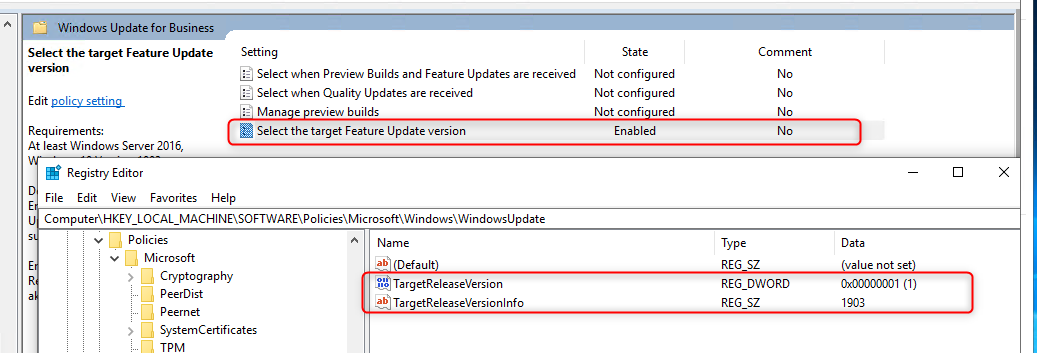
@RAJU2529 - It keeps it on the version you set until you change it and yes it will jump to whatever version is specified. So yes you can go from 1809 directly to 2004. The GPO name is actually referenced which is why I posted my earlier comment. It is in Computer Configuration > Windows Settings > Administrative Templates > Windows Components > Windows Update > Windows Update for Business > "Select the Target Feature Update Version". This corresponding to the registry key:
HKEY_LOCAL_MACHINE\SOFTWARE\Policies\Microsoft\Windows\WindowsUpdate > TargetReleaseVersion and TargetReleaseInfo
brookspeppin
on 27 Aug 2020
@brookspeppin The CSP and GPO for Target Release Version are identical, I have no idea why it is phrased that way or referencing GP at all and I will fix that text.
@RAJU2529 To your questions: 1. No, the target release version policy whether set through GP or CSP is only applicable to released Feature Update versions of Windows 10. 2. That is correct. The device will move to and/or stay on whatever version you have specified, in the case listed that would be moving from 1809 to 2004. 3. The page in question is "Walkthrough: Use CSPs and MDMs to configure Windows Update for Business" which therefore is only focused on CSPs and not GPO. There is an entire GPO walkthrough that explains how to use Target release version with GP. Additionally, brookspeppin outline it above.
Please let me know if either of you have any further questions.
 arcarley
on 27 Aug 2020
arcarley
on 27 Aug 2020
@arcarley Great! Thank you for the quick response.
brookspeppin
on 27 Aug 2020
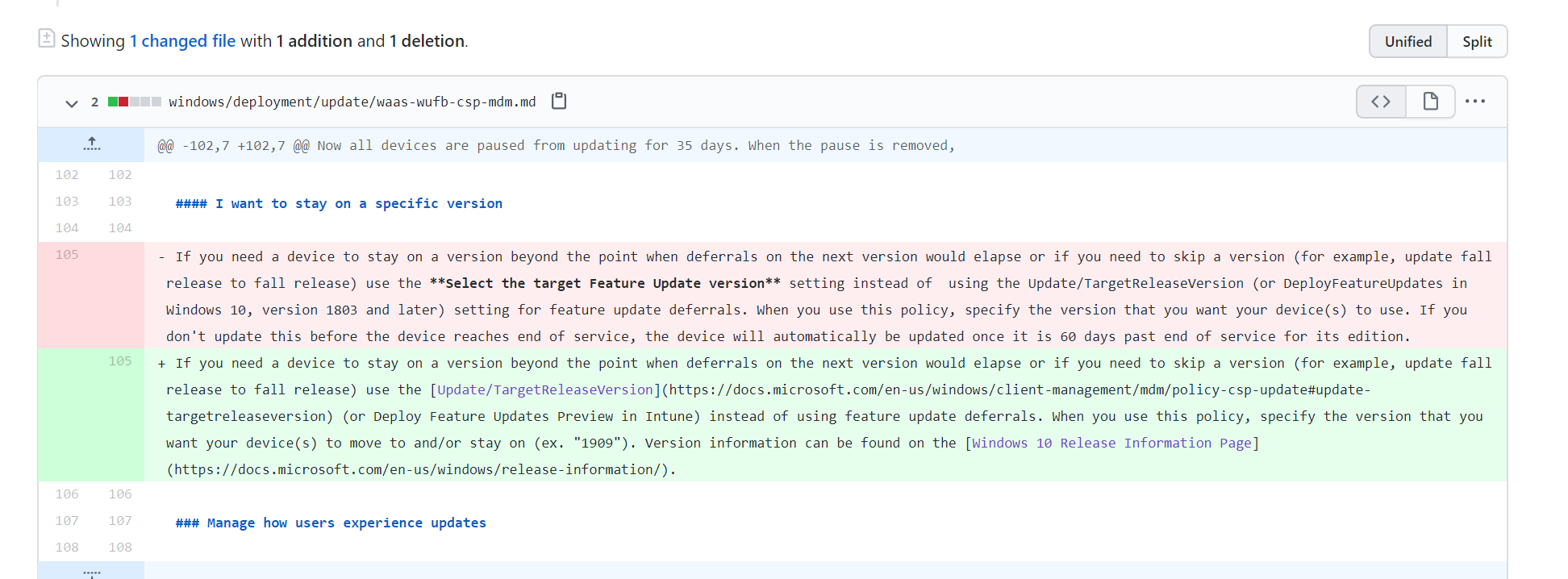
Change in progress. Thank you for helping make our docs better! :)
arcarley
on 27 Aug 2020
@arcarley . Thanks for your response, Now no more questions, But in future, in my mind, if a question arises, then I will post here.
@brookspeppin, thanks for your reply, i knew that settings in gpo, in today morning i was checked before posting questions here.
2004 is enough or should include 2004 build no 19041.207 or 2004 build no 19041.450
RAJU2529
on 27 Aug 2020
Related issues
 sundhaug92
·
3Comments
sundhaug92
·
3Comments
 LanceMcCarthy
·
3Comments
LanceMcCarthy
·
3Comments
 jadelise
·
3Comments
jadelise
·
3Comments
 helloitsliam
·
3Comments
helloitsliam
·
3Comments
 KamilSzafarczyk
·
3Comments
KamilSzafarczyk
·
3Comments
Most helpful comment
Change in progress. Thank you for helping make our docs better! :)