Windows-itpro-docs: need to be cross check
when i add %USERPROFILE% in the exclusionpath list, it adds this path C:\Users\RAJU
not this path C:\Windows\System32\config\systemprofile
RAJU is username ,
so please cross-check this article again
Document Details
⚠ Do not edit this section. It is required for docs.microsoft.com ➟ GitHub issue linking.
- ID: 33c0eddd-98ca-1e7a-bddb-36c7037850fe
- Version Independent ID: 6afa98e8-a402-4ef9-2189-8ecc111c3dba
- Content: Configure and validate exclusions based on extension, name, or location - Windows security
- Content Source: windows/security/threat-protection/microsoft-defender-antivirus/configure-extension-file-exclusions-microsoft-defender-antivirus.md
- Product: w10
- Technology: windows
- GitHub Login: @denisebmsft
- Microsoft Alias: deniseb
 RAJU2529
All 5 comments
From a regular user point of view, I see what you mean, because it looks like incorrect information on the page.
Then again, I assume that Microsoft Defender Advanced Threat Protection (Microsoft Defender ATP) relates to, or deals with, a different type of user account than the one most of us observe when we use our own computers.
Based on this idea, I wonder how much you know about C:\Windows\System32\config\systemprofile -- you might want to look it up for yourself.
Maybe these pages will be of interest:
- https://docs.microsoft.com/en-us/windows/deployment/usmt/usmt-recognized-environment-variables
- https://superuser.com/questions/598601/what-is-system32-config-systemprofile
Please also note the context of the table contents on the referenced page:
System environmental variables
The following table lists and describes the system account environmental variables.
| System environment variables | Will redirect to: |
|:--- |:--- |
| %APPDATA% | C:\Users\UserName.DomainName\AppData\Roaming |
| %APPDATA%\Microsoft\Internet Explorer\Quick Launch | C:\Windows\System32\config\systemprofile\AppData\Roaming\Microsoft\Internet Explorer\Quick Launch |
| %APPDATA%\Microsoft\Windows\Start Menu | C:\Windows\System32\config\systemprofile\AppData\Roaming\Microsoft\Windows\Start Menu |
| %APPDATA%\Microsoft\Windows\Start Menu\Programs | C:\Windows\System32\config\systemprofile\AppData\Roaming\Microsoft\Windows\Start Menu\Programs |
| %LOCALAPPDATA% | C:\Windows\System32\config\systemprofile\AppData\Local |
*
*
*
| | |
|:---- |:----|
%USERPROFILE% | C:\Windows\System32\config\systemprofile
%USERPROFILE%\AppData\Local | C:\Windows\System32\config\systemprofile\AppData\Local
%USERPROFILE%\AppData\LocalLow | C:\Windows\System32\config\systemprofile\AppData\LocalLow
%USERPROFILE%\AppData\Roaming | C:\Windows\System32\config\systemprofile\AppData\Roaming
From my own point of view, as a very minor systems administrator, only the first data row of the table looks slightly out of order, compared to the rows following the first one.
 illfated
on 3 Jul 2020
illfated
on 3 Jul 2020
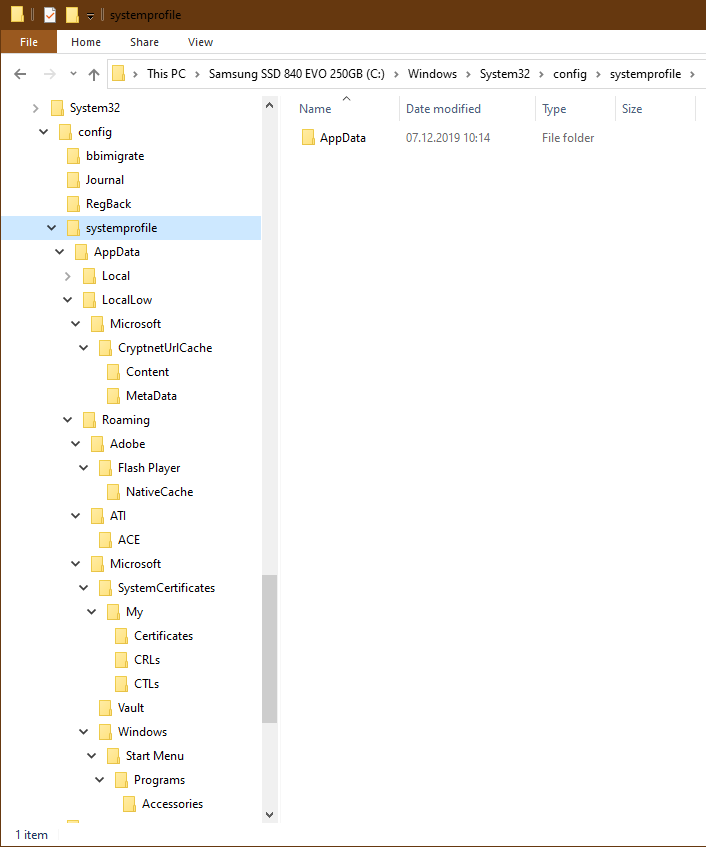
Oh, and before I forget: C:\Windows\System32\config\systemprofile exists as a path also in Windows 10 Home edition, as well as in Windows 10 Pro and Windows Server.
As a regular user (even from an administrator account), you can't go directly to that path before allowing access to yourself on a folder level above, C:\Windows\System32\config\.
After giving yourself access (via the GUI message box), you can browse the system account profile folders:
illfated
on 3 Jul 2020
I checked those links.
Normally when you entered this %USERPROFILE% in RUN command click ok.
You will be redirected to. C:\Users\yourusername
RAJU2529
on 3 Jul 2020
I checked those links.
Normally when you entered this %USERPROFILE% in RUN command click ok.
You will be redirected to. C:\Users\yourusername
Yes, I am aware that this is what you normally see as a regular user in most Windows configurations.
What I am trying to say is that Microsoft Defender Advanced Threat Protection (Microsoft Defender ATP) may not be looking for the same profile folder as we do, because it is looking for system "user" files used to build new (or not yet created) user accounts. To us, it is normal to assume that we only deal with our own user profile files, but Microsoft Defender ATP is trying to make sure that none of the source files for new accounts are unsafe or compromised before creating a new user account. That is why the environment variable %USERPROFILE% is different to Microsoft Defender ATP compared to what we regular users see and access from our user interface (GUI).
Therefore, I don't think the document is incorrect, because Microsoft Defender ATP is not dealing with the direct user account files in use by a logged-in user. Files in use by the logged-on user should be inspected and handled by the local Microsoft Windows Defender application by scanning them when the operating system is in use by any logged-in users. The main goal for Microsoft Defender Advanced Threat Protection should be to prevent any security breach of the system files needed by the operating system itself, not those files we access from our regular user account.
illfated
on 3 Jul 2020
I think @illfated is correct in explaining that the profile paths of system processes are going to be different than that of regular users. This is a common behavior across many different Operating Systems. Thank you for the detailed explanation. Much appreciated.
 e0i
on 6 Jul 2020
e0i
on 6 Jul 2020
Related issues
 Ludwig1770
·
3Comments
Ludwig1770
·
3Comments
 sundhaug92
·
3Comments
sundhaug92
·
3Comments
 iadgovuser1
·
3Comments
iadgovuser1
·
3Comments
 zjalexander
·
3Comments
zjalexander
·
3Comments
 andrewpong
·
3Comments
andrewpong
·
3Comments