Windows-itpro-docs: Password with no TPM
"Manage passwords and PINs" only covers the TPM case. How are passwords/PINs mananged if the PC doesn't have a TPM?
Document Details
⚠ Do not edit this section. It is required for docs.microsoft.com ➟ GitHub issue linking.
- ID: 29116f85-264f-d031-be7b-e32a1816cd28
- Version Independent ID: 640478e6-a367-4e47-a177-3a10dd006d1c
- Content: Overview of BitLocker Device Encryption in Windows 10 - Microsoft 365 Security
- Content Source: windows/security/information-protection/bitlocker/bitlocker-device-encryption-overview-windows-10.md
- Product: w10
- Technology: windows
- GitHub Login: @Dansimp
- Microsoft Alias: dansimp
 Rob190
All 6 comments
If TPM does not in PC means you can't able to enable bitlocker.
I had own experience
 RAJU2529
on 4 Jan 2020
RAJU2529
on 4 Jan 2020
If TPM does not in PC means you can't able to enable bitlocker.
I had own experience
That's wrong. It works without TPM and i do that on my Laptop.
See also https://blogs.technet.microsoft.com/hugofe/2010/10/29/bitlocker-without-tpm/
 beerisgood
on 4 Jan 2020
beerisgood
on 4 Jan 2020
@beerisgood. Thanks for the information, once i had TPM device driver is missing, so that time I could not able to enable BitLocker, after reading the article link provided by you,i will try with another computer modifying by via GPO
RAJU2529
on 4 Jan 2020
@Rob190 The issue has been noted for clarification. Thanks.
 e0i
on 1 Feb 2020
e0i
on 1 Feb 2020
@Rob190 the answer to your questions is in the article provided by @beerisgood (thanks for that).
https://docs.microsoft.com/en-us/archive/blogs/hugofe/bitlocker-without-tpm
In summary, because you don’t have a TPM, you must choose to either enter a password each time your PC boots, or provide a USB flash drive.
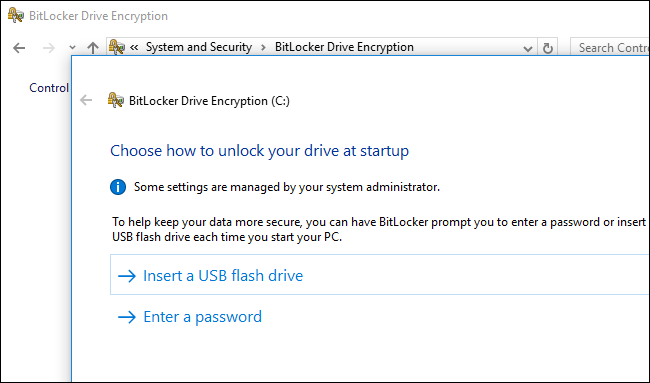
 VLG17
on 23 Mar 2020
VLG17
on 23 Mar 2020
Closing via the above answer. Thank you all for participating.
e0i
on 31 Mar 2020
Related issues
 LanceMcCarthy
·
3Comments
LanceMcCarthy
·
3Comments
 Ludwig1770
·
3Comments
Ludwig1770
·
3Comments
 KamilSzafarczyk
·
3Comments
KamilSzafarczyk
·
3Comments
 sundhaug92
·
3Comments
sundhaug92
·
3Comments
 thohun
·
3Comments
thohun
·
3Comments
Most helpful comment
@Rob190 the answer to your questions is in the article provided by @beerisgood (thanks for that).
https://docs.microsoft.com/en-us/archive/blogs/hugofe/bitlocker-without-tpm
In summary, because you don’t have a TPM, you must choose to either enter a password each time your PC boots, or provide a USB flash drive.