Windows-itpro-docs: Some comments about this documentation page
Hi,
Just executed a firmware update of my Surface docking, here are my comments on this documentation page, which could use some rewriting if you ask me.
- You need to download an .MSI from the Microsoft Surface Dock Firmware Update page. The MSI installs and asks for a reboot? Later I read that a reboot is not really necessary.
- The documentation states:"After you connect Surface Dock to your Surface device, the tool checks the firmware status while running in the background." - does that mean that the MSI must be installed while the Surface Dock is disconnected? or do we mean that we need to disconnect and connect the Surface Dock in order for "something" to start? - and why is there no visual window explaining what is going on?
So, apparently the firmware was updated, but again no visual indication of what happened. or will it only be completed once the power disconnects and it boots again?
About Manual Installation:
Reconnect your Surface Dock for 2 minutes and then disconnect it from your device. The DisplayPort firmware update will be installed while the hardware is disconnected. The LED in the Ethernet port of the dock will blink while the update is in progress. Please wait until the LED stops blinking before you unplug your Surface Dock from power.
a) what is the difference here compared to the first installation...was that the automatic installation or something? and let me see if I understand this completely - I need to reconnect my surface dock for 2 minutes (so, disconnect if already connected and then connect), within those 2 minutes "something" happens. Then I need to disconnect for some installation to take place, and then when the Ethernet LED stops blinking I need to unplug the Surface Dock from power?
Manually installing the MSI file may prompt you to restart Surface; however, restarting is optional and not required. -< then remove this from the MSI, its confusing and unnecessary
You will need to disconnect and reconnect the dock twice before the update fully completes. <- this was neither mentioned in the first part and manual installation part
Network Deployment: Msiexec.exe /i /quiet /norestart will do nothing, you must specify the .MSI file after the /i parameter. when people execute this command line nothing will happen.
it says "A log file is not created by default. In order to create a log file, you will need to append "/l*v [path]" two times? why?
For Intune deployment, please specify how the detection method must be created, later the registry locations are explained but nowhere that these could be used as a detection method as well, also here the .msi file must be specified after /i
The Notes section of the "Surface Dock Firmware Update log" metions Earlier versions of this tool wrote events to Applications and Services Logs\Microsoft Surface Dock Updater.? What does the Surface Dock Firmware Update Log have to do with the EventLog? Is this the logfile you create with the /L*V parameter for msiexec? or another logfile..
The events are logged into the "Application" event log, and I can see the event ID mentioned in Table 2, but all the eventlog messages look something like:
The description for Event ID 2009 from source SurfaceDockFwUpdate cannot be found. Either the component that raises this event is not installed on your local computer or the installation is corrupted. You can install or repair the component on the local computer.
If the event originated on another computer, the display information had to be saved with the event.
The following information was included with the event:
surfacedockfwupdate
Dock MCU firmware version does not support telemetry. hr=0 DriverTelementry EventCode = 2009
The request is not supported
Come on Microsoft, you can do better than these vague messages? please make sure that valid eventlog messages are written to the event log which are readable and not raise questions on whether the installation failed or was successful.
Troubleshooting Tips:
Uninstall any current Surface Dock Firmware Update and then install the latest version. How ?????
Document Details
⚠ Do not edit this section. It is required for docs.microsoft.com ➟ GitHub issue linking.
- ID: 2a7b356e-3dbd-7f59-845e-a92e05865a52
- Version Independent ID: 711c5497-373f-662c-7fae-ba60f046e50c
- Content: Microsoft Surface Dock Firmware Update - Surface
- Content Source: devices/surface/surface-dock-firmware-update.md
- Product: w10
- Technology: windows
- GitHub Login: @Dansimp
- Microsoft Alias: dansimp
 kennethvs
All 28 comments
@illfated . Please review the PR
 RAJU2529
on 29 Dec 2019
RAJU2529
on 29 Dec 2019
(Ref. #5759 )
 illfated
on 30 Dec 2019
illfated
on 30 Dec 2019
@illfated. I think PR#5759 still not merged with article.
RAJU2529
on 31 Dec 2019
Yes, I know. I simply referenced this ticket back to the PR, to make it more visible that you have not added any comment to automatically close this ticket when the PR becomes merged.
edit: I did not mean to suggest that your PR should close this issue ticket. I was thinking more about referencing the status of this ticket. Then again, I noticed now that there is a more central issue described in the original post above, so we will likely see more PRs referencing this ticket.
illfated
on 31 Dec 2019
@illfated. I have some screenshots which shows the proofs of some articlesa and it's compulsory needed , so I want to know how to add screenshots3 photos to the articles.
Could you tell me steps or give instructions how to add
RAJU2529
on 31 Dec 2019
Well, as soon as you have started working on a new PR branch, you should be able to upload images (make sure to use lowercase file names) to the GitHub folder where the image is meant to be, usually in a separate folder called "images" inside the folder where the article is located.
edit: Think of it as uploading the images via FTP after creating and switching to a new PR branch.
illfated
on 31 Dec 2019
@illfated. Thanks, i will try to upload in next PR
RAJU2529
on 31 Dec 2019
Example image:
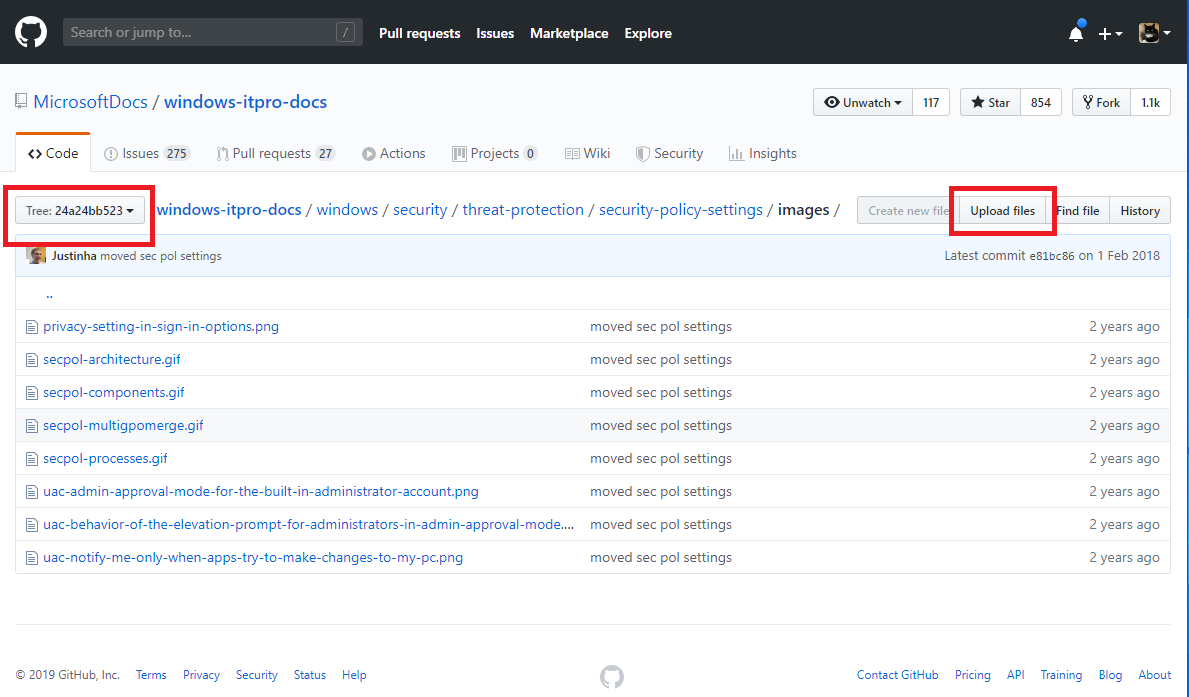
in your case, the button in my image saying [ Tree: 24a24bb523 ] should show the name of your PR branch ( e.g. "patch-123").
Notice also the 2nd red frame around the [ Upload files ] button.
illfated
on 31 Dec 2019
(ref. #5832 )
illfated
on 14 Jan 2020
(ref. #5214 )
illfated
on 14 Jan 2020
I thought I had a reply from the product team, but I'm still waiting for some details. I wish I could test this myself and just update the topic based on the behavior, but I don't have a surface dock.
 greg-lindsay
on 7 Feb 2020
greg-lindsay
on 7 Feb 2020
Well wadda you know I suddenly have a surface dock :) I'll see what I can do to follow the instructions in the guide and clarify them.
greg-lindsay
on 7 Feb 2020
I was able to get some information that I'll be adding to the topic.
Here's how the update process works:
Note: before starting you might want to open eventvwr.msc and click on Windows Logs\Application then click Filter Current Log in the right hand pane, and enter a source of SurfaceDockFwUpdate. This will help to notify when the process is started and when it is finished.
Also review the following registry node:
HKEY_LOCAL_MACHINE\SOFTWARE\Microsoft\Windows NT\CurrentVersion\WUDF\Services\SurfaceDockFwUpdate\Parameters
There are several REG_DWORD items here that provide status of the update. The most important ones are:
Component10CurrentFwVersion
Component20CurrentFwVersion
When the update is complete, you will see the following values for these two DWORDs:
Component10CurrentFwVersion 0x04ac3970 (78395760)
Component20CurrentFwVersion 0x04915a70 (76634736)
...anyway here's what to do:
- Download and install the .msi as described in the article.
- You will notice some events in the Application log, but the firmware will not update until you disconnect from the dock and then reconnect.
- Disconnect the magnetic power cord from the side of the Surface device and wait a couple minutes. Then connect it again.
When you look in the Application log again, you should see these events:
ID 2001 update started
ID 2004 get version (10)
ID 2004 get version (20)
time interval here
ID 2007 update finished
ID 2008 telemetry start
ID 2011 telemetry end
(I gave a general description of the event above in parenthesis - this isn't the precise wording in the event)Refresh the registry keys again and now you should have the updated versions.
I still have a couple more questions to get answered, but I should be able to update this topic on Monday with better procedures.
greg-lindsay
on 8 Feb 2020
FYI you can use this query from the command line:
Reg query "HKLM\SOFTWARE\Microsoft\Windows NT\CurrentVersion\WUDF\Services\SurfaceDockFwUpdate\Parameters"
greg-lindsay
on 8 Feb 2020
Good updates. Nice to see that there is progress, particularly for issues important to quite a lot of users.
illfated
on 8 Feb 2020
Documentation improvements are good but can't the firmware updater be updated so it actually tells you what it is doing and if you need the update. Would be easier than having to check the registry and event viewer. Seems rather strange it doesn't do this as all bios updaters have this basic functionality.
 robinwilson16
on 9 Feb 2020
robinwilson16
on 9 Feb 2020
Looks like a quite useful feedback to the firmware updater developers. I agree, based on other firmware updating experience.
illfated
on 9 Feb 2020
I have heard that this particular tool is not meant to be a final solution, and that it won't be developed further, but rather replaced by something with better functionality.
greg-lindsay
on 10 Feb 2020
I have heard that this particular tool is not meant to be a final solution, and that it won't be developed further, but rather replaced by something with better functionality.
I sure hope so. The current version seems to have made a lot of users unhappy. Let's keep the hope up.
illfated
on 10 Feb 2020
OK I have updated the article to hopefully make it clearer.
There was a lot of information at the end of the article that was helpful to understand the beginning of the article, but you'd never see it if you just read it top to bottom because you would be confused before you got there. I've linked those sections now and also explained the process a little simpler. I'll close this issue tomorrow assuming I don't hear that more is needed. The changes I just made will appear this afternoon, in about 3-4 hours.
greg-lindsay
on 10 Feb 2020
I see the GitHub page is updated,
- GitHub page: https://github.com/MicrosoftDocs/windows-itpro-docs/blob/public/devices/surface/surface-dock-firmware-update.md
- commits: https://github.com/MicrosoftDocs/windows-itpro-docs/commits/public/devices/surface/surface-dock-firmware-update.md
but it will still take a couple of days for the changes to migrate to the docs.microsoft.com page.
I presume the involved users will be interested: @DennisGaida, @termnews, @StuBeck32, @MJBu, @goxia and @kennethvs
illfated
on 11 Feb 2020
The updates are very good. Thank you @greg-lindsay and congrats on your new Surface Dock 😉
There is still the error of this original issue in the doc: The line Msiexec.exe /i /quiet /norestart will do nothing as the MSI needs to be specified. Same goes further down for Intune Deployment.
Given that the update doc is pretty technical (event log, using reg query & registry) I don't think any layperson (i.e. regular consumer) understands how to update the Surface Dock. I hope this is intentional.
 DennisGaida
on 11 Feb 2020
DennisGaida
on 11 Feb 2020
Hi Dennis, thanks for pointing out these issues! I should have seen that, but I was focused on reorganizing all the topics. I'll get in and fix that right now.
Indeed the page is meant for IT pros, not the general public. However we can't prevent the general public from hitting this page when they run a search.
By the way, the command is actually written as **Msiexec.exe /i \
greg-lindsay
on 11 Feb 2020
I've pushed this latest update out. It should appear later this afternoon. I'm closing the issue now. Let me know if more needs to be done here. Thanks again for helping to improve the article so much.
greg-lindsay
on 11 Feb 2020
Is there a way to set this so the issue isn’t closed until either a week has passed or someone external has okayed the changes? Closing it before we can even see the changes makes it seem like you don’t want us to review the changes and simply create a new issue.
Stuart
From: Greg Lindsay notifications@github.com
Sent: Tuesday, February 11, 2020 2:47:24 PM
To: MicrosoftDocs/windows-itpro-docs windows-itpro-docs@noreply.github.com
Cc: StuBeck32 stuartbecktell@outlook.com; Mention mention@noreply.github.com
Subject: Re: [MicrosoftDocs/windows-itpro-docs] Some comments about this documentation page (#5756)
I've pushed this latest update out. It should appear later this afternoon. I'm closing the issue now. Let me know if more needs to be done here. Thanks again for helping to improve the article so much.
—
You are receiving this because you were mentioned.
Reply to this email directly, view it on GitHubhttps://eur04.safelinks.protection.outlook.com/?url=https%3A%2F%2Fgithub.com%2FMicrosoftDocs%2Fwindows-itpro-docs%2Fissues%2F5756%3Femail_source%3Dnotifications%26email_token%3DAK5FPN6MY3GMBQJOTNNE3VTRCL6EZA5CNFSM4KAM6WF2YY3PNVWWK3TUL52HS4DFVREXG43VMVBW63LNMVXHJKTDN5WW2ZLOORPWSZGOELNZY7I%23issuecomment-584817789&data=02%7C01%7C%7C45efbc887c4248a6f4b108d7af2b37c4%7C84df9e7fe9f640afb435aaaaaaaaaaaa%7C1%7C0%7C637170472458624970&sdata=HtO2VFG29e7RzohGRQJYHvPLFTo099Td9YBgAPm7K5U%3D&reserved=0, or unsubscribehttps://eur04.safelinks.protection.outlook.com/?url=https%3A%2F%2Fgithub.com%2Fnotifications%2Funsubscribe-auth%2FAK5FPN2G76YEZEGPNW2KPO3RCL6EZANCNFSM4KAM6WFQ&data=02%7C01%7C%7C45efbc887c4248a6f4b108d7af2b37c4%7C84df9e7fe9f640afb435aaaaaaaaaaaa%7C1%7C0%7C637170472458624970&sdata=GB9Kh6L73OJM3%2BPIB7JgaLDJykggswLKBpStSYY0g6k%3D&reserved=0.
 StuBeck32
on 11 Feb 2020
StuBeck32
on 11 Feb 2020
The changes were very minor. All I did was escape some hidden characters. I reviewed the PR and verified that the characters are displaying correctly. If there's still a problem I can fix it without having to open another issue. I need to move on though, this topic is just one of many hundreds I'm looking at.
greg-lindsay
on 11 Feb 2020
Understand, and also of course you have a ton of work to do like all of us. This seems to be a bigger problem with how github sends notices either way as I was responding more to your "I'm closing this" and not seeing the other notes you had done. MS has a history here of closing cases without actually doing anything.
StuBeck32
on 11 Feb 2020
I see, yes the notifications aren't ideal. In fact it makes it difficult for me to even see issues unless they are specifically assigned to me and that doesn't happen for a while in some cases.
greg-lindsay
on 11 Feb 2020
Related issues
 michalzobec
·
3Comments
michalzobec
·
3Comments
 helloitsliam
·
3Comments
illfated
·
3Comments
helloitsliam
·
3Comments
illfated
·
3Comments
 SwiftOnSecurity
·
3Comments
SwiftOnSecurity
·
3Comments
 Ludwig1770
·
3Comments
Ludwig1770
·
3Comments
Most helpful comment
The changes were very minor. All I did was escape some hidden characters. I reviewed the PR and verified that the characters are displaying correctly. If there's still a problem I can fix it without having to open another issue. I need to move on though, this topic is just one of many hundreds I'm looking at.