Windows-itpro-docs: 1903 fails to provision with set up schools pcs app
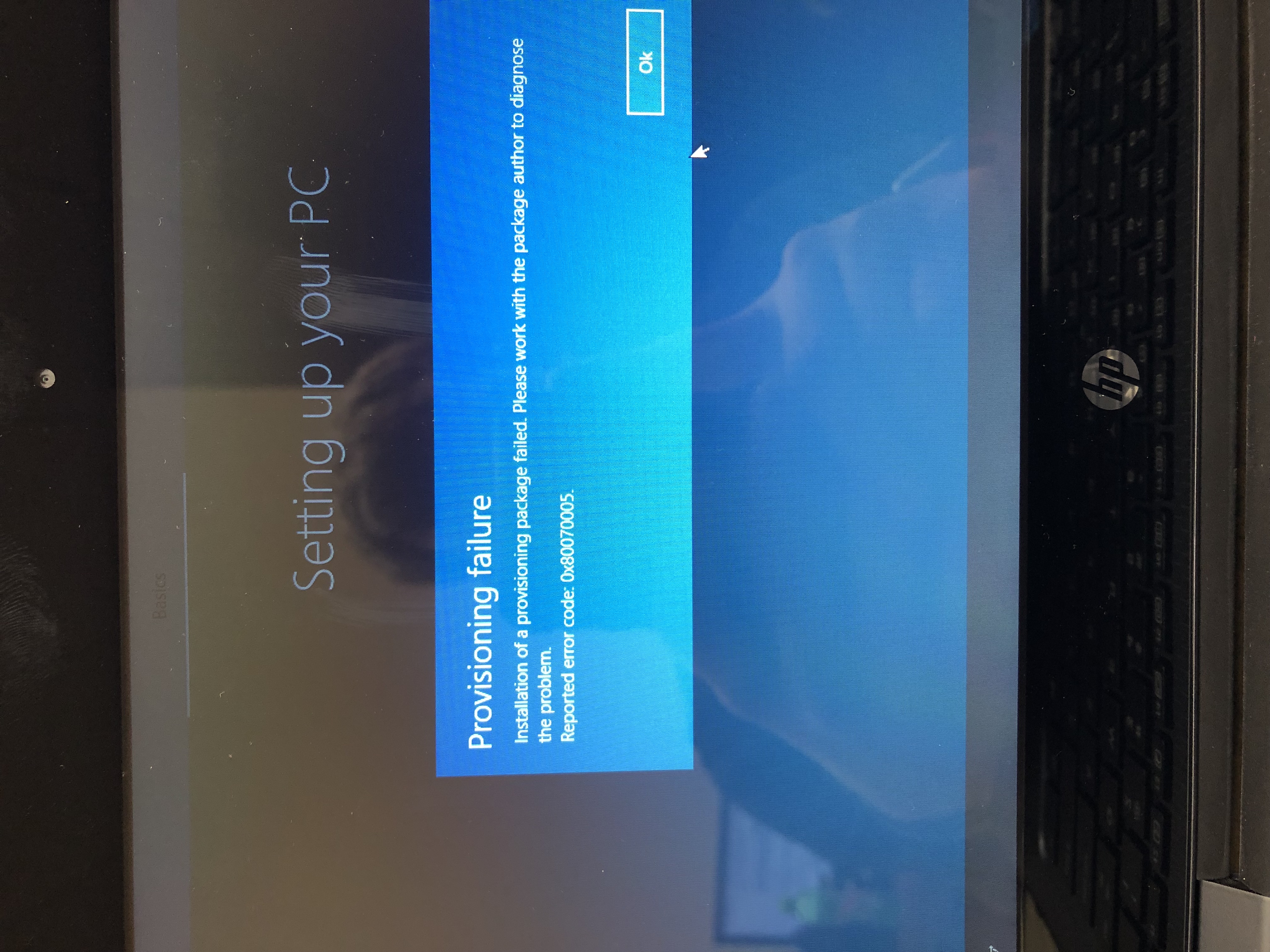
With 1903 running in S mode provisioning with the set up school pcs stick fails. I get error code 0x80070005. I have tried several different combinations of settings on the app but it has failed everytime.
Document Details
⚠ Do not edit this section. It is required for docs.microsoft.com ➟ GitHub issue linking.
- ID: e2ca5807-f011-cdd1-eb80-c74655aa4738
- Version Independent ID: fe016307-69a4-ec63-4979-eac841d13c3c
- Content: Use Set up School PCs app
- Content Source: education/windows/use-set-up-school-pcs-app.md
- Product: w10
- GitHub Login: @lenewsad
- Microsoft Alias: lanewsad
 nickesping
All 11 comments
Error code 0x80070005 is also known as ACCESS DENIED.
Have you tried searching the web for pages describing how to deal with error code 0x80070005?
- https://answers.microsoft.com/en-us/windows/forum/all/error-code-0x80070005/08a90197-f23b-4d70-95d9-d47ddedcb54f
- https://www.thewindowsclub.com/windows-update-install-error-0x80070005
- https://windowsreport.com/error-0x80070005-pc/
- https://www.diskgenius.com/how-to/fix-error-code-0x80070005.php#Windows_update_Error_0x80070005
 illfated
on 31 May 2019
illfated
on 31 May 2019
All of those pages are related to windows updates. I am trying to run the set up school pcs app provisioning package on a new 1903 image running S mode. I get this error during OOBE.
nickesping
on 31 May 2019
Fair enough, maybe there is something new happening within 1903 which did not happen on earlier versions (or there could be something else entirely).
We need to wait for follow-up from one of the team members handling the issues.
I also presume you will need to contact Microsoft Support in your region to get your problem solved in a timely manner.
Please note that these pages are intended for improving the Documentation pages.
If you are able to get the issue solved with help from Microsoft Support, you are more than welcome to share, especially if the solution adds useful information to the current documentation page content.
illfated
on 31 May 2019
@officedocsbot assign @mypil
 mypil
on 7 Jun 2019
mypil
on 7 Jun 2019
@nickesping - Thank you for submitting feedback.
I think the best way forward is if you can open a service ticket so this can get resolved ASAP. Based on outcome let me know if it is something that can be called out in the docs.
Please follow this link to contact support for Windows 10 products:
https://support.microsoft.com/en-us/hub/4338813/windows-help?os=windows-10
If you don't mind please keep us posted here on the resolution and I really want to get this information you are discovering back into the docs.
mypil
on 7 Jun 2019
@mypil - I submitted a ticket with the intune support team a few days ago and provided them with all the information and logs they have asked for so far. I will update this post when we figure out a resolution. Thanks.
nickesping
on 7 Jun 2019
@nickesping - This is noted. We will close this issue for now. Please feel free to re-open this issue if there is a specific area of the docs that we can improve or make better. Thank you.
mypil
on 10 Jun 2019
@officedocsbot close
mypil
on 10 Jun 2019
After working with intune support we have a workaround for my issue. There is currently a known issue with provisioning over wifi. The solution that worked for me was to create a stick with Windows imaging and configuration designer with just the wifi settings and then create a second stick with set up schools to configure the rest after the wifi settings are applied. Here is a link to some more info https://techcommunity.microsoft.com/t5/Intune-Customer-Success/Known-issue-Provisioning-error-on-Wi-Fi-for-Azure-AD-joined/ba-p/676299
nickesping
on 11 Jun 2019
Thank you for posting again, good to see that you got a solution. Even if we consider that the Microsoft Docs team might want to "chime in" with a suggestion, do you have a suggestion for an improvement to the article?
illfated
on 11 Jun 2019
Hi @nickesping, thank you for keeping us up-to-date and sharing your resolution. I filed an internal work item to update the SUSPC articles with some troubleshooting help. Here's some additional information/alternative solutions from the product team about this particular error.
Error 0x80070005: Access Denied.
If you encounter this error immediately after plugging the USB, it’s likely there is another package on the device and it is not in a clean state. There can only be one provisioning package applied to a device. You will need to reimage and try again.
If the error occurs after you’ve seen the UI showing the provisioning progress, then the AAD bulk token likely isn't valid anymore. Check if the package works on other devices. If not, likely one of the prerequisites is not met. If all prerequisites are met, please create a new package and try again. If it still fails, collect information and contact support.
 lenewsad
on 11 Jun 2019
lenewsad
on 11 Jun 2019
Related issues
 andrewpong
·
3Comments
andrewpong
·
3Comments
 helloitsliam
·
3Comments
helloitsliam
·
3Comments
 LanceMcCarthy
·
3Comments
LanceMcCarthy
·
3Comments
 marcnil815
·
3Comments
marcnil815
·
3Comments
 zjalexander
·
3Comments
zjalexander
·
3Comments
Most helpful comment
After working with intune support we have a workaround for my issue. There is currently a known issue with provisioning over wifi. The solution that worked for me was to create a stick with Windows imaging and configuration designer with just the wifi settings and then create a second stick with set up schools to configure the rest after the wifi settings are applied. Here is a link to some more info https://techcommunity.microsoft.com/t5/Intune-Customer-Success/Known-issue-Provisioning-error-on-Wi-Fi-for-Azure-AD-joined/ba-p/676299