Windows-itpro-docs: Commercial ID Key?
The article has some old screenshots and mentions a Commercial ID key but it doesn't exist anywhere. It seems like it needs to be updated to the new terminology that's being used in the Azure portal. This is a recurring problem across all of MS documentation.
 lXbalanque
All 9 comments
Looks like your post did not get linked to any particular docs.microsoft.com page.
Could you link the page(s) your are making a reference to?
 illfated
on 20 Mar 2019
illfated
on 20 Mar 2019
Oh, oops! That would be helpful. Here's the link: https://docs.microsoft.com/en-us/windows/deployment/update/update-compliance-get-started#feedback
I'm attempting to pull log information about Windows 10 updates in my environments using Windows Intune and Log Analytics. I think this is what I should be doing but if there's another path I should be going down, I'm all ears. I just need to report on patch compliance and make sure all of my machine are adhering to the update rings I've assigned. Hopefully it contains the ability to drill down into specific machines and see what's installed.
lXbalanque
on 20 Mar 2019
Thanks. To sum up, the article is:
Docs / Windows / Deployment : Get started with Update Compliance
Github page to improve / update:
illfated
on 20 Mar 2019
Hello, @IXbalanque
The issue is under investigation and you will be notified with any changes on the way.
Thank you for providing feedback.
 e0i
on 9 May 2019
e0i
on 9 May 2019
@lXbalanque A PR is under delivery for this issue. Thank you.
e0i
on 27 May 2019
@e0i : Could you link the PR you refer to, so we may link the PR back here too?
illfated
on 27 May 2019
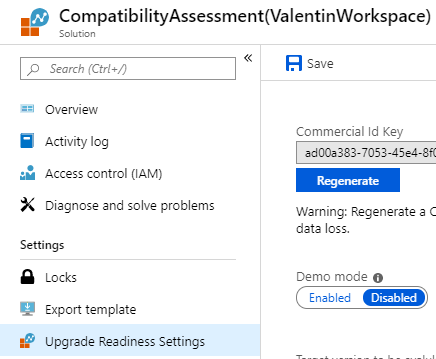
@lXbalanque I have tested and the Commercial ID Key is there...i guess you don't see it under the Log Analytics Workspace because you haven't created an Upgrade Readiness resource before doing that.
In order to reach your goal of pulling log information about Windows 10 updates in your environments your need to take advantage of Upgrade Readiness (or even the newer Device Health), which leverages Log Analytics Workspace.
After you configure Upgrade Readiness in Azure, you'll see that the Commercial Id Key will be generated in the Analytics Workspace under "Upgrade Readiness Settings":
 VLG17
on 23 Jul 2019
VLG17
on 23 Jul 2019
Hello @lXbalanque,
We are closing this issue since your question seems to be answered. Feel free to re-open this issue if you still experience problems.
Thanks.
e0i
on 30 Jul 2019
@officedocsbot close
e0i
on 30 Jul 2019
Related issues
 andrewpong
·
3Comments
andrewpong
·
3Comments
 thohun
·
3Comments
thohun
·
3Comments
 sundhaug92
·
3Comments
sundhaug92
·
3Comments
 arcotek-ltd
·
3Comments
arcotek-ltd
·
3Comments
 KamilSzafarczyk
·
3Comments
KamilSzafarczyk
·
3Comments