Windows-itpro-docs: TPM 2.0
I have a modern enterprise device - Lenovo M920p - with TPM 2.0, but am getting "Securing your hardware (Failed: 0x800705b4)" while testing autopilot in self deploy mode. I am using 1809 Enterprise. Any ideas ?
Document Details
⚠ Do not edit this section. It is required for docs.microsoft.com ➟ GitHub issue linking.
- ID: 6867cc8c-868d-d472-8aa5-1ed5b94ced2c
- Version Independent ID: 6822e12d-7474-9e49-1e8b-88f7eec3b22c
- Content: Windows Autopilot Self-Deploying mode (Preview)
- Content Source: windows/deployment/windows-autopilot/self-deploying.md
- Product: w10
- GitHub Login: @greg-lindsay
- Microsoft Alias: greg-lindsay
 Niglb
Niglb
All 19 comments
Some further event logs now - Event 176 - MSA TPM keystate has been updated. New server state = 3, new client state = 6, followed by 152, 182, 150, 183, and finally 177 'TPM attestation retry is being attempted. Current retry attempt 3 of 3 maximum'. This is a modern TPM 2.0 device as stated.
Niglb
on 20 Dec 2018
As this is modern hardware and I don't see the explicit TPM failure event , am I missing anything on the configuration side of things? Or is there a 'TPM prep' I could perform?
Niglb
on 23 Dec 2018
I have now tried it on another piece of hardware - T450s with TPM 2.0 enabled - same time out issues.
Update: also tested Surface Laptop, timed out. I re-downloaded the ISO media for 1809, and re-created my offline JSON file (I am testing with an Offline JSON, as well as traditional 'online' hardware hash), and still run into this issue.
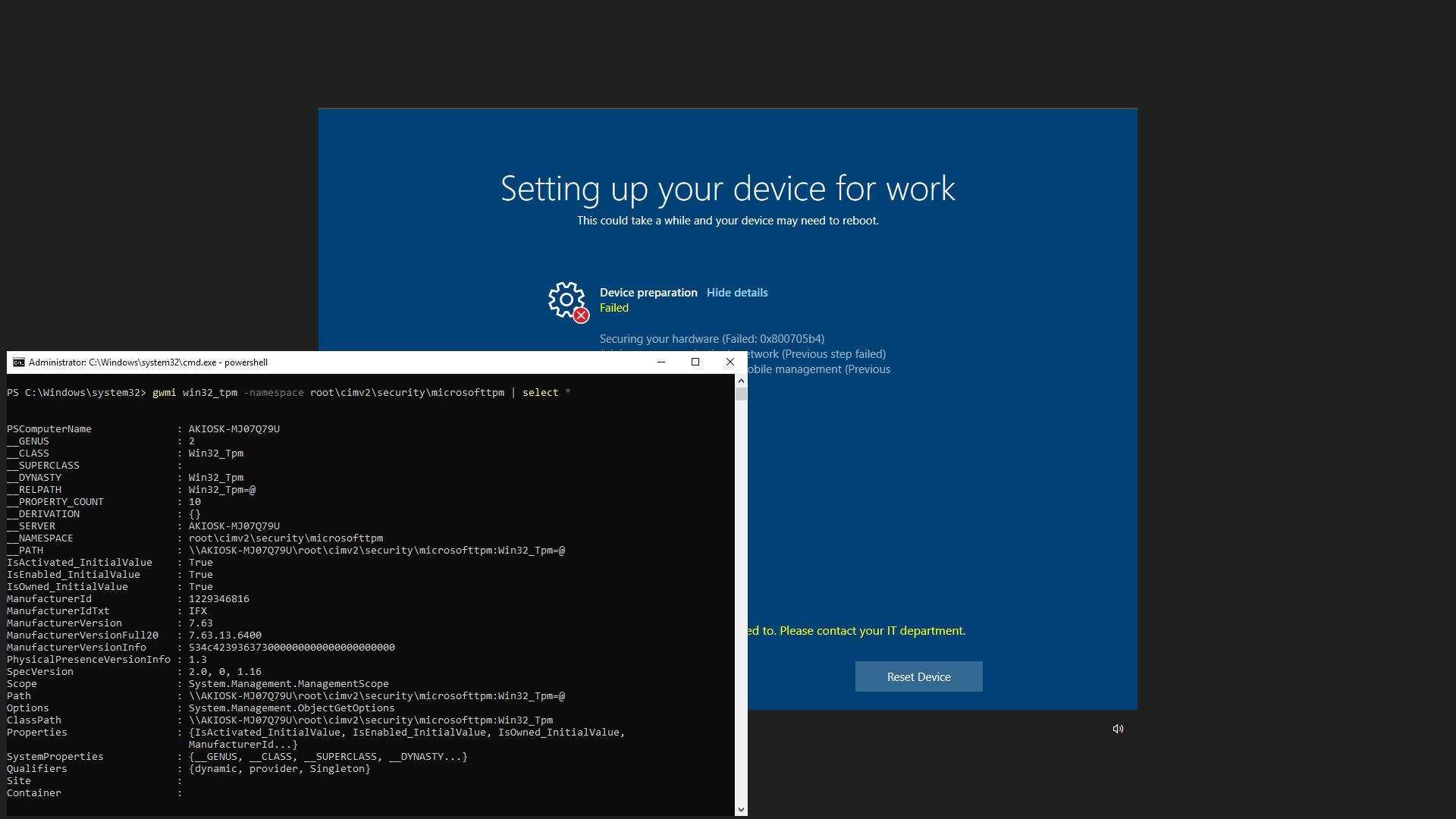
As you can see this device does support TPM 2.0.
Niglb
on 27 Dec 2018
I am getting the same thing with a HP 430 G5 with TPM 2.0
 rlawrimore
on 3 Jan 2019
rlawrimore
on 3 Jan 2019
I try Autopilot Self Deploy with a Lenovo M920s and a HP EliteDesk 800 G4. I found:
- When I do a clean reinstall with the VLSC ISO 1809, Windows reports that the security chip does not support "Attestation" (see screenshot). If I understand correctly, this TPM feature must be supported for Self Deploy to work.
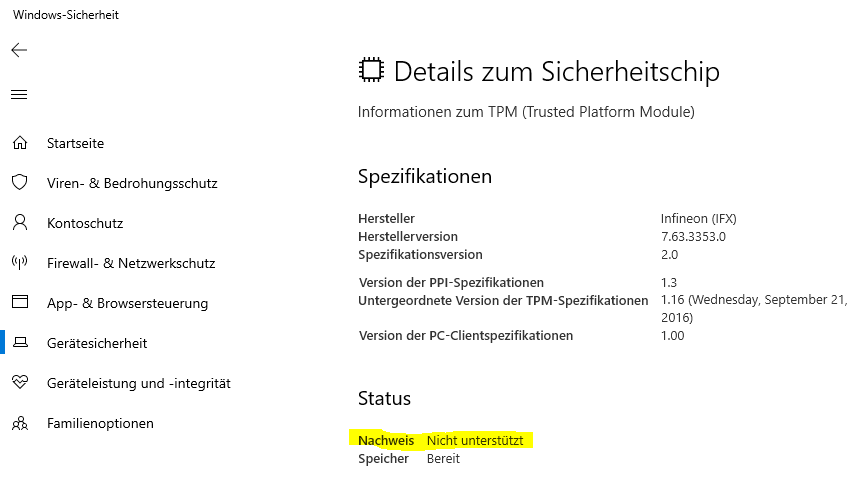
- When I reset the PCs to Lenovo / HP factory image (Win 10 1803), that same Attestation feature is supported. (Of course, 1803 does not support Self Deploy, thats why I must clean install 1809.)
So in my situation, the question is: how can I have TPM Attestation supported in clean install 1809? Do I need to install a special driver or Windows component? Or somehow prepare the TPM with keys that match for Win 1809?
 hirnidrin
on 10 Jan 2019
hirnidrin
on 10 Jan 2019
anything?
Niglb
on 24 Jan 2019
Let us hope @greg-lindsay will find time to reply soon, unless something keeps him too occupied elsewhere.
 illfated
on 24 Jan 2019
illfated
on 24 Jan 2019
Have you contacted HP or Lenovo?
 egallagh
on 24 Jan 2019
egallagh
on 24 Jan 2019
I was away for 2 weeks, no progress so far. I have not yet contacted HP or Lenovo, will try. @Niglb @rlawrimore do you also see the Attestation feature disabled on your devices, after install of 1809?
hirnidrin
on 24 Jan 2019
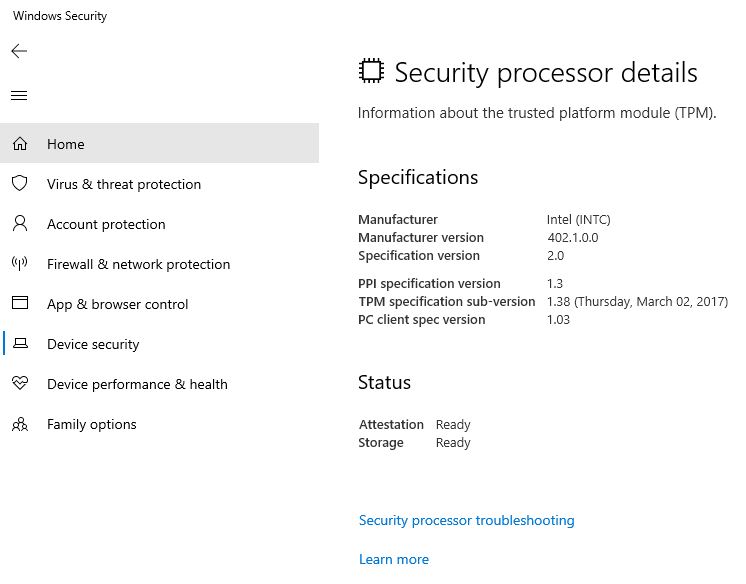
Mine shows as Attestation Ready:
Niglb
on 24 Jan 2019
I have the same issue on a Lenovo X1 Carbon. Updated to 1809 via Windows Update and attestation is shown as Ready, but autopilot deployment fails with 0x800705b4 after a computer reset. Unfortunately I don't have access to a VLSC image, so can't test that.
 hambranch
on 31 Jan 2019
hambranch
on 31 Jan 2019
Possible solution
After some back and forth with the InTune support (which was wildly unhelpful fwiw) I realised that I had set up a bunch of Bitlocker settings that were only supported on Win10 Enterprise, not on Pro. After re-creating my deployment profile with only the settings that are supported by Pro I was able to complete the deployment as intended. If anyone wants to know what exact settings I'm using, LMK.
TL:DR deployment profile contained Enterprise only settings, computer was running Pro
EDIT: Having the same issue with a Dell XPS, difference is I can't get it to work. Already wasted a whole day on this, and user-driven deploy works so I'll be using that until self-deploy is out of preview and hopefully working.
hambranch
on 4 Feb 2019
hi, we are running a self-deployment profile. We got an image from our vendor. When we run the image with the imported hardwarehash and serialnumber we got an error "AutoPilot Registering your device for mobile manamgement (Failed: 3, 0x801c03ea".
When i the reset the system (remove the device from aad and import it again in devices) the self-deployment works fine.
Anyone an idea?
 johanvjr
on 8 Feb 2019
johanvjr
on 8 Feb 2019
Although I don't work with this technology these days, I will hazard a guess that it could be some kind of cache or synchronization issue.
illfated
on 10 Feb 2019
We found the issue. It was regarding the image the 3rd party had created. Don't know what the problem was, but after system reset and recreating the image the problem was gone.
johanvjr
on 11 Feb 2019
I had the same issue, when we upgraded a machine from 1803 to 1809 it doesn't work. If you fresh install 1809, it does work.
 Ruthhl3ss
on 15 Apr 2019
Ruthhl3ss
on 15 Apr 2019
Hi everyone.
Please understand that this is not a technical support forum. This feedback area is intended only for feedback regarding the documentation on this page.
If you are having problems requiring technical support, please consider opening a support case or try support.microsoft.com.
Thank you.
Recommend closure
egallagh
on 15 Apr 2019
@officedocsbot assign @e0i
 e0i
on 15 Apr 2019
e0i
on 15 Apr 2019
@officedocsbot close
e0i
on 15 Apr 2019
Related issues
 RAJU2529
·
3Comments
RAJU2529
·
3Comments
 LanceMcCarthy
·
3Comments
LanceMcCarthy
·
3Comments
 SwiftOnSecurity
·
3Comments
SwiftOnSecurity
·
3Comments
 michalzobec
·
3Comments
michalzobec
·
3Comments
 helloitsliam
·
3Comments
helloitsliam
·
3Comments
Most helpful comment
We found the issue. It was regarding the image the 3rd party had created. Don't know what the problem was, but after system reset and recreating the image the problem was gone.