Windows_exporter: Unable to get Hypervisor cpu load percentage
Hello,
I'm trying to monitor my hyper-V servers with WMI_Exporter but I can't get the real cpu load, all I got are some random unitless numbers with wmi_hyperv_host_cpu_hypervisor_run_time.
I also got the powershell command to get this numbers : Get-Counter -Counter “\Hyper-V Hypervisor Logical Processor(_Total)\% Total Run Time".
If anyone is interested in adding this in the exporter, it would be really great.
 aroumo
All 16 comments
It looks like that “\Hyper-V Hypervisor Logical Processor(_Total)\% Total Run Time" is related to the class Win32_PerfRawData_HvStats_HyperVHypervisorLogicalProcessor whose not implemented in the file _hyperv.go_.
You can find the class into the following link : https://wutils.com/wmi/root/cimv2/win32_perfrawdata_hvstats_hypervhypervisorlogicalprocessor/
This could give us the numbers we're looking for, if anyone can help with that.
aroumo
on 4 Dec 2019
Thank you @aroumo, and sorry for not getting back to you sooner!
Not having a hyper-v environment to experiment with at the moment, I would still guess that wmi_hyperv_host_cpu_hypervisor_run_time is a counter on the total number of cpu seconds consumed. To get the percentage use, you'd do a query something like sum(rate(wmi_hyperv_host_cpu_hypervisor_run_time[5m])) by (instance). Does that give reasonable numbers?
In general, we prefer not to expose percentages pre-processed by Windows, and rather go with the raw numbers that are easier to aggregate.
 carlpett
on 8 Jan 2020
carlpett
on 8 Jan 2020
sum(rate(wmi_hyperv_host_cpu_hypervisor_run_time[5m])) by (instance) - can`t understand what does it displays.
 caxepok
on 11 Feb 2020
caxepok
on 11 Feb 2020
sum(rate(wmi_hyperv_host_cpu_hypervisor_run_time[5m])) by (instance). Does that give
reasonable numbers?
Sadly it doesn't...

I tried something like (sum(rate(wmi_cpu_time_total{job="your_job_name",mode!~"idle"}[2m])) by (instance)) * (100 / 7.5).

But I am uncertain if that's accurate.
 Pamalosebi
on 26 Mar 2020
Pamalosebi
on 26 Mar 2020
In general, we prefer not to expose percentages pre-processed by Windows, and rather go with the raw numbers that are easier to aggregate.
I agree with you, but I have been playing with those values for several days and this are what I learned:
windows_hyperv_host_cpu_total_run_time = windows_hyperv_host_cpu_hypervisor_run_time + windows_hyperv_host_cpu_guest_run_time
windows_hyperv_vm_cpu_total_run_time = windows_hyperv_vm_cpu_hypervisor_run_time + windows_hyperv_vm_cpu_guest_run_time
Witch make one of the three value useless because you can compute it with the other two.
To get any true % of the total we either need the "real" total, or the Idle time.
Maybe in that case the counter following counters are more useful:
Hyper-V Hypervisor Logical Processor
% Guest Run Time
% Hypervisor Run Time
% Idle Time
% Total Run Time
and
Hyper-V Hypervisor Virtual Processor
% Guest Run Time
% Hypervisor Run Time
% Remote Run Time
% Total Run Time
I have several Hyper-V at my disposal if you want me to do some testing.
 JDA88
on 17 Jun 2020
JDA88
on 17 Jun 2020
Good news, alter a lot of digging in the values I think I finally got the solution, I am able to compute those values:
- Virtual CPU % utilisation (Total, Guest and Hypervisor space)
- Physical CPU % utilisation (Total, Guest and Hypervisor space)
Short answer:
we just need a new counter value added to hyperv.go, or is it available already? could not find it
Timestamp_PerfTime
UPDATE: Timestamp_PerfTime difference value is veri close to the number of second * 10000000. I'll try to get it with the Uptime later today...
Long answer:
You need all the following counters:
Timestamp_PerfTime #Not available, need to be added from HyperVHypervisorVirtualProcessor
PercentTotalRunTime #Available
PercentGuestRunTime #Available
PercentHypervisorRunTime #Available
CorePhysical #Available in windows_cs_logical_processors
CoreInVM #Can be computed?
Once you have all those values, those are the calculation that give you the final values.
The "_D" stand for the difference between two ticks
VM_CPU_Usage_Total_Percent = (PercentTotalRunTime_D / Timestamp_PerfTime_D) / CoreInVM
VM_CPU_Usage_Guest_Percent = (PercentGuestRunTime_D / Timestamp_PerfTime_D) / CoreInVM
VM_CPU_Usage_Hyper_Percent = (PercentHypervisorRunTime_D / Timestamp_PerfTime_D) / CoreInVM
Physical_CPU_Usage_Total_Percent = (PercentTotalRunTime_D / Timestamp_PerfTime_D) / CorePhysical
Physical_CPU_Usage_Guest_Percent = (PercentGuestRunTime_D / Timestamp_PerfTime_D) / CorePhysical
Physical_CPU_Usage_Hyper_Percent = (PercentHypervisorRunTime_D / Timestamp_PerfTime_D) / CorePhysical
Here you quick PowerShell code that validate the calculation. It works on my Hyper-V
$CorePhysical = (Get-CimInstance Win32_ComputerSystem).NumberOfLogicalProcessors
$VL = @('Name','Timestamp_PerfTime','PercentTotalRunTime','PercentGuestRunTime','PercentHypervisorRunTime')

$OK = $False
While($True){
 $Tick2 = Get-WmiObject -Query ('SELECT {0} FROM Win32_PerfRawData_HvStats_HyperVHypervisorVirtualProcessor' -F ($VL -join ','))

 If($OK){
  #$CoreVirtual = $Tick1.Count - 1

  $Result = @{}
  ForEach($T1 in $Tick1){
   $Name = $T1.Name
   $T2 = $Tick2 | ? Name -eq $Name

   $Name = $T1.Name.Split(':')[0]

   If(!$Result.ContainsKey($Name)){
    $Result.Add($Name,(New-Object PSObject -Property ([Ordered]@{Name = $Name; Core = 0; vCPU_Total = 0; vCPU_Guest = 0; vCPU_Hyper = 0; pCPU_Total = 0; pCPU_Guest = 0;pCPU_Hyper = 0})))
   }

   $Timestamp_PerfTime_D       = $T2.Timestamp_PerfTime       - $T1.Timestamp_PerfTime
   $PercentTotalRunTime_D      = $T2.PercentTotalRunTime      - $T1.PercentTotalRunTime
   $PercentGuestRunTime_D      = $T2.PercentGuestRunTime      - $T1.PercentGuestRunTime
   $PercentHypervisorRunTime_D = $T2.PercentHypervisorRunTime - $T1.PercentHypervisorRunTime

   $Result[$Name].Core += 1
   $Result[$Name].vCPU_Total += [Math]::Round(($PercentTotalRunTime_D      / $Timestamp_PerfTime_D) * 100,2)
   $Result[$Name].vCPU_Guest += [Math]::Round(($PercentGuestRunTime_D      / $Timestamp_PerfTime_D) * 100,2)
   $Result[$Name].vCPU_Hyper += [Math]::Round(($PercentHypervisorRunTime_D / $Timestamp_PerfTime_D) * 100,2)
   $Result[$Name].pCPU_Total += [Math]::Round(($PercentTotalRunTime_D      / $Timestamp_PerfTime_D) * 100 / $CorePhysical,2)
   $Result[$Name].pCPU_Guest += [Math]::Round(($PercentGuestRunTime_D      / $Timestamp_PerfTime_D) * 100 / $CorePhysical,2)
   $Result[$Name].pCPU_Hyper += [Math]::Round(($PercentHypervisorRunTime_D / $Timestamp_PerfTime_D) * 100 / $CorePhysical,2)
  }

  $Result.Values | Sort-Object Name | ft -AutoSize
 }
 $OK = $True
 Start-Sleep -Seconds 4
 $Tick1 = $Tick2
}
Hope this can help :)
JDA88
on 18 Jun 2020
Those query look promising:
% consumption of the physical CPU ressources on Host ServerName by VMs (On a specific Host):
(sum by (vm) (rate(windows_hyperv_vm_cpu_total_run_time{instance="ServerName"}[60s]))) / ignoring(vm) group_left sum (windows_cs_logical_processors{instance="ServerName"}) / 100000
% consumption of the physical CPU ressources by the VMs (On all Hosts):
(sum by (instance)(rate(windows_hyperv_vm_cpu_total_run_time{}[1m]))) / max by (instance)(windows_cs_logical_processors{}) / 100000
% consumption of the physical CPU ressources by the Hosts himself (On all Hosts):
(sum by (instance)(rate(windows_hyperv_host_cpu_total_run_time{}[1m]))) / sum by (instance)(windows_cs_logical_processors{}) / 100000
PS: The 100000 is a constant, don't ask me why...
JDA88
on 18 Jun 2020
Hey,
I just tried this one (after your query @JDA88):
sum(rate(windows_hyperv_vm_cpu_total_run_time{job="_windows_exporter_"}[2m])) by (instance) / sum(windows_cs_logical_processors{job="_windows_exporter_"}) by (instance) / 100000
It is is working okay.
The results are very different to:
sum(rate(windows_cpu_time_total{job="_windows_exporter_",mode!~"idle"}[2m])) by (instance)) * (100 / 7.5)
I can't test which one is more correct right now. But you can see the difference here:
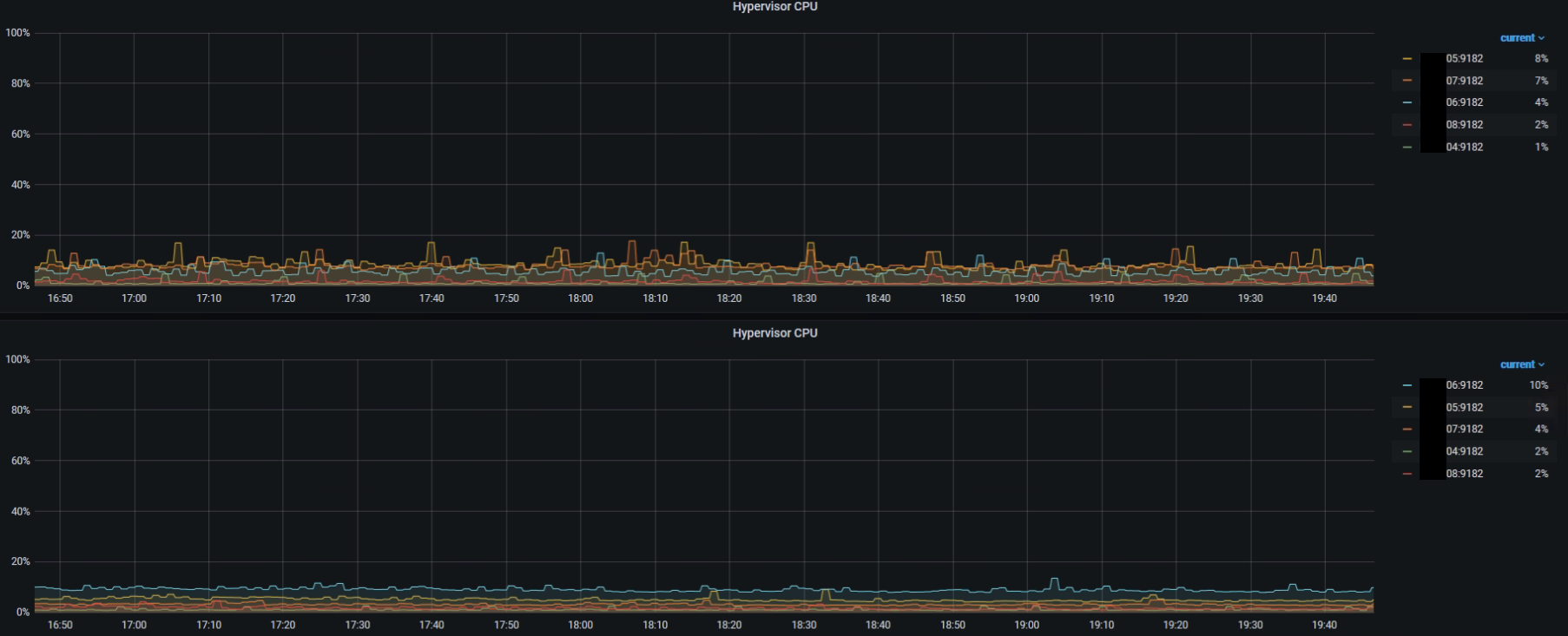
(the first is 2., the second is 1.)
Pamalosebi
on 18 Jun 2020
@Pamalosebi dont forget the windows_cpu_time_total on the host is not representative of the true activity.
With my query I am trying to match what the Hyper-V manager console show on the CPU Usage column which is supposed to represent the % of the physical CPU resource consumption.
For example:
- 1 VM with 6 vCPU at 100% on a host with 24 Core with no extra load should display a 25% physical resource utilization.
- 2 VM with 24 vCPU at 100% on a host with 24 Core with no extra load should display a 50% physical resource utilization (each).
EDIT1: I managed to fix my query with automatic CPU detection.
JDA88
on 18 Jun 2020
Okay... I just tried to help finding the solution for the headline "Unable to get Hypervisor cpu load percentage"
Your query is working if you want so see the sum of VMs cpu usage from hypervisor sight, right?
Pamalosebi
on 19 Jun 2020
@Pamalosebi
Your query is working if you want so see the
sumof VMs cpu usage from hypervisor sight, right?
Correct, but you see the real CPU workload, from the Hardware perspective, not the Virtual Workload!
If you want the workload on the Host himself (excluding the vms) the normal CPU counter will partialy work. The Host is in fact a "hidden" VM on Hyper-V. I'll try to play a little more with the other counter if I can get any more interesting numbers
JDA88
on 19 Jun 2020
I think this is maybe what you are looking for:
% consumption of the physical CPU ressources by the Hosts himself (On all Hosts):
(sum by (instance)(rate(windows_hyperv_host_cpu_total_run_time{}[1m]))) / sum by (instance)(windows_cs_logical_processors{}) / 100000
JDA88
on 19 Jun 2020
Hmm... these results are far from actual utilization.
Pamalosebi
on 19 Jun 2020
That's weird, everything looks good on all Hyper-V I have tested, do you have an example? Does the number are off by a factor or completly random?
JDA88
on 19 Jun 2020
While using the Task-Manager and your PS-script (https://github.com/prometheus-community/windows_exporter/issues/444#issuecomment-646043943) I get stable results around 10 - 12 % on one of the Hyper-V hypervisors.
While using (sum by (instance)(rate(windows_hyperv_host_cpu_total_run_time{}[2m]))) / sum by (instance)(windows_cs_logical_processors{}) / 100000 its around 2 - 3 %.
So, something doesn't fit in my case.
Pamalosebi
on 19 Jun 2020
The query should be good for the "% consumption of the physical CPU ressources by the Hosts himself"
The PowerShell script was only for debuging the counters.
The pCPU_Total, pCPU_Guest, pCPU_Hyper should work but they show a totally different set of value % consumption of the physical CPU ressources on Host by VMs
JDA88
on 19 Jun 2020
Related issues
 benridley
·
5Comments
carlpett
·
7Comments
benridley
·
5Comments
carlpett
·
7Comments
 LuisLoranca
·
5Comments
LuisLoranca
·
5Comments
 wizardmatas
·
5Comments
wizardmatas
·
5Comments
 Knuspel
·
5Comments
Knuspel
·
5Comments
Most helpful comment
Those query look promising:
% consumption of the physical CPU ressources on Host
ServerNameby VMs (On a specific Host):(sum by (vm) (rate(windows_hyperv_vm_cpu_total_run_time{instance="ServerName"}[60s]))) / ignoring(vm) group_left sum (windows_cs_logical_processors{instance="ServerName"}) / 100000% consumption of the physical CPU ressources by the VMs (On all Hosts):
(sum by (instance)(rate(windows_hyperv_vm_cpu_total_run_time{}[1m]))) / max by (instance)(windows_cs_logical_processors{}) / 100000% consumption of the physical CPU ressources by the Hosts himself (On all Hosts):
(sum by (instance)(rate(windows_hyperv_host_cpu_total_run_time{}[1m]))) / sum by (instance)(windows_cs_logical_processors{}) / 100000PS: The 100000 is a constant, don't ask me why...