Windows-build-tools: Errno 1: ELIFECYCLE (exited with status null)
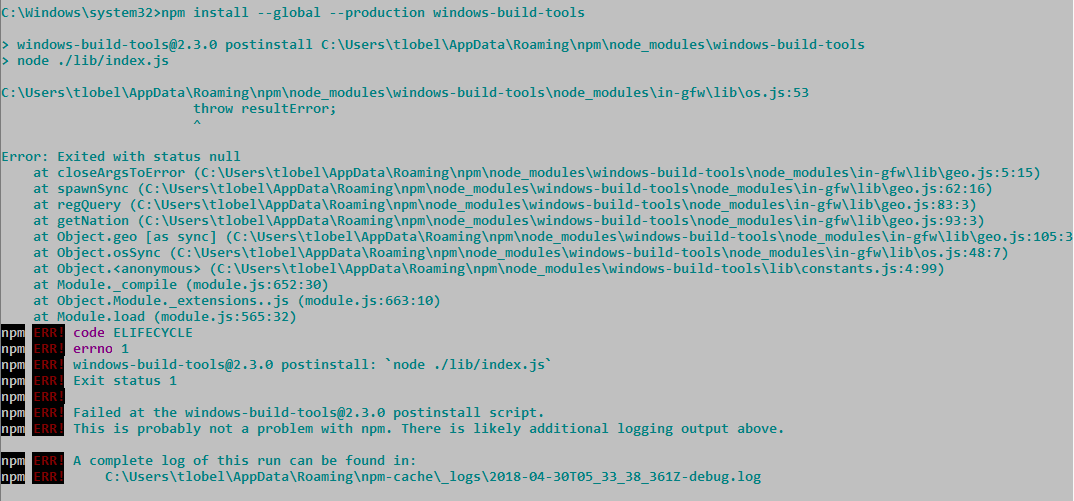
I am running this as administrator and cannot find the solution to this problem...
 TikiLobel
All 17 comments
It looks like the part that is causing the problem is this line: https://github.com/felixrieseberg/windows-build-tools/blob/v2.3.0/src/constants.js#L3, which is related to a recent PR (https://github.com/felixrieseberg/windows-build-tools/pull/107) that added some geolocation to improve download times outside the USA.
@TikiLobel To work-around the problem, could you try setting the environment variable npm_config_python_mirror="https://www.python.org/ftp/python" to prevent in-gfw from attempting to detect your location? Also, could you provide some information about your system? For example, version of OS, node, npm, etc. In this case it might be helpful to get a copy of the whole log file too (you can use <details> to keep from filling excessive amounts of visual space.)
@gucong3000 Would you please take a quick look to see what might be causing this? It seems like it could be a bug in in-gfw. (It seems the error is happening somewhere around lib/os.js:48, but I can't tell from the user's output what)
 jacobq
on 30 Apr 2018
jacobq
on 30 Apr 2018
Thank you very much for the response, that worked! it's installing now
TikiLobel
on 30 Apr 2018
@TikiLobel
could you provide some information about your system? For example, version of OS, node, npm, etc. In this case it might be helpful to get a copy of the whole log file too (you can use
<details>to keep from filling excessive amounts of visual space.)
 gucong3000
on 2 May 2018
gucong3000
on 2 May 2018
It should be fixed in [email protected]
But I need more information to reproduce this issue.
I tried windows 10 x64 + node v10 & AppVeyor
gucong3000
on 2 May 2018
If child process of C:\Windows\System32\reg.exe is killed, this issue will reproduce.
Maybe the reason for Ctrl + C or anti-virus software?
gucong3000
on 2 May 2018
I think this issue has been fixed in in-gfw v1.1.1
However, since this issue is not reproduced, I cannot sure 100%.
gucong3000
on 8 May 2018
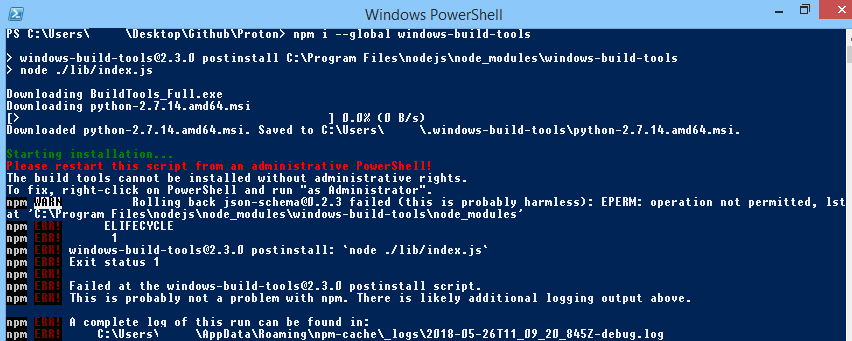
@jacobq , @TikiLobel , @gucong3000 : I have the same problem, but I'm not understanding how to solve it you can tell me the steps you can do?
Win 8.1, npm 5.6.0, Italy
 Angelk90
on 26 May 2018
Angelk90
on 26 May 2018
@Angelk90 It looks like you are running PowerShell but not with elevated privileges. Please try running it as Administrator.

(image copied from http://www.thewindowsclub.com/how-to-open-an-elevated-powershell-prompt-in-windows-10)
jacobq
on 26 May 2018
@jacobq : I did as you say, says that the installation was successful, then if I go on the path:
%AppData%\npm\node_modules
I can not find npm installed.
Angelk90
on 26 May 2018
@Angelk90 What you are describing doesn't sound like the same problem to me. I would recommend reviewing the README and checking the logs for errors. If you're still stuck then feel free to open a new issue and include detailed information about your problem.
The image you shared before suggests that the installation was not successful. It should look more like this:
PS C:\Windows\system32> npm install --global --production windows-build-tools

> [email protected] postinstall C:\Program Files\nodejs\node_modules\windows-build-tools
> node ./lib/index.js

Downloading BuildTools_Full.exe
Downloading python-2.7.14.amd64.msi
[============================================>] 100.0% of 20.17 MB (3.67 MB/s)
Downloaded python-2.7.14.amd64.msi. Saved to C:\Users\Jacob\.windows-build-tools\python-2.7.14.amd64.msi.

Starting installation...
Launched installers, now waiting for them to finish.
This will likely take some time - please be patient!

Status from the installers:
---------- Visual Studio Build Tools ----------
Successfully installed Visual Studio Build Tools.
------------------- Python --------------------
Successfully installed Python 2.7
+ [email protected]
added 140 packages in 55.335s
Should be fixed in v3.0.0. Feel free to re-open if the problem persists.
jacobq
on 29 May 2018
I am still getting this in windows-build-tools:3.0.0
I tried with both node-v9.9.0. and node-v8.11.2 LTS.
npm install --global --production windows-build-tools


> [email protected] postinstall c:\softwares\nodejs\npm-cmd\node_modules\windows-build-tools
> node ./dist/index.js

c:\softwares\nodejs\npm-cmd\node_modules\windows-build-tools\node_modules\in-gfw\lib\os.js:53
                        throw resultError;
                        ^

Error: Exited with status 1
    at closeArgsToError (c:\softwares\nodejs\npm-cmd\node_modules\windows-build-tools\node_modules\in-gfw\lib\geo.js:6:15)
    at spawnSync (c:\softwares\nodejs\npm-cmd\node_modules\windows-build-tools\node_modules\in-gfw\lib\geo.js:61:16)
    at regQuery (c:\softwares\nodejs\npm-cmd\node_modules\windows-build-tools\node_modules\in-gfw\lib\geo.js:80:3)
    at getNation (c:\softwares\nodejs\npm-cmd\node_modules\windows-build-tools\node_modules\in-gfw\lib\geo.js:90:3)
    at Object.geo [as sync] (c:\softwares\nodejs\npm-cmd\node_modules\windows-build-tools\node_modules\in-gfw\lib\geo.js:102:3)
    at Object.osSync (c:\softwares\nodejs\npm-cmd\node_modules\windows-build-tools\node_modules\in-gfw\lib\os.js:48:7)
    at Object.<anonymous> (c:\softwares\nodejs\npm-cmd\node_modules\windows-build-tools\dist\constants.js:8:15)
    at Module._compile (module.js:652:30)
    at Object.Module._extensions..js (module.js:663:10)
    at Module.load (module.js:565:32)
npm ERR! code ELIFECYCLE
npm ERR! errno 1
npm ERR! [email protected] postinstall: `node ./dist/index.js`
npm ERR! Exit status 1
npm ERR!
npm ERR! Failed at the [email protected] postinstall script.
I did some more experiment that installed in-gfw in a new package.json in-gfw-1.1.1 got pulled in by default.
$ node
> const inGFW = require("in-gfw");
undefined
>  inGFW.os().then(console.log).catch((e) => { console.log(e); })
Promise {
  <pending>,
  domain:
   Domain {
     domain: null,
     _events: { error: [Function: debugDomainError] },
     _eventsCount: 1,
     _maxListeners: undefined,
     members: [] } }
> { Error: Exited with status 1
    at closeArgsToError (C:\myprojects\IDSE\temp\tp\node_modules\in-gfw\lib\geo.js:6:15)
    at ChildProcess.cp.once.code (C:\myprojects\IDSE\temp\tp\node_modules\in-gfw\lib\geo.js:40:17)
    at Object.onceWrapper (events.js:317:30)
    at emitTwo (events.js:126:13)
    at ChildProcess.emit (events.js:214:7)
    at Process.ChildProcess._handle.onexit (internal/child_process.js:198:12)
  exitStatus: 1,
  stderr: 'ERROR: Registry editing has been disabled by your administrator.\r\n',
  stdout: '' }
Also
> inGFW.osSync()
Error: Exited with status 1
    at closeArgsToError (C:\myprojects\IDSE\temp\tp\node_modules\in-gfw\lib\geo.js:6:15)
    at spawnSync (C:\myprojects\IDSE\temp\tp\node_modules\in-gfw\lib\geo.js:61:16)
 samarjit
on 2 Jun 2018
samarjit
on 2 Jun 2018
ERROR: Registry editing has been disabled by your administrator.
https://www.tweakandtrick.com/2011/04/enable-regedit-registry-editor.html
gucong3000
on 2 Jun 2018
Hi, I noticed this registry disabled thing. Though I was running from admin mode cmd shell I still faced this. However after I specified python repo url, everything worked, python and MSBuild got installed. So I am not sure which part of the registry access was the problem. But I feel it should not require any more privilege than the software installation itself. I am on a corporate laptop so there might be limitations of elevated privilege.
The below code only handles the returned values not the exception path.
const pythonMirror = process.env.npm_config_python_mirror
  || process.env.PYTHON_MIRROR
  || (inGFW.osSync() ? 'https://npm.taobao.org/mirrors/python' : 'https://www.python.org/ftp/python');
I know these kinds of issues are hard to reproduce. So please do not take my comment in offensive way.
samarjit
on 5 Jun 2018
I am looking for alternatives to read the registry
gucong3000
on 5 Jun 2018
fixed in [email protected]
gucong3000
on 7 Jun 2018
Perfect with [email protected] I don't see the same error.
C:\myprojects\IDSE\tmp
> node
> const inGFW = require("in-gfw");
undefined
> inGFW.osSync()
false
Related issues
 jdalton
·
6Comments
jdalton
·
6Comments
 kimbaudi
·
3Comments
kimbaudi
·
3Comments
 keithnbrown
·
12Comments
keithnbrown
·
12Comments
 brucejo75
·
3Comments
brucejo75
·
3Comments
 Infinitay
·
6Comments
Infinitay
·
6Comments