Winappdriver: Appium not finding WPF elements
Copied over from Appium Github Issues as I was recommended that it was more of a WAD issue than one with Appium.
The problem
I am working on a team that is creating a WPF application, and I am tasked with doing automated testing on it. For the most part I haven't have any issues at all and work has gone smoothly. However, there are a few elements that appium isn't able to see. Most of them are TextBlock elements, where I am trying to grab the text so that I can confirm that the correct element is selected. When I look inside the visual tree on Appium Desktop, I see this:
 .
.
However the actual application also has a TextBlock that should be above and below the ComboBox.

Even though I have the TextBlocks ID'd in my code, it gives me an exception that says: OpenQA.Selenium.WebDriverException: An element could not be located on the page using the given search parameters.
The elements just seem to be completely invisible to Appium.
Environment
- Appium version (or git revision) that exhibits the issue: 1.17.1
- Desktop OS/version used to run Appium: Windows 10
- Type of application under test: WPF
Code To Reproduce Issue
var partNumDropdownTxt = partNumTile.FindElementByAccessibilityId("PartNumberDesc").Text;
This is what I'm using to find the element, which exists, but is not seen by appium, leading to the exception given above.
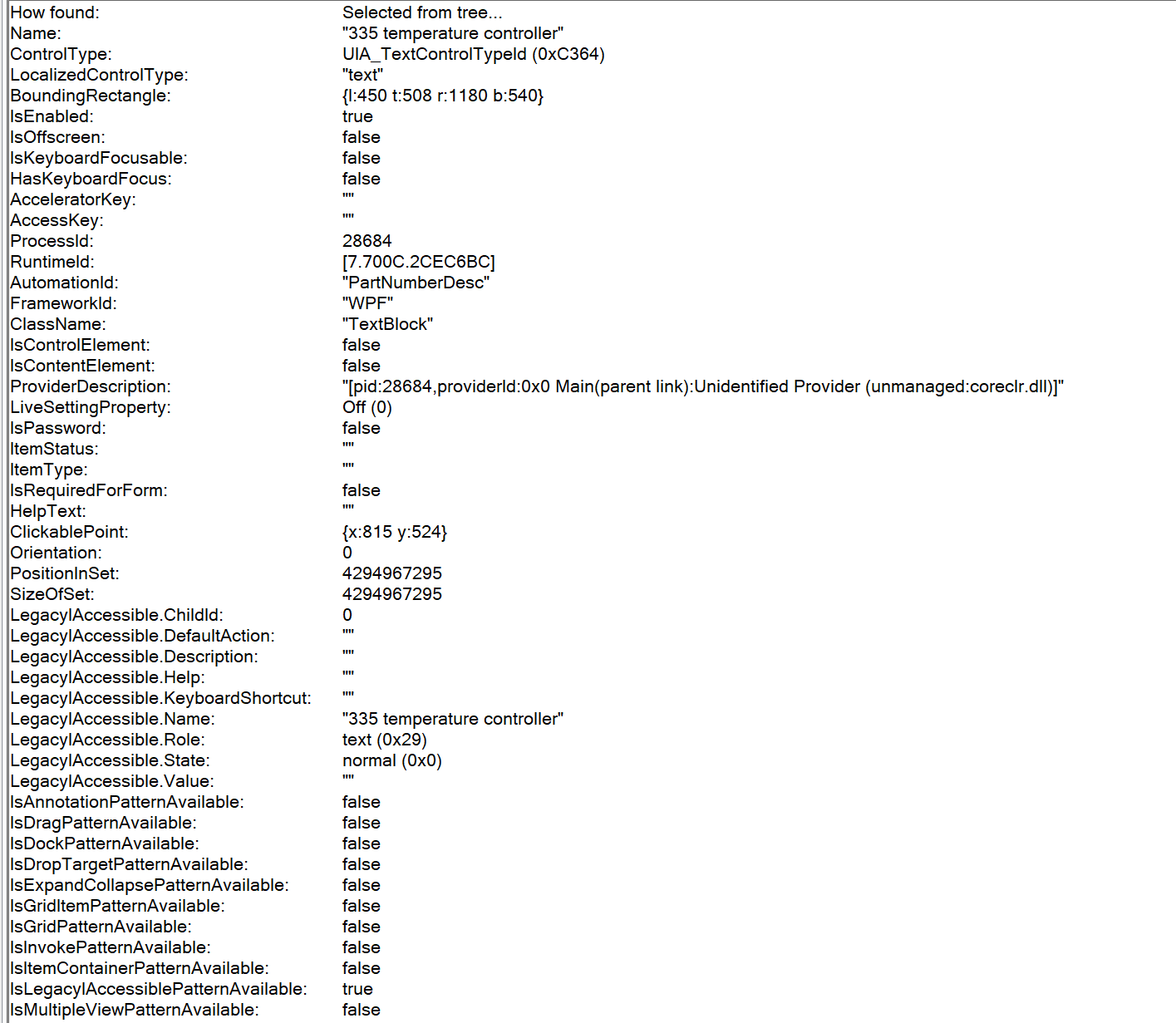
Edit: I'm posting a screenshot of inspece.exe to show that it is there and visible, but for whatever reason is not being found. Inspect is also noticing the AutomationID that the element has.

(sorry for the blurryness)
 evansct
All 22 comments
You can try with the below;
Assuming you have already created a driver instance:
string text = string text = driver.FindElementByName("button").FindElmentByClassname("comboBox1").Text
if you have multiple comboboxes:
string text = string text = driver.FindElementByName("button").FindElmentsByClassname("comboBox1")[Index].Text
 anunay1
on 30 Jul 2020
anunay1
on 30 Jul 2020
@anunay1 It isn't the combo box that I'm trying to get, it's the text that is next to the combo box that I want. It's just a regular text box, but for whatever reason (unlike every other text box) it isn't visible to be grabbed. I can get the combo box just fine!
evansct
on 30 Jul 2020
Can you show the description from Inspect for that text control?
 PandaMagnus
on 30 Jul 2020
PandaMagnus
on 30 Jul 2020
@PandaMagnus Yes, here it is
evansct
on 30 Jul 2020
This is really weird, can you check the page source, what is grabbed by WAD, I don't see any good reason for this not to work.
anunay1
on 30 Jul 2020
I'm not sure I understand what you mean by that/how I would do that
evansct
on 30 Jul 2020
This is how you get the page source:
var source = session.PageSource;
File.WriteAllText(@"C:\AutomationResults\Source.xml", source);
anunay1
on 30 Jul 2020
@anunay1

It seems that the page source does not have it in the file. So inspect is finding it, but for whatever reason it's not being loaded in/seen by WAD?
Edit: One thing that was brought to my attention is that in all the instances which this is happening is that it's textblocks on a button. Do you know if this would cause an issue for whatever reason?
evansct
on 31 Jul 2020
Apologies for silly question, but does this combo box open after you click on any button, then it appears like timing issue, can you try adding sleep in case if you are not doing it after you click on the button to open comboBox and then take the page source.
based on you last comment can you try this
var partNumDropdownTxt = driver.FindElementByName("Button").FindElementByAccessibilityId("PartNumberDesc").Text;
anunay1
on 31 Jul 2020
The combo box is disabled until everything on the page is loaded in. Then it only opens if you click on it. The button that it's on being clicked has no effect on the combo box. I believe I have already tried finding the button and then finding the PartNumberDesc that is on it, but I will try again just to be sure.
evansct
on 31 Jul 2020
Will it be possible to share a small video of the scenario, what I assume is, its a timing issue.
anunay1
on 31 Jul 2020
I thought that as well, but the "Part Number" textblock is available immediately on the page (at least visually) but it cannot be found either. I also tried putting a ridiculous sleep of 60 seconds on to let the page load in before doing anything on the page, and it still didn't see the textblocks.
Is it possible that the WAD cannot see textblocks that are located on top of buttons?
evansct
on 31 Jul 2020
I thought that as well, but the "Part Number" textblock is available immediately on the page (at least visually) but it cannot be found either. I also tried putting a ridiculous sleep of 60 seconds on to let the page load in before doing anything on the page, and it still didn't see the textblocks.
Is it possible that the WAD cannot see textblocks that are located on top of buttons?
No.
anunay1
on 31 Jul 2020
I can try recording something and sending it, but as stated I did put a sleep in to try and allow everything to load and that didn't help. So I'm not sure if the recording would do much other than show that it doesn't work.
evansct
on 31 Jul 2020
I want a recording of the application, not the test
anunay1
on 31 Jul 2020
@anunay1 What email would I be able to share that with?
evansct
on 31 Jul 2020
anunay1
on 31 Jul 2020
I tried changing it to a textbox rather than a textblock just to see what happened, and it had no issues at all finding/using it.
evansct
on 31 Jul 2020
I tried changing it to a textbox rather than a textblock just to see what happened, and it had no issues at all finding/using it.
Great
anunay1
on 31 Jul 2020
I'm looking into if there's some special way that we're setting up the textblock that's different from all the other ones I'm already able to access, but it needs to be a block rather than a box in the end. Do you have any thoughts/ideas why it might be doing this other than timing? Also, if you didn't see I did send the video
evansct
on 31 Jul 2020
I'm looking into if there's some special way that we're setting up the textblock that's different from all the other ones I'm already able to access, but it needs to be a block rather than a box in the end. Do you have any thoughts/ideas why it might be doing this other than timing? Also, if you didn't see I did send the video
Thanks, I saw the video and it appears pretty straight forward, why it searches with testbox and text block I don't know.
anunay1
on 31 Jul 2020
This issue was never solved, but we changed from a textblock to a label and it is seeming to work fine/can find the element and compare it.
evansct
on 3 Aug 2020
Related issues
 hassanuz
·
4Comments
hassanuz
·
4Comments
 sandeepdroid
·
3Comments
sandeepdroid
·
3Comments
 tetsushmz
·
3Comments
tetsushmz
·
3Comments
 vnabokit
·
3Comments
vnabokit
·
3Comments
 Blank517
·
4Comments
Blank517
·
4Comments