Winappdriver: Finding elements by tag name is not working.
I am using appium python client and added following unit test to calculatortest.py sample:
   def test_tag_name(self):
        buttons=self.driver.find_elements_by_tag_name("button")

        for i in buttons:
            print(i.text)
 ```

When this unit test runs, WinAppDriver gives this result:
==========================================
POST /session/0491F049-B8E4-43C4-AE7C-665BAC521E76/elements HTTP/1.1
Accept: application/json
Accept-Encoding: identity
Connection: keep-alive
Content-Length: 93
Content-Type: application/json;charset=UTF-8
Host: 127.0.0.1:4723
User-Agent: appium/python 0.48 (selenium/3.141.0 (python windows))
{"using": "tag name", "value": "button", "sessionId": "0491F049-B8E4-43C4-AE7C-665BAC521E76"}
Exception: Encountered element sharing the same runtimeId 42.985794.3.0
new Object {System, , 42.985794.3.0}
runtimeId 42.985794.3.0
className
name System
NativeWindowHandle 0

existing Object {System, , 42.985794.3.0}
runtimeId 42.985794.3.0
className
name System
NativeWindowHandle 0
Ignoring new object and keeping existing one
HTTP/1.1 200 OK
Content-Length: 74
Content-Type: application/json
{"sessionId":"0491F049-B8E4-43C4-AE7C-665BAC521E76","status":0,"value":[]}
``
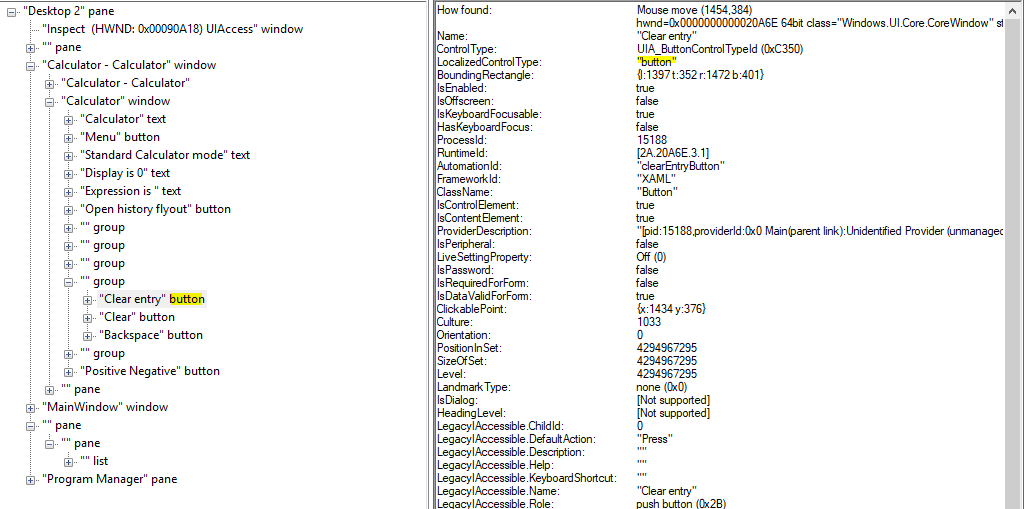
I inspect the calculator app there are bunch of button tagged (in Inspect.exeLocalizedControlType: "button"` ) element. Why WinAppDriver returns nothing?
 pcbt
pcbt
All 4 comments
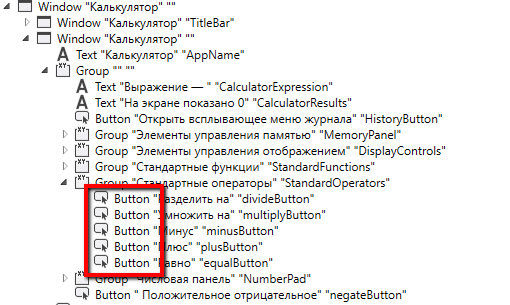
@pcbt probably you should use cappital letter in tag name :
self.driver.find_elements_by_tag_name("Button")
do not forget to check locators through inspectors
 StasGrishaev
on 27 Dec 2019
StasGrishaev
on 27 Dec 2019
@StasGrishaev thanks for help it is working now. I used lowercase because my inspector (Windows SDK/inspector.exe) shows with lowercase. It looks little bit different then yours. Which inspector do you use?
pcbt
on 27 Dec 2019
@pcbt yep, i use different one - https://github.com/FlaUI/FlaUInspect
glad to help, cheers.
StasGrishaev
on 27 Dec 2019
WinAppDriver UI Recorder is also a good tool for inspecting UI elements, I prefer using WAD UIR instead of the inspector.exe.
 naeemakram
on 27 Dec 2019
naeemakram
on 27 Dec 2019
Related issues
 AmitVerma4HP
·
3Comments
AmitVerma4HP
·
3Comments
 jsa34
·
3Comments
jsa34
·
3Comments
 bharathp666
·
3Comments
bharathp666
·
3Comments
 ant-skelia
·
4Comments
ant-skelia
·
4Comments
 sky205
·
3Comments
sky205
·
3Comments
Most helpful comment
WinAppDriver UI Recorder is also a good tool for inspecting UI elements, I prefer using WAD UIR instead of the inspector.exe.