Winappdriver: handle is invalid , Failed to initialize: 0x80004005
I am not able to start the WinAppDriver.exe.
Initially it was working fine but now stopped working.
--> uninstalled and installed again, that also not worked.
--> tried on windows Os build - 17134.285 and 17134.320, for both not working

--> where as its working on another device of mine.

 gouravtayal
All 7 comments
Hi @gouravtayal,
Can you provide additional information on the device that you're using, e.g. hardware configuration, and try the following -
- Open a feedback item in the networking area repro'ing the problem with logs attached. This will us identify the issue.
- Closing any firewall or anti-virus software you may have open.
 hassanuz
on 10 Oct 2018
hassanuz
on 10 Oct 2018
Hi @hassanuz
please find the attached screenshot for hardware configuration
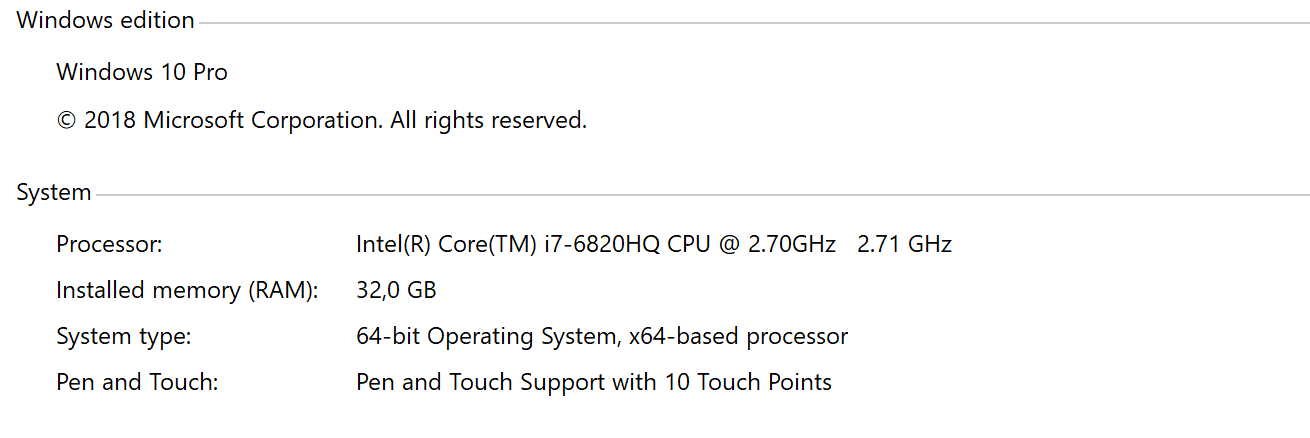
.
gouravtayal
on 15 Oct 2018
Make sure developer mode is enabled in the "For developers settings" in Windows settings
 cjkeilig
on 15 Oct 2018
cjkeilig
on 15 Oct 2018
@cjkeilig developer mode is enabled.
gouravtayal
on 15 Oct 2018
Hi @gouravtayal,
Were you able to open a feedback item in the networking area (repro'ing the problem with logs attached)?
Please do this if you have not already as this will definitely help us further investigate this.
Thanks
hassanuz
on 17 Oct 2018
@gouravtayal I had this same issue. It appears to be an issue binding to the IP Address and Port. I found the following error in Event Viewer:
The HTTP Service service failed to start due to the following error: The configuration registry database is corrupt.
A quick Google search presented this solution on StackOverflow: https://stackoverflow.com/a/47702775
I also found an empty key in my registry and removed it, then I was able to start WinAppDriver.
 DevinSanders
on 23 Feb 2019
DevinSanders
on 23 Feb 2019
@DevinSanders64 Thanks for your input, i tried the steps mentioned by you. But it also not worked for me.
gouravtayal
on 26 Feb 2019
Related issues
 sandeepdroid
·
3Comments
sandeepdroid
·
3Comments
 quincycs
·
3Comments
quincycs
·
3Comments
 vnabokit
·
3Comments
vnabokit
·
3Comments
 mdesousa
·
4Comments
mdesousa
·
4Comments
 ant-skelia
·
4Comments
ant-skelia
·
4Comments