Winappdriver: Unable to find elements using XPath
Hi,
I'm trying to start with Windows automation. I have a problem with searching elements by xpath.
This is a part of source code of Calculator application on Windows

When I try to find Window element by using this code, it works:
driver.findElementByClassName("ApplicationFrameTitleBarWindow");
Similarly, I'm able to find this element by using
driver.findElementsByAccessibilityId("TitleBar")
When I try to use xpath expression
driver.findElementByXPath("//Window[@className='ApplicationFrameTitleBarWindow']");
driver.findElementByXPath("//Window[@ClassName='ApplicationFrameTitleBarWindow']");
or
driver.findElementByXPath("//Window[@automationId='TitleBar']");
driver.findElementByXPath("//Window[@AutomationId='TitleBar']");
I received this error message
org.openqa.selenium.NoSuchElementException: java.lang.ClassCastException: com.google.common.collect.Maps$TransformedEntriesMap cannot be cast to java.lang.String (WARNING: The server did not provide any stacktrace information)
Command duration or timeout: 60 milliseconds
For documentation on this error, please visit: http://seleniumhq.org/exceptions/no_such_element.html
Build info: version: 'unknown', revision: 'unknown', time: 'unknown'
System info: host: 'PC-ASUS', ip: '192.168.176.1', os.name: 'Windows 10', os.arch: 'amd64', os.version: '10.0', java.version: '1.8.0_77'
Driver info: io.appium.java_client.windows.WindowsDriver
Capabilities [{app=Microsoft.WindowsCalculator_8wekyb3d8bbwe!App, platformName=Windows, deviceName=PC-ASUS, platform=ANY}]
Session ID: 1897e6af-b38b-4cea-8c58-b65e5b4beb61
*** Element info: {Using=xpath, value=//Window[@className='ApplicationFrameTitleBarWindow']}
    at sun.reflect.NativeConstructorAccessorImpl.newInstance0(Native Method)
    at sun.reflect.NativeConstructorAccessorImpl.newInstance(NativeConstructorAccessorImpl.java:62)
    at sun.reflect.DelegatingConstructorAccessorImpl.newInstance(DelegatingConstructorAccessorImpl.java:45)
    at java.lang.reflect.Constructor.newInstance(Constructor.java:423)
    at org.openqa.selenium.remote.ErrorHandler.createThrowable(ErrorHandler.java:206)
    at org.openqa.selenium.remote.ErrorHandler.throwIfResponseFailed(ErrorHandler.java:158)
    at org.openqa.selenium.remote.RemoteWebDriver.execute(RemoteWebDriver.java:647)
    at io.appium.java_client.AppiumDriver.execute(AppiumDriver.java:180)
    at io.appium.java_client.windows.WindowsDriver.execute(WindowsDriver.java:1)
    at org.openqa.selenium.remote.RemoteWebDriver.findElement(RemoteWebDriver.java:353)
    at io.appium.java_client.windows.WindowsDriver.findElement(WindowsDriver.java:1)
    at org.openqa.selenium.remote.RemoteWebDriver.findElementByXPath(RemoteWebDriver.java:490)
    at io.appium.java_client.windows.WindowsDriver.findElementByXPath(WindowsDriver.java:1)
    at DemoWindows.main(DemoWindows.java:28)
I don't know, where is the problem. XPath should work here. Can you please help?
Thank you.
 hornyja4
All 22 comments
Thanks for reporting this. We're opening this up as a bug and will take a look.
 hassanuz
on 10 Jan 2018
hassanuz
on 10 Jan 2018
Hi @hornyja4,
Thanks again for the detailed and well put issue report. I have attempted to reproduce the issue but everything seems to work as expected when you use the right casing (e.g. ClassName instead of 'className'). The following snippet of code works perfectly for me using Windows Application Driver version 1.0
```c#
// These are known to work
session.FindElementByClassName("ApplicationFrameTitleBarWindow");
session.FindElementByAccessibilityId("TitleBar");
// These also work (notice the uppercase C in ClassName and A in AutomationId
session.FindElementByXPath("//Window[@ClassName='ApplicationFrameTitleBarWindow']");
session.FindElementByXPath("//Window[@AutomationId='TitleBar']");
Below is a modified snippet of [test scenario using calculator app](https://github.com/Microsoft/WinAppDriver/blob/v1.0/Tests/WebDriverAPI/ElementName.cs#L39) that we can use to verify that both element find operations return the same element successfully.
[TestMethod]
public void GetElementTagName()
{
WindowsElement header = session.FindElementByAccessibilityId("AppNameTitle");
Assert.AreEqual("ControlType.Text", header.TagName);
WindowsElement navButton = session.FindElementByAccessibilityId("NavButton");
Assert.AreEqual("ControlType.Button", navButton.TagName);

WindowsElement header2 = session.FindElementByXPath("//Text[@AutomationId='AppNameTitle']");
Assert.AreEqual("ControlType.Text", header.TagName);

WindowsElement navButton2 = session.FindElementByXPath("//Button[@AutomationId='NavButton']");
Assert.AreEqual("ControlType.Button", navButton.TagName);
}
```
Would you be able to try it on your setup?
 timotiusmargo
on 10 Jan 2018
timotiusmargo
on 10 Jan 2018
I was using Appium with WinAppDriver version 0.9-Beta. I tried to install WinAppDriver version 1.0 and run test directly through WinAppDriver without Appium.
I did all the same like in Calculator test but still have a problem with xpath.
Java
        DesiredCapabilities capabilities = new DesiredCapabilities();
        capabilities.setCapability("app", "Microsoft.WindowsCalculator_8wekyb3d8bbwe!App");
        capabilities.setCapability("platformName", "WINDOWS");
        capabilities.setCapability("deviceName", "PC-ASUS");
        WindowsDriver driver = new WindowsDriver(new URL("http://127.0.0.1:4723"), capabilities);
        driver.manage().timeouts().implicitlyWait(60, TimeUnit.SECONDS);
        driver.findElementByAccessibilityId("num2Button").click(); // works
        driver.findElementByName("Dva").click(); // works ('dva' means 'Two' in Czech)
        driver.findElementByXPath("//Button[@AutomationId='num2Button']"); // not working
        driver.findElementByXPath("//Text[@AutomationId='AppNameTitle']"); // not working
>
Error message
org.openqa.selenium.NoSuchElementException: An element could not be located on the page using the given search parameters. (WARNING: The server did not provide any stacktrace information)
Command duration or timeout: 35 milliseconds
For documentation on this error, please visit: http://seleniumhq.org/exceptions/no_such_element.html
Build info: version: 'unknown', revision: 'unknown', time: 'unknown'
System info: host: 'PC-ASUS', ip: '192.168.176.1', os.name: 'Windows 10', os.arch: 'amd64', os.version: '10.0', java.version: '1.8.0_77'
Driver info: io.appium.java_client.windows.WindowsDriver
Capabilities [{app=Microsoft.WindowsCalculator_8wekyb3d8bbwe!App, platformName=Windows, platform=ANY}]
Session ID: 2425DD77-95BF-4E1D-9201-54B9870B5CFB
*** Element info: {Using=xpath, value=//Text[@AutomationId='AppNameTitle']}
    at sun.reflect.NativeConstructorAccessorImpl.newInstance0(Native Method)
    at sun.reflect.NativeConstructorAccessorImpl.newInstance(NativeConstructorAccessorImpl.java:62)
    at sun.reflect.DelegatingConstructorAccessorImpl.newInstance(DelegatingConstructorAccessorImpl.java:45)
    at java.lang.reflect.Constructor.newInstance(Constructor.java:423)
    at org.openqa.selenium.remote.ErrorHandler.createThrowable(ErrorHandler.java:206)
    at org.openqa.selenium.remote.ErrorHandler.throwIfResponseFailed(ErrorHandler.java:158)
    at org.openqa.selenium.remote.RemoteWebDriver.execute(RemoteWebDriver.java:647)
    at io.appium.java_client.AppiumDriver.execute(AppiumDriver.java:180)
    at io.appium.java_client.windows.WindowsDriver.execute(WindowsDriver.java:1)
    at org.openqa.selenium.remote.RemoteWebDriver.findElement(RemoteWebDriver.java:353)
    at io.appium.java_client.windows.WindowsDriver.findElement(WindowsDriver.java:1)
    at org.openqa.selenium.remote.RemoteWebDriver.findElementByXPath(RemoteWebDriver.java:490)
    at io.appium.java_client.windows.WindowsDriver.findElementByXPath(WindowsDriver.java:1)
    at DemoWindows.main(DemoWindows.java:29)
I don't know, where is the problem. In Calculator test you are not using findElementByXpath. Can you please check this in Java with
    <dependency>
        <groupId>io.appium</groupId>
        <artifactId>java-client</artifactId>
        <version>6.0.0-BETA2</version>
    </dependency>
hornyja4
on 10 Jan 2018
Hi @hornyja4,
To be able to further assist you, can you please paste the JSON wire protocol command log from the WinAppDriver.exe console log? This will help us tremendously in identifying where the issue is.
timotiusmargo
on 12 Jan 2018
`Windows Application Driver listening for requests at: http://127.0.0.1:4723/
Press ENTER to exit.
==========================================
POST /session HTTP/1.1
Accept-Encoding: gzip,deflate
Connection: Keep-Alive
Content-Length: 127
Content-Type: application/json; charset=utf-8
Host: 127.0.0.1:4723
User-Agent: Apache-HttpClient/4.3.3 (java 1.5)
{"desiredCapabilities":{"app":"Microsoft.WindowsCalculator_8wekyb3d8bbwe!App","platformName":"Windows","deviceName":"PC-ASUS"}}
HTTP/1.1 200 OK
Content-Length: 152
Content-Type: application/json
{"sessionId":"73DD9342-BC9F-4E26-9FE5-6B6CD66132AD","status":0,"value":{"app":"Microsoft.WindowsCalculator_8wekyb3d8bbwe!App","platformName":"Windows"}}
==========================================
POST /session/73DD9342-BC9F-4E26-9FE5-6B6CD66132AD/timeouts HTTP/1.1
Accept-Encoding: gzip,deflate
Connection: Keep-Alive
Content-Length: 30
Content-Type: application/json; charset=utf-8
Host: 127.0.0.1:4723
User-Agent: Apache-HttpClient/4.3.3 (java 1.5)
{"type":"implicit","ms":60000}
HTTP/1.1 200 OK
Content-Length: 63
Content-Type: application/json
{"sessionId":"73DD9342-BC9F-4E26-9FE5-6B6CD66132AD","status":0}
==========================================
GET /session/73DD9342-BC9F-4E26-9FE5-6B6CD66132AD/source HTTP/1.1
Accept-Encoding: gzip,deflate
Cache-Control: no-cache
Connection: Keep-Alive
Host: 127.0.0.1:4723
User-Agent: Apache-HttpClient/4.3.3 (java 1.5)
HTTP/1.1 200 OK
Content-Length: 34727
Content-Type: application/json
{"sessionId":"73DD9342-BC9F-4E26-9FE5-6B6CD66132AD","status":0,"value":" ========================================== {"using":"accessibility id","value":"num2Button"} {"sessionId":"73DD9342-BC9F-4E26-9FE5-6B6CD66132AD","status":0,"value":{"ELEMENT":"42.67160.3.84"}} ========================================== {"id":"42.67160.3.84"} {"sessionId":"73DD9342-BC9F-4E26-9FE5-6B6CD66132AD","status":0} ========================================== {"using":"name","value":"Dva"} {"sessionId":"73DD9342-BC9F-4E26-9FE5-6B6CD66132AD","status":0,"value":{"ELEMENT":"42.67160.3.84"}} ========================================== {"id":"42.67160.3.84"} {"sessionId":"73DD9342-BC9F-4E26-9FE5-6B6CD66132AD","status":0} ========================================== {"using":"xpath","value":"//Button[@AutomationId='num2Button']"} {"status":7,"value":{"error":"no such element","message":"An element could not be located on the page using the given search parameters."}}`
POST /session/73DD9342-BC9F-4E26-9FE5-6B6CD66132AD/element HTTP/1.1
Accept-Encoding: gzip,deflate
Connection: Keep-Alive
Content-Length: 49
Content-Type: application/json; charset=utf-8
Host: 127.0.0.1:4723
User-Agent: Apache-HttpClient/4.3.3 (java 1.5)
HTTP/1.1 200 OK
Content-Length: 99
Content-Type: application/json
POST /session/73DD9342-BC9F-4E26-9FE5-6B6CD66132AD/element/42.67160.3.84/click HTTP/1.1
Accept-Encoding: gzip,deflate
Connection: Keep-Alive
Content-Length: 22
Content-Type: application/json; charset=utf-8
Host: 127.0.0.1:4723
User-Agent: Apache-HttpClient/4.3.3 (java 1.5)
HTTP/1.1 200 OK
Content-Length: 63
Content-Type: application/json
POST /session/73DD9342-BC9F-4E26-9FE5-6B6CD66132AD/element HTTP/1.1
Accept-Encoding: gzip,deflate
Connection: Keep-Alive
Content-Length: 30
Content-Type: application/json; charset=utf-8
Host: 127.0.0.1:4723
User-Agent: Apache-HttpClient/4.3.3 (java 1.5)
HTTP/1.1 200 OK
Content-Length: 99
Content-Type: application/json
POST /session/73DD9342-BC9F-4E26-9FE5-6B6CD66132AD/element/42.67160.3.84/click HTTP/1.1
Accept-Encoding: gzip,deflate
Connection: Keep-Alive
Content-Length: 22
Content-Type: application/json; charset=utf-8
Host: 127.0.0.1:4723
User-Agent: Apache-HttpClient/4.3.3 (java 1.5)
HTTP/1.1 200 OK
Content-Length: 63
Content-Type: application/json
POST /session/73DD9342-BC9F-4E26-9FE5-6B6CD66132AD/element HTTP/1.1
Accept-Encoding: gzip,deflate
Connection: Keep-Alive
Content-Length: 64
Content-Type: application/json; charset=utf-8
Host: 127.0.0.1:4723
User-Agent: Apache-HttpClient/4.3.3 (java 1.5)
HTTP/1.1 404 Not Found
Content-Length: 139
Content-Type: application/json
hornyja4
on 12 Jan 2018
I faced with same problem and found solution that works for me.
please try to put dot('.') as first character of xpath expression:
driver.findElementByXPath(".//Button[@AutomationId='num2Button']");
also for some reason not all attributes which are available in Inspect tool can be used in winAppDriver.
another option which may help is to replace Button tagName with wildcard symbol ( * )
 pfatula
on 16 Jan 2018
pfatula
on 16 Jan 2018
Hi @hornyja4,
In addition to @pfatula suggestion, can you try using the right casing for AutomationId (i.e. Upper case A and I) instead of automationid you used in the snippet above?
timotiusmargo
on 16 Jan 2018
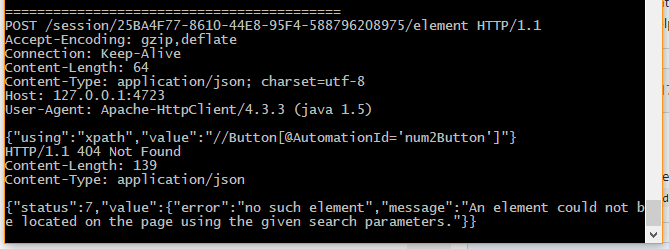
Hi @timotiusmargo
I'm using driver.findElementByXPath("//Button[@AutomationId='num2Button']"); with right casing of AutomationId, but when I copied the command log, 'AutomationId' was changed to 'automationid', don't know why :)
hornyja4
on 16 Jan 2018
Hi @pfatula,
I tried
driver.findElementByXPath(".//*[@AutomationId='num2Button']"); driver.findElementByXPath(".//Button[@AutomationId='num2Button']");
It does not work...
hornyja4
on 16 Jan 2018
Hi @hornyja4,
Oh interesting. WinAppDriver.exe simply receives the JSON wire protocol commands sent from the Appium/Selenium client your test script is using. In this case it looks like you are using the Appium Java client. This client shouldn't change the casing of the XPath expression. Otherwise, it is a bug for that Java client project that you can raise in their repository.
timotiusmargo
on 16 Jan 2018
@timotiusmargo
I tried to connect directly to WinAppDriver through RemoteWebDriver instead of WindowsDriver. The result is the same...
Windows Application Driver listening for requests at: http://127.0.0.1:4723/
Press ENTER to exit.
==========================================
POST /session HTTP/1.1
Accept-Encoding: gzip,deflate
Connection: Keep-Alive
Content-Length: 127
Content-Type: application/json; charset=utf-8
Host: 127.0.0.1:4723
User-Agent: Apache-HttpClient/4.3.3 (java 1.5)
{"desiredCapabilities":{"app":"Microsoft.WindowsCalculator_8wekyb3d8bbwe!App","platformName":"WINDOWS","deviceName":"PC-ASUS"}}
HTTP/1.1 200 OK
Content-Length: 152
Content-Type: application/json
{"sessionId":"45AB2E93-93AC-451B-8F64-81E9250540B7","status":0,"value":{"app":"Microsoft.WindowsCalculator_8wekyb3d8bbwe!App","platformName":"WINDOWS"}}
==========================================
POST /session/45AB2E93-93AC-451B-8F64-81E9250540B7/timeouts HTTP/1.1
Accept-Encoding: gzip,deflate
Connection: Keep-Alive
Content-Length: 30
Content-Type: application/json; charset=utf-8
Host: 127.0.0.1:4723
User-Agent: Apache-HttpClient/4.3.3 (java 1.5)
{"type":"implicit","ms":60000}
HTTP/1.1 200 OK
Content-Length: 63
Content-Type: application/json
{"sessionId":"45AB2E93-93AC-451B-8F64-81E9250540B7","status":0}
==========================================
GET /session/45AB2E93-93AC-451B-8F64-81E9250540B7/source HTTP/1.1
Accept-Encoding: gzip,deflate
Cache-Control: no-cache
Connection: Keep-Alive
Host: 127.0.0.1:4723
User-Agent: Apache-HttpClient/4.3.3 (java 1.5)
HTTP/1.1 200 OK
Content-Length: 34672
Content-Type: application/json
{"sessionId":"45AB2E93-93AC-451B-8F64-81E9250540B7","status":0,"value":" ========================================== {"using":"name","value":"Dva"} {"sessionId":"45AB2E93-93AC-451B-8F64-81E9250540B7","status":0,"value":{"ELEMENT":"42.67224.3.84"}} ========================================== {"id":"42.67224.3.84"} {"sessionId":"45AB2E93-93AC-451B-8F64-81E9250540B7","status":0} ========================================== {"using":"xpath","value":"//Button[@AutomationId='num2Button']"} {"status":7,"value":{"error":"no such element","message":"An element could not be located on the page using the given search parameters."}}
POST /session/45AB2E93-93AC-451B-8F64-81E9250540B7/element HTTP/1.1
Accept-Encoding: gzip,deflate
Connection: Keep-Alive
Content-Length: 30
Content-Type: application/json; charset=utf-8
Host: 127.0.0.1:4723
User-Agent: Apache-HttpClient/4.3.3 (java 1.5)
HTTP/1.1 200 OK
Content-Length: 99
Content-Type: application/json
POST /session/45AB2E93-93AC-451B-8F64-81E9250540B7/element/42.67224.3.84/click HTTP/1.1
Accept-Encoding: gzip,deflate
Connection: Keep-Alive
Content-Length: 22
Content-Type: application/json; charset=utf-8
Host: 127.0.0.1:4723
User-Agent: Apache-HttpClient/4.3.3 (java 1.5)
HTTP/1.1 200 OK
Content-Length: 63
Content-Type: application/json
POST /session/45AB2E93-93AC-451B-8F64-81E9250540B7/element HTTP/1.1
Accept-Encoding: gzip,deflate
Connection: Keep-Alive
Content-Length: 64
Content-Type: application/json; charset=utf-8
Host: 127.0.0.1:4723
User-Agent: Apache-HttpClient/4.3.3 (java 1.5)
HTTP/1.1 404 Not Found
Content-Length: 139
Content-Type: application/json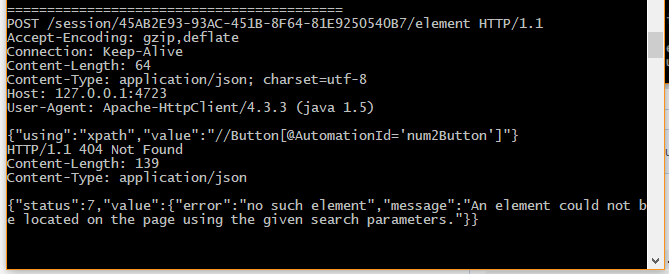
hornyja4
on 16 Jan 2018
Hi @hornyja4,
Can you also try redirecting the WinAppDriver log to a file, and attaching it here? (e.g. launching WinAppDriver > WinAppDriversession.log )
Can you also provide additional information about your setup? Such as your Windows build version, the Selenium SDK version, etc.
Thanks
hassanuz
on 17 Jan 2018
Hi @hornyja4 ,
Try this :
driver.findElementByXPath("//*[contains(@AutomationId,'num2Button')]");
 Ntlneo
on 19 Jan 2018
Ntlneo
on 19 Jan 2018
Hi @hassanuz,
Where can I find the WinAppDriversession.log? There is no log in WinAppDriver directory.
I have windows 10 PRO - build 16299. Selenium version 3.7.1.
hornyja4
on 21 Jan 2018
Hi @hornyja4,
In @hassanuz comment, he suggested you to pipe/redirect the console output from WinAppDriver.exe to a file instead of displaying on the console terminal window. In order to do this, you use the > (greater than) operator specifying the output file you want to redirect the output to e.g. C:\WinAppDriverSessionOutputFile.log. This way we may be able to analyze the issue you reported better.
timotiusmargo
on 22 Jan 2018
How about attaching the page source along with the logs?
 dhapolapankaj
on 28 Feb 2018
dhapolapankaj
on 28 Feb 2018
Hi, here is a log. But there is just the same information I wrote before... Anyway, I tried the same scenario on other device (Windows server 2016) and everything works. The same project, configuration and version of WinAppDriver and Appium. On server it works properly, on my desktop it's not. Probably, I have a problem with my windows, because originally I had Windows 10 Home which I upgraded to Pro with product key through Microsoft store.
hornyja4
on 27 Mar 2018
try to add a Thread.sleep() before the xpath statement and check if the element is found by winappdriver. I was facing a similar issue when trying to run a script on rdp but it was working fine locally. After a lot of trial and error I found out that it was due to the element not being available on the screen.
If you are able to identify the element after adding thread.sleep() ,then I would suggest to use explicit wait from selenium as implicit wait doesn't solve the problem.
 amod-thakur
on 22 Aug 2018
amod-thakur
on 22 Aug 2018
Hi @hornyja4,
Were you able to resolve your issue?
hassanuz
on 12 Sep 2018
can someone please help me with this , i am getting this error
{"using":"-windows uiautomation","value":"custom-background"}
HTTP/1.1 400 Bad Request
Content-Length: 102
Content-Type: application/json
{"status":32,"value":{"error":"invalid selector","message":"Invalid selector: -windows uiautomation"}}
i tried xpath in different ways even through te ui recorder and did not work for me
"/Pane[@Name=\"Desktop 1\"][@ClassName=\"#32769\"]/Window[@Name=\"CCH Axcess Login\"][@ClassName=\"Window\"]/Pane[@AutomationId=\"browser\"]/Pane[@ClassName=\"Shell Embedding\"]/Pane[@ClassName=\"Shell DocObject View\"]/Pane[starts-with(@Name,\"https://**\")][@ClassName=\"Internet Explorer_Server\"]/Pane[@AutomationId=\"custom-background\"][@Name=\"Wolters Kluwer Login\"]
/Table/DataItem/Hyperlink[@Name=\"792541\"]/Text[@Name=\"792541\"]"
 samkhayal
on 30 Apr 2019
samkhayal
on 30 Apr 2019
Hi @samkhayal, if you are still facing this issue, please open a new ticket.
hassanuz
on 23 Oct 2019
Why was this issue closed? Still having the same problem: Elements are not found by XPath. Windows 10, WinAppDriver 1.1, C#. WinAppDriver log:
POST /session/CF6470EA-D3E7-47BC-9A84-3750DBF33411/elements HTTP/1.1
Accept: application/json, image/png
Content-Length: 73
Content-Type: application/json;charset=utf-8
Host: 127.0.0.1:4723
{"using":"xpath","value":".//Window[@AutomationId='uiFrmAccountUpload']"}
HTTP/1.1 200 OK
Content-Length: 74
Content-Type: application/json
{"sessionId":"CF6470EA-D3E7-47BC-9A84-3750DBF33411","status":0,"value":[]}
Nothing is found, the test log returns the count of the collection as 0;
 ecchioni
on 12 Feb 2020
ecchioni
on 12 Feb 2020
Related issues
 sky205
·
3Comments
sky205
·
3Comments
 mdesousa
·
4Comments
mdesousa
·
4Comments
 Blank517
·
4Comments
Blank517
·
4Comments
 sandeepdroid
·
3Comments
sandeepdroid
·
3Comments
 ant-skelia
·
4Comments
ant-skelia
·
4Comments
Most helpful comment
Why was this issue closed? Still having the same problem: Elements are not found by XPath. Windows 10, WinAppDriver 1.1, C#. WinAppDriver log:
POST /session/CF6470EA-D3E7-47BC-9A84-3750DBF33411/elements HTTP/1.1
Accept: application/json, image/png
Content-Length: 73
Content-Type: application/json;charset=utf-8
Host: 127.0.0.1:4723
{"using":"xpath","value":".//Window[@AutomationId='uiFrmAccountUpload']"}
HTTP/1.1 200 OK
Content-Length: 74
Content-Type: application/json
{"sessionId":"CF6470EA-D3E7-47BC-9A84-3750DBF33411","status":0,"value":[]}
Nothing is found, the test log returns the count of the collection as 0;