Winappdriver: [Question]How to use FindElementByXPath to locate the element on UWP APP
I am writing automation codes to test the UWP APP with WinAppDriver latest version, and use inspect.exe tool to check the element attribute, find the ancestors of this button are:
"System Update" list item
"" list
"" pane
"Lenovo Companion" window
"Lenovo Companion" window
"Desktop 1" pane
[ No Parent]
my locating element code like this:
driver.FindElementByXPath("/pane[@name='Desktop 1']/window[@name='Lenovo Companion']/window[@name='Lenovo Companion']/list[3]/list item[@name='System Update']/button[@name='Check for updates']");
after running, the Exception is invalid XPath expression /pane[@name='Desktop 1']/window[@name='Lenovo Companion']/window[@name='Lenovo Companion']/list[3]/list item[@name='System Update']/button[@name='Check for updates'].
Is this absolute path right?how to locate element with XPath ? and is there any examples to learn?
 questions555
All 13 comments
In line with your issue, I have proposed an enhancement on XPath interpretation #218
I understand that you are looking at Inspect.exe and trying to build the XPath based on the Object names and attribute names present in Inspect.exe
The first letter of the Object name is mostly caps
E.g.
driver.FindElementByXPath("/Pane[@Name='Desktop 1']
Best way is to look at page source!
 dhapolapankaj
on 6 Nov 2017
dhapolapankaj
on 6 Nov 2017
Hi @questions555,
Yes, @dhapolapankaj is absolutely correct--page source is the way to go, and do look for casing difference on the elements ("pane" vs "Pane").
 hassanuz
on 8 Nov 2017
hassanuz
on 8 Nov 2017
Thanks for your answers@dhapolapankaj @hassanuz ,I will try to look at page source
questions555
on 8 Nov 2017
Hello @dhapolapankaj
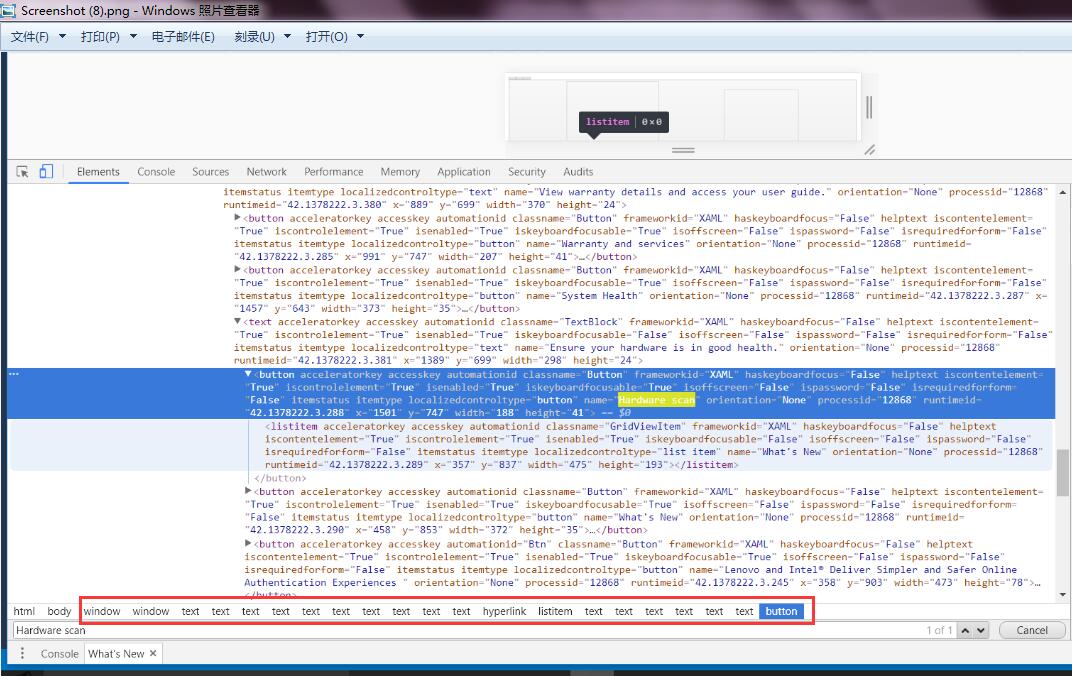
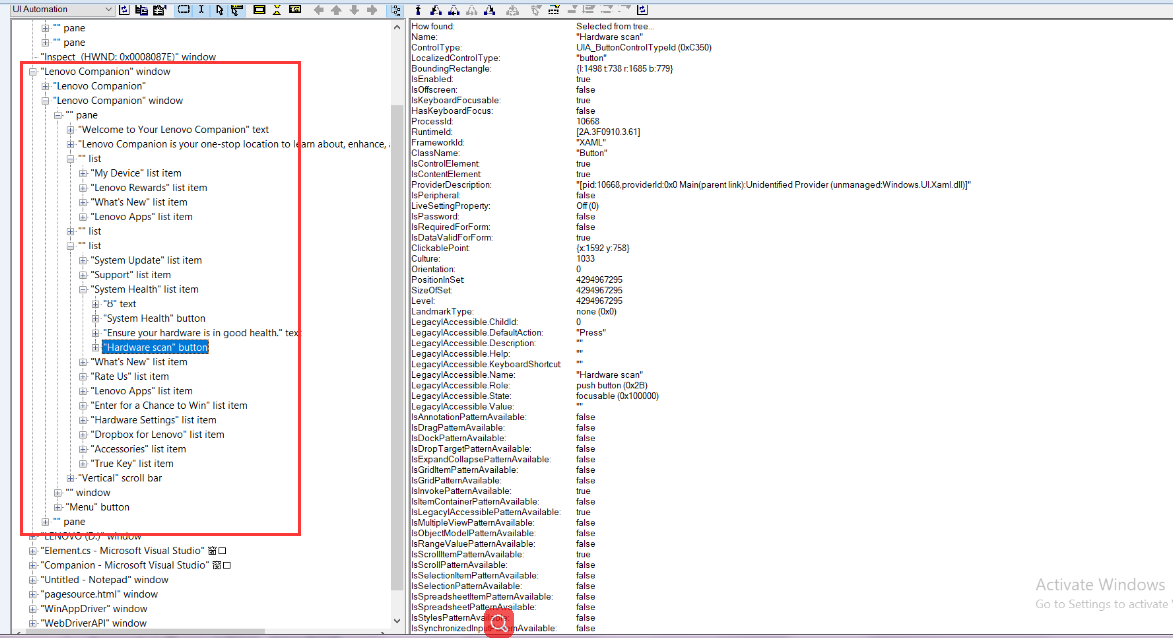
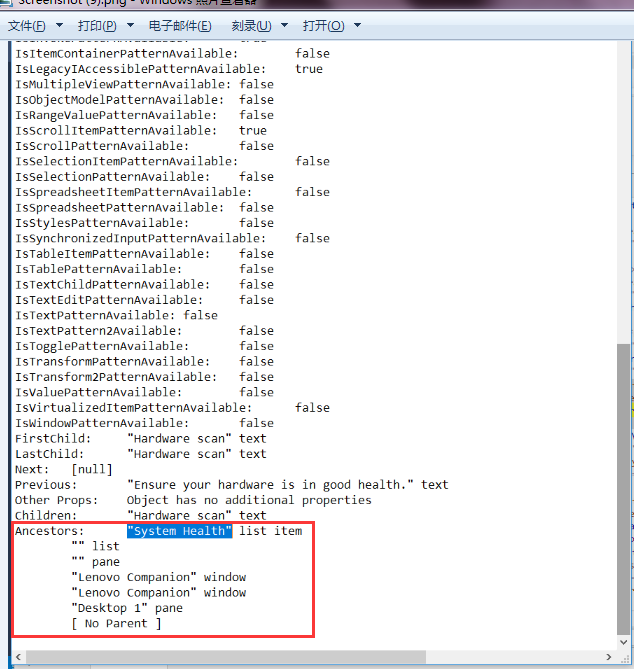
I have tried to export Page Source of my UWP, and I want to make sure if I use FindElementByXpath to locate the element , the Absolute path of to located element is based on Page Source or based on Inspect tool, shown as attachments. I have tried with absolute path in inspect.exe, it doesn't work. and I also have tried with method like this: driver.FindElementByXPath("/Window[@Name=\"Lenovo Companion\"] //List Item[@Name=\"System Health\"] //Button[@Name=\"Hardware scan\"]") ,this method also doesn't work. Does my method have some problem?
questions555
on 9 Nov 2017
Hey @questions555
I am little confused when I see the HTML content in the source, we should be expecting XML content.
Can you try below code snippet!
http://simplifyautomation.blogspot.in/2017/11/code-to-save-iwebdriverpagesource-in.html
Once you have got the xml file dumped in te PageSource, you should be able to write the XPath.
Regards
PD
dhapolapankaj
on 11 Nov 2017
@
questions555
on 13 Nov 2017
@dhapolapankaj I use System.IO.File.AppendAllText(@"D:\pagesource.xml",driver.PageSource) to export page source, and what XML reader tool do you use to view the xml, I read xml with notepad , but the format is disorderly, then I change to html format ,and open with browser.
questions555
on 13 Nov 2017
hi @dhapolapankaj
Thank you very much, I have located the element successfully using FindElementByXPath with absolute path, and know more about difference between the element path with inspect.exe and with pagesource. and thank you again.
questions555
on 14 Nov 2017
Casing being followed in issue #218, closing this ticket.
hassanuz
on 15 Nov 2017
Hi @dhapolapankaj @questions555 I am having similar issue. However, I dont have access to the page source. Here is my question that I posted just now on stackoverflow.
https://stackoverflow.com/questions/54207664/xpath-using-inspect-exe-and-appium
Can you please guide me? I only have inspect.exe and would like to build an absolute XPath. The question on stackoverflow has all the details.
 YouWhy
on 15 Jan 2019
YouWhy
on 15 Jan 2019
hi @YouWhy
Did u solve the problem? There is the solved method I had summarized on the below link :
http://www.51testing.com/index.php?uid-324121-action-viewspace-itemid-3722375
questions555
on 27 Jan 2019
@questions555 Yes. I was able to make it work..I did this
I did some trial and error and I removed the 1st token of the above XPATH.
Changed /Pane[@Name='Desktop 1']/Window[@Name='FusionReg-MockUI']/Window[@Name='FusionReg-MockUI']/RadioButton[@Name='QA']
to
/Window[@Name='FusionReg-MockUI']/Window[@Name='FusionReg-MockUI']/RadioButton[@Name='QA']
and it worked.
YouWhy
on 12 Apr 2019
Hello Gentlemen,
I have recently started exploration and coding for automation framework using WinAppDriver (previously working for Automation using Selenium C# for almost 3 years). I came across some issues. Can someone help me with the solution for the following querries I am facing?
(I am using Visual Studio 2019)
- Can we use keywords like child, following, sibling, etc. which we use to find XPaths of web-elements for window-elements?
- When we get only one attribute value for an window-element as name in Inspect tool and receive error as An element could not be located on the page using the given search parameters, how to deal with the situation?
Thanks in advance :)
 vishwa-jit
on 5 Sep 2019
vishwa-jit
on 5 Sep 2019
Related issues
 tetsushmz
·
3Comments
tetsushmz
·
3Comments
 Iziksh
·
3Comments
Iziksh
·
3Comments
 mdesousa
·
4Comments
mdesousa
·
4Comments
 SanjeevKumarmn
·
4Comments
SanjeevKumarmn
·
4Comments
 vnabokit
·
3Comments
vnabokit
·
3Comments
Most helpful comment
hi @dhapolapankaj
Thank you very much, I have located the element successfully using FindElementByXPath with absolute path, and know more about difference between the element path with inspect.exe and with pagesource. and thank you again.