Winappdriver: Tests are slow after upgrade to v0.9
Hi Guys,
I have just upgraded from v0.3 to V0.9 and have experienced a dramatic reduction in speed between "clicks".
In v0.3 for example, I could run all the C# Calculator sample tests in less than 30 seconds with a couple of milliseconds between clicks. On v0.9, there are about 2 seconds between clicks and so it takes minutes to run the test.
Is this a limitation on the new version due to the new touch features or can I get around this somehow?
Thanks all.
 ajessep
All 10 comments
any ideas???
ajessep
on 27 Jul 2017
Hi @ajessep,
The way actions such as click are performed have changed dramatically since the 0.3 release to address behavioral issues and follow the automation spec more closely. We can look at some of the performance issues that you mention and see if we can improve this timing without affecting behavior.
 khouzam
on 31 Jul 2017
khouzam
on 31 Jul 2017
OK I see. That would be great. We want to include most of our automation tests into our CI build process, and as we have a lot of functionality to test a can see that running tests on .09 will be literally hours slower than on 0.3! The ability to be able to turn off functions that may slow the process down, such as touch input, would be great (not sure of this impacts speed but just a thought...)
ajessep
on 2 Aug 2017
We have the same problem in our company. After switching from version 0.8 to 1.0, running the tests is more than 5x slower. So instead of 30 minutes it almost takes 3 hours to run all the tests. This is unfortunately a blocker for us to switch to a newer version, and in addition, watching WinAppDriver click (which is much slower than a human would click) is quite nerve-racking for our testers ;-) Therefore, we would really appreciate if a solution is found for this issue, thanks.
 jstaehli
on 14 Aug 2017
jstaehli
on 14 Aug 2017
Hi @jstaehli
We're looking at different places where our performance might have had some changes, would it possible to get some details on your scenarios to help direct our investigations?
Feel free to send details privately for things that you can't share in an open forum.
Thanks
khouzam
on 14 Aug 2017
It seems that there is a larger delay between simple clicks. The tests that take up the most time in our company are keyboard tests of a self implemented on-screen keyboard (UWP). These tests click all keys for all key pages and all language layouts (quite a few). Before doing a click, the test also checks whether the button has the correct caption. In some cases the test performs a long-click so that additional characters pop up. At the end the whole output is checked.
The keyboard is made of custom buttons, a custom automation peer is implemented to support finding those buttons by their AutomationID using FindElementByAccessibilityId.
jstaehli
on 15 Aug 2017
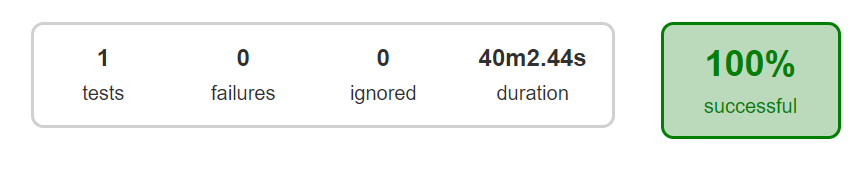
It is a simple test, which can be executed manually in 2 minutes. Clicking the menu and then clicking ok. in a for loop with size 7.
It took 40 minutes. Crazy stuff. It is taking 15 minutes to click OK button. Please improve the performance.
Regards,
Goutham
 gouthamsam
on 25 Aug 2017
gouthamsam
on 25 Aug 2017
I compared WinAppDriver between v0.7 and v1.0, the execution time on v0.7 is doubled at least.
Pls help improve its performance.
 holphi
on 26 Aug 2017
holphi
on 26 Aug 2017
This should be addressed by our RC2 release.
Thanks for the patience.
khouzam
on 5 Oct 2017
Great job guys! Much improved speed in the latest version. Loving your work! Thanks
ajessep
on 24 Oct 2017
Related issues
 quincycs
·
3Comments
quincycs
·
3Comments
 tetsushmz
·
3Comments
tetsushmz
·
3Comments
 sandeepdroid
·
3Comments
sandeepdroid
·
3Comments
 AmitVerma4HP
·
3Comments
AmitVerma4HP
·
3Comments
 Iziksh
·
3Comments
Iziksh
·
3Comments
Most helpful comment
Great job guys! Much improved speed in the latest version. Loving your work! Thanks