Winappdriver: SendKeys does not unescape double-slash
Repro steps:
Use Element.SendKeys to enter a string including a single slash, e.g. "foo/bar"
Expected:
WinAppDriver correctly enters foo\bar
Actual:
WinAppDriver enters foo\\bar
 HSAR
HSAR
All 18 comments
@HSAR, is this issue for back-slashes \ or forward-slashes /?
 mjcheetham
on 4 Jul 2017
mjcheetham
on 4 Jul 2017
Backslashes.
HSAR
on 4 Jul 2017
Hi @HSAR,
Can you help me understand why would you expect foo\bar after sending foo/bar?
Windows Application Driver Element.SendKeys API simply send the text verbatim and return in verbatim too without any conversion. Below is sample test case added to our test sample https://github.com/Microsoft/WinAppDriver/blob/v1.0-RC/Tests/WebDriverAPI/ElementSendKeys.cs
```c#
[TestMethod]
public void SendKeysToElement_Slashes()
{
alarmNameTextBox.SendKeys(@"foo/bar foo//bar foobar foo\bar");
Assert.AreEqual(@"foo/bar foo//bar foobar foo\bar", alarmNameTextBox.Text);
}
If you run it on the latest release, you will see that the text is sent without any modification and returned the same way unchanged. Below is the WinAppDriver log showing the text received and the text returned:
==========================================
POST /session/6F52F111-76C9-4B62-B45A-662507C91ED9/element/42.68029020.3.96/value HTTP/1.1
Accept: application/json, image/png
Content-Length: 56
Content-Type: application/json;charset=utf-8
Host: 127.0.0.1:4723
{"value":["foo/bar foo//bar foo\bar foo\\bar"]}
HTTP/1.1 200 OK
Content-Length: 63
Content-Type: application/json
{"sessionId":"6F52F111-76C9-4B62-B45A-662507C91ED9","status":0}
==========================================
GET /session/6F52F111-76C9-4B62-B45A-662507C91ED9/element/42.68029020.3.96/text HTTP/1.1
Accept: application/json, image/png
Host: 127.0.0.1:4723
HTTP/1.1 200 OK
Content-Length: 116
Content-Type: application/json
{"sessionId":"6F52F111-76C9-4B62-B45A-662507C91ED9","status":0,"value":"foo/bar foo//bar foo\bar foo\\bar"}
```
Can you also share which Appium client (language binding) and WinAppDriver version are you using?
 timotiusmargo
on 18 Aug 2017
timotiusmargo
on 18 Aug 2017
Hi @timotiusmargo, thanks for getting back to us.
As per the original post - we send foo\bar and get foo\\bar typed. There's no exchange of forward- and back-slashes, merely a doubling-up of backslash. I assume it's because the backslash is escaped for going over the wire, and not correcly unescaped before being typed in.
We are using the C# library, WinAppDriver 0.9-beta, and Appium 1.6.5. Hope this helps.
HSAR
on 18 Aug 2017
Hi @HSAR,
Can you please try the following test cases?
In both cases, WinAppDriver v1.0-RC consistently type one single backslash for each backslash inputted in Alarms & Clock new alarm name text box and Notepad edit box. You should also paste the SendKeysToElement_Slashes snippet in the reply above on your setup and validate the result. I precisely got foo\bar typed on the app after sending foo\bar even if it is being transported as foo\\bar in the wire protocol.
Pasting the corresponding WinAppDriver log here would be extremely useful as well to identify where the issue is.
timotiusmargo
on 18 Aug 2017
Hi @timotiusmargo,
Sure thing, thanks for continuing to look into this. In the following two comments are the test cases I ran: firstly in a native C# WinForms app, and secondly in a webview spawned by a library embedded into this app (our actual test case).
Apologies for the cropping of the logs. I'm not sure how much you need, or don't.
HSAR
on 21 Aug 2017
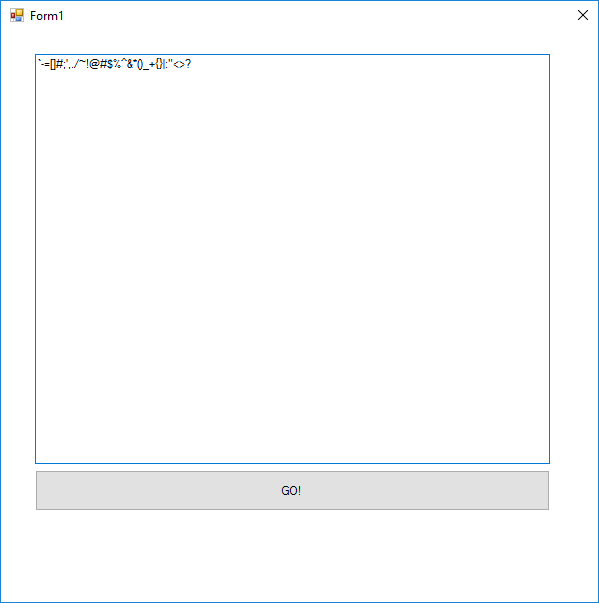
Code executed:
tb.SendKeys("`-=[]\\;',./~!@#$%^&*()_+{}|:\"<>?");
Result in text box:
`-=[]#;',./~!@#$%^&*()_+{}|:"<>?
Screenshot:
Appium log:
https://gist.github.com/HSAR/ab5795f61f9a4c09ea67266ff49cf432
HSAR
on 21 Aug 2017
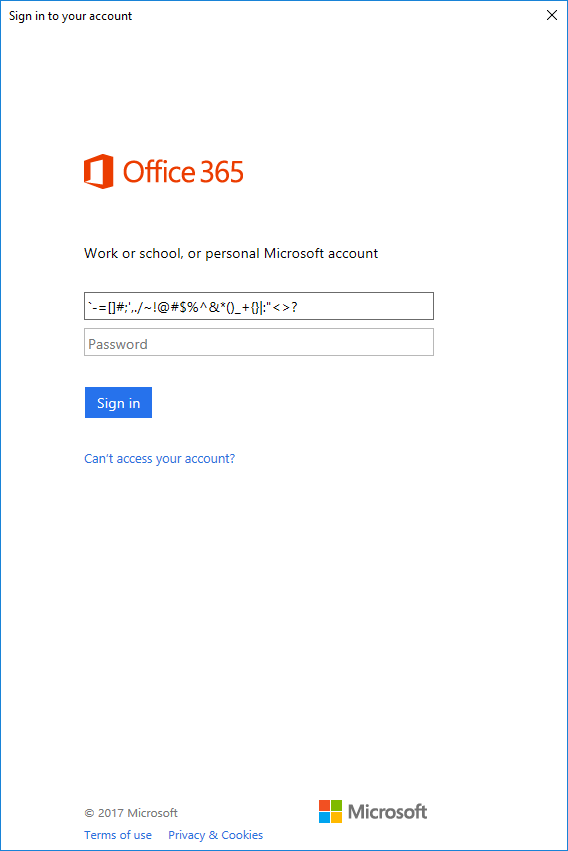
Code executed:
element.SendKeys("`-=[]\\;',./~!@#$%^&*()_+{}|:\"<>?");
Result in text box:
`-=[]#;',./~!@#$%^&*()_+{}|:"<>?
Screenshot:
Appium log:
https://gist.github.com/HSAR/488c9d94ba03bfc9dd08a2b454368c0d
HSAR
on 21 Aug 2017
Although that's not the behaviour I previously saw, it's clear that backslashes are not being typed properly.
HSAR
on 21 Aug 2017
Interesting that the "\" ("\\" in the code to escape) in was being typed as "#".
Perhaps this is an issue with different keyboard layouts?
mjcheetham
on 22 Aug 2017
@HSAR, what happens if you try and send keys with "£"?
mjcheetham
on 22 Aug 2017
Doesn't seem to be keyboard-specific.
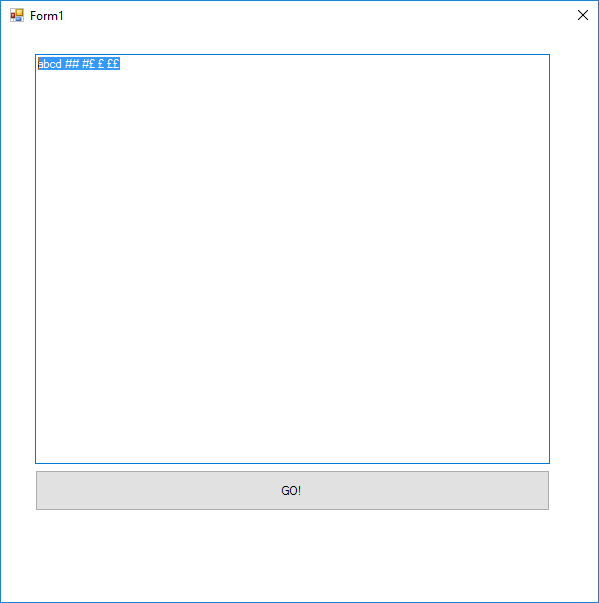
Code executed:
tb.SendKeys("abcd \\\\ \\£ £ ££");
Result in text box:
abcd ## #£ £ ££
Screenshot:
Appium log:
[WinAppDriver] [STDOUT] ==========================================
[WinAppDriver] [STDOUT] POST /wd/hub/session/873FEDC8-7546-4A6D-A7F2-8B7C670DA3B8/element/42.18291608/value HTTP/1.1
[WinAppDriver] [STDOUT] Accept: */*
[WinAppDriver] [STDOUT] Connection: keep-alive
[WinAppDriver] [STDOUT] Content-Length: 36
[WinAppDriver] [STDOUT] Content-Type: application/json
[WinAppDriver] [STDOUT] Host: 127.0.0.1:4724
[WinAppDriver] [STDOUT] User-Agent: appium
[WinAppDriver] [STDOUT]
[WinAppDriver] [STDOUT] {"value":["abcd \\\\ \\£ £ ££"]}
[WinAppDriver] [STDOUT] HTTP/1.1 200 OK
[WinAppDriver] [STDOUT] Content-Length: 63
[WinAppDriver] [STDOUT] Content-Type: application/json
[WinAppDriver] [STDOUT]
[WinAppDriver] [STDOUT] {"sessionId":"873FEDC8-7546-4A6D-A7F2-8B7C670DA3B8","status":0}
[debug] [JSONWP Proxy] Got response with status 200: {"sessionId":"873FEDC8-7546-4A6D-A7F2-8B7C670DA3B8","status":0}
[JSONWP Proxy] Replacing sessionId 873FEDC8-7546-4A6D-A7F2-8B7C670DA3B8 with 86dd05b1-4c77-4bf2-a585-0a0b93be7850
[HTTP] <-- POST /wd/hub/session/86dd05b1-4c77-4bf2-a585-0a0b93be7850/element/42.18291608/value 200 1346 ms - 63
[HTTP] --> GET /wd/hub/session/86dd05b1-4c77-4bf2-a585-0a0b93be7850/element/42.18291608/text {}
[MJSONWP] Driver proxy active, passing request on via HTTP proxy
[debug] [JSONWP Proxy] Proxying [GET /wd/hub/session/86dd05b1-4c77-4bf2-a585-0a0b93be7850/element/42.18291608/text] to [GET http://127.0.0.1:4724/wd/hub/session/873FEDC8-7546-4A6D-A7F2-8B7C670DA3B8/element/42.18291608/text] with body: {}
Hi @HSAR,
What keyboard layout do you have selected on your test machine? Current Windows Application Driver only supports the standard US keyboard layout.
timotiusmargo
on 23 Aug 2017
@timotiusmargo I am in the UK and use a UK keyboard. I executed the tests on my local PC, which is using the UK layout.
I'm not sure that this has anything to do with the issue above, though. As demonstrated in the previous comment, it can type the GBP symbol perfectly fine (as it should).
I'll switch to the US keyboard layout and attempt to repro.
HSAR
on 23 Aug 2017
Aha - it doesn't repro with the US keyboard.
Code executed:
tb.SendKeys("`-=[]\\;',./~!@#$%^&*()_+{}|:\"<>? abcd \\\\ \\£ £ ££");
Result in text box:
`-=[]\;',./~!@#$%^&*()_+{}|:"<>? abcd \\ \£ £ ££
Screenshot:

[WinAppDriver] [STDOUT] ==========================================
[WinAppDriver] [STDOUT] POST /wd/hub/session/ED30BC1A-AB0F-4808-BC6D-53A3BAE5731D/element/42.22875568/value HTTP/1.1
[WinAppDriver] [STDOUT] Accept: */*
[WinAppDriver] [STDOUT] Connection: keep-alive
[WinAppDriver] [STDOUT] Content-Length: 71
[WinAppDriver] [STDOUT] Content-Type: application/json
[WinAppDriver] [STDOUT] Host: 127.0.0.1:4724
[WinAppDriver] [STDOUT] User-Agent: appium
[WinAppDriver] [STDOUT]
[WinAppDriver] [STDOUT] {"value":["`-=[]\\;',./~!@#$%^&*()_+{}|:\"<>? abcd \\\\ \\£ £ ££"]}
[WinAppDriver] [STDOUT] HTTP/1.1 200 OK
[WinAppDriver] [STDOUT] Content-Length: 63
[WinAppDriver] [STDOUT] Content-Type: application/json
[WinAppDriver] [STDOUT]
[WinAppDriver] [STDOUT] {"sessionId":"ED30BC1A-AB0F-4808-BC6D-53A3BAE5731D","status":0}
[debug] [JSONWP Proxy] Got response with status 200: {"sessionId":"ED30BC1A-AB0F-4808-BC6D-53A3BAE5731D","status":0}
[JSONWP Proxy] Replacing sessionId ED30BC1A-AB0F-4808-BC6D-53A3BAE5731D with 5e3505f1-b586-4519-b83f-69a8760f4d3f
[HTTP] <-- POST /wd/hub/session/5e3505f1-b586-4519-b83f-69a8760f4d3f/element/42.22875568/value 200 3627 ms - 63
[HTTP] --> GET /wd/hub/session/5e3505f1-b586-4519-b83f-69a8760f4d3f/element/42.22875568/text {}
[MJSONWP] Driver proxy active, passing request on via HTTP proxy
[debug] [JSONWP Proxy] Proxying [GET /wd/hub/session/5e3505f1-b586-4519-b83f-69a8760f4d3f/element/42.22875568/text] to [GET http://127.0.0.1:4724/wd/hub/session/ED30BC1A-AB0F-4808-BC6D-53A3BAE5731D/element/42.22875568/text] with body: {}
[WinAppDriver] [STDOUT]
[WinAppDriver] [STDOUT]
[WinAppDriver] [STDOUT] ==========================================
[WinAppDriver] [STDOUT] GET /wd/hub/session/ED30BC1A-AB0F-4808-BC6D-53A3BAE5731D/element/42.22875568/text HTTP/1.1
[WinAppDriver] [STDOUT] Accept: */*
[WinAppDriver] [STDOUT] Connection: keep-alive
[WinAppDriver] [STDOUT] Content-Type: application/json
[WinAppDriver] [STDOUT] Host: 127.0.0.1:4724
[WinAppDriver] [STDOUT] User-Agent: appium
[WinAppDriver] [STDOUT]
[WinAppDriver] [STDOUT]
[WinAppDriver] [STDOUT] HTTP/1.1 200 OK
[WinAppDriver] [STDOUT] Content-Length: 131
[WinAppDriver] [STDOUT] Content-Type: application/json
[WinAppDriver] [STDOUT]
[WinAppDriver] [STDOUT] {"sessionId":"ED30BC1A-AB0F-4808-BC6D-53A3BAE5731D","status":0,"value":"`-=[]\\;',./~!@#$%^&*()_+{}|:\"<>? abcd \\\\ \\£ £ ££"}
[debug] [JSONWP Proxy] Got response with status 200: "{\"sessionId\":\"ED30BC1A-AB0F-4808-BC6D-53A3BAE5731D\",\"status\":0,\"value\":\"`-=[]\\\\;',./~!@#$%^&*()_+{}|:\\\"<>? abcd \\\\\\\\ \\\\£ £ ££\"}"
Yes at the moment only standard US keyboard is supported. We can update you if this changes in the future. Thanks for bringing up all the details! 👍
timotiusmargo
on 28 Aug 2017
Following up a feature request as a result of this - it would be very handy if WinAppDriver could switch the device into en-US keyboard layout at the start, and (possibly) switch back to the pre-test keyboard layout at the end.
HSAR
on 7 Sep 2017
I just had the same problem, being UK based. I was trying to send a path name to a file open dialog and all I got were '#' characters instead of '\' characters in the path name.
Is there an easy way to change keyboard for the session?
 Arlorean
on 5 Jul 2018
Arlorean
on 5 Jul 2018
Related issues
 ant-skelia
·
4Comments
ant-skelia
·
4Comments
 viji-123
·
4Comments
viji-123
·
4Comments
 vnabokit
·
3Comments
vnabokit
·
3Comments
 sandeepdroid
·
3Comments
sandeepdroid
·
3Comments
 AmitVerma4HP
·
4Comments
AmitVerma4HP
·
4Comments
Most helpful comment
Aha - it doesn't repro with the US keyboard.
Code executed:
tb.SendKeys("`-=[]\\;',./~!@#$%^&*()_+{}|:\"<>? abcd \\\\ \\£ £ ££");Result in text box:
`-=[]\;',./~!@#$%^&*()_+{}|:"<>? abcd \\ \£ £ ££Screenshot:
