Question
I have been trying to install wiki.js in a dedicated instance for several hours and I cannot make the content of the pages visible. Pages (any page) are blank. This does not happen if I access directly from the IP and port in question (skipping cloudflare and nginx).
Host Info (please complete the following information):
OS: Ubuntu 18.04
Wiki.js version: 2.4.107
Database engine: sqlite


 xXLoloGameplayXx
All 38 comments
Seems like you have set up the site url to be used using http but you are actually running it under https so the browser blocks all the calls to the backend.
Can you try to install the wiki service from scratch but making sure that the site url you select includes https?
I can't see how this actually affects when looking at the code but that is a start...
 regevbr
on 29 Jun 2020
regevbr
on 29 Jun 2020
Edit: I have configured it in https and it keeps giving me problems
xXLoloGameplayXx
on 29 Jun 2020
hmm... it will help if you will share the full errors from the console as it seems that all the paths in the client are relative and as such should always use the same domain and protocol as the one the website was loaded on.
The errors clearly show that the website was loaded using https but there are resources that are being fetched using http (thus insecure and blocked)...
Other thing that comes to mind but seem unlikely - Did you add any external custom css/js/images in the admin or the pages you try to load? if you did make sure they all use the https protocol or the relative protocol //
regevbr
on 29 Jun 2020
One more possibility that I found online is that you had a previous 302 redirect form https to http on your domain. That causes resources that you are now requesting to get with https to be actually fetched using http. That will explain why using ip works (if you use https with it) as it avoid the browser cache of the 302 responses from before because it uses a different address.
You can check if that is the case by trying to load your website in a new browser that never tried to access your domain (your phone for example) and see if it works.
regevbr
on 29 Jun 2020
I already tried it. Same problem
xXLoloGameplayXx
on 30 Jun 2020
Tried what exactly?
regevbr
on 30 Jun 2020
I already tried to load it with another browser and it gave the same problem
xXLoloGameplayXx
on 30 Jun 2020
Ok I understand... Sadly without more details (like full console errors) I don't know how else to help.
Maybe someone else will have a better shot at it than me...
regevbr
on 30 Jun 2020
Console logs (no error appears when accessing)
https://paste.filobot.xyz/yadivevaga.sql
xXLoloGameplayXx
on 30 Jun 2020
nginx? Do you use reverse proxy? How do you setup it?
 Smankusors
on 2 Jul 2020
Smankusors
on 2 Jul 2020
Console logs (no error appears when accessing)
https://paste.filobot.xyz/yadivevaga.sql
@xXLoloGameplayXx I was actually talking about the browser logs if you care to send them please
regevbr
on 2 Jul 2020
server {
listen 80;
listen [::]:80;
server_name mydomain;
location / {
proxy_set_header Host $http_host;
proxy_set_header X-Real-IP $remote_addr;
proxy_pass http://localhost:3000;
proxy_http_version 1.1;
proxy_set_header Upgrade $http_upgrade;
proxy_set_header Connection "upgrade";
proxy_next_upstream error timeout http_502 http_503 http_504;
}
}
xXLoloGameplayXx
on 2 Jul 2020
I also tried configuring it using https
server {
listen [::]:443 ssl http2;
listen 443 ssl http2;
listen [::]:80;
listen 80;
server_name mydomain;
charset utf-8;
client_max_body_size 50M;
location /.well-known/acme-challenge/ {
allow all;
}
# RSA
ssl_certificate /etc/letsencrypt/mydomain.cer;
ssl_certificate_key /etc/letsencrypt/mydomain.key;
# ECDSA
ssl_certificate /etc/letsencrypt/mydomain_cc.cer;
ssl_certificate_key /etc/letsencrypt/mydomain_cc.key;
location / {
proxy_set_header Host $http_host;
proxy_set_header X-Real-IP $remote_addr;
proxy_pass http://localhost:3000;
proxy_http_version 1.1;
proxy_set_header Upgrade $http_upgrade;
proxy_set_header Connection "upgrade";
proxy_next_upstream error timeout http_502 http_503 http_504;
}
}
xXLoloGameplayXx
on 2 Jul 2020
can you test your HTTPS reverse proxy setup with this?
proxy_set_header X-Forwarded-For $remote_addr;
proxy_set_header X-Forwarded-Host $host;
proxy_set_header Host $host;
proxy_set_header X-Forwarded-HTTPS on;
proxy_set_header X-Forwarded-Proto $scheme;
proxy_set_header X-Forwarded-Port 443;
proxy_set_header X-Url-Scheme $scheme;
proxy_pass http://localhost:3000;
proxy_pass_request_headers on;
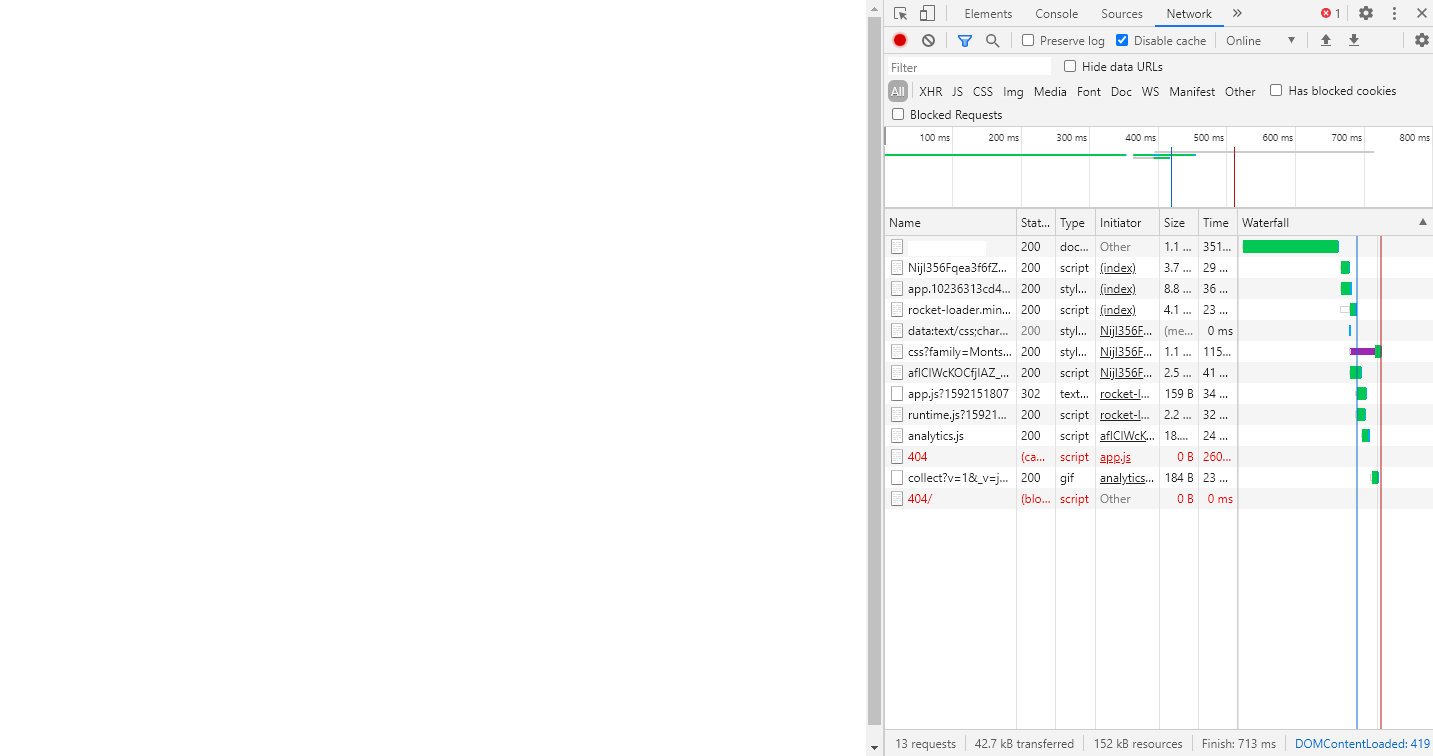
It seems to work better, but still continues without fully loading
xXLoloGameplayXx
on 2 Jul 2020
can you show us the "Console" tab in DevTools too beside of "Network" tab? Or paste the DevTools' console logs here...
Smankusors
on 2 Jul 2020
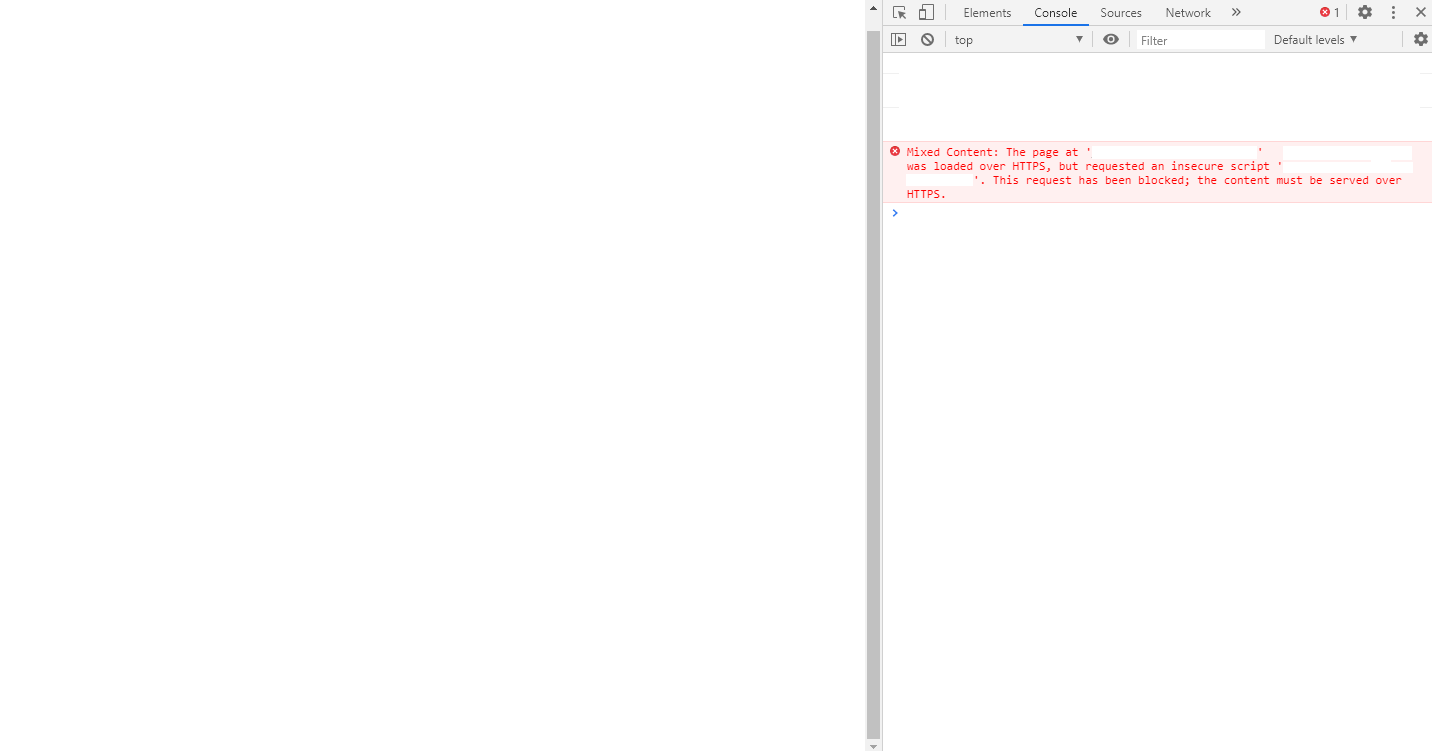
Sure
xXLoloGameplayXx
on 2 Jul 2020
ah that same error again... idk but it's kinda hard (?) which is causing this... Can you just censor your domain/hostname but leave the path as it is? 🤔
Smankusors
on 2 Jul 2020
also leave the protocol unhidden and let us know if you use https in the url input of the browser
regevbr
on 2 Jul 2020
console.log
(I have a domain where all errors point, including 404)
xXLoloGameplayXx
on 2 Jul 2020
It seems that there is a redirect somewhere like I suggested before...
Why there are 2 different domains there? are they both your wiki ones?
regevbr
on 2 Jul 2020
console.log
(I have a domain where all errors point, including 404)
wait, where's the path? It seems unlikely the Wiki.js tries to load script file without .js ended
I mean for example you got error with URL like :
http://example.org/wawa/wawa.js
you can censor it like this
http://mydomain/wawa/wawa.js
console.log
(I have a domain where all errors point, including 404)wait, where's the path? It seems unlikely the Wiki.js tries to load script file without
.jsendedI mean for example you got error with URL like :
http://example.org/wawa/wawa.jsyou can censor it like this
http://mydomain/wawa/wawa.js
I only censored the domain
xXLoloGameplayXx
on 2 Jul 2020
It seems that there is a redirect somewhere like I suggested before...
Why there are 2 different domains there? are they both your wiki ones?
I don't know if I said it, but I have a subdomain for the wiki and a subdomain to display the error pages (custom error pages)
xXLoloGameplayXx
on 2 Jul 2020
It seems that there is a redirect somewhere like I suggested before...
Why there are 2 different domains there? are they both your wiki ones?I don't know if I said it, but I have a subdomain for the wiki and a subdomain to display the error pages (custom error pages)
Ok now we are getting somewhere...
It is not allowed to use http resources within an https website. How are you causing that domain to be a part of wiki? however you use it, you should use https for that error domain and not http and things will start to work
regevbr
on 2 Jul 2020
I use https in the error domain
xXLoloGameplayXx
on 2 Jul 2020
But the logs clearly shows it tries to use http... where is it coming from?
regevbr
on 2 Jul 2020
idk
xXLoloGameplayXx
on 2 Jul 2020
Sadly, without any more info it will be hard to help.
Can you please explain what is that errors domain, how and when is it being used and where and how did you configure it in your wiki instance?
regevbr
on 2 Jul 2020
404 domain: https://error.filobot.xyz/404
I configured it using the nginx error page settings.
xXLoloGameplayXx
on 2 Jul 2020
what is your current nginx config now? It seems certain path isn't correctly forwarded to Wiki.js... 🤔
Smankusors
on 2 Jul 2020
Okay, can you share the nginx configuration related to it?
I think the issue here is that when you try to access the https website, nginx fails to realize it as a valid request and tried to redirect to the error page which is set up to be http.
I see possible 2 issues with the configuration you sent earlier -
- Try to set the
server_namedirective in theserverpart to be the domain you want. - You listen to 443 using http2, mabye change it to http (not sure how to excatly)
regevbr
on 2 Jul 2020
what is your current nginx config now? It seems certain path isn't correctly forwarded to Wiki.js... 🤔
This is the only thing modified to show custom error pages
error_page 403 https://error.filobot.xyz/403;
error_page 404 https://error.filobot.xyz/404;
error_page etc, etc
xXLoloGameplayXx
on 2 Jul 2020
Okay, can you share the nginx configuration related to it?
I think the issue here is that when you try to access the https website, nginx fails to realize it as a valid request and tried to redirect to the error page which is set up to be http.
I see possible 2 issues with the configuration you sent earlier -
- Try to set the
server_namedirective in theserverpart to be the domain you want.- You listen to 443 using http2, mabye change it to http (not sure how to excatly)
- I don't know what you mean exactly.
- I already tried.
xXLoloGameplayXx
on 2 Jul 2020
what is your current nginx config now? It seems certain path isn't correctly forwarded to Wiki.js... 🤔
This is the only thing modified to show custom error pages
error_page 403 https://error.filobot.xyz/403;
error_page 404 https://error.filobot.xyz/404;
error_page etc, etc
can you let ~403 and 404~ error pages handled by Wiki.js?
Smankusors
on 2 Jul 2020
what is your current nginx config now? It seems certain path isn't correctly forwarded to Wiki.js... 🤔
This is the only thing modified to show custom error pages
error_page 403 https://error.filobot.xyz/403;
error_page 404 https://error.filobot.xyz/404;
error_page etc, etccan you let 403 and 404 handled by Wiki.js?
Okay, but the problem persists, keep giving error 404
xXLoloGameplayXx
on 2 Jul 2020
The only script that doesn't load is this: https://mydomain/_assets/js/app.js?1592151807
xXLoloGameplayXx
on 2 Jul 2020
can you test your HTTPS reverse proxy setup with this?
proxy_set_header X-Forwarded-For $remote_addr;
proxy_set_header X-Forwarded-Host $host;
proxy_set_header Host $host;
proxy_set_header X-Forwarded-HTTPS on;
proxy_set_header X-Forwarded-Proto $scheme;
proxy_set_header X-Forwarded-Port 443;
proxy_set_header X-Url-Scheme $scheme;
proxy_pass http://localhost:3000;
proxy_pass_request_headers on;
This fixed the problem itself. I cleared the Cloudflare cache and the website started working.
xXLoloGameplayXx
on 2 Jul 2020
Related issues
 ccolella-mdc
·
3Comments
ccolella-mdc
·
3Comments
 ahkimkoo
·
4Comments
ccolella-mdc
·
3Comments
ahkimkoo
·
4Comments
ccolella-mdc
·
3Comments
 sbonaime
·
3Comments
sbonaime
·
3Comments
 raikoug
·
3Comments
raikoug
·
3Comments
Most helpful comment
can you test your HTTPS reverse proxy setup with this?