Wiki: Wiki.js crashes after a upload of more than 100MB and is no longer responsive.
Solution: You need to set max_allowed_packet on the mysql
Hey, thanks already for your time and effort.
OS: [Ubuntu 19.10, Linux]
Wiki.js version: [2.1.113]
Node.js version: [10.12]
Database engine: [MySQL]
RAM: 6GB RAM
Cores: 2 Cores
I have Wiki.js (2.113) running. As soon as I upload a file that is a bit bigger (in my example 100MB or more) the whole wiki crashes and is no longer accessible - until I restart the wiki server. I have already seen and revised the parameter in the configuration file. I use the Wiki on my Intranet, so no proxy or anything.
Edit:
I recorded the whole scenario: https://streamable.com/jqaqr
Any ideas? And thanks again for your effort.

 arcoidis
All 8 comments
it crashes? Can you show the logs from wiki server process?
 Smankusors
on 19 Mar 2020
Smankusors
on 19 Mar 2020
it crashes? Can you show the logs from wiki server process?
Warning: got packets out of order. Expected 7 but received 5
I recorded the whole thing with a 50MB Upload, so maybe it will help to understand my problem better.
arcoidis
on 20 Mar 2020
oh yeah, I forgot about this. How about your mysql settings? Because... you're uploading that asset to the database. You need to set max_allowed_packet on the mysql
Smankusors
on 20 Mar 2020
oh yeah, I forgot about this. How about your mysql settings? Because... you're uploading that asset to the database. You need to set
max_allowed_packeton the mysql
Thanks for your reply!
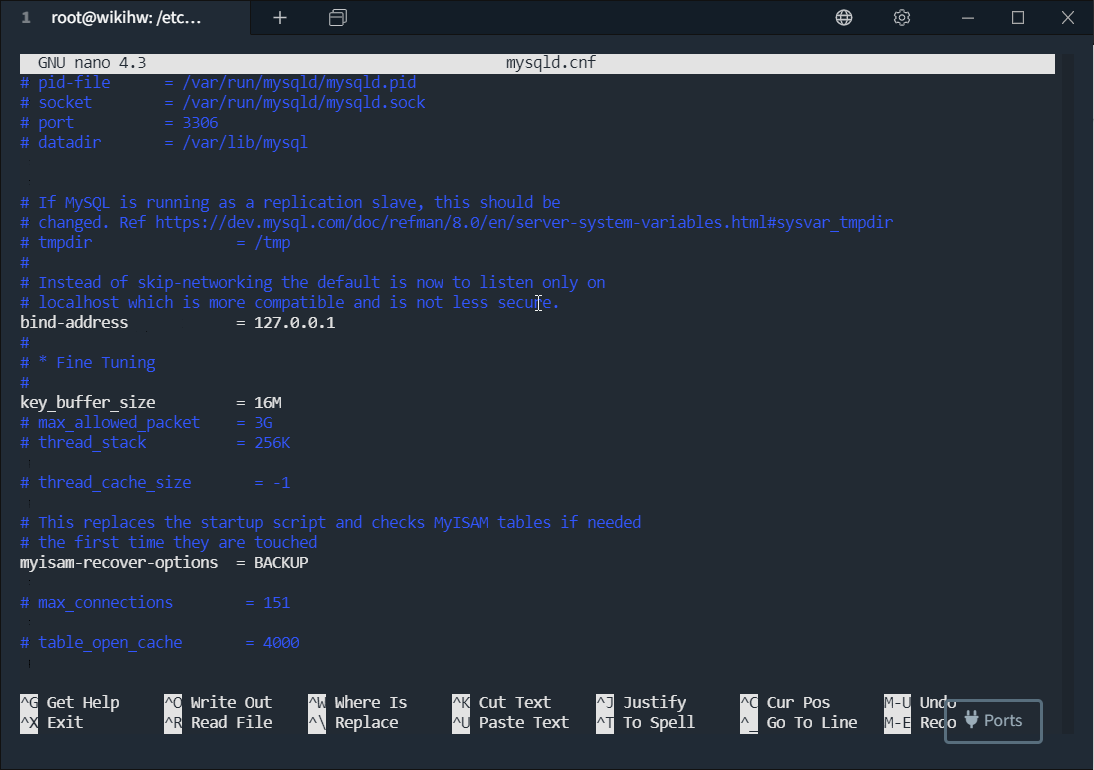
I have changed the parameter "max_allowed_packet" in the mysqld.conf file to 3GB
Then restarted the MySQL server and the Wiki.js server. After the upload the server crashes again.
By the way, the default value in the mysqld.conf file was set to 60MB... I tried it before with a 50MB file.
Attached is a GIF: https://i.imgur.com/ZFtNcl3.gifv
arcoidis
on 20 Mar 2020
Hello Nemanja,
You did remove the hash sign from the line, didn't you?
That sign marks the start of a comment.
Cheers,
Bas
On Fri, Mar 20, 2020 at 2:53 PM Nemanja Dumitraskovic <
[email protected]> wrote:
oh yeah, I forgot about this. How about your mysql settings? Because...
you're uploading that asset to the database. You need to set
max_allowed_packet on the mysqlThanks for your reply!
I have changed the parameter "max_allowed_packet" in the mysqld.conf file
to 3GB
Then restarted the MySQL server and the Wiki.js server. After the upload
the server crashes again.By the way, the default value in the mysqld.conf file was set to 60MB... I
tried it before with a 50MB file.Attached is a GIF: https://i.imgur.com/ZFtNcl3.gifv
—
You are receiving this because you are subscribed to this thread.
Reply to this email directly, view it on GitHub
https://github.com/Requarks/wiki/issues/1599#issuecomment-601712349, or
unsubscribe
https://github.com/notifications/unsubscribe-auth/AAF2Y3OD76DW226M2WLG4R3RINYOVANCNFSM4LPOQMVQ
.
 bas-velthuizen
on 20 Mar 2020
bas-velthuizen
on 20 Mar 2020
Hello Nemanja, You did remove the hash sign from the line, didn't you? That sign marks the start of a comment. Cheers, Bas
Hey Bas,
No it's still there.
Kind regards,
Nemanja
arcoidis
on 20 Mar 2020
Hello Nemanja,
As long as the '#' is in front of the row, the row is ignored.
So if you want to increase the max_allowed_packet size, please remove the '#' sign and restart MySQL.
I just read the default value for max_allowed_packet is 16M (https://dev.mysql.com/doc/refman/8.0/en/packet-too-large.html) so that might indeed fix the issue.
Cheers,
Bas
bas-velthuizen
on 20 Mar 2020
Hello Nemanja,
As long as the '#' is in front of the row, the row is ignored.
So if you want to increase the max_allowed_packet size, please remove the '#' sign and restart MySQL.
I just read the default value for max_allowed_packet is 16M (https://dev.mysql.com/doc/refman/8.0/en/packet-too-large.html) so that might indeed fix the issue.Cheers,
Bas
Hey Bas,
I must have misunderstood you there - please excuse my bad English.
It was really the max_allowed_packet.
Thank you
arcoidis
on 20 Mar 2020
Related issues
 ccolella-mdc
·
3Comments
ccolella-mdc
·
3Comments
 ghost
·
3Comments
ghost
·
3Comments
 sbonaime
·
3Comments
sbonaime
·
3Comments
 gruesomehit
·
4Comments
gruesomehit
·
4Comments
 D3mon86
·
4Comments
D3mon86
·
4Comments